
ASWIFT
ASWIFT fits square-wave voltammetry (SWV) traces and extracts peak signal, background, peak voltage, full-prominence peak width, and baseline-subtracted full-prominence peak area. Use the no-code ASWIFT Viewer for interactive analysis, or install the Python package to build ASWIFT into a custom workflow.
Setup
ASWIFT is available as a standalone desktop application and as a Python package. The standalone application includes everything needed to run the viewer; Python is not required.
Install the desktop application
Precompiled applications are available from the
ASWIFT 1.0.3 GitHub Release.
Download the archive that matches your computer:
| Download | System |
|---|---|
ASWIFT-Viewer-macos-arm64.zip |
Apple Silicon Mac (M1, M2, M3, M4, or newer) |
ASWIFT-Viewer-macos-x64.zip |
Intel-based Mac |
ASWIFT-Viewer-windows-x64.zip |
64-bit Windows |
Unzip the archive, then open ASWIFT Viewer. Because ASWIFT is distributed outside the Apple App Store and Microsoft Store, your operating system may show a security warning the first time it opens. Follow the system prompt to allow the application to run; on macOS, this may require approval under Privacy & Security.
Install the Python package
ASWIFT requires Python 3.12 or newer. Install the core fitting utilities with:
pip install aswift
Install the viewer, pandas CSV helpers, plotting tools, and PalmSens
.pssession support with:
pip install "aswift[viewer]"
PalmSens support uses pypalmsens, which requires the
Microsoft .NET 9 Runtime.
If ASWIFT reports that it could not create a .NET runtime or CoreCLR, install
the runtime and restart ASWIFT.
Activate the Python environment in which ASWIFT was installed, then launch the viewer:
aswift-viewer
Example notebooks for SWV fitting, CSV workflows, and PalmSens data are in the
examples directory.
Using the ASWIFT Viewer
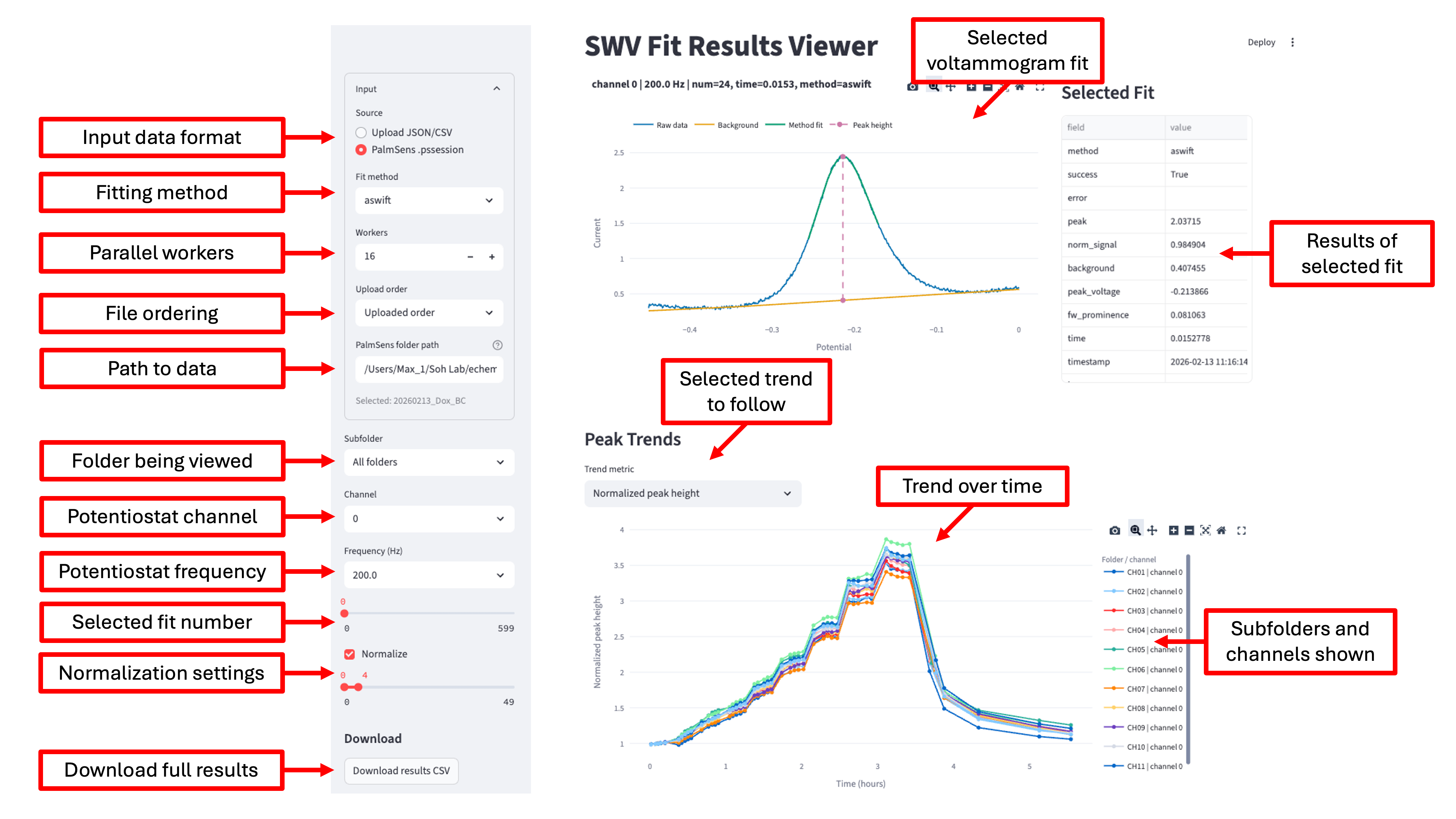
The viewer displays the selected voltammogram and its fitted background and peak, a table of values extracted from that fit, and a trend plot across the full dataset.
Load data
Choose an input source in the sidebar, then upload one or more SWV data files
or enter the path to a directory containing a PalmSens dataset. Download
correctly formatted sample files from the
v1.0.3 example-data archive.
ASWIFT supports three input formats:
-
PalmSens
.pssession: Select PalmSens .pssession and enter a folder containing.pssessionfiles. Subfolders are searched automatically. ASWIFT extracts available frequency, acquisition time, and channel metadata and saves processed results as a structured JSON file in the selected directory. While the viewer remains open, newly added files are detected and processed automatically. Files accidentally downloaded with a.pssession.mp3suffix are renamed before processing. -
CSV: Upload either a simple sweep with voltage in the first column and one or more current traces in subsequent columns, or a structured table with one complete voltammogram per row plus metadata such as channel and frequency. Simple sweeps may have a header row or no header row. UTF-8, UTF-8 BOM, UTF-16, and Latin-1 encodings are accepted.
-
JSON: Upload structured fit results previously generated by ASWIFT. This lets you reopen, visualize, and analyze a processed dataset without fitting the raw data again.
If a trace cannot be fit but its raw voltage and current are available, the viewer still displays the raw trace for inspection.
Inspect and process results
Use the sidebar controls to choose what appears in the fit and trend plots:
- Fit method: Choose the ASWIFT or polynomial-linear fitting method.
- Workers: Increase the number of worker processes to accelerate larger datasets on multi-core computers.
- Upload order: Keep uploaded order or sort uploaded files by file name.
- Subfolder: Choose which PalmSens subfolder to inspect, or show all folders together.
- Channel: Choose the potentiostat channel for the individual fit. Trend plots initially show all channels; click legend entries to hide or show them.
- Frequency: Choose the SWV frequency shown in the individual fit and trend plots.
- Sample index: Step through voltammograms for the selected folder, channel, and frequency. Samples are ordered by acquisition time when a timestamp is available and by upload order otherwise.
- Normalize: Normalize peak heights to the average over a selected reference range. Normalization is calculated independently for every subfolder, method, frequency, and channel.
- Invert current: Multiply raw current values by -1 before fitting. This is useful for positive-to-negative SWV sweeps whose peaks otherwise point in the opposite direction from the fitting model.
The Trend metric menu switches the time or measurement series among peak height, peak voltage, full-prominence peak width, and full-prominence peak area when those values are available. Use the plot legend and toolbar to explore individual series.
Select Download results CSV at the bottom of the sidebar to export raw and normalized results with their associated metadata.
Python API
Fit and plot one trace
import numpy as np
from aswift import aswift_fit, plot_fit_result, poly_linear_fit

volts = np.asarray([...], dtype=float)
current = np.asarray([...], dtype=float)

result = aswift_fit(volts, current)
# Alternative model:
# result = poly_linear_fit(volts, current)

print(result.peak_signal, result.peak_voltage)
ax = plot_fit_result(result)
The returned FitResult contains:
peak_signal: background-subtracted peak heightpeak_background: background current at the peakpeak_voltage: voltage at the peak maximumfw_prominence: full-prominence peak widthfull_prominence_peak_area: integral of the smoothed signal minus the fitted baseline across the full-prominence peak boundspeak_profile: fitted peak-only profilebackground_profile: fitted background profilefitted_current: combined peak and background profiles
Fit a structured dataframe
Use one row per voltammogram. The voltage and current columns each contain
the full array for that trace; additional metadata columns such as file,
hz, num, channel, and time are preserved. This workflow requires the
batch, plot, or viewer extra.
from aswift import fit_dataframe, results_to_signal_table

results = fit_dataframe(df, method="aswift", n_workers=1)
signals = results_to_signal_table(
    results,
    calibration_lower_idx=0,
    calibration_upper_idx=4,
)
For large CPU-bound batches, independent traces can be fit in separate processes:
results = fit_dataframe(
    df,
    method="aswift",
    n_workers=4,
    parallel_backend="process",
    chunksize=16,
)
Single-worker fitting avoids process startup and serialization overhead and is
often faster for small interactive datasets. Benchmark representative data
before increasing n_workers.
Load PalmSens files
from aswift import fit_pssession_folder, pssession_folder_to_dataframe

df = pssession_folder_to_dataframe("path/to/pssession/folder", recursive=True)
df, results = fit_pssession_folder(
    "path/to/pssession/folder",
    recursive=True,
    n_workers=1,
)
ASWIFT orders traces using available timestamp, frequency, file number, and
channel metadata. Elapsed time is reported in hours from the earliest
measurement.
Development
Install the developer dependencies and run the test suite from the repository root:
python -m venv venv
source venv/bin/activate
python -m pip install -e ".[developer]"
NUMBA_CACHE_DIR=/private/tmp/numba-cache python -m pytest -q
Verify the distributable package with:
python -m build
Desktop packaging and release instructions are documented in
release_assets/README.md.
The maintainer checklist for publishing GitHub and PyPI releases is in
docs/RELEASING.md.
Bug reports and feature requests
Please open a GitHub issue for bug reports, questions, feedback, or feature requests.
Citation
If you use ASWIFT in your research, please cite:
Yates, M., Ji, J., Yee, S., & Soh, H. T. (2026). Robust Regularization Enables Automated, Real-Time Square-Wave Voltammetry Signal Quantification. bioRxiv. https://doi.org/10.64898/2026.07.25.740173
Machine-readable citation metadata is available in
CITATION.cff.
Acknowledgments
This work was supported by resources provided by the Soh Lab within Stanford University's School of Engineering. The authors thank Stan Yates for his development and consulting contributions in preparing ASWIFT for distribution as a PyPI package.
Author
Max Yates - PhD Candidate - GitHub profile
License
ASWIFT is licensed under the MIT License. See LICENSE for details.
1 maintainer

Release files for aswift 1.0.3
For a detailed explanation of source distributions (sdists) and built distributions (wheels), please see the package formats documentation.
Source distribution (sdist)
| File | Size | Uploaded | |
|---|---|---|---|
| aswift-1.0.3.tar.gz | 1.0 MB | Details |
Built distribution (wheel)
| File | Interpreter | ABI | Platform | Reset |
|---|---|---|---|---|
| aswift-1.0.3-py3-none-any.whl | Python 3 | none | any | Details |
Total release size: 2.1 MB
Release files / aswift-1.0.3.tar.gz
| Download URL | aswift-1.0.3.tar.gz |
|---|---|
| Size | 1.0 MB |
| Tags | Source |
|
SHA-256 checksum How to use checksums |
94b73e11f3aed62cc4cc689ba80767af273fd30e2d0e106d6fd8bdf93f87a304
|
|
BLAKE2b-256 checksum How to use checksums |
ddf987dde421558c6ed560f8789cee18b9d2a76b0175cdddd3ca1ab50864e98b
|
| Upload date | |
|
Uploaded using Trusted Publishing? What is trusted publishing? |
Yes |
| Uploaded via |
twine/7.0.0 CPython/3.13.14
|
Provenance
Provenance describes where a file came from. On PyPI, provenance is shared via attestations, which provide a verifiable record of the build or publishing details. View details, limitations and caveats.


PyPI Publish Attestation
PyPI verified that this artifact, at this checksum, originated from the publisher listed below.
Signed by GitHub Actions, verified by PyPI on Aug 25, 2026.
Transparency logRelease files / aswift-1.0.3-py3-none-any.whl
| Download URL | aswift-1.0.3-py3-none-any.whl |
|---|---|
| Size | 1.0 MB |
| Tags | Python 3 |
|
SHA-256 checksum How to use checksums |
7f0e6c4f4003a405f9a60918cec5d121d4c90d8219d39a524f2d2d153c505419
|
|
BLAKE2b-256 checksum How to use checksums |
3b861ca6653323928072b80fd6107291ad728c8e4e7daefbd91881173810bc41
|
| Upload date | |
|
Uploaded using Trusted Publishing? What is trusted publishing? |
Yes |
| Uploaded via |
twine/7.0.0 CPython/3.13.14
|
Provenance
Provenance describes where a file came from. On PyPI, provenance is shared via attestations, which provide a verifiable record of the build or publishing details. View details, limitations and caveats.
PyPI Publish Attestation
PyPI verified that this artifact, at this checksum, originated from the publisher listed below.
Signed by GitHub Actions, verified by PyPI on Aug 25, 2026.
Transparency log













