
Python 3 Asynchronous TCP/IP Connect Port Scanner






A simple TCP Connect port scanner developed in Python 3. This application leverages
the use of Python's Standard Library asyncio framework to execute a
number of TCP connections to an arbitrary number ports on target IP
addresses, taking a maximum time equal to the connection timeout
setting (defaults to 10 seconds) to return all results.
This application maintains no dependencies on third-party modules.
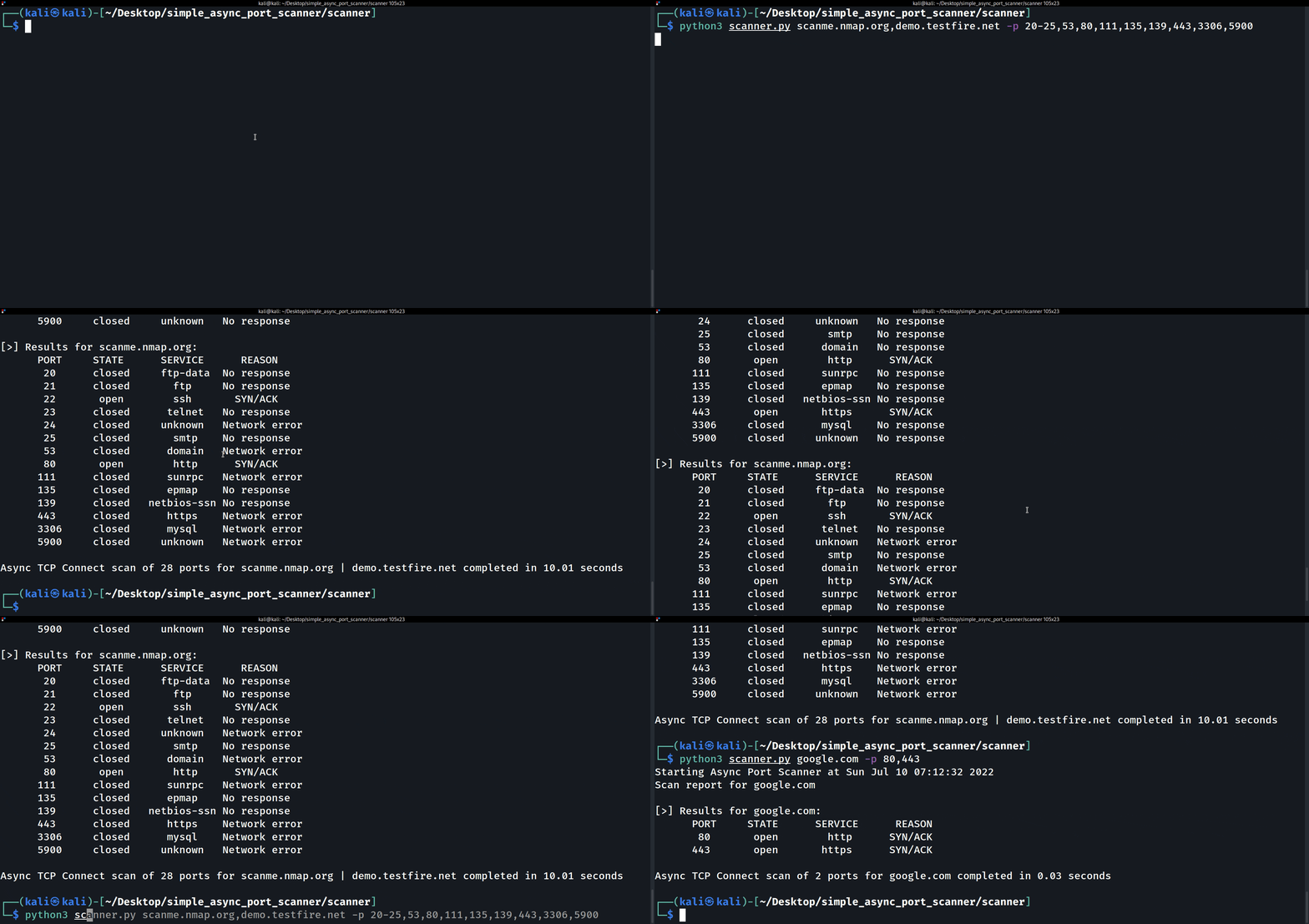
Demo
Installation
Install from PyPI, ideally with pipx so the async-port-scanner
command is available globally in its own isolated environment:
user@host:~$ pipx install async-port-scanner
Or with pip:
user@host:~$ pip install async-port-scanner
For development
user@host:~$ git clone https://github.com/EONRaider/Simple-Async-Port-Scanner.git
user@host:~$ cd Simple-Async-Port-Scanner
user@host:~/Simple-Async-Port-Scanner$ uv sync
user@host:~/Simple-Async-Port-Scanner$ uv run async-port-scanner example.com -p 80,443
Usage
usage: async-port-scanner [-h] -p PORTS [--timeout TIMEOUT] [--open]
                          [--version]
                          ADDRESSES

Simple asynchronous TCP Connect port scanner

positional arguments:
  ADDRESSES             A comma-separated sequence of IP addresses and/or domain names to scan, e.g., '45.33.32.156,65.61.137.117,testphp.vulnweb.com'.

options:
  -h, --help            show this help message and exit
  -p PORTS, --ports PORTS
                        A comma-separated sequence of port numbers and/or port ranges to scan on each target specified, e.g., '20-25,53,80,443'.
  --timeout TIMEOUT     Time to wait for a response from a target before closing a connection (defaults to 10.0 seconds).
  --open                Only show open ports in scan results.
  --version             show program's version number and exit

Usage examples:
1. async-port-scanner google.com -p 80,443
2. async-port-scanner 45.33.32.156,demo.testfire.net,18.192.172.30 -p 20-25,53,80,111,135,139,443,3306,5900
async-port-scanner is also runnable as a module with python -m async_port_scanner.
Application Performance
Due to the nature of Python's asyncio framework results such as the
ones shown below are possible: the first 1000 TCP/IP ports of
scanme.nmap.org are scanned in 1.68 seconds:
eonraider@havoc:~$ async-port-scanner scanme.nmap.org -p 1-1000 --open
Starting Async Port Scanner at Sat Jan 30 13:41:25 2021
Scan report for scanme.nmap.org

[>] Results for scanme.nmap.org:
      PORT     STATE      SERVICE      REASON
       22       open        ssh       SYN/ACK
       80       open        http      SYN/ACK

Async TCP Connect scan of 1000 ports for scanme.nmap.org completed in 1.68 seconds
ADVISORY: For the sake of simplicity this application does not implement a maximum number of workers responsible for making each connection, instead spawning a new worker for every target socket (i.e. combination of target address and TCP port) until the process is complete. What this means in practice is that performing a scan of a significant number of ports on a single host will consequently trigger a great number of requests being sent almost simultaneously, potentially causing an involuntary situation analogous to that of a SYN-flood Denial-of-Service attack on hosts not able to handle the sudden spike in the number of requests they have to handle. For this particular reason, and in addition to the Legal Disclaimer section below, all users are advised by the developers to use caution when scanning live hosts.
Legal Disclaimer
The use of code contained in this repository, either in part or in its totality, for engaging targets without prior mutual consent is illegal. It is the end user's responsibility to obey all applicable local, state and federal laws.
Developers assume no liability and are not responsible for misuses or damages caused by any code contained in this repository in any event that, accidentally or otherwise, it comes to be utilized by a threat agent or unauthorized entity as a means to compromise the security, privacy, confidentiality, integrity, and/or availability of systems and their associated resources by leveraging the exploitation of known or unknown vulnerabilities present in said systems, including, but not limited to, the implementation of security controls, human- or electronically-enabled.
The use of this code is only endorsed by the developers in those circumstances directly related to educational environments or authorized penetration testing engagements whose declared purpose is that of finding and mitigating vulnerabilities in systems, limiting their exposure to compromises and exploits employed by malicious agents as defined in their respective threat models.
1 maintainer

Metadata
1 maintainer
Release files for async-port-scanner 2.0.0
For a detailed explanation of source distributions (sdists) and built distributions (wheels), please see the package formats documentation.
Source distribution (sdist)
| File | Size | Uploaded | |
|---|---|---|---|
| async_port_scanner-2.0.0.tar.gz | 57.5 kB | Details |
Built distribution (wheel)
| File | Interpreter | ABI | Platform | Reset |
|---|---|---|---|---|
| async_port_scanner-2.0.0-py3-none-any.whl | Python 3 | none | any | Details |
Total release size: 77.9 kB
Release files / async_port_scanner-2.0.0.tar.gz
| Download URL | async_port_scanner-2.0.0.tar.gz |
|---|---|
| Size | 57.5 kB |
| Tags | Source |
|
SHA-256 checksum How to use checksums |
e3791711a163df713f9210afbdf5598f6112914d3a699b591f1bbf63bfc6106e
|
|
BLAKE2b-256 checksum How to use checksums |
ddef42c7401b916b21efca2be82fc1d5fc4b10a230ded934c884b89f96ff3827
|
| Upload date | |
|
Uploaded using Trusted Publishing? What is trusted publishing? |
Yes |
| Uploaded via |
uv/0.12.11 {"installer":{"name":"uv","version":"0.12.11","subcommand":["publish"]},"python":null,"implementation":{"name":null,"version":null},"distro":{"name":"Ubuntu","version":"24.04","id":"noble","libc":null},"system":{"name":null,"release":null},"cpu":null,"openssl_version":null,"setuptools_version":null,"rustc_version":null,"ci":true}
|
Release files / async_port_scanner-2.0.0-py3-none-any.whl
| Download URL | async_port_scanner-2.0.0-py3-none-any.whl |
|---|---|
| Size | 20.4 kB |
| Tags | Python 3 |
|
SHA-256 checksum How to use checksums |
e14474fba0c2787c3557b1bcf1d057001fd367f76cd9c6549a35eccb5ddbfe76
|
|
BLAKE2b-256 checksum How to use checksums |
0b8f36023c0043eee03e1216090c4155bdcd826a8a87ae55486d6c42d103d665
|
| Upload date | |
|
Uploaded using Trusted Publishing? What is trusted publishing? |
Yes |
| Uploaded via |
uv/0.12.11 {"installer":{"name":"uv","version":"0.12.11","subcommand":["publish"]},"python":null,"implementation":{"name":null,"version":null},"distro":{"name":"Ubuntu","version":"24.04","id":"noble","libc":null},"system":{"name":null,"release":null},"cpu":null,"openssl_version":null,"setuptools_version":null,"rustc_version":null,"ci":true}
|













