
asyncapi-viewer
Render AsyncAPI documents with one element, in your documentation site or in any web page:
<asyncapi-viewer src="asyncapi.yaml"></asyncapi-viewer>
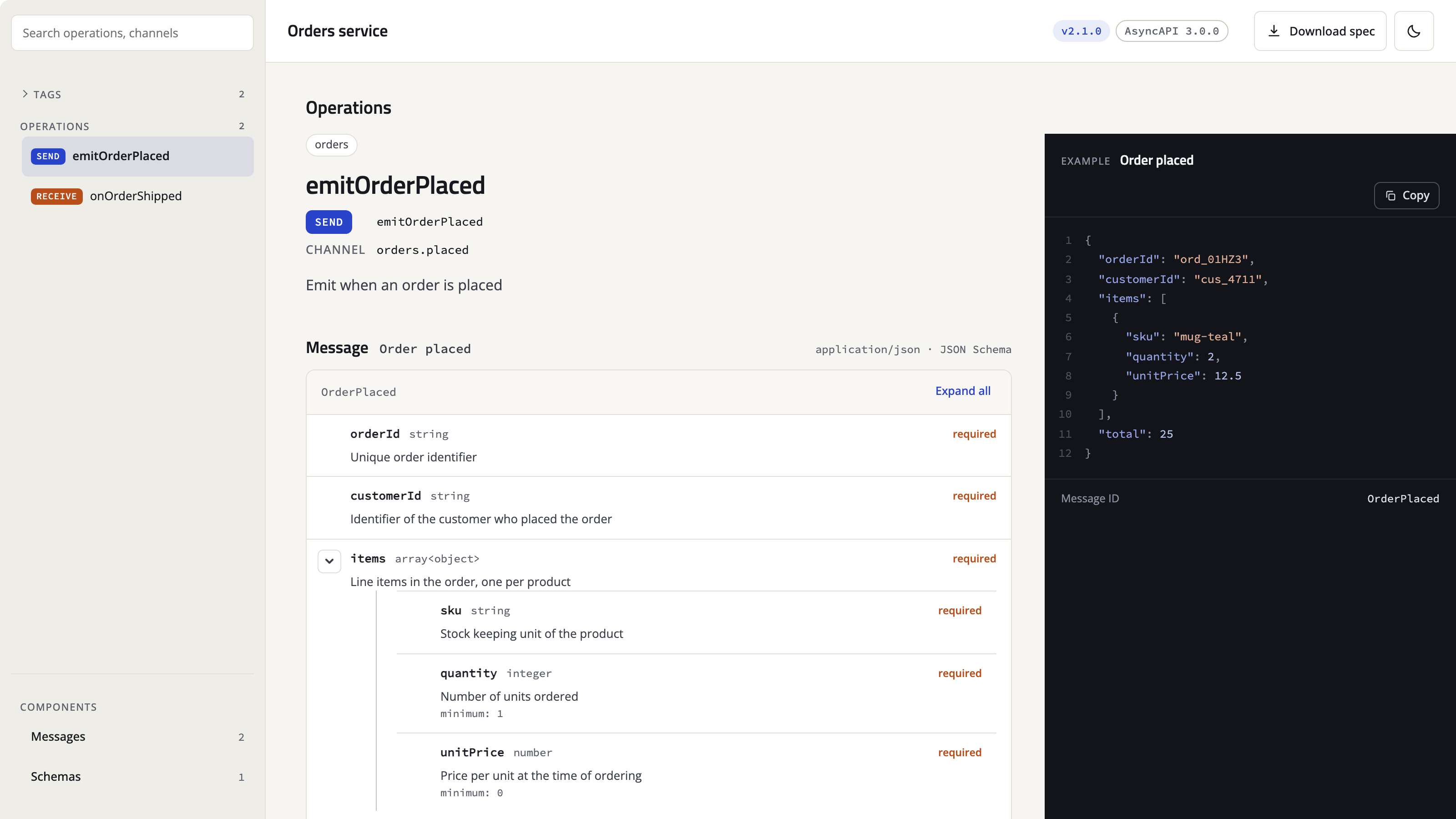
The viewer is a web component that renders AsyncAPI 2 and 3 documents, JSON or YAML, in the browser: payload trees and example panels, servers, messages and schemas, a searchable sidebar, light and dark modes that follow the page, and a layout that fits a documentation column. It needs no inline script or style and renders into its own shadow root.
It comes as a Python package for documentation sites (a Python-Markdown extension with a plugin for MkDocs) and as an npm package for everything else, with one version number.
Documentation and live demo: https://weesho-lapara.github.io/asyncapi-viewer/
Formerly published as
asyncapi-tag(and before thatmkdocs-asyncapi-tag-plugin). See Migrating.
Documentation sites
pip install asyncapi-viewer
MkDocs: add the plugin. It serves the viewer from your site with integrity hashes, indexes local
documents for the site search, and makes mkdocs build --strict fail on a missing document.
# mkdocs.yml
plugins:
  - asyncapi-viewer
Zensical: it runs no plugins, so list the extension and put the viewer under docs/ once.
python -m asyncapi_viewer copy-assets docs/assets/asyncapi-viewer
# mkdocs.yml
markdown_extensions:
  - asyncapi_viewer
Any Python-Markdown: markdown.markdown(text, extensions=["asyncapi_viewer"]).
Then reference a document from a page, with a path relative to the page:
<asyncapi-viewer src="events.yaml" sidebar></asyncapi-viewer>
or as a fenced block using the same names:
```asyncapi
src: events.yaml
sidebar: true
```
Guide: https://weesho-lapara.github.io/asyncapi-viewer/getting-started/
Web pages and apps
npm install asyncapi-viewer
import 'asyncapi-viewer';
import type {} from 'asyncapi-viewer/react';   // JSX typing for React

<asyncapi-viewer src="/asyncapi.yaml" sidebar onasyncapi-load={(e) => console.log(e.detail.model.title)} />
Or one script tag from jsDelivr, pinned to a version. TypeScript types ship with the package, the
element fires asyncapi-load and asyncapi-error events, and a React 19 app is part of the test
suite. Guide: https://weesho-lapara.github.io/asyncapi-viewer/web/
Options
Every option is an attribute, the same in Markdown, HTML and JSX: sections to show, the sidebar and its grouping, badge labels, the theme and a theme toggle. Reference: https://weesho-lapara.github.io/asyncapi-viewer/attributes/. Plugin and extension options (where the viewer is served from, integrity, search index) are on https://weesho-lapara.github.io/asyncapi-viewer/configuration/.
Migrating from older names
From asyncapi-tag (1.0 and 1.1). Replace asyncapi-tag with asyncapi-viewer in your
requirements. The plugin id asyncapi-tag, the extension name asyncapi_tag and the
<asyncapi-tag> element are still accepted until 3.0, and asyncapi-tag 1.2.0 on PyPI is a shim
that only depends on this package.
From 1.x. Pages and configuration keep working; renderer: legacy brings the 1.x React-based
output back for one major version. From mkdocs-asyncapi-tag-plugin (0.x), also remove the
asyncapi_file option. Details: https://weesho-lapara.github.io/asyncapi-viewer/migration/
Development
python -m venv .venv && source .venv/bin/activate
pip install -e ".[test]"
cd viewer && npm ci && npm run build && cd ..      # the viewer (Node 22)
python scripts/sync_viewer.py                     # copy it into the package
pytest
The viewer lives in viewer/ (Lit, TypeScript, Vite, Vitest, Playwright). Build the docs site with
pip install -e ".[docs]" && mkdocs build --strict. See AGENTS.md for the repository layout and
release procedure, and ROADMAP.md
for plans.
License
MIT
1 maintainer

Metadata
1 maintainer
Release files for asyncapi-viewer 2.1.1
For a detailed explanation of source distributions (sdists) and built distributions (wheels), please see the package formats documentation.
Source distribution (sdist)
| File | Size | Uploaded | Provenance | Actions |
|---|---|---|---|---|
| asyncapi_viewer-2.1.1.tar.gz | 275.1 kB | With provenance | Details for asyncapi_viewer-2.1.1.tar.gz |
Built distribution (wheel)
| File | Interpreter | ABI | Platform | Actions Reset |
|---|---|---|---|---|
| asyncapi_viewer-2.1.1-py3-none-any.whl | Python 3 | none | any | Details for asyncapi_viewer-2.1.1-py3-none-any.whl |
Total release size: 540.5 kB
Release files / asyncapi_viewer-2.1.1.tar.gz
| Download URL | asyncapi_viewer-2.1.1.tar.gz |
|---|---|
| Size | 275.1 kB |
| Tags | Source |
|
SHA-256 checksum How to use checksums |
7567bff0137fb30e01fd0cbb48c07698e8aa6f43d39f6a4ed6404ec0ffb86b42
|
|
BLAKE2b-256 checksum How to use checksums |
758b0ead4f9d9d90c9815c979f0800a94e3b32558536b817c9b4cd70a48a50f6
|
| Upload date | |
|
Uploaded using Trusted Publishing? What is trusted publishing? |
Yes |
| Uploaded via |
twine/7.0.0 CPython/3.13.14
|
Provenance
Provenance describes where a file came from. On PyPI, provenance is shared via attestations, which provide a verifiable record of the build or publishing details. View details, limitations and caveats.


PyPI Publish Attestation
PyPI verified that this artifact, at this checksum, originated from the publisher listed below.
Signed by GitHub Actions, verified by PyPI on Sep 27, 2026.
Transparency logRelease files / asyncapi_viewer-2.1.1-py3-none-any.whl
| Download URL | asyncapi_viewer-2.1.1-py3-none-any.whl |
|---|---|
| Size | 265.4 kB |
| Tags | Python 3 |
|
SHA-256 checksum How to use checksums |
de01441f447e5736c519e29209c0c9c66eaa9813f44bcbe2b2cffffd2bafc3b0
|
|
BLAKE2b-256 checksum How to use checksums |
dc09f7f8218e2d23ab749b901f101f70c8e9078c2d538b364228236856e99460
|
| Upload date | |
|
Uploaded using Trusted Publishing? What is trusted publishing? |
Yes |
| Uploaded via |
twine/7.0.0 CPython/3.13.14
|
Provenance
Provenance describes where a file came from. On PyPI, provenance is shared via attestations, which provide a verifiable record of the build or publishing details. View details, limitations and caveats.
PyPI Publish Attestation
PyPI verified that this artifact, at this checksum, originated from the publisher listed below.
Signed by GitHub Actions, verified by PyPI on Sep 27, 2026.
Transparency logSecurity for asyncapi-viewer 2.1.1
Provenance
Provenance describes where a file came from. On PyPI, provenance is shared via attestations, which provide a verifiable record of the build or publishing details. View details, limitations and caveats.
Full provenance
Both files in this release have been uploaded with provenance metadata.
Attestation for asyncapi_viewer-2.1.1.tar.gz
PyPI Publish Attestation
PyPI verified that this artifact, at this checksum, originated from the publisher listed below.
Signed by GitHub Actions, verified by PyPI on Sep 27, 2026.
Transparency logA note on package security
PyPI is a repository for distributing packages, not a service for auditing them. While third-party security researchers and our staff do their best to detect and remove malicious packages, PyPI cannot guarantee the quality, security or suitability of any given package.
To learn more about protecting yourself from malicious actors, visit our package security documentation.














