

Asyncer, async and await, focused on developer experience.



Documentation: https://asyncer.tiangolo.com
Source Code: https://github.com/fastapi/asyncer
Asyncer is a small library built on top of AnyIO.
Asyncer has a small number of utility functions that allow working with async, await, and concurrent code in a more convenient way under my (@tiangolo - Sebastián Ramírez) very opinionated and subjective point of view.
The main goal of Asyncer is to improve developer experience by providing better support for autocompletion and inline errors in the editor, and more certainty that the code is bug-free by providing better support for type checking tools like mypy.
Asyncer also tries to improve convenience and simplicity when working with async code mixed with regular blocking code, allowing to use them together in a simpler way... again, under my very subjective point of view.
Can I Use It?
Yes 🎉 (but continue reading).
This is a very small library, there are things that can change and improve in the future.
If you use it, pin the exact Asyncer version for your project, to make sure it all works.
Have tests for your project (as you should, anyway). And upgrade the version once you know that the new version continues to work correctly.
Still, it's just 4 functions, so there's not much to change, if you had to refactor your code to update something it would not be much.
And if you don't want to add asyncer as a dependency to your project, you can also just copy the main file and try out those functions, it's quite small (but in that case you won't get updates easily).
Requirements
As Asyncer is based on AnyIO it will be also installed automatically when you install Asyncer.
Installation
$ pip install asyncer
---> 100%
Successfully installed asyncer anyio
How to Use
You can read more about each of the use cases and utility functions in Asyncer in the tutorial.
As a sneak preview of one of the utilities, you can call sync code from async code using asyncify():
import time

import anyio
from asyncer import asyncify


def do_sync_work(name: str):
    time.sleep(1)
    return f"Hello, {name}"


async def main():
    message = await asyncify(do_sync_work)(name="World")
    print(message)


anyio.run(main)
Asyncer's asyncify() will use AnyIO underneath to do the smart thing, avoid blocking the main async event loop, and run the sync/blocking function in a worker thread.
Editor Support
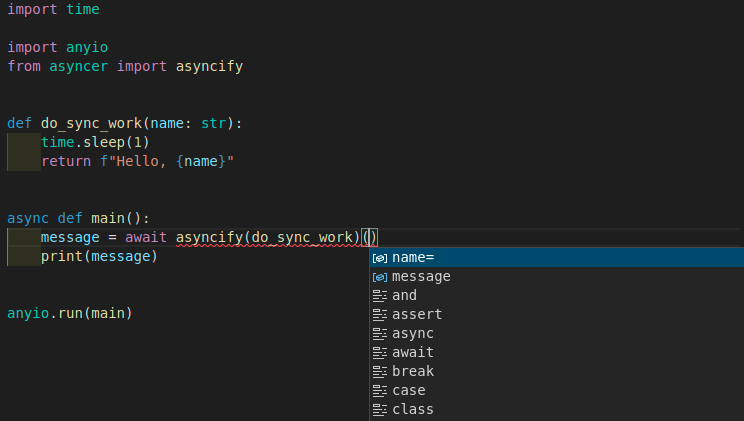
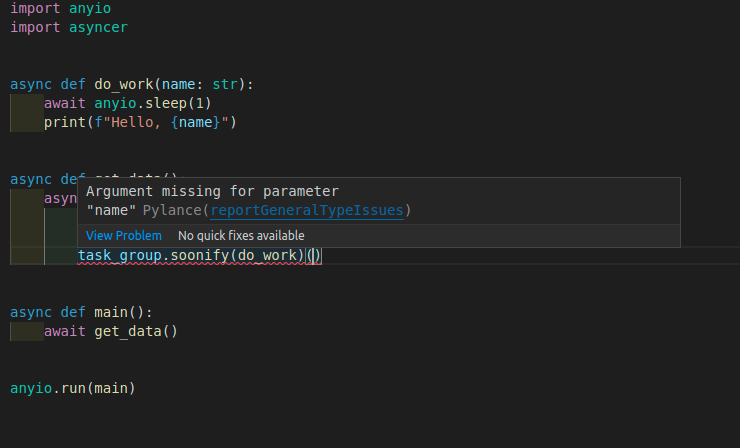
Everything in Asyncer is designed to get the best developer experience possible, with the best editor support.
- Autocompletion for function arguments:
- Autocompletion for return values:

- Inline errors in editor:
- Support for tools like mypy, that can help you verify that your code is correct, and prevent many bugs.
License
This project is licensed under the terms of the MIT license.
1 maintainer

Metadata
1 maintainer
Release files for asyncer 0.0.18
For a detailed explanation of source distributions (sdists) and built distributions (wheels), please see the package formats documentation.
Source distribution (sdist)
| File | Size | Uploaded | Provenance | Actions |
|---|---|---|---|---|
| asyncer-0.0.18.tar.gz | 24.5 kB | Without provenance | Details for asyncer-0.0.18.tar.gz |
Built distribution (wheel)
| File | Interpreter | ABI | Platform | Actions Reset |
|---|---|---|---|---|
| asyncer-0.0.18-py3-none-any.whl | Python 3 | none | any | Details for asyncer-0.0.18-py3-none-any.whl |
Total release size: 36.6 kB
Release files / asyncer-0.0.18.tar.gz
| Download URL | asyncer-0.0.18.tar.gz |
|---|---|
| Size | 24.5 kB |
| Tags | Source |
|
SHA-256 checksum How to use checksums |
dc233a466f85f1bc17dafcdb861b06291b64777a8d9076f7884467cbb66f95ef
|
|
BLAKE2b-256 checksum How to use checksums |
95e3a9de31596d386b8e76e17c609e20775c6a414cff95d025551aca3c63f282
|
| Upload date | |
|
Uploaded using Trusted Publishing? What is trusted publishing? |
Yes |
| Uploaded via |
uv/0.11.18 {"installer":{"name":"uv","version":"0.11.18","subcommand":["publish"]},"python":null,"implementation":{"name":null,"version":null},"distro":{"name":"Ubuntu","version":"24.04","id":"noble","libc":null},"system":{"name":null,"release":null},"cpu":null,"openssl_version":null,"setuptools_version":null,"rustc_version":null,"ci":true}
|
Release files / asyncer-0.0.18-py3-none-any.whl
| Download URL | asyncer-0.0.18-py3-none-any.whl |
|---|---|
| Size | 12.1 kB |
| Tags | Python 3 |
|
SHA-256 checksum How to use checksums |
054be3c0c3d7f0f79aac5b7d2cf7ad3a740bc465b62a77b48716a30c22679962
|
|
BLAKE2b-256 checksum How to use checksums |
1d6273cea402f7c55b830bc02850f84724d9f6e3538c68610f69016f6f480a94
|
| Upload date | |
|
Uploaded using Trusted Publishing? What is trusted publishing? |
Yes |
| Uploaded via |
uv/0.11.18 {"installer":{"name":"uv","version":"0.11.18","subcommand":["publish"]},"python":null,"implementation":{"name":null,"version":null},"distro":{"name":"Ubuntu","version":"24.04","id":"noble","libc":null},"system":{"name":null,"release":null},"cpu":null,"openssl_version":null,"setuptools_version":null,"rustc_version":null,"ci":true}
|
Security for asyncer 0.0.18
Provenance
Provenance describes where a file came from. On PyPI, provenance is shared via attestations, which provide a verifiable record of the build or publishing details. View details, limitations and caveats.
No provenance found
None of the files in this release were uploaded with provenance metadata.
A note on package security
PyPI is a repository for distributing packages, not a service for auditing them. While third-party security researchers and our staff do their best to detect and remove malicious packages, PyPI cannot guarantee the quality, security or suitability of any given package.
To learn more about protecting yourself from malicious actors, visit our package security documentation.














