


atcoder-submit-status
acss はコマンドライン上でAtCoderの提出状況を確認するためのCLIツールです。
提出状況を取得することに特化しています。
スクリーンショット
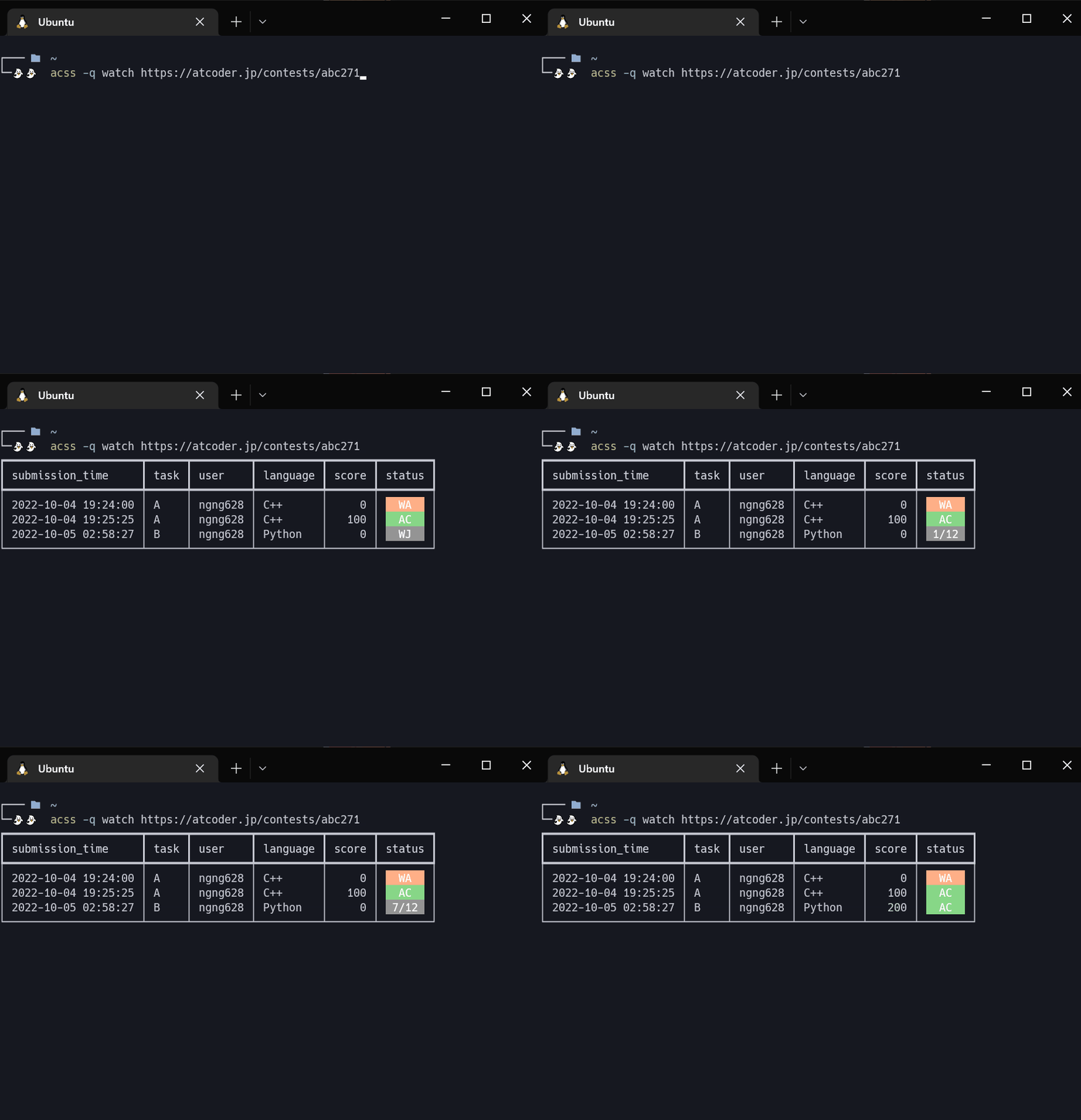
機能
基本
コマンドは以下の形式で与えます。
$ acss [-h] [-v] [-c COOKIE] [-q] [--version] {login,l,logout,watch,w,fetch,f}
| オプション | 説明 |
|---|---|
-h, --help |
ヘルプを表示します |
-v, --verbose |
ログの出力を多くします |
-c COOKIE, --cookie COOKIE |
クッキーへのパスを指定します |
-q, --quiet |
ログの出力を少なくします(このオプションは3回まで重ねることができます) |
--version |
acss のバージョンを表示します |
ログイン
以下のコマンドでログインすることができます。 CLI上でユーザ名の入力とパスワードの入力が求められます。
$ acss login atcoder # login は l に省略可能
ログアウト
以下のコマンドでログアウトすることができます。
$ acss logout atcoder
提出一覧の確認
 |
 |
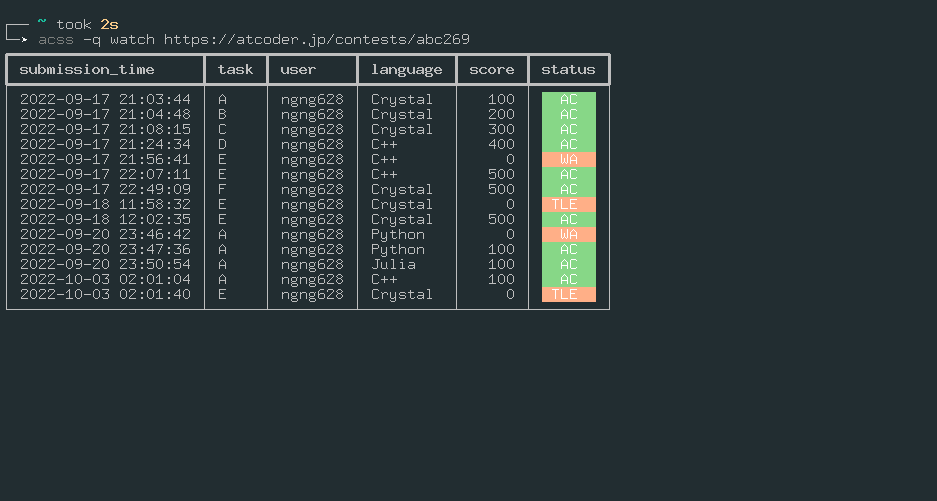
以下のコマンドで指定したコンテストの提出一覧を取得します。
$ acss watch URL  # watch は w に省略可能
$
$ acss watch https://atcoder.jp/contests/abc252
$ acss watch abc252  # url が https://atcoder.jp/contests/ で始まらない場合は、自動的に補完されます。
以下のオプションがサポートされています。
| オプション | 説明 | 例 |
|---|---|---|
-h, --help |
ヘルプを表示します。 | acss watch -h |
--no-color |
色付きの出力をオフにします。 | acss watch abc252 --no-color |
--tasks |
問題で絞り込みます。 | acss watch abc252 --task a b ex |
--languages |
言語で絞り込みます。 | acss watch abc252 --languages C++ C# |
--statuses |
ジャッジの状態で絞り込みます 。 | acss watch abc252 --statuses WA TLE RE |
-u, --users |
ユーザ名で絞り込みます。 | acss watch abc252 -u user1 user2 |
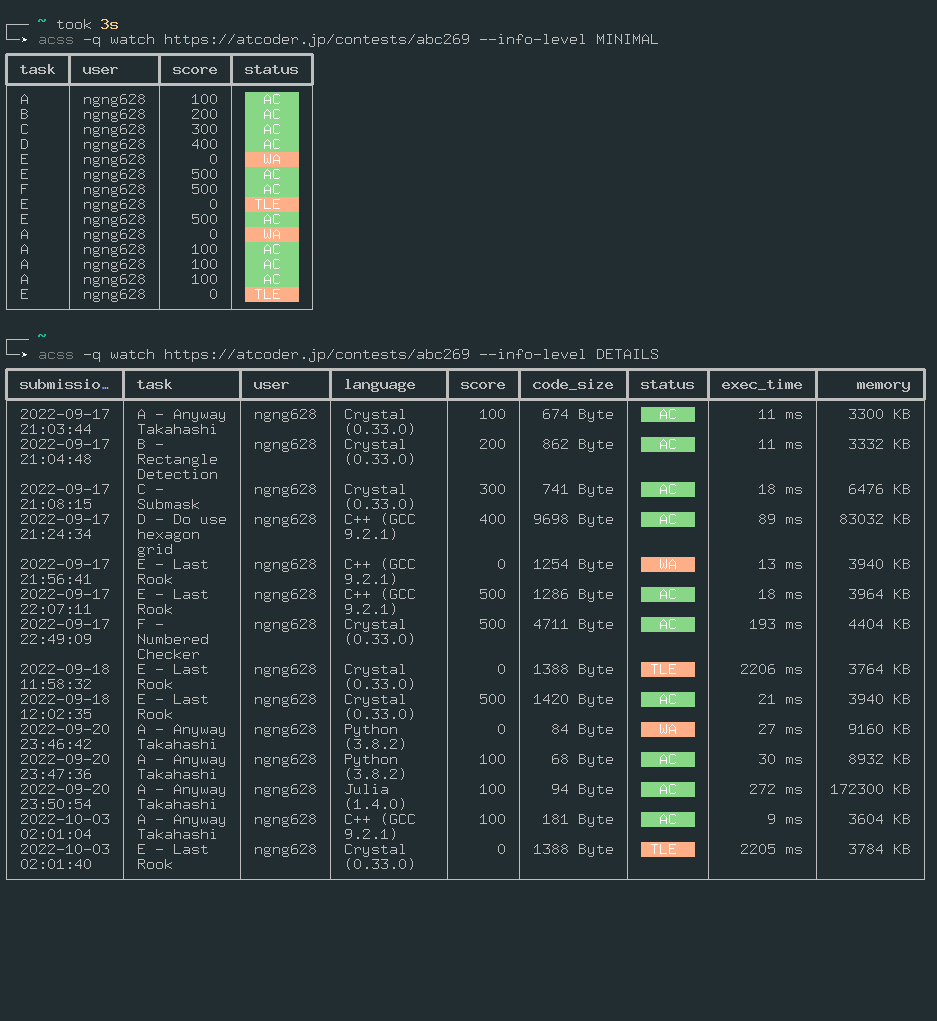
--info-level |
提出の情報の詳しさを設定します。(MINIMAL, NORMAL, DETAILS の3段階) |
acss watch abc252 --info-level MINIMAL |
-r, --reverse |
提出を逆順に表示します。 | acss watch abc252 -r |
-t, --tail |
全提出のうち指定した数だけ出力します。 | acss watch abc252 -t 5 |
提出一覧の保存
$ acss watch URL > result.txt などとすることで、出力結果をファイルに書き込むことはできますが、不必要な空白やログ情報も書き込まれてしまいます。
そこで、提出一覧を保存する専用のコマンドを提供します。
$ acss fetch URL  # fetch は f に省略可能
$ acss fetch URL -o result.csv  # result.csv に出力
以下のオプションがサポートされています。
| オプション | 説明 | 例 |
|---|---|---|
-h, --help |
ヘルプを表示します。 | acss fetch -h |
-o |
結果の出力先を指定します。 | acss fetch abc252 -o result.csv |
-S, --separator |
区切り文字を変更します。 | acss fetch abc252 -s '\t' -o result.tsv |
-e, --encoding |
文字コードを変更します。 | acss fetch abc252 -e 'sjis' -o result.csv |
--tasks |
問題で絞り込みます。 | acss fetch abc252 --task a b ex |
--languages |
言語で絞り込みます。 | acss fetch abc252 --languages C++ C# |
--statuses |
ジャッジの状態で絞り込みます 。 | acss fetch abc252 --statuses WA TLE RE |
-u, --users |
ユーザ名で絞り込みます。 | acss fetch abc252 -u user1 user2 |
--info-level |
提出の情報の詳しさを設定します。(MINIMAL, NORMAL, DETAILS の3段階) |
acss fetch abc252 --info-level MINIMAL |
-t, --tail |
全提出のうち指定した数だけ出力します。 | acss fetch abc252 -t 5 |
インストール
以下のコマンドでインストールできます。
pip install atcoder-submit-status
LICENSE
MITライセンスで提供します。
また、以下の著作物を利用しました。
The MIT License (MIT)
Copyright (c) 2017-2020 Kimiyuki Onaka.
https://github.com/online-judge-tools/oj/blob/master/LICENSE
1 maintainer

Metadata
1 maintainer
Release files for atcoder-submit-status 0.0.4
For a detailed explanation of source distributions (sdists) and built distributions (wheels), please see the package formats documentation.
Source distribution (sdist)
| File | Size | Uploaded | Provenance | |
|---|---|---|---|---|
| atcoder-submit-status-0.0.4.tar.gz | 122.4 kB | Without provenance | Details |
Built distribution (wheel)
| File | Interpreter | ABI | Platform | Reset |
|---|---|---|---|---|
| atcoder_submit_status-0.0.4-py3-none-any.whl | Python 3 | none | any | Details |
Total release size: 139.1 kB
Release files / atcoder-submit-status-0.0.4.tar.gz
| Download URL | atcoder-submit-status-0.0.4.tar.gz |
|---|---|
| Size | 122.4 kB |
| Tags | Source |
|
SHA-256 checksum How to use checksums |
e387a7c9d11aa311d88681ce23078f2893c82f9443b6d07652d7020afe954b00
|
|
BLAKE2b-256 checksum How to use checksums |
dee14e08ca2baf2bb627ae93373b3457b1706c6e8938d44a971e50e90954bbea
|
| Upload date | |
|
Uploaded using Trusted Publishing? What is trusted publishing? |
No |
| Uploaded via |
twine/4.0.1 CPython/3.8.10
|
Release files / atcoder_submit_status-0.0.4-py3-none-any.whl
| Download URL | atcoder_submit_status-0.0.4-py3-none-any.whl |
|---|---|
| Size | 16.7 kB |
| Tags | Python 3 |
|
SHA-256 checksum How to use checksums |
34565e872f288a13f70d8e341174342c5dc85e4e743382deae24ba83c97989e0
|
|
BLAKE2b-256 checksum How to use checksums |
41439f75abea008588f0f795c0009cd81b7dfbc4f9b52182f84c5ed8e5a12a42
|
| Upload date | |
|
Uploaded using Trusted Publishing? What is trusted publishing? |
No |
| Uploaded via |
twine/4.0.1 CPython/3.8.10
|
Security for atcoder-submit-status 0.0.4
Provenance
Provenance describes where a file came from. On PyPI, provenance is shared via attestations, which provide a verifiable record of the build or publishing details. View details, limitations and caveats.
No provenance found
None of the files in this release were uploaded with provenance metadata.
A note on package security
PyPI is a repository for distributing packages, not a service for auditing them. While third-party security researchers and our staff do their best to detect and remove malicious packages, PyPI cannot guarantee the quality, security or suitability of any given package.














