
Athanore




Code-defined AI agent workflows over the Agent Client Protocol (ACP).
A workflow is a Python graph: decorated async functions are nodes,
parameter names are edges, and a node's return value picks the next node.
Inside a node you may await an ACP agent (pi, Claude Code, a container, a
fake), run deterministic Python (tests, linters, git), or ask a human. A
server runs many concurrent runs of many workflows under explicit capacity
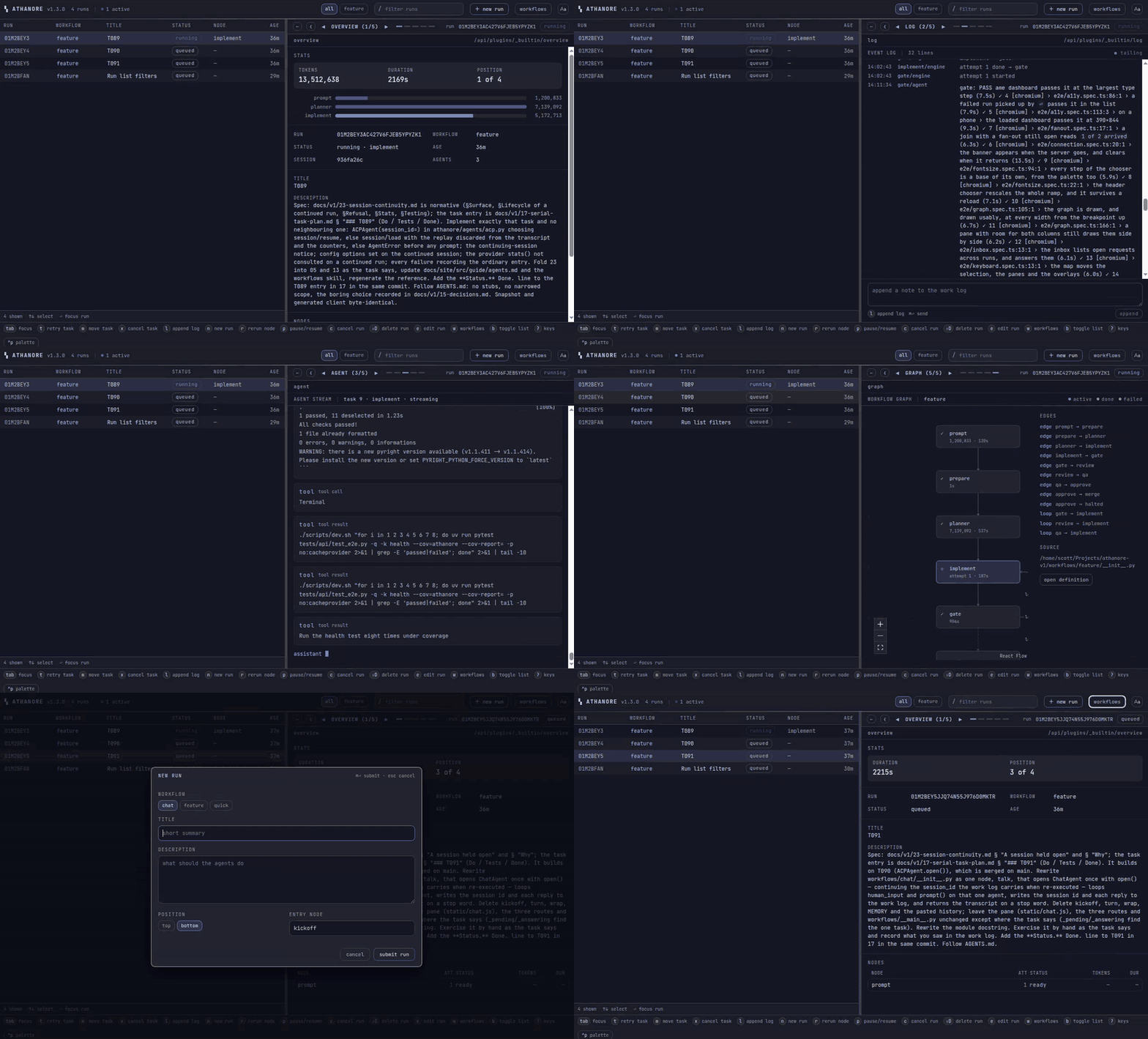
limits, persists everything, and exposes it to an operator through a browser
SPA and a small CLI.
The bet is that agents produce values and deterministic code makes decisions. An agent never moves a task. It submits a validated value and the node body routes on it, so every edge a run traverses is code you can read, test, and blame.
Install
Python 3.11 or newer, with uv.
uv add athanore                # into a project that defines workflows
uv tool install athanore       # or just the CLI
uv add "athanore[postgres]"    # Postgres instead of the default SQLite
Athanore stores runs in SQLite in the directory it is started in and needs nothing else: no service, no login, no API key until a workflow of yours dispatches an agent that wants one.
v1 is tagged in this repository and nowhere else. There is no git remote
and nothing has been uploaded, so PyPI still carries the v0 MVP (0.0.12)
and the uv add lines above fetch that until v1 is published. Until then,
install from a checkout, as described under
Developing Athanore.
Write a workflow
Two nodes, no agents, so it runs with nothing configured. Save it as
hello.py:
from athanore import Workflow, human_input

wf = Workflow("hello")


@wf.node(start=True)
async def greet(shout):
    name = await human_input("Who is this run for?")
    return shout(name)          # a called edge ref carries the payload


@wf.node()
async def shout(*, name):
    return {"greeting": f"HELLO {name.upper()}"}   # no edges: the run ends here
greet is the start node and shout is its one successor, because
shout is greet's parameter. shout takes no edges of its own, only
the payload, so it is terminal, and what it returns is the run's output.
Waiting for the answer to human_input releases the worker slot, so a run
parked on a question does not hold the server.
Serve and drive a run
Serve the file, then drive it from a second shell:
athanore serve hello.py:wf # http://127.0.0.1:4002, SPA and API
athanore submit hello "first run"   # prints the run id
athanore ls                         # runs, with the node each is on
athanore requests                   # what is waiting for you
athanore answer 1 world             # the request id, and the text typed
athanore show <run>                 # output: {'greeting': 'HELLO WORLD'}
Or open http://127.0.0.1:4002, submit from the command palette, and
answer the question in the inbox.
Graph, routing, and failure policy
Three declarations make up the whole authoring interface. New capability attaches to one of them; nothing adds a fourth.
- The signature is the graph. Positional parameters are edges to other
nodes. A keyword-only parameter after
*is the optional payload. Exactly one node isstart=True. - The return value is the routing. A plain value with one successor
auto-transitions. An edge ref (
return qa) or called ref (return qa(payload)) transitions explicitly. A list of refs fans out. No successors means the branch completes, and the run completes when its last branch lands. - The exception is the failure policy. Raising fails the attempt; the engine applies retry, then dead-letter.
A node declared join=True closes a fan-out: it runs once, after every
branch has transitioned into it, with the branch values as its payload.
Dispatch an agent from a node
Nodes that dispatch an agent have the same shape. An agent is a class carrying its own configuration, and its prompt is inlined text:
from athanore import ACPAgent
from pydantic import BaseModel


class Verdict(BaseModel):
    ship: bool
    why: str


class Reviewer(ACPAgent):
    command = ["npx", "pi-acp"]           # any ACP adapter
    system_prompt = "You review one branch of one repository. ..."
    output_model = Verdict                # what the agent must submit


@wf.node(retries=1, timeout=1800)
async def review(merge, engineering):
    result = await Reviewer().run("Review the branch in the work log.")
    verdict: Verdict = result.output       # validated, or the run never got here
    return merge if verdict.ship else engineering
The agent submits a Verdict through the API and the node body routes on
it. It cannot move the task itself, and the branch that gets taken is the
if you just read.
Features
- Engine. Fan-out and fan-in, loop-backs, deterministic nodes, retries with dead-letter, restart recovery, named capacity pools, priorities, pause/resume, cancel, rerun, retry, move. Waiting on a human releases the worker slot.
- Agents. Any ACP agent as a class carrying its config. Kickoff prompts,
structured submissions validated against a pydantic model with in-session
repair turns, permission and elicitation policies, streamed output, env
scrubbing, real-data-only stats. An agent reaches the API through MCP
tools, a harness extension, or
curl, with a token that reaches its own task and no other. - Human in the loop. One request object for permissions, elicitations, and node questions, answered from the SPA or CLI, durable across restarts.
- One wire contract. HTTP plus server-sent events. The OpenAPI document comes from the code, and the typed TypeScript client comes from OpenAPI.
- Plugins. Workflows declare routes, actions, panels, and event handlers; the built-in operator views are plugins too. Custom UI is a web component.
- Local first. Loopback needs no login. Binding to a network turns on an operator token. Agents get a per-task token, header-only, scoped to their own task.
- Storage. SQLite by default, Postgres optional, Alembic migrations, retention windows, and an importer for a v0 database.
CLI commands
athanore serve [module:wf ...] [--host] [--port] [--workers N] [--db URL] [--open]
athanore submit <workflow> "<title>" ["<description>"]
athanore ls | show <run> | logs <run> [-f] | stream <task> [-f] | workflows
athanore requests [run] | answer <req> <value> | permit <req> | deny <req>
athanore pause <run> | resume | cancel | rm | position <run> up|down|<index>
athanore rerun <run> <node> | retry <task> | move <task> <node>
athanore db upgrade | backup <path> | import-v0 <file>
athanore token show | rotate        athanore login <url>        athanore open
Every read verb takes --json, so the CLI composes with jq. The full
reference is docs/site/src/reference/cli.md.
Capacity pools in athanore.toml
Pools and per-workflow capacity come from an athanore.toml beside the
database:
[pools]
build = 2

[workflows.feature_build]
pool = "build"
Repository layout
athanore/        Python package: graph, engine, requests, agents, events,
                 store, plugins, api, cli, server, testing, web/dist
web/             SPA source (Vite + React + TypeScript), builds into athanore/web/dist
examples/        user-land workflows and vendor adapters (uv workspace member)
tests/           Python tests
docs/site/       the published documentation site (MkDocs Material)
skills/          agent skills, one per interface, self-contained; copy one into your agent
The per-module breakdown and the layering rule are in
AGENTS.md. Nothing in athanore/ depends on pi, Claude, or
Docker. Vendor adapters are user-land, in examples/.
Developing Athanore
Everything runs in the dev stack. One container image is behind the gate, the app, the SPA dev server and every agent, so the gate a human runs is the gate an agent runs:
./scripts/test.sh                          # the gate: ruff, pyright, import-linter,
                                           # pytest, the docs build, the SPA suites
./scripts/run.sh                           # serve the app on 127.0.0.1:4002
./scripts/docs.sh                          # serve the docs on 127.0.0.1:8000
./scripts/dev.sh                           # a shell in the container
./scripts/dev.sh "uv run pytest -q -k settings"
Or directly, with uv and pnpm on the host:
uv sync --all-packages --all-groups --all-extras
uv run pytest -q
uv run ruff check . && uv run pyright && uv run lint-imports
uv run mkdocs build --strict -f docs/site/mkdocs.yml
pnpm -C web install && pnpm -C web test && pnpm -C web build
uv run athanore serve then serves the workflows in examples/, which is
a workspace member and registers them as entry points.
Documentation
docs/site/is the documentation site: install, quickstart, writing a workflow, dispatching agents, plugins, the CLI, the HTTP and SSE reference, deployment. Start here if you are using Athanore rather than building it. A script generates its reference section from the code. Read it withuv run mkdocs serve -f docs/site/mkdocs.yml..github/workflows/pages.ymlpublishes it to GitHub Pages on every push tomain, which, as noted under Install, waits on this repository having a remote to push to.skills/README.mdlists five agent skills, one for each interface you can build against. Each is the site's pages for that interface, republished so the skill stands alone. Install one by copying its directory into your agent's skills directory, or withnpx skills add.AGENTS.mdexplains how to work in this repository. Read it before changing anything, human or agent.DESIGN.mdsays where the MVP's design document went.LICENSEis the MIT license. Athanore is copyright Scott Russell and free to use, copy, modify and redistribute under its terms.
1 maintainer

Download files
Download the file for your platform. If you're not sure which to choose, learn more about installing packages.
Source Distribution
Built Distribution
Filter files by name, interpreter, ABI, and platform.
If you're not sure about the file name format, learn more about wheel file names.
Copy a direct link to the current filters
File details
Details for the file athanore-1.4.1.tar.gz.
File metadata
- Download URL: athanore-1.4.1.tar.gz
- Upload date:
- Size: 7.9 MB
- Tags: Source
- Uploaded using Trusted Publishing? No
- Uploaded via:
uv/0.12.10 {"installer":{"name":"uv","version":"0.12.10","subcommand":["publish"]},"python":null,"implementation":{"name":null,"version":null},"distro":{"name":"Debian GNU/Linux","version":"12","id":"bookworm","libc":null},"system":{"name":null,"release":null},"cpu":null,"openssl_version":null,"setuptools_version":null,"rustc_version":null,"ci":null}
File hashes
| Algorithm | Hash digest | |
|---|---|---|
| SHA256 |
dd9dbe09eed069fc131d815698a37479c05908b2082a288bbd83c55e316b1c15
|
|
| MD5 |
b7e1a91a66e0fe9236c21cb651ba1fd7
|
|
| BLAKE2b-256 |
cddd6736442cdbdf9db42a3bbfb6c853c6cb58620b4e380c11a18dad910a7a9e
|
File details
Details for the file athanore-1.4.1-py3-none-any.whl.
File metadata
- Download URL: athanore-1.4.1-py3-none-any.whl
- Upload date:
- Size: 2.1 MB
- Tags: Python 3
- Uploaded using Trusted Publishing? No
- Uploaded via:
uv/0.12.10 {"installer":{"name":"uv","version":"0.12.10","subcommand":["publish"]},"python":null,"implementation":{"name":null,"version":null},"distro":{"name":"Debian GNU/Linux","version":"12","id":"bookworm","libc":null},"system":{"name":null,"release":null},"cpu":null,"openssl_version":null,"setuptools_version":null,"rustc_version":null,"ci":null}
File hashes
| Algorithm | Hash digest | |
|---|---|---|
| SHA256 |
9ebef870ef5dbfd33fd0d7b7a27a2f00141ef323dcc4b05a13ef5d797edb8022
|
|
| MD5 |
292d0dcc12a2f125b8995c1250f4f957
|
|
| BLAKE2b-256 |
a14babb94fe08fc8269ad9045fb8248f90b68c3931fa43ed3bed4d8b0efd1550
|














