
Unofficial Python SDK for Athena Federation

Project description
(Unofficial) Python SDK for Athena Federation
This is an unofficial Python SDK for Athena Federation.
Overview
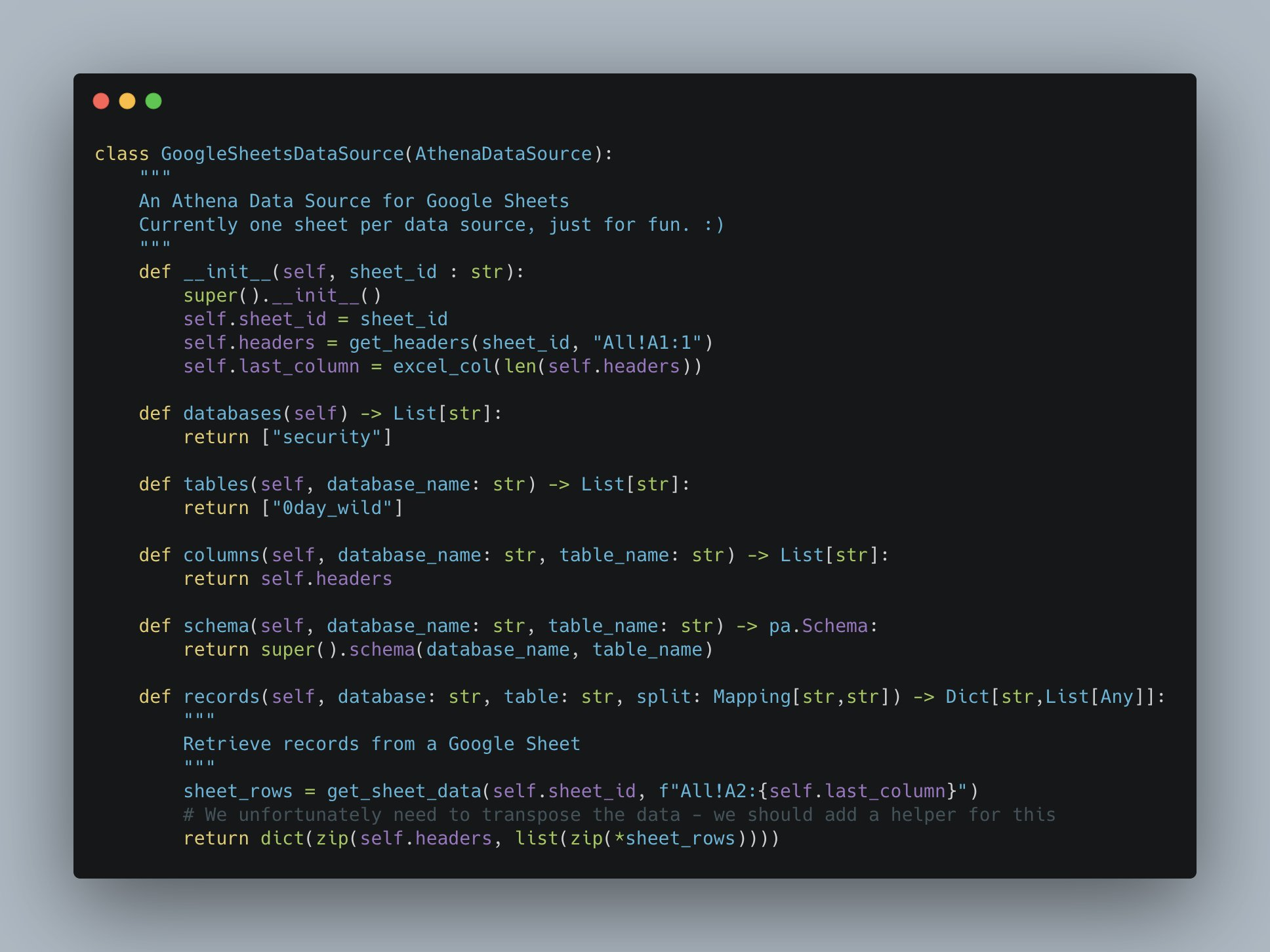
The Python SDK makes it easy to create new Amazon Athena Data Source Connectors using Python. It is under active development so the API may change from version to version.
You can see an example implementation that queries Google Sheets using Athena.
Current Limitations
- Partitions are not supported, so Athena will not parallelize the query using partitions.
Example Implementations
Testing Connector Locally Using Docker
You can test your Lambda function locally using Lambda Docker images. Note that you must have a Docker daemon running on your machine. You can test it by calling the CLI:
Verifying Docker is running
docker ps
Logging in to Docker
You will need an account on, e.g., Docker Hub.
sudo docker login
# username
# password
Build Docker Images
First, build our Docker image and run it.
make docker-build
make docker-detached  # or docker-run for testing
Then, we can execute a sample PingRequest.
make lambda-ping
{"@type": "PingResponse", "catalogName": "athena_python_sdk", "queryId": "1681559a-548b-4771-874c-2aa2ea7c39ab", "sourceType": "athena_python_sdk", "capabilities": 23}
We can also list schemas.
make lambda-list-schemas
{"@type": "ListSchemasResponse", "catalogName": "athena_python_sdk", "schemas": ["sampledb"], "requestType": "LIST_SCHEMAS"}
Deploying your Lambda function to AWS
Creating your Lambda function
💁 Please note these are manual instructions until a serverless application can be built.
- First, let's define some variables we need throughout.
export SPILL_BUCKET=<BUCKET_NAME>
export AWS_ACCOUNT_ID=123456789012
export AWS_REGION=us-east-1
export IMAGE_TAG=v0.0.1
- Create an S3 bucket that this Lambda function will use for Spill data
aws s3 mb ${SPILL_BUCKET}
- Create an ECR repository for this image
aws ecr create-repository --repository-name athena_example --image-scanning-configuration scanOnPush=true
- Push tag the image with the repo name and push it up
docker tag local/athena-python-example ${AWS_ACCOUNT_ID}.dkr.ecr.${AWS_REGION}.amazonaws.com/athena_example:${IMAGE_TAG}
aws ecr get-login-password | docker login --username AWS --password-stdin ${AWS_ACCOUNT_ID}.dkr.ecr.${AWS_REGION}.amazonaws.com
docker push ${AWS_ACCOUNT_ID}.dkr.ecr.${AWS_REGION}.amazonaws.com/athena_example:${IMAGE_TAG}
- Create an IAM role that will allow your Lambda function to execute
Note the Arn of the role that's returned
aws iam create-role \
    --role-name athena-example-execution-role \
    --assume-role-policy-document '{"Version": "2012-10-17","Statement": [{ "Effect": "Allow", "Principal": {"Service": "lambda.amazonaws.com"}, "Action": "sts:AssumeRole"}]}'
aws iam attach-role-policy \
    --role-name athena-example-execution-role \
    --policy-arn arn:aws:iam::aws:policy/service-role/AWSLambdaBasicExecutionRole
- Grant the IAM role access to your S3 bucket
aws iam create-policy --policy-name athena-example-s3-access --policy-document '{
  "Version": "2012-10-17",
  "Statement": [
    {
      "Effect": "Allow",
      "Action": ["s3:ListBucket"],
      "Resource": ["arn:aws:s3:::'${SPILL_BUCKET}'"]
    },
    {
      "Effect": "Allow",
      "Action": [
        "s3:PutObject",
        "s3:GetObject",
        "s3:DeleteObject"
      ],
      "Resource": ["arn:aws:s3:::'${SPILL_BUCKET}'/*"]
    }
  ]
}'
aws iam attach-role-policy \
    --role-name athena-example-execution-role \
    --policy-arn arn:aws:iam::${AWS_ACCOUNT_ID}:policy/athena-example-s3-access
- Now create your function pointing to the created repository image
aws lambda create-function \
    --function-name athena-python-example \
    --role arn:aws:iam::${AWS_ACCOUNT_ID}:role/athena-example-execution-role \
    --code ImageUri=${AWS_ACCOUNT_ID}.dkr.ecr.${AWS_REGION}.amazonaws.com/athena_example:${IMAGE_TAG} \
    --environment 'Variables={TARGET_BUCKET=<BUCKET_NAME>}' \
    --description "Example Python implementation for Athena Federated Queries" \
    --timeout 60 \
    --package-type Image
Connect with Athena
-
Choose "Data sources" on the top navigation bar in the Athena console and then click "Connect data source"
-
Choose the Lambda function you just created and click
Connect!
Updating the Lambda function
If you update the Lambda function, re-run the build and push steps (updating the IMAGE_TAG variable) and then update the Lambda function:
aws lambda update-function-code \
    --function-name athena-python-example \
    --image-uri ${AWS_ACCOUNT_ID}.dkr.ecr.${AWS_REGION}.amazonaws.com/athena_example:${IMAGE_TAG}
Local Development
This version now uses Poetry for dependency management. Everything is accessible via a Makefile.
Run Tests
make # test (with coverage)
Build and Install
make install
Linting
make lint
Run tests continuously
make watch
Push athena_federation to PyPI
make publish


Download files
Download the file for your platform. If you're not sure which to choose, learn more about installing packages.
Source Distribution
Built Distribution
Filter files by name, interpreter, ABI, and platform.
If you're not sure about the file name format, learn more about wheel file names.
Copy a direct link to the current filters
File details
Details for the file athena_federation-0.1.5.tar.gz.
File metadata
- Download URL: athena_federation-0.1.5.tar.gz
- Upload date:
- Size: 15.3 kB
- Tags: Source
- Uploaded using Trusted Publishing? No
- Uploaded via: poetry/1.8.3 CPython/3.12.4 Darwin/23.6.0
File hashes
| Algorithm | Hash digest | |
|---|---|---|
| SHA256 |
e113edb696ac53e37ab37d7a5f0332da7ce3f4cafe4baa575f7c91246697ec8b
|
|
| MD5 |
b7eb7ca561cf906eea67a36a2e0fe2ae
|
|
| BLAKE2b-256 |
0aa56eb111fcc5c10d2f4ecbb9a80d68f989d570ee2fb04cbb2bfdf4bd2a4e2f
|
File details
Details for the file athena_federation-0.1.5-py3-none-any.whl.
File metadata
- Download URL: athena_federation-0.1.5-py3-none-any.whl
- Upload date:
- Size: 16.1 kB
- Tags: Python 3
- Uploaded using Trusted Publishing? No
- Uploaded via: poetry/1.8.3 CPython/3.12.4 Darwin/23.6.0
File hashes
| Algorithm | Hash digest | |
|---|---|---|
| SHA256 |
b4f0818695030d887f3bbdbc917816ab8a84206959836d9a5a03ff2459d64f4b
|
|
| MD5 |
f909512ba7b3df2c65a8cb2a1db71e4d
|
|
| BLAKE2b-256 |
736cf44bce994755dea8008808f0b668cc9cd1cb64ea53d6a96605fa5ad46ded
|






