
atlas-schema v0.5.0





This is the python package containing schemas and helper functions enabling analyzers to work with ATLAS datasets (Monte Carlo and Data), using coffea.
Hello World
The simplest example is to just get started processing the file as expected:
from atlas_schema.schema import NtupleSchema
from coffea import dataset_tools
import awkward as ak

fileset = {"ttbar": {"files": {"path/to/ttbar.root": "tree_name"}}}
samples, report = dataset_tools.preprocess(fileset)


def noop(events):
    return ak.fields(events)


fields = dataset_tools.apply_to_fileset(noop, samples, schemaclass=NtupleSchema)
print(fields)
which produces something similar to
{
    "ttbar": [
        "dataTakingYear",
        "mcChannelNumber",
        "runNumber",
        "eventNumber",
        "lumiBlock",
        "actualInteractionsPerCrossing",
        "averageInteractionsPerCrossing",
        "truthjet",
        "PileupWeight",
        "RandomRunNumber",
        "met",
        "recojet",
        "truth",
        "generatorWeight",
        "beamSpotWeight",
        "trigPassed",
        "jvt",
    ]
}
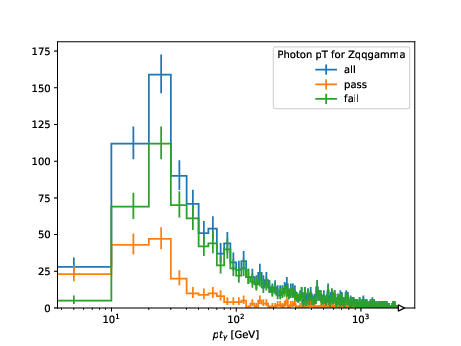
However, a more involved example to apply a selection and fill a histogram looks like below:
import awkward as ak
from hist import Hist
import matplotlib.pyplot as plt
from coffea import processor
from distributed import Client

from atlas_schema.schema import NtupleSchema


class MyFirstProcessor(processor.ProcessorABC):
    def __init__(self):
        pass

    def process(self, events):
        dataset = events.metadata["dataset"]
        h_ph_pt = (
            Hist.new.StrCat(["all", "pass", "fail"], name="isEM")
            .Regular(200, 0.0, 2000.0, name="pt", label="$pt_{\gamma}$ [GeV]")
            .Int64()
        )

        cut = ak.all(events.ph.isEM, axis=1)
        h_ph_pt.fill(isEM="all", pt=ak.firsts(events.ph.pt / 1.0e3))
        h_ph_pt.fill(isEM="pass", pt=ak.firsts(events[cut].ph.pt / 1.0e3))
        h_ph_pt.fill(isEM="fail", pt=ak.firsts(events[~cut].ph.pt / 1.0e3))

        return {
            dataset: {
                "entries": ak.num(events, axis=0),
                "ph_pt": h_ph_pt,
            }
        }

    def postprocess(self, accumulator):
        pass


if __name__ == "__main__":
    client = Client()

    fileset = {"700352.Zqqgamma.mc20d.v1": {"files": {"ntuple.root": "analysis"}}}

    run = processor.Runner(
        executor=processor.IterativeExecutor(compression=None),
        schema=NtupleSchema,
        savemetrics=True,
    )

    out, metrics = run(fileset, processor_instance=MyFirstProcessor())

    print(out)
    print(metrics)

    fig, ax = plt.subplots()
    computed["700352.Zqqgamma.mc20d.v1"]["ph_pt"].plot1d(ax=ax)
    ax.set_xscale("log")
    ax.legend(title="Photon pT for Zqqgamma")

    fig.savefig("ph_pt.pdf")
which produces
Processing with Systematic Variations
For analyses requiring systematic uncertainty evaluation, you can easily iterate
over all systematic variations using the new events["NOSYS"] alias and
systematic_names property:
import awkward as ak
from hist import Hist
from coffea import processor
from atlas_schema.schema import NtupleSchema


class SystematicsProcessor(processor.ProcessorABC):
    def __init__(self):
        self.h = (
            Hist.new.StrCat([], name="variation", growth=True)
            .Regular(50, 0.0, 500.0, name="jet_pt", label="Leading Jet $p_T$ [GeV]")
            .Int64()
        )

    def process(self, events):
        dsid = events.metadata["dataset"]

        # Process all systematic variations including nominal ("NOSYS")
        for variation in events.systematic_names:
            event_view = events[variation]

            # Fill histogram with leading jet pT for this systematic variation
            leading_jet_pt = event_view.jet.pt[:, 0] / 1_000  # Convert MeV to GeV
            weights = (
                event_view.weight.mc
                if hasattr(event_view, "weight")
                else ak.ones_like(leading_jet_pt)
            )

            self.h.fill(variation=variation, jet_pt=leading_jet_pt, weight=weights)

        return {
            "hist": self.h,
            "meta": {"sumw": {dsid: {(events.metadata["fileuuid"], ak.sum(weights))}}},
        }

    def postprocess(self, accumulator):
        return accumulator
This approach allows you to seamlessly process both nominal and systematic variations in a single loop, eliminating the need for special-case handling of the nominal variation.
Developer Notes
Converting Enums from C++ to Python
This useful vim substitution helps:
%s/ \([A-Za-z]\+\)\s\+= \(\d\+\),\?/ \1: Annotated[int, "\1"] = \2
1 maintainer

Metadata
1 maintainer
Release files for atlas-schema 0.5.0
For a detailed explanation of source distributions (sdists) and built distributions (wheels), please see the package formats documentation.
Source distribution (sdist)
| File | Size | Uploaded | |
|---|---|---|---|
| atlas_schema-0.5.0.tar.gz | 23.9 kB | Details |
Built distribution (wheel)
| File | Interpreter | ABI | Platform | Reset |
|---|---|---|---|---|
| atlas_schema-0.5.0-py3-none-any.whl | Python 3 | none | any | Details |
Total release size: 51.4 kB
Release files / atlas_schema-0.5.0.tar.gz
| Download URL | atlas_schema-0.5.0.tar.gz |
|---|---|
| Size | 23.9 kB |
| Tags | Source |
|
SHA-256 checksum How to use checksums |
d55c7a9f44e47d8255e0dcc5dddbc4994a92f8a063ebb503b2472c2ec20c0b2d
|
|
BLAKE2b-256 checksum How to use checksums |
af8236f7737887ed278b4a4d84c3c1e4fb04645dd961af23e5f77b2234154454
|
| Upload date | |
|
Uploaded using Trusted Publishing? What is trusted publishing? |
Yes |
| Uploaded via |
twine/6.1.0 CPython/3.13.12
|
Provenance
Provenance describes where a file came from. On PyPI, provenance is shared via attestations, which provide a verifiable record of the build or publishing details. View details, limitations and caveats.


PyPI Publish Attestation
PyPI verified that this artifact, at this checksum, originated from the publisher listed below.
Signed by GitHub Actions, verified by PyPI on Jun 5, 2026.
Transparency logRelease files / atlas_schema-0.5.0-py3-none-any.whl
| Download URL | atlas_schema-0.5.0-py3-none-any.whl |
|---|---|
| Size | 27.5 kB |
| Tags | Python 3 |
|
SHA-256 checksum How to use checksums |
f6fdeefc6e267ac6baf4246bf27b195c9ecc79434e98f7598930290e0bea4832
|
|
BLAKE2b-256 checksum How to use checksums |
c48f1be0f5e59ab91e22fb9d3c1e1b713186f704f0c77ef0b122c7cf1e399eb9
|
| Upload date | |
|
Uploaded using Trusted Publishing? What is trusted publishing? |
Yes |
| Uploaded via |
twine/6.1.0 CPython/3.13.12
|
Provenance
Provenance describes where a file came from. On PyPI, provenance is shared via attestations, which provide a verifiable record of the build or publishing details. View details, limitations and caveats.
PyPI Publish Attestation
PyPI verified that this artifact, at this checksum, originated from the publisher listed below.
Signed by GitHub Actions, verified by PyPI on Jun 5, 2026.
Transparency log













