
ATLAS




ATLAS is a framework for multi-omic trajectory inference from paired single-cell RNA and ATAC sequencing data. By integrating transcriptional and chromatin accessibility information within a unified representation, ATLAS enables pseudotime reconstruction and cell fate prediction that directly incorporate regulatory dynamics. See our publication to learn more:
Leclercq, A., Martini, L., Bardini, R., Savino, A., & Di Carlo, S. (2026). ATLAS: A scverse-compatible package for multi-omic single-cell trajectory inference integration. bioRxiv. https://doi.org/10.64898/2026.05.23.727175
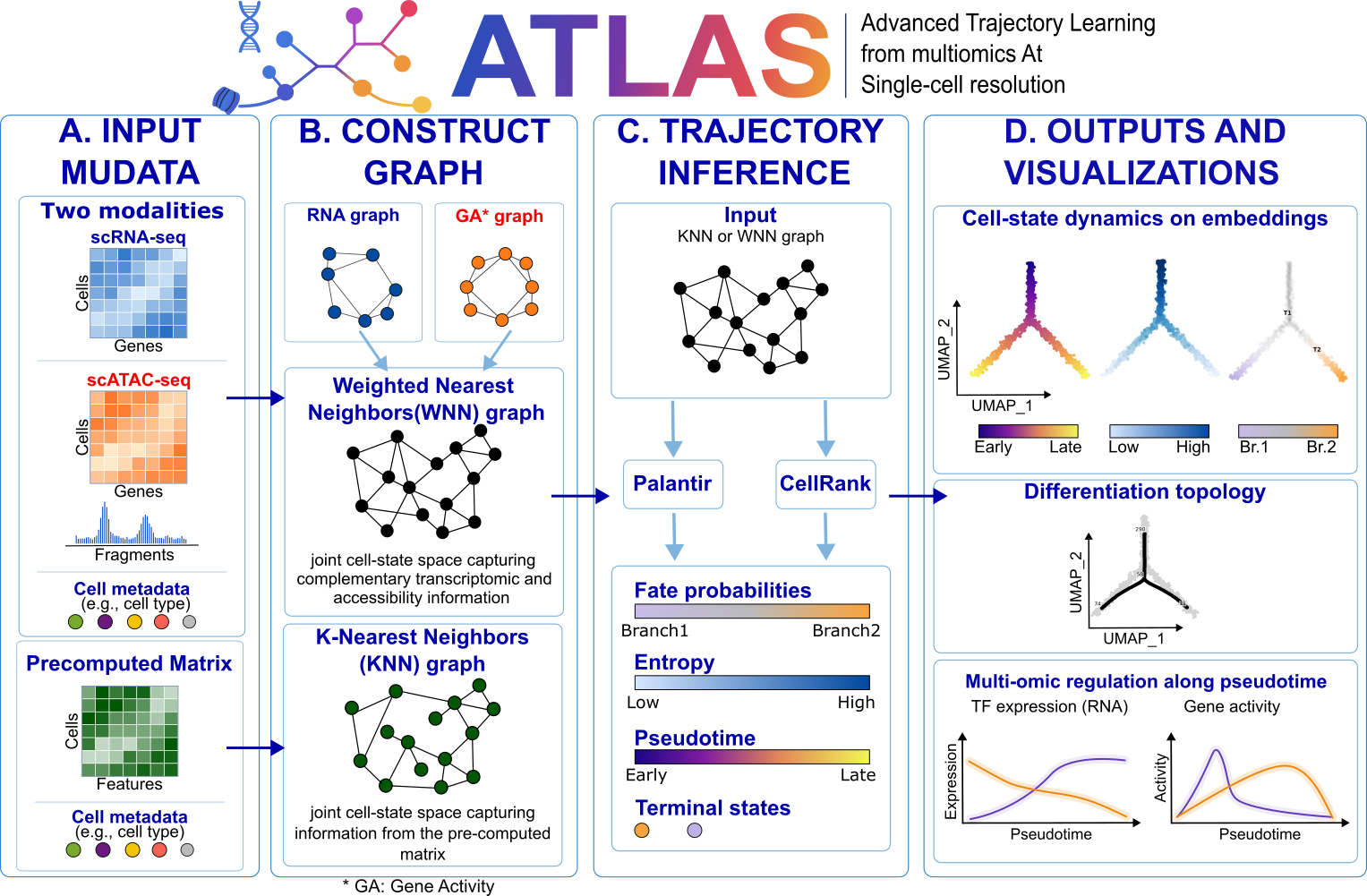
ATLAS main functionalities include:
- Computation of gene activity from scATAC-seq data
- Support for multi-omics representations using MuData
- Creation of a Weighted Nearest Neighbors graph
- Trajectory inference based on multiple strategies
- Trajectory evaluation based on unsupervised metrics
Getting started
Please refer to the documentation in particular, the API documentation.
Installation
Install ATLAS into a fresh environment, created either with venv or with conda:
python -m venv atlas-env && source atlas-env/bin/activate
pip install atlas-smilies
conda create -n atlas python=3.13 && conda activate atlas
pip install atlas-smilies
Install into an environment you created for ATLAS. Installing into one that already holds other work might not work:
pipmay replace packages another tool installed and manages. The platform table below records what happens in a fresh environment.
Optional components
Three features draw on packages ATLAS does not install. Everything else works without them.
Fate tree figures need scFates, available as an extra:
pip install atlas-smilies[trees]
Keeping it separate lets ATLAS install without a compiler where that wheel is unavailable.
Gene activity from scATAC-seq (atlas.pp.compute_gene_activity) needs pysam to read
the fragment file.
Faster trajectory inference. atlas.tl.CellRankExtension.run defaults to
method="krylov", which needs petsc4py and slepc4py.
Without them CellRank falls back to method="brandts", which requires a dense
transition matrix. Evaluate conda forge or installation of PETSC and SLEPC.
Platforms
ATLAS supports Python 3.11 through 3.14 on the platforms below, and the claims are checked against reality by two workflows with two different subjects.
ATLAS supports Python 3.11 through 3.14 on the platforms below. This table is written from
platform-support.toml, which the Platforms workflow checks against reality. One job
resolves every platform against PyPI and runs on every change. The jobs that install and
import ATLAS on a machine of each platform — in a venv and in a conda environment alike,
since the instructions above offer both — run on a schedule, twice a month, because what
they detect is upstream packaging changing rather than anything in this repository.
| Platform | Python | pip install atlas-smilies |
Verified by |
|---|---|---|---|
| Linux x86_64 | 3.11 – 3.14 | works | test suite |
| Linux aarch64 | 3.11 – 3.14 | works, core only — see below | install and import |
| macOS arm64 | 3.11 – 3.14 | works | test suite |
| macOS x86_64 (Intel) | 3.11 – 3.14 | needs conda for four packages — see below | test suite (scheduled) |
| Windows x86_64 | 3.11 – 3.14 | works | test suite |
"Install and import" means ATLAS has been installed and imported on that platform in CI, but the test suite does not run there. On Intel macOS the suite runs on the twice-monthly schedule rather than on every change.
Linux aarch64 and the trees extra. pip install atlas-smilies needs no compiler
here, but pip install atlas-smilies[trees] does: scikit-misc publishes no aarch64
Linux wheel, so it is built from source and a Fortran toolchain is required. This is why
scFates is an extra rather than a dependency — the core package stays installable
everywhere.
macOS x86_64 (Intel) needs four packages from conda. pip install atlas-smilies alone
does not work there: on 3.11 to 3.13 it resolves and then fails to build, ending with
Failed building wheel for llvmlite, and on 3.14 it does not resolve at all.
Install those packages from conda-forge first, then ATLAS on top:
conda create -n atlas -c conda-forge python=3.13 numba llvmlite jax jaxlib
conda activate atlas
pip install atlas-smilies[trees]
Release notes
See the CHANGELOG.
Contact
For questions, bug report and help requests, please use the issue tracker.
Related Works
- Lange, M., Bergen, V., Klein, M. et al. CellRank for directed single-cell fate mapping. Nat Methods 19, 159–170 (2022). https://doi.org/10.1038/s41592-021-01346-6
- Weiler, P., Lange, M., Klein, M. et al. CellRank 2: unified fate mapping in multiview single-cell data. Nat Methods 21, 1196–1205 (2024). https://doi.org/10.1038/s41592-024-02303-9
- Setty, M., Kiseliovas, V., Levine, J. et al. Characterization of cell fate probabilities in single-cell data with Palantir. Nat Biotechnol 37, 451–460 (2019). https://doi.org/10.1038/s41587-019-0068
- Louis Faure, Ruslan Soldatov, Peter V. Kharchenko, Igor Adameyko, scFates: a scalable python package for advanced pseudotime and bifurcation analysis from single cell data, Bioinformatics, btac746; doi: https://doi.org/10.1093/bioinformatics/btac746
Disclaimer
This project includes third-party code under MIT and BSD-3 licenses, see THIRD_PARTY_NOTICES for details.
Metadata
Release files for atlas-smilies 1.1.1
For a detailed explanation of source distributions (sdists) and built distributions (wheels), please see the package formats documentation.
Source distribution (sdist)
| File | Size | Uploaded | |
|---|---|---|---|
| atlas_smilies-1.1.1.tar.gz | 3.4 MB | Details |
Built distribution (wheel)
| File | Interpreter | ABI | Platform | Reset |
|---|---|---|---|---|
| atlas_smilies-1.1.1-py3-none-any.whl | Python 3 | none | any | Details |
Total release size: 3.5 MB
Release files / atlas_smilies-1.1.1.tar.gz
| Download URL | atlas_smilies-1.1.1.tar.gz |
|---|---|
| Size | 3.4 MB |
| Tags | Source |
|
SHA-256 checksum How to use checksums |
964e8f9b6b40eb861afb7f51dcb3dd269b009a7219984c29b9465a0d43087e76
|
|
BLAKE2b-256 checksum How to use checksums |
4d5c3863baf2d50dcc401b9aae32b88a0be98c7d84c4f96e1cdaeefea04f35cb
|
| Upload date | |
|
Uploaded using Trusted Publishing? What is trusted publishing? |
Yes |
| Uploaded via |
twine/7.0.0 CPython/3.13.14
|
Provenance
Provenance describes where a file came from. On PyPI, provenance is shared via attestations, which provide a verifiable record of the build or publishing details. View details, limitations and caveats.


PyPI Publish Attestation
PyPI verified that this artifact, at this checksum, originated from the publisher listed below.
Signed by GitHub Actions, verified by PyPI on Sep 15, 2026.
Transparency logRelease files / atlas_smilies-1.1.1-py3-none-any.whl
| Download URL | atlas_smilies-1.1.1-py3-none-any.whl |
|---|---|
| Size | 58.6 kB |
| Tags | Python 3 |
|
SHA-256 checksum How to use checksums |
4a7dfc5c268b350d7565ce2a85e0ecce51ab0e5f20bc502ebadfde3ad3f6d029
|
|
BLAKE2b-256 checksum How to use checksums |
2c5cba96d8d51142a3edcf777e7c7295a37f8b3f7917ad168c675be1564b355c
|
| Upload date | |
|
Uploaded using Trusted Publishing? What is trusted publishing? |
Yes |
| Uploaded via |
twine/7.0.0 CPython/3.13.14
|
Provenance
Provenance describes where a file came from. On PyPI, provenance is shared via attestations, which provide a verifiable record of the build or publishing details. View details, limitations and caveats.
PyPI Publish Attestation
PyPI verified that this artifact, at this checksum, originated from the publisher listed below.
Signed by GitHub Actions, verified by PyPI on Sep 15, 2026.
Transparency log













