

AtlasServer‑Core
💻 Fast deploy. No cloud. Just code.
From developers to developers.





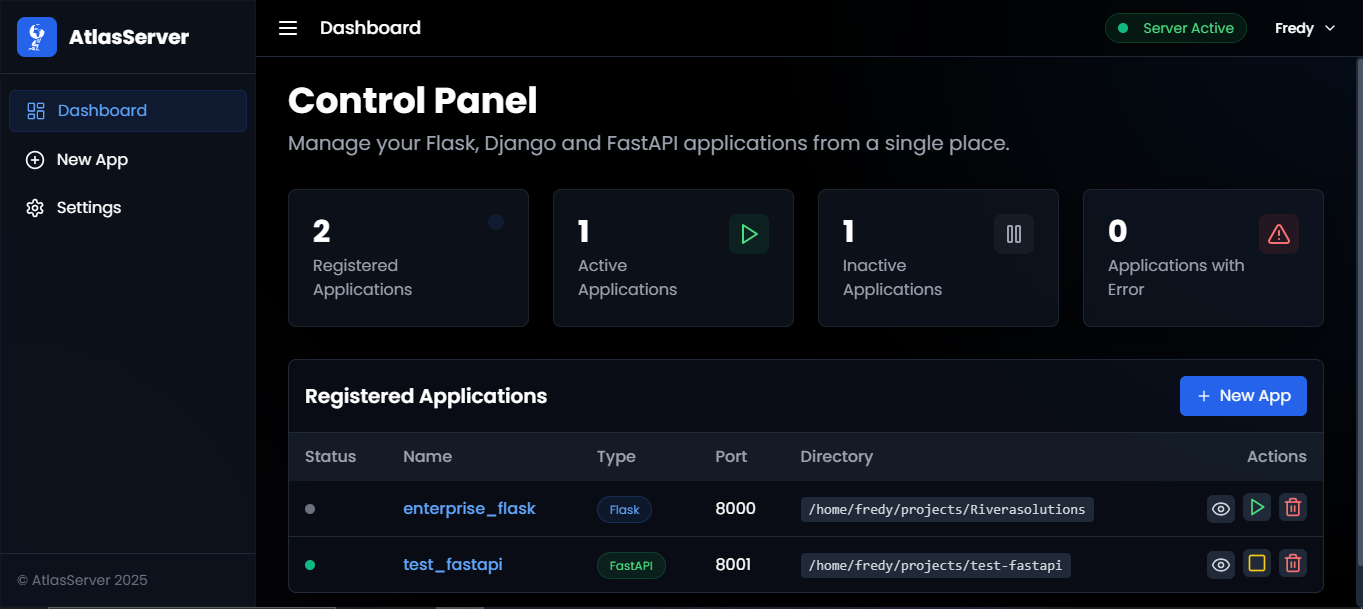
⚙️ Current Features
- Supported frameworks:
Flask,FastAPI,DjangoandDjango REST Framework - Tunneling: Support for
Ngrok - Admin panel: Basic web interface to manage applications
- App management: Start, stop, and delete applications from the panel
- Command Line Interface: Manage server and applications from the terminal
- Authentication: Basic authentication system with limited roles
- AI-powered deployment: Intelligent project analysis and deployment suggestions
🚀 Quick Start
# Install AtlasServer from PyPI
pip install atlasserver

# Optional: Install AI capabilities
pip install atlasai-cli

# Start the server
atlasserver start

# Access the web interface at http://localhost:5000
# Default credentials: Create your own admin account on first run

# List all applications from CLI
atlasserver app list
💻 CLI Commands
AtlasServer includes a powerful CLI for easier management:
# Server management
atlasserver start    # Start the server
atlasserver stop     # Stop the server
atlasserver status   # Check server status

# Application management
atlasserver app list           # List all applications
atlasserver app start APP_ID   # Start an application
atlasserver app stop APP_ID    # Stop an application
atlasserver app restart APP_ID # Restart an application
atlasserver app info APP_ID    # Show application details
Optional AI Commands (requires atlasai-cli)
# AI configuration
atlasserver ai setup --model llama3:8b      # Configure with local Ollama model
atlasserver ai setup --provider openai --model gpt-4.1 --api-key YOUR_KEY  # Use OpenAI

# Project analysis
atlasserver ai suggest ~/path/to/your/project     # Get deployment suggestions
atlasserver ai suggest ~/my-project --language es # Get suggestions in Spanish

# General AI queries
atlasai --query "What files are in this project?"                     # Simple query
atlasai --query "How can I deploy this Express app?" --language es    # Query in Spanish
atlasai --query "Compare this project's dependencies with best practices"  # Complex analysis
🤖 AI-Powered Deployment (Optional)
AtlasServer supports intelligent project analysis through the optional AtlasAI-CLI package:
- Smart project detection: Automatically identifies Flask, FastAPI, Django and other frameworks
- Contextual recommendations: Suggests appropriate commands, ports, and environment variables
- Interactive exploration: Analyzes project structure and key files
- Multilingual support: Get explanations in English or Spanish
- General AI queries: Ask anything about your system, projects, or development needs
Installation:
# Install the optional AI capabilities
pip install atlasai-cli

# Alternatively, install both AtlasServer and AI capabilities
pip install atlasserver atlasai-cli
Requirements:
- Ollama for running local AI models
- Alternatively, OpenAI API for cloud-based models
Setup:
# Install and start Ollama (for local models)
ollama serve

# Pull your preferred model
ollama pull llama3:8b

# Configure AtlasServer AI
atlasserver ai setup --model llama3:8b

# Analyze a project
atlasserver ai suggest ~/path/to/your/project

# Make a general query about your system or projects
atlasai --query "What projects do I have here and how should I deploy them?"
🔧 Development Installation
If you want to contribute to AtlasServer or install from source:
# Clone the repository
git clone https://github.com/AtlasServer-Core/AtlasServer-Core.git
cd AtlasServer-Core

# Install in development mode
pip install -e .
📢 Join the Beta
We're running a 3–4 week closed beta to refine usability, tunnel stability, and overall workflow.
👉 Join our Discord for beta access, discussions, and direct feedback:

📄 License
This project is licensed under the Apache License 2.0.
You may obtain a copy of the License at:
http://www.apache.org/licenses/LICENSE-2.0
Unless required by applicable law or agreed to in writing, software
distributed under the License is distributed on an "AS IS" BASIS,
WITHOUT WARRANTIES OR CONDITIONS OF ANY KIND, either express or implied.
See the full license text for details.
Star History
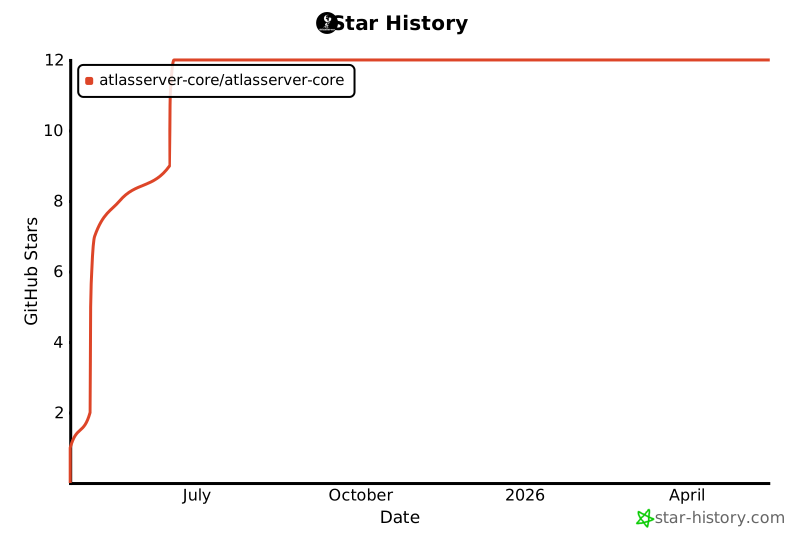
💖 THANK YOU FOR YOUR STARS!!
💖 Support the Project
If you find AtlasServer-Core useful, please consider buying me a coffee:

1 maintainer

Metadata
1 maintainer
Release files for atlasserver 0.3.5
For a detailed explanation of source distributions (sdists) and built distributions (wheels), please see the package formats documentation.
Source distribution (sdist)
| File | Size | Uploaded | |
|---|---|---|---|
| atlasserver-0.3.5.tar.gz | 58.9 kB | Details |
Built distribution (wheel)
| File | Interpreter | ABI | Platform | Reset |
|---|---|---|---|---|
| atlasserver-0.3.5-py3-none-any.whl | Python 3 | none | any | Details |
Total release size: 126.9 kB
Release files / atlasserver-0.3.5.tar.gz
| Download URL | atlasserver-0.3.5.tar.gz |
|---|---|
| Size | 58.9 kB |
| Tags | Source |
|
SHA-256 checksum How to use checksums |
865c129a26f67dd63d48cd915c2b91ca33c77a156f5e86280a46fdda56637b49
|
|
BLAKE2b-256 checksum How to use checksums |
a2e5c06b1d89e371f3edbb1986ca07f769cac91758342b2a951645a082b73491
|
| Upload date | |
|
Uploaded using Trusted Publishing? What is trusted publishing? |
No |
| Uploaded via |
twine/6.1.0 CPython/3.12.3
|
Release files / atlasserver-0.3.5-py3-none-any.whl
| Download URL | atlasserver-0.3.5-py3-none-any.whl |
|---|---|
| Size | 67.9 kB |
| Tags | Python 3 |
|
SHA-256 checksum How to use checksums |
3ddc99f422f875f7857429876131bea164608edfa36f1baacb099e4d37f86c11
|
|
BLAKE2b-256 checksum How to use checksums |
e773053c06b5165b5592ce2beff9502121f6e57e5e60d6eed47d82113a4742d1
|
| Upload date | |
|
Uploaded using Trusted Publishing? What is trusted publishing? |
No |
| Uploaded via |
twine/6.1.0 CPython/3.12.3
|














