
ATR: Automation for Token Reduction
ATR makes your AI use fewer tokens when it works with tools. Fewer tokens means lower bills and fewer "usage limit reached" messages.
It works with Claude Code, Codex, Claude Desktop, Cursor, Windsurf, claude.ai and ChatGPT. It's free and runs on your own computer.
The problem
When an AI uses tools (GitHub, a browser, a database, your test runner), two things waste tokens:
- Every tool's instructions are sent on every message, even tools the AI never uses. Ten MCP servers can mean 10,000+ tokens before you've typed anything.
- Tool results are huge. A list of GitHub issues, a web page or a test run can be tens of thousands of tokens, and all of it goes into the chat.
What ATR does
ATR sits between your AI app and your tools:
- It hides the tool list. The AI sees a few small ATR tools and searches for the tool it needs when it needs it.
- It shrinks results. Before the AI sees a result, ATR removes the noise and keeps what matters. A failing test run keeps the failures and drops the passing tests. A web page keeps its text and links and drops the layout.
- Nothing is lost. When ATR cuts something, it keeps the full result, and the AI can ask for any part of it.
  Your AI app (Claude Code, Codex, Claude Desktop, …)
          │  sees a few small ATR tools instead of every tool
          ▼
        ATR  ← finds the right tool, runs it, shrinks the result
          │
          ▼
  Your MCP servers (GitHub, Playwright, Postgres, Slack, …)
Get started
You need Python 3.11 or newer.
pip install atr-mcp
atr setup
atr setup finds the AI apps on your computer, shows you what it will change, and asks first. Then it:
- moves your MCP servers behind ATR, and
- adds ATR to each app.
Restart your apps and you're done.
| Command | What it does |
|---|---|
atr setup --dry-run |
Shows the plan without changing anything |
atr setup --undo |
Puts every app back exactly how it was |
pip install --upgrade atr-mcp |
Updates ATR |
Every file atr setup changes also gets a backup copy (.atr-backup).
Just want to try it?
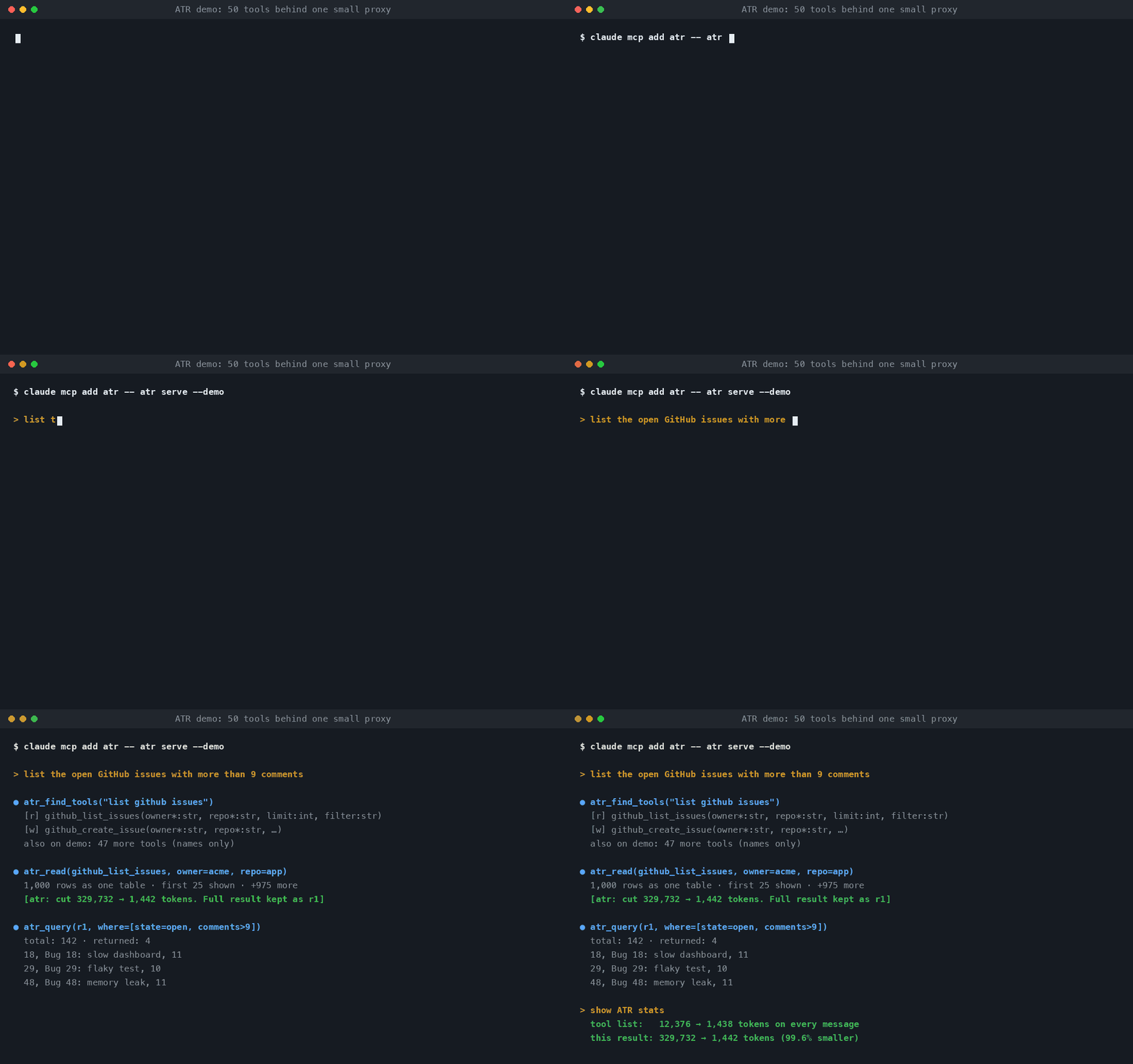
The demo connects a fake server with 50 tools (GitHub, Slack, logs, a database). Nothing leaves your computer.
claude mcp add atr -- atr serve --demo        # Claude Code
codex mcp add atr -- atr serve --demo         # Codex
Ask your AI to "list the open GitHub issues", then "show ATR stats" to see how many tokens it saved.
How much it saves
Live tests
We gave AI agents the same browser task with and without ATR: open Hacker News, click "new", then open a GitHub issues page. Each setup ran 3 times, and every answer was correct.
| Agent | Without ATR | With ATR |
|---|---|---|
| Claude Code | $0.237 per task, 13 turns | $0.110 per task, 10 turns (54% cheaper) |
| Codex | 84k tokens (33k at full price) | 134k tokens (18k at full price) |
Codex is mixed: with ATR it sends about half as many full-price tokens, but more tokens overall.
Single results
What the AI receives, in tokens, measured with python -m benchmarks.bench_atr:
| Result | Without ATR | With ATR | Saved |
|---|---|---|---|
| 1,000 GitHub issues | 429,203 | 879 | 99.8% |
| 2,000-line server log | 61,072 | 208 | 99.7% |
git diff with a lockfile change |
22,294 | 207 | 99.1% |
| Web page in a browser (Hacker News) | 12,023 | 4,046 | 66% |
| 50 tools' instructions, on every message | 12,056 | 1,508 | 87.5% |
pytest -v, 303 tests, 3 failing |
6,685 | 675 | 90% |
pip install, 60 packages |
5,977 | 697 | 88% |
In each case, the parts that matter are kept: errors, failing tests, changed code lines, page text and links.
When ATR helps, and when it doesn't
- Helps most: you use MCP servers that return big results, like GitHub, browsers (Playwright), databases, logs or web pages.
- Helps a little: plain coding in Claude Code or Codex with no MCP servers. Those apps already trim their own commands, so in our test ATR made no difference there.
- Can't help: your chat history and the AI's own replies. An MCP server only sees tool calls, never the conversation.
ATR's tools
The AI uses these. You don't need to call them yourself.
For your MCP servers
| Tool | What it does |
|---|---|
atr_find_tools |
Searches all your servers' tools and returns the few that fit the task |
atr_read |
Runs a tool that only reads, and shrinks the result |
atr_call |
Runs a tool that changes something (your app can ask you first) |
atr_query |
Reads more of a result that was cut, such as one page, one field or a search |
For coding
| Tool | Instead of |
|---|---|
atr_repo_map |
Opening files one by one to learn a project |
atr_search_code |
Pages of search results |
atr_read_file |
Reading a whole file to see one function. It also says "unchanged" if the AI reads the same part twice |
atr_diff |
A git diff full of lockfiles |
atr_run |
Thousands of lines of test or build output |
atr_stats |
Shows how many tokens ATR has saved |
Safety
- Secrets are never read, searched or shown, including
.envfiles, private keys, cloud credentials, and files named likeapi_keys.json. This also applies to tools behind ATR and toatr_diff. - Reading and changing are separate. Tools that only read go through
atr_read. Anything that changes something goes throughatr_call, so your app can ask you before it runs.atr_run(shell commands) always asks. - Files stay in allowed folders. File tools only see the folders listed in your settings.
Using ATR in claude.ai or ChatGPT
These apps can only reach servers on the internet, so ATR needs a public link.
pip install "atr-mcp[http]"
atr serve --http                               # prints a link with a secret in it
tailscale funnel --bg 8789                     # a permanent public https link (or: cloudflared tunnel --url http://127.0.0.1:8789)
Add https://<your-link>/mcp/<secret> as a connector:
- claude.ai: Settings → Connectors → Add custom connector (no sign-in)
- ChatGPT: Settings → Apps & Connectors → developer mode → create a connector (no sign-in)
Keep the link private. Anyone who has it can use your tools. File reading and shell commands are off over the internet unless you turn them on with --read-files and --allow-run. To change the secret, delete ~/.atr/http_token.
Settings
atr setup writes these for you. You can also edit ~/.atr/config.json yourself:
{
  "servers": {                          // the MCP servers ATR runs for you
    "github": { "command": "npx", "args": ["-y", "@modelcontextprotocol/server-github"] }
  },
  "budget": 1500,                       // most tokens one result may use
  "level": 2,                           // 1 = keep almost everything, 3 = shrink hard
  "pin": ["github__create_issue"],      // tools to always show (skips the search step)
  "read_only": ["github__list_*"],      // tools that only read, if a server doesn't say so itself
  "read_roots": ["~"]                   // folders the file tools may open
}
More
No MCP at all? atr compress shrinks a file or your clipboard before you paste it into any chat:
atr compress dump.json --copy
pbpaste | atr compress --copy
Set up by hand: atr init writes the settings file, and atr snippet prints the entry to add to your app's MCP config.
"No module named 'atr'" on macOS: run chflags nohidden .venv*/lib/python*/site-packages/*.pth, or use the entry from atr snippet.
Limits:
- Online servers that need a sign-in (OAuth) can't go behind ATR yet, so
atr setupleaves them in your app. - ATR lowers what each message costs. It doesn't change your plan's limits.
For developers
git clone https://github.com/JacobBhatt12/atr && cd atr
pip install -e ".[dev]"
python -m pytest atr/tests -c /dev/null       # 44 tests
python -m benchmarks.bench_atr                # the savings table above
| File | What's in it |
|---|---|
atr/server.py |
The MCP server your app talks to |
atr/remote.py |
The same server over the internet (atr serve --http) |
atr/downstream.py |
Talks to the MCP servers behind ATR |
atr/compress.py |
Shrinks results |
atr/stash.py |
Keeps full results for atr_query |
atr/router.py |
Tool search |
atr/code.py |
Coding tools |
atr/setup.py |
atr setup |
Next up: remembering repeated tool calls so the same result isn't sent twice, sign-in support for online servers, and a small local model that summarizes long text when cutting would lose meaning.
License: MIT
1 maintainer

Metadata
1 maintainer
Release files for atr-mcp 1.0.0
For a detailed explanation of source distributions (sdists) and built distributions (wheels), please see the package formats documentation.
Source distribution (sdist)
| File | Size | Uploaded | Provenance | |
|---|---|---|---|---|
| atr_mcp-1.0.0.tar.gz | 54.5 kB | Without provenance | Details |
Built distribution (wheel)
| File | Interpreter | ABI | Platform | Reset |
|---|---|---|---|---|
| atr_mcp-1.0.0-py3-none-any.whl | Python 3 | none | any | Details |
Total release size: 110.3 kB
Release files / atr_mcp-1.0.0.tar.gz
| Download URL | atr_mcp-1.0.0.tar.gz |
|---|---|
| Size | 54.5 kB |
| Tags | Source |
|
SHA-256 checksum How to use checksums |
531620af16545406782408311d1b8eba7e2ad2ffc4092840667d9c05ae445bf9
|
|
BLAKE2b-256 checksum How to use checksums |
06455a39b20a39da04bb48b2173ec9caa40112a15ce7b20e742c777b00cb7f69
|
| Upload date | |
|
Uploaded using Trusted Publishing? What is trusted publishing? |
No |
| Uploaded via |
twine/7.0.0 CPython/3.11.15
|
Release files / atr_mcp-1.0.0-py3-none-any.whl
| Download URL | atr_mcp-1.0.0-py3-none-any.whl |
|---|---|
| Size | 55.7 kB |
| Tags | Python 3 |
|
SHA-256 checksum How to use checksums |
1458a14ac68a823485e42a5b336a37d677a17baccc5302362472d0a092a68976
|
|
BLAKE2b-256 checksum How to use checksums |
cacdaa9b474b32f886ee076743439883254d59ea8aa783e9514bb9fb0f766d29
|
| Upload date | |
|
Uploaded using Trusted Publishing? What is trusted publishing? |
No |
| Uploaded via |
twine/7.0.0 CPython/3.11.15
|
Security for atr-mcp 1.0.0
Provenance
Provenance describes where a file came from. On PyPI, provenance is shared via attestations, which provide a verifiable record of the build or publishing details. View details, limitations and caveats.
No provenance found
None of the files in this release were uploaded with provenance metadata.
A note on package security
PyPI is a repository for distributing packages, not a service for auditing them. While third-party security researchers and our staff do their best to detect and remove malicious packages, PyPI cannot guarantee the quality, security or suitability of any given package.
To learn more about protecting yourself from malicious actors, visit our package security documentation.













