
An open-source framework for reproducible P-wave phenotyping

Project description
An Open-Source Framework for Reproducible P-Wave Phenotyping

Quick Example
The fastest way to try AtriaKit hands-on is examples/demo.ipynb, which generates synthetic ECG data and runs it through the full pipeline end to end.
from atriakit import AnnotationsLoader, Pipeline

annotations = AnnotationsLoader().load("annotations.csv")
pipeline = Pipeline(ecg_base_path="path/to/dicom/root")

features = pipeline.run(annotations)
print(features.get_df().head())
Highlights
- Temporal, morphological, nonlinear, and spatial (VCG) P-wave descriptors, each with an explicit mathematical definition; see the manuscript
- Paired with
ecg_annotator, an interactive tool for expert P-wave boundary annotation - Configuration-driven: filtering, boundary mode, and baseline correction are explicit and reproducible, not hard-coded; tune them via config classes directly in Python or a single YAML file that maps to them
- Batch feature computation across recordings through a standardized
Pipelineinterface - Unit-tested reusable components
Atrial fibrillation (AF) is a major cause of cardiovascular morbidity, and the P-wave of the surface electrocardiogram is an important non-invasive marker of atrial remodeling and conduction heterogeneity. In practice, however, P-wave analysis is often implemented through custom or ad hoc signal-processing pipelines, which makes results harder to reproduce across studies. General ECG processing libraries exist, but they often do not provide the more specialized atrial and P-wave metrics needed for high-resolution AF research.
AtriaKit addresses that gap with a modular feature-extraction library (see Highlights above), built to scale from exploratory analysis to larger clinical datasets.
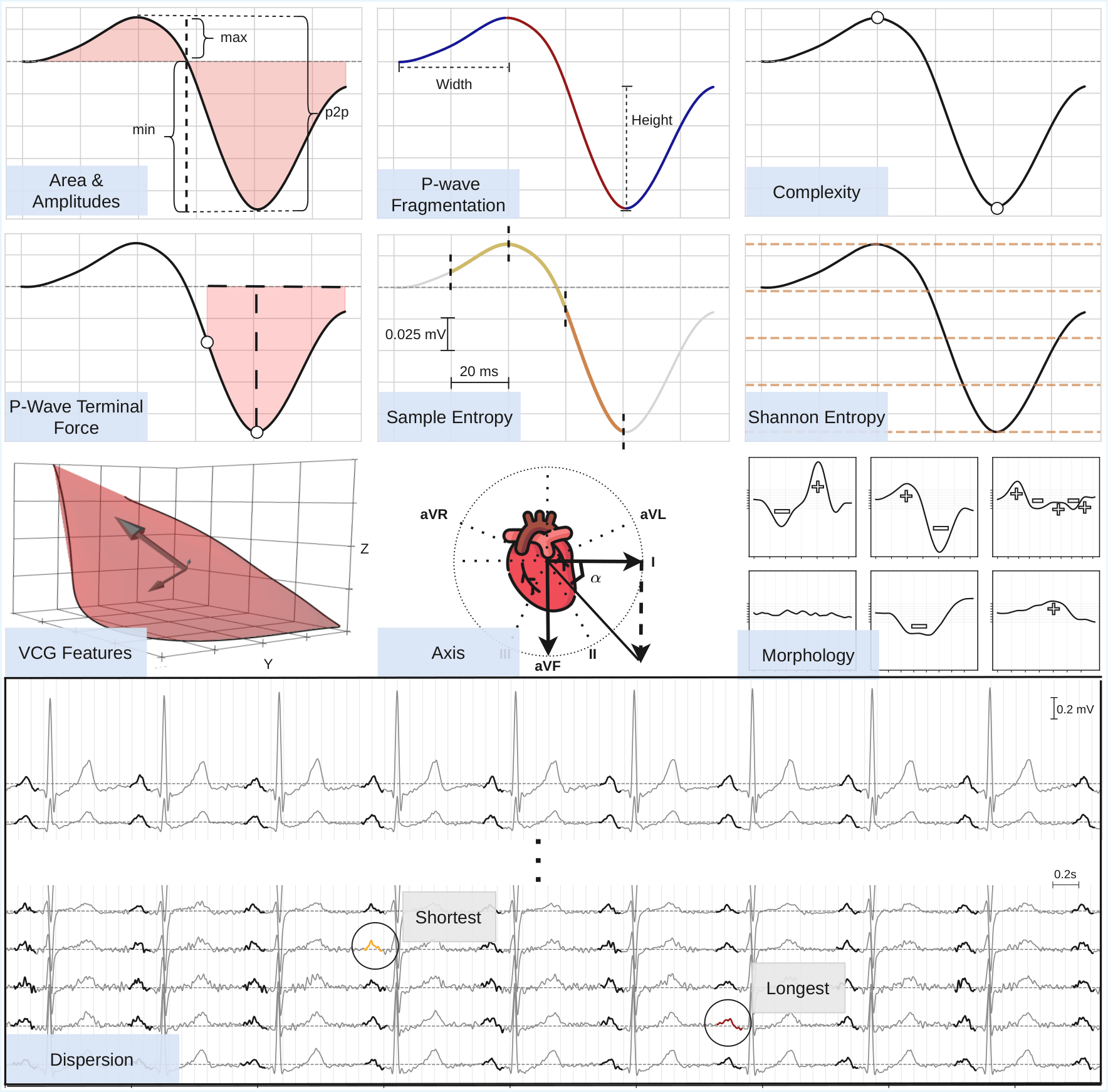
Implemented Feature Families
The library currently includes:
- Duration and Dispersion
- Amplitude-Based P-Wave Features
- Area and Area-To-Duration Ratio
- P-Wave Terminal Force
- Morphology and Inflection-Point Features
- Fragmentation-Based Features
- Complexity
- Shannon Entropy and Sample Entropy
- Atrial Rate and Heart Rate
- Frontal and VCG Axis
- VCG Area and Eigenfeatures
- Signal-Averaged Vector-Magnitude P-Wave Amplitudes
The set is modular and can be extended with new metrics. For implementation details and mathematical definitions of each feature, see the AtriaKit manuscript (Citation).
Installation
pip install atriakit
To work from a clone of this repository instead (e.g. for development), install in editable mode:
pip install -e .
For development dependencies (testing, etc.):
pip install -e .[dev]
The package requires Python 3.12+.
Core API
The public package interface is exposed through atriakit:
from atriakit import (
    Annotations,
    AnnotationsLoader,
    ECGData,
    ECGDataset,
    ECGLoader,
    FeatureCalculators,
    FeatureComputationConfig,
    Pipeline,
    PipelineConfig,
    SegmentConfig,
    SignalPreprocessor,
    SignalPreprocessorConfig,
)
Important components:
ECGLoader: loads ECG waveforms from DICOM/IMA files and returnsECGData; register additional file types withECGLoader().register(extension, loader)ECGData: holds the raw signal array plus lead layout, and returns preprocessed lead signals via aSignalPreprocessorAnnotationsLoader: loads a CSV or directory of annotation files into anAnnotationsobject; also extensible via.register(extension, loader)for other annotation file formatsAnnotations: wrapper around the annotation tableFeatureCalculators: computes ECG and VCG features for annotated segments, constructed with aSegmentConfigSegmentConfig: baseline correction mode and leading-sample skip applied to extracted segments
Pipeline: runs batch feature extraction over a set of files, constructed with aPipelineConfigPipelineConfig: bundles everything needed to tune aPipelinerun: segment-boundary and baseline-correction settings, preprocessing filters for both feature and morphology signals, feature-computation parameters (viaFeatureComputationConfig), and beat-grouping toleranceFeatureComputationConfig: per-call parameters forFeatureCalculators.compute_all(entropy, complexity, noise, morphology, and fragmentation settings)
SignalPreprocessor: applies notch filtering, bandpass filtering, baseline correction, and normalization as a reusable preprocessing object; each step is optional and toggled independently viaSignalPreprocessorConfigECGDataset: computes per-lead mean/std across a set of files, forSignalPreprocessorConfig's z-score normalization
Usage
Pipeline is the main entry point: it batches feature computation across many recordings at once, matching each file to its rows in a combined annotations table (e.g. one annotations.csv covering a whole directory of DICOM/IMA files). Every config object ships with reasonable defaults, as in the Quick Example above: Pipeline(ecg_base_path=...) works with no further configuration, but you can tune it to your needs via a YAML file or by building the config objects directly in Python:
1. Configure via YAML (recommended)
Rather than building PipelineConfig/SignalPreprocessorConfig objects by hand, point Pipeline.from_yaml at a config file. See examples/pipeline_config.yaml for the full reference, covering paths, annotation boundary mode, preprocessing filters, and pipeline parameters (abbreviated below):
ecg_base_path: ./data
annotations_dir: ./data
pipeline:
  group_tolerance_ms: 200
  signal_preprocessor_config:
    lowcut: 1
    highcut: 40
    notch_freq: 50.0
  feature_computation:
    shannon_entropy_n_bins: 128
pipeline, annotations = Pipeline.from_yaml("pipeline_config.yaml")
result = pipeline.run(annotations)
Required annotation columns: file_path, lead, onset, offset, p_wave_id. Optional columns such as type, patient_id, and ignore are used when available.
2. Or configure directly in Python
For programmatic control (e.g. sweeping parameters in a script), pass a PipelineConfig straight to Pipeline:
from atriakit import FeatureComputationConfig, Pipeline, PipelineConfig, SignalPreprocessorConfig

pipeline = Pipeline(
    ecg_base_path="path/to/dicom/root",
    pipeline_config=PipelineConfig(
        signal_preprocessor_config=SignalPreprocessorConfig(
            lowcut=1.0, highcut=40.0, notch_freq=50.0
        ),
        morphology_preprocessor_config=SignalPreprocessorConfig(
            lowcut=1.0, highcut=30.0, notch_freq=50.0
        ),
        feature_computation=FeatureComputationConfig(shannon_entropy_n_bins=128),
    ),
)
3. Compute features for one recording directly
Unlike Pipeline, FeatureCalculators works on a single already-loaded recording, so its annotations must be pre-filtered to that one file, since onset/offset are sample indices into that specific signal:
from atriakit import AnnotationsLoader, ECGLoader, FeatureCalculators

ecg_data = ECGLoader().load("path/to/file.IMA")
annotations = AnnotationsLoader().load("annotations.csv")
file_annotations = annotations[annotations["file_path"] == "path/to/file.IMA"]

fc = FeatureCalculators()

area = fc.area(file_annotations, ecg_data)
max_amplitude = fc.max_amplitude(file_annotations, ecg_data)
all_features = fc.compute_all(file_annotations, ecg_data)
Preprocessing
Signal preprocessing is intentionally separated from feature extraction.
- filter settings live in
SignalPreprocessorConfig - runtime normalization state (
mean/std) lives onSignalPreprocessor ECGDatadelegates preprocessing to aSignalPreprocessorFeatureCalculatorscan use separate preprocessors for standard signal features and morphology-specific features
Example:
from atriakit import ECGLoader, FeatureCalculators, SignalPreprocessor, SignalPreprocessorConfig

preprocessor = SignalPreprocessor(
    SignalPreprocessorConfig(lowcut=1.0, highcut=40.0, notch_freq=50.0)
)

ecg_data = ECGLoader().load("path/to/file.IMA")
lead_ii = ecg_data.get_lead_signal("II", preprocessor=preprocessor)

# FeatureCalculators takes the same kind of preprocessor, separately for
# standard signal features and morphology-specific features (both optional;
# see Core API above for the defaults used when omitted)
fc = FeatureCalculators(
    signal_preprocessor=preprocessor,
    morphology_preprocessor=SignalPreprocessor(
        SignalPreprocessorConfig(lowcut=1.0, highcut=30.0, notch_freq=50.0)
    ),
)
Repository Layout
AtriaKit/
├── atriakit/
│   ├── __init__.py
│   ├── datasets.py
│   ├── feature_calculator.py
│   ├── utils.py
│   ├── configs/
│   ├── features/
│   ├── io/
│   ├── models/
│   ├── preprocessing/
│   └── processing/
├── examples/
├── tests/
├── ecg_annotator/        # companion desktop annotation tool (separate package)
└── pyproject.toml
Main directories:
atriakit/: reusable ECG feature extraction packageatriakit/io/: DICOM/ECG loading, annotation-file loading, and waveform accessatriakit/models/:ECGData,Annotations, and the annotation column schemaatriakit/preprocessing/: signal and annotation preprocessingatriakit/processing/: dataset utilities and the batch pipelineatriakit/features/: individual feature implementationsatriakit/configs/: processing and feature configurationexamples/: demo materialtests/: unit testsecg_annotator/: standalone PyQt6 desktop app for manually annotating P-waves; a separate, independently packaged project, see its own README
Testing
Run the test suite with:
pytest
Or run a specific test module:
pytest tests/test_features.py -q
Notes
The repository favors a pragmatic research-code style, but the core package is structured to support gradual cleanup, extension, and more standardized use over time.
Citation
If you use AtriaKit in your research, please cite:
@software{atriakit,
  author  = {Kormushev, Nikolay},
  title   = {AtriaKit: An Open-Source Framework for Reproducible P-Wave Phenotyping},
  year    = {2026},
  url     = {https://github.com/nickormushev/AtriaKit}
}
License
MIT, see LICENSE.
Development Ideas
Areas that would likely improve maintainability further:
- split
feature_calculator.pyinto smaller focused modules over time - expand examples and API documentation
- add parallelisation
Release history Release notifications | RSS feed

Download files
Download the file for your platform. If you're not sure which to choose, learn more about installing packages.
Source Distribution
Built Distribution
Filter files by name, interpreter, ABI, and platform.
If you're not sure about the file name format, learn more about wheel file names.
Copy a direct link to the current filters
File details
Details for the file atriakit-0.1.0.tar.gz.
File metadata
- Download URL: atriakit-0.1.0.tar.gz
- Upload date:
- Size: 72.9 kB
- Tags: Source
- Uploaded using Trusted Publishing? No
- Uploaded via: twine/6.2.0 CPython/3.12.11
File hashes
| Algorithm | Hash digest | |
|---|---|---|
| SHA256 |
b5eb95aafba53fad6168ffcd7b8d9190c15219c37637244c372aaf39ee56a79e
|
|
| MD5 |
00897bc17207ab5692877ead016c1b5f
|
|
| BLAKE2b-256 |
951fad36f0ddf40b1a3109f76eb69a2d08429eab344eceda86d96c878745bae5
|
File details
Details for the file atriakit-0.1.0-py3-none-any.whl.
File metadata
- Download URL: atriakit-0.1.0-py3-none-any.whl
- Upload date:
- Size: 58.7 kB
- Tags: Python 3
- Uploaded using Trusted Publishing? No
- Uploaded via: twine/6.2.0 CPython/3.12.11
File hashes
| Algorithm | Hash digest | |
|---|---|---|
| SHA256 |
ddabe9be55ed754741bc818a6a815280d88f7bb90eeef583bff229968f0e11d7
|
|
| MD5 |
f04db4b985bf3ab110e3442092c377fd
|
|
| BLAKE2b-256 |
2a94677c2c2970ba0dde09554e80a91ae9ec718eab535a165ad8bacec2e6026f
|






