
ATS Resume Optimizer: free ATS resume checker, CV builder and LinkedIn optimizer



Português: README.pt-BR.md
Check your resume the way an Applicant Tracking System (ATS) reads it, tailor it to a job description, and export a clean ATS-friendly PDF or DOCX. Works three ways:
- Terminal app (TUI): pick your CV, paste a job, see the results live.
- Command line (CLI): one command per task, scriptable.
- AI agent skill for Claude Code: your AI writes the words with you; the tools check layout, keywords and truthfulness.
Optimized for ATS parsing (Workday, Greenhouse, Lever, Taleo, iCIMS, Ashby), the 7-second recruiter skim, and LinkedIn recruiter search. Zero fabrication: it never invents employers, titles, dates or numbers.
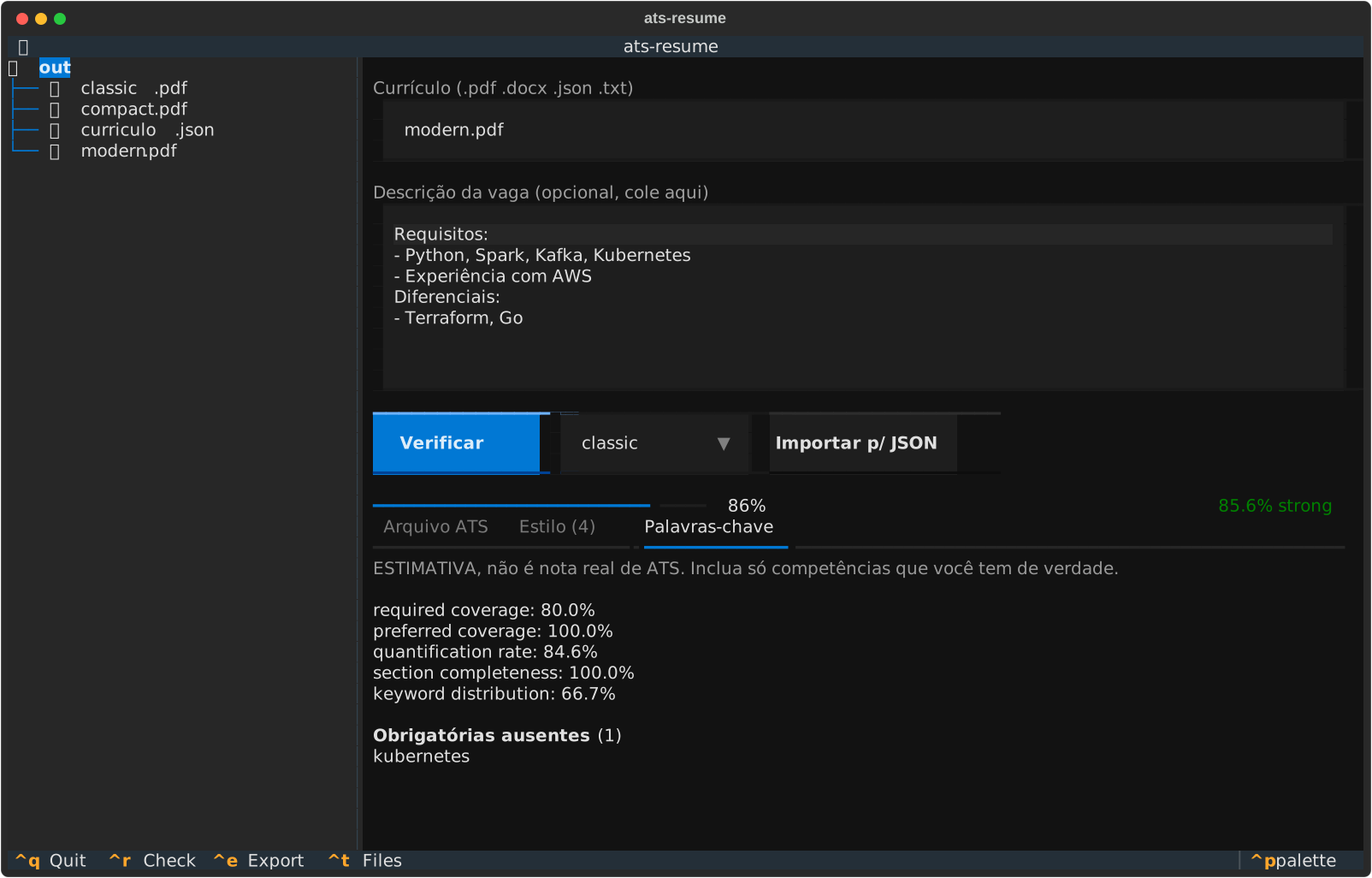
Get started in 1 minute
You need uv (one installer, handles Python for you). Then:
uv tool install "ats-resume[tui] @ git+https://github.com/paulo-amaral/ats-resume-optimizer"
ats-resume tui
That's it. Pick your resume (PDF, DOCX, TXT or JSON) in the left panel, paste the job description, and read the three tabs: ATS file, Style, Keywords.
Prefer pipx? pipx install "ats-resume[tui] @ git+https://github.com/paulo-amaral/ats-resume-optimizer".
What you can do
| Goal | Command |
|---|---|
| Check the resume you already have | ats-resume check my-cv.pdf |
| Compare it with a job posting | ats-resume check my-cv.pdf --job job.txt |
| Turn a PDF/DOCX into editable JSON | ats-resume import my-cv.pdf |
| Start from an example | ats-resume new (or --lang pt) |
| Export an ATS-safe PDF or DOCX | ats-resume render resume.json -o Jane-Doe-Resume.pdf -t modern |
| Export LaTeX (Overleaf) or a LaTeX-built PDF | ats-resume render resume.json -o cv.tex / -o cv.pdf --latex |
| Prove nothing was invented | ats-resume validate resume.json --source master.json |
| Interactive app | ats-resume tui |
Real output of check on the bundled example (ats-resume new, rendered with -t modern)
against this job.txt:
Senior Data Engineer
Requirements:
- Python, SQL, Spark, Kafka
- Kubernetes and Terraform
Nice to have:
- dbt, Airflow
ATS file check: en-modern.pdf
  ✓ selectable text (1906 chars)
  ✓ 1 page(s)
  ✓ email found
  ✓ standard section headings detected

Style (de-slop): 0
  ✓ no issues found

Keyword coverage vs job (ESTIMATE, not a real ATS score)
  94.0% (strong)  required_coverage=88.9%, preferred_coverage=100.0%, quantification_rate=92.3%, ...
  Missing required keywords: kubernetes
  Add missing keywords only if you truly have the skill: in Skills and in a real bullet.
The score is a labeled estimate of keyword fit. No tool can reproduce a real ATS's internal ranking, and this one does not pretend to.
Templates
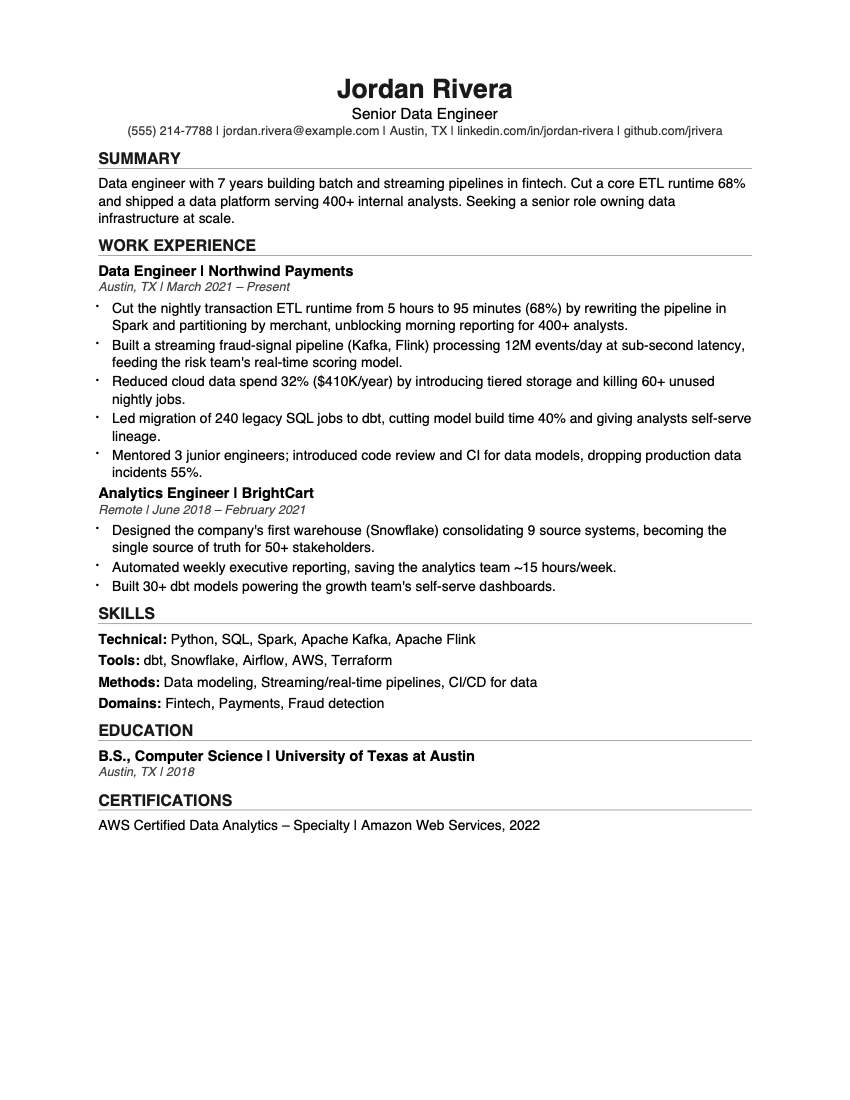
Three single-column, text-based templates. All pass the built-in ATS check.
classic |
modern |
|---|---|
 |
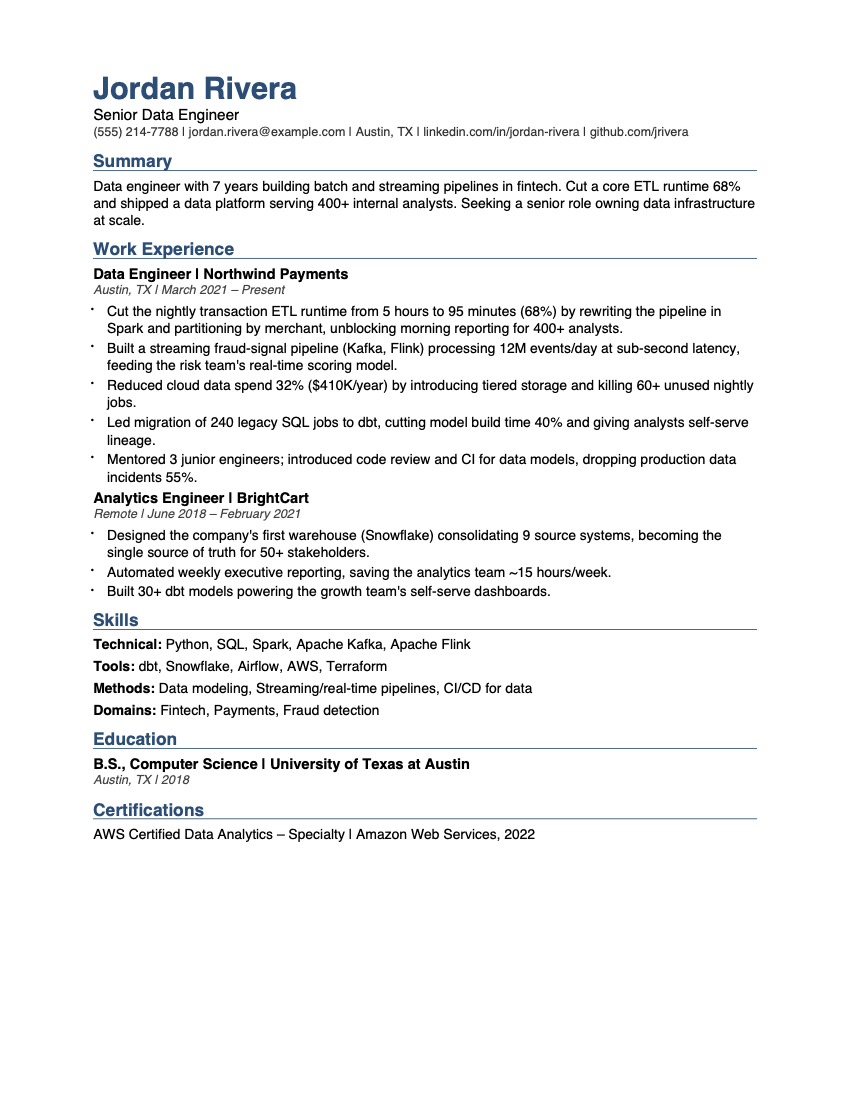 |
compact uses a serif font and tighter spacing to fit more on one page.
LaTeX. ats-resume render resume.json -o cv.tex writes LaTeX source you can edit or
upload to Overleaf (set Menu → Compiler → XeLaTeX); -o cv.pdf --latex compiles it
locally with Tectonic, XeLaTeX or LuaLaTeX.
The LaTeX output is tuned for ATS text extraction: kerning is turned off, because kerned
pairs like "AW" or "Va" extract as split words ("A WS", "V arejo"). pdfLaTeX is not used
for that reason: it cannot switch kerning off, and CI caught it splitting "Texas". A test compiles the examples and fails if any
word from the source is missing from the extracted text.
Portuguese resumes ("lang": "pt") get localized headings and A4 paper automatically.
Use it with your AI agent
The agent writes the words with you; ats-resume checks layout, keywords and truthfulness.
| Agent | Install |
|---|---|
| Claude Code | /plugin marketplace add paulo-amaral/ats-resume-optimizer then /plugin install ats-resume-optimizer@ats-resume-optimizer |
| Claude Cowork (desktop) | Customize → Plugins → Add marketplace → paulo-amaral/ats-resume-optimizer → Install |
| OpenAI Codex | git clone https://github.com/paulo-amaral/ats-resume-optimizer && mkdir -p ~/.agents/skills && cp -R ats-resume-optimizer/skills/resume-ats-linkedin-optimizer ~/.agents/skills/ |
| Cursor, Gemini CLI, others | Open this repository in the agent: AGENTS.md tells it what to do. Or add the skills/resume-ats-linkedin-optimizer/ folder to its context. |
Then ask, in English or Portuguese:
- "Here is my old CV (cv.pdf). Import it, check it for ATS and improve it."
- "Tailor my resume to this job: ..."
- "Optimize my LinkedIn headline and About."
- "Write a cover letter for this role."
Importing a previous CV. ats-resume import old-cv.pdf extracts what is safe to
extract automatically (contact data, headline, summary, skills, language) and keeps
every other section as raw text for the agent to structure, asking you when something
is ambiguous. Your original stays the source of truth: ats-resume validate proves no
employer, title, date or contact detail was invented. Step-by-step flow: AGENTS.md.
The skill runs a gated workflow:
Intake → Master Profile → Metric Excavation → Content → ATS Formatting
       → Keyword Tailoring → Render → Evaluate → (LinkedIn)
The Master Profile is your private record of everything you have done. Every resume is a selection from it, never an invention on top of it.
Why this one
- Honest scoring. A labeled keyword-coverage estimate, never a fake "ATS score 98/100".
- Reads your real file. Detects scanned PDFs with no selectable text, tables, images and header/footer text in DOCX, missing email, missing standard headings.
- Sourced guidance. Harvard/MIT career services, Google's XYZ formula, recruiter eye-tracking research, documented ATS parsing behavior. Myths are debunked in
07-myths-and-truth.md. - Bilingual. English and Brazilian Portuguese: headings, A4, PT-BR keyword matching (accents included), PT-BR cliché detection, and a Brazilian market guide (LGPD, Lei 9.029/1995, Gupy).
- Private. Runs locally. Nothing is uploaded anywhere.
Myths it refuses to repeat
- "ATS auto-reject 75% of resumes." A myth from a defunct 2012 vendor. What filters people out is recruiter overload and knockout questions.
- "Hidden white-text keywords beat the bot." Modern screening flags it.
- "ATS can't read PDFs." Text-based PDFs parse fine. Two-column and image layouts are the problem.
Project layout
src/ats_resume/        CLI, TUI, checks, renderer, importer (Python package)
skills/…/SKILL.md      the AI agent workflow (start here for the skill)
skills/…/references/   ATS, bullets, keywords, LinkedIn, scoring, myths, cover letters, Brazil
skills/…/assets/       schema, templates, verb banks and cliché lists (EN + PT-BR)
tests/                 pytest suite, including render → re-parse round trips and the TUI
Develop
uv sync --all-extras
uv run pytest
uv run ruff check .
Credits
Based on artificialguybr/resume-ats-linkedin-optimizer by João Vitor Amaral (MIT). This fork adds the installable CLI, the terminal app, PDF/DOCX import and audit, three templates, Portuguese (PT-BR) support, tests and CI.
License
MIT. See LICENSE.
1 maintainer

Metadata
1 maintainer
Release files for ats-resume 2.0.0
For a detailed explanation of source distributions (sdists) and built distributions (wheels), please see the package formats documentation.
Source distribution (sdist)
| File | Size | Uploaded | |
|---|---|---|---|
| ats_resume-2.0.0.tar.gz | 433.4 kB | Details |
Built distribution (wheel)
| File | Interpreter | ABI | Platform | Reset |
|---|---|---|---|---|
| ats_resume-2.0.0-py3-none-any.whl | Python 3 | none | any | Details |
Total release size: 467.0 kB
Release files / ats_resume-2.0.0.tar.gz
| Download URL | ats_resume-2.0.0.tar.gz |
|---|---|
| Size | 433.4 kB |
| Tags | Source |
|
SHA-256 checksum How to use checksums |
04b656690f3bb56a85ea262b4927443697aadad545a5d26285fde12ffe1df7b8
|
|
BLAKE2b-256 checksum How to use checksums |
49ef77f2ca0eec88cc1b66cd7e69bd3c6ebe1cd0f9ec5314637adf368798e846
|
| Upload date | |
|
Uploaded using Trusted Publishing? What is trusted publishing? |
Yes |
| Uploaded via |
uv/0.12.24 {"installer":{"name":"uv","version":"0.12.24","subcommand":["publish"]},"python":null,"implementation":{"name":null,"version":null},"distro":{"name":"Ubuntu","version":"24.04","id":"noble","libc":null},"system":{"name":null,"release":null},"cpu":null,"openssl_version":null,"setuptools_version":null,"rustc_version":null,"ci":true}
|
Release files / ats_resume-2.0.0-py3-none-any.whl
| Download URL | ats_resume-2.0.0-py3-none-any.whl |
|---|---|
| Size | 33.6 kB |
| Tags | Python 3 |
|
SHA-256 checksum How to use checksums |
0be30641b5763b2d9287b82cde0861ee71f96e9ad24edd1574994fda103b3432
|
|
BLAKE2b-256 checksum How to use checksums |
10a08112c0149a36ce04028b639fc32a5b07dd07c5531b087bf49dfc3d0ab1b5
|
| Upload date | |
|
Uploaded using Trusted Publishing? What is trusted publishing? |
Yes |
| Uploaded via |
uv/0.12.24 {"installer":{"name":"uv","version":"0.12.24","subcommand":["publish"]},"python":null,"implementation":{"name":null,"version":null},"distro":{"name":"Ubuntu","version":"24.04","id":"noble","libc":null},"system":{"name":null,"release":null},"cpu":null,"openssl_version":null,"setuptools_version":null,"rustc_version":null,"ci":true}
|














