
atspm-detector
Give it a signal controller's hi-res event log; for every vehicle detector it returns the phase, function, lanes, setback from the stop bar and health. No cabinet print needed: the answers come from how each detector behaves. Use it to build a signal's ATSPM detector configuration, or to check the one you have.
- Tested on 115 signals it never trained on: phase right for 98.0 % of detectors, function 91.7 % (30 minutes or more of log).
- More accurate than hand-labled configuration: phase wrong on 1.3 % of detectors, against 2.6 % by hand.
- Fast and light: one second per signal on CPU.
Contents: Detector functions · Install · Usage · Input · How much data · How it works · Accuracy · Detector health · License
Detector functions
| Function | ATSPM | What it is |
|---|---|---|
| Presence | yes | Stop-bar presence zone. The presence zones used in training were about 20 ft long at the stop bar. |
| Advance | yes | Advance count zone, upstream. Single lane or spanning several lanes. |
| Count | yes | Stop-bar count zone. Usually set to pulse, one per lane. |
| Yellow_Red | yes | At the stop bar; may span several lanes. Configure it in the field with a 5 mph speed threshold. |
| Mid | no | Zone between the advance and the stop bar. A class of its own because it helps the model. |
| Bike | no | Bicycle detection zone. |
| Other | no | Everything else that drives operations but is not an ATSPM zone. |
Install
pip install atspm-detector # Python 3.10 or newer
Usage
import pandas as pd
from atspm_detector import predict

events = pd.read_csv("events.csv")   # or pd.read_parquet (needs pyarrow)
events.head()
                               DeviceId                Timestamp  EventId  Parameter
0  d2d0de72-c8aa-45ca-ae1a-8fc626c5afc9  2024-12-03 12:00:00.000      150          7
1  d2d0de72-c8aa-45ca-ae1a-8fc626c5afc9  2024-12-03 12:00:00.000      320          0
2  d2d0de72-c8aa-45ca-ae1a-8fc626c5afc9  2024-12-03 12:00:00.000      318          3
3  d2d0de72-c8aa-45ca-ae1a-8fc626c5afc9  2024-12-03 12:00:00.000      316        120
4  d2d0de72-c8aa-45ca-ae1a-8fc626c5afc9  2024-12-03 12:00:00.600       13          6
results = predict(events)
results[["Detector", "phase_pred", "phase_prob", "function_pred", "function_prob",
         "lanes", "distance_ft", "health_status"]].round(2).head()
   Detector  phase_pred  phase_prob function_pred  function_prob lanes  distance_ft    health_status
0         2           2        0.99       Advance           0.90     2        164.0               ok
1         3           2        1.00       Advance           0.64   1,2        153.0               ok
2         4           2        1.00      Presence           0.40   1,2          0.0               ok
3         5           2        1.00       Advance           0.53     1        152.0               ok
4         6        <NA>         NaN           NaN            NaN   NaN          NaN  not_enough_data
From the bundled 30-minute sample; detector 6 had one actuation, too few to judge. One row per detector; main columns:
| Column | What |
|---|---|
phase_pred, phase_prob |
phase and its probability (phase_2nd, phase_2nd_prob: runner-up) |
function_pred, function_prob |
function (table above) and its probability |
lanes, phase_n_lanes |
lane(s) the detector covers, number of lanes on its phase |
distance_ft, night_speed_mph |
setback from the stop bar (ft); typical night speed on the phase |
health_status, health_reason |
ok / watch / suspect / bad / not_enough_data, and why |
status, review_flag |
"ok", or why an answer is missing or weak; True = worth a look |
Under 5 actuations: no answer (guess in phase_guess, function_guess). return_phases=True also returns a phase table.
One signal or many. DeviceId separates signals. Each is processed on its own, so its answers are the same alone
or in a batch. predict also takes a parquet or CSV path or glob, and start / end times. To build it into an
application, see docs/embedding.md.
Input
One row per event, standard Indiana hi-res format: DeviceId (any signal id), Timestamp (controller local time),
EventId, Parameter. Give it the whole log; unused event codes are dropped.
How much data
| Sample length | Phase | Function | Notes |
|---|---|---|---|
| 5 minutes | 94.1 % | 86.4 % | works, but weaker; no lanes |
| 30 minutes | 97.7 % | 91.7 % | recommended minimum; lanes from here on |
| 1 hour | 98.0 % | 91.8 % | |
| 3 hours | 98.2 % | 92.9 % | best for phase and function (3 to 24 hours) |
| 24 hours | 98.4 % | 92.5 % | full health check |
On the 115 test signals. Health runs on any length; time-of-day checks need a full day, night speed midnight to 5 am.
How it works
- In: detector on / off, signal colors and phase calls. The model never sees a phase or channel number; it scores each detector against every phase that turned green, from behavior alone.
- Models: gradient-boosted trees and a small neural network score each detector against each phase and function. A final step looks at the whole intersection to keep at most one detector of each ATSPM function per lane. Small models give lanes and setback. Health is checked last, by rules, and never changes an answer. All on the CPU with onnxruntime (8.5 MB of weights).
Accuracy
Measured once, on the final model, on 115 locked signals never used for training or tuning (30 minutes to 24 hours of log). Phase truth: controller timing (21,341 detector samples, 113 signals). Function truth: configuration export checked against cabinet prints (87 signals). Detectors with no actuations or no green on their phase are not scored. All labels come from one agency; other agencies' conventions may differ.
- Phase: 98.0 % (95 % interval 97.0-98.9 %). Most errors are between through phases nearly always green together (2 and 6, 4 and 8).
- Function: 91.7 % (88.7-94.0 %), ATSPM errors only, excluding detectors whose label the model picked (print vs hand label). By true class: Advance 93.9 %, Presence 95.2 %, Count 96.6 %, Yellow_Red 89.5 %, Other 81.8 %.
- Lanes: lane count per phase exact for 82.5 % of phases, within one for 97.5 % (298 phases).
- Setback: median error 36 ft (59.9 % within 50 ft; Advance, 25 signals); 23.9 ft in cross-validation.
- Night speed: an approach speed, not the posted speed; two nights agree to a median of 1.5 mph.
- Speed: 0.8 s per signal for 30 minutes of log, 1.7 s for 24 hours; 250-400 MB of memory.
Against hand labels (signals not trained on): phase wrong on 1.3 % of 4,636 detectors (hand labels 2.6 %); function off the cabinet print on about 6 % of 5,254 (hand labels 9.7 %). Where model and hand label differed, the timing backed the model 104 times to 24, the print 398 to 177. Prints can be out of date.
Health: flagged 19 of 20 detectors a traffic engineer judged faulty, and none of the 12 judged fine. Flagged (suspect or bad) per 100 detectors: 0.4 on 30 minutes, 1.2 on 3 hours, 3.9 on 24 hours. Not field-verified.
Detector health
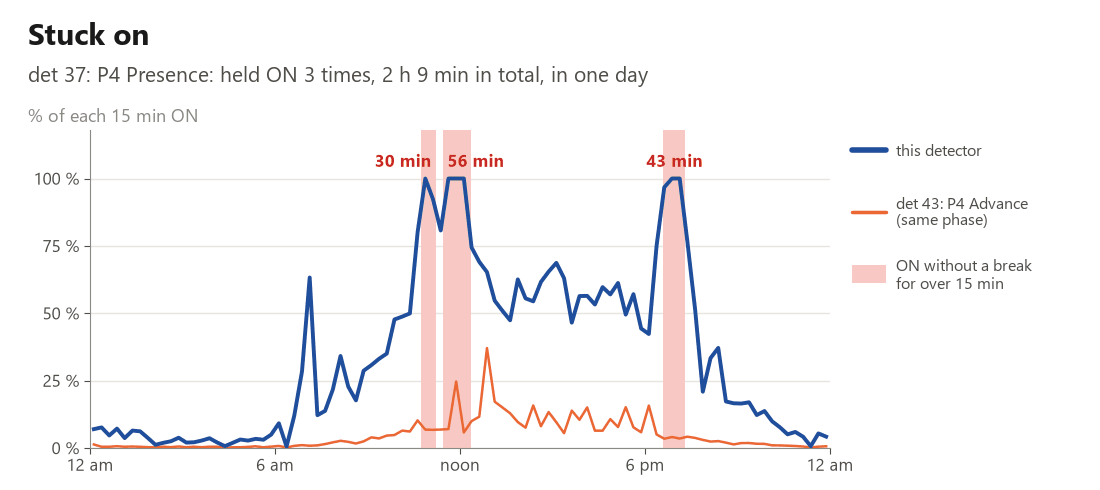
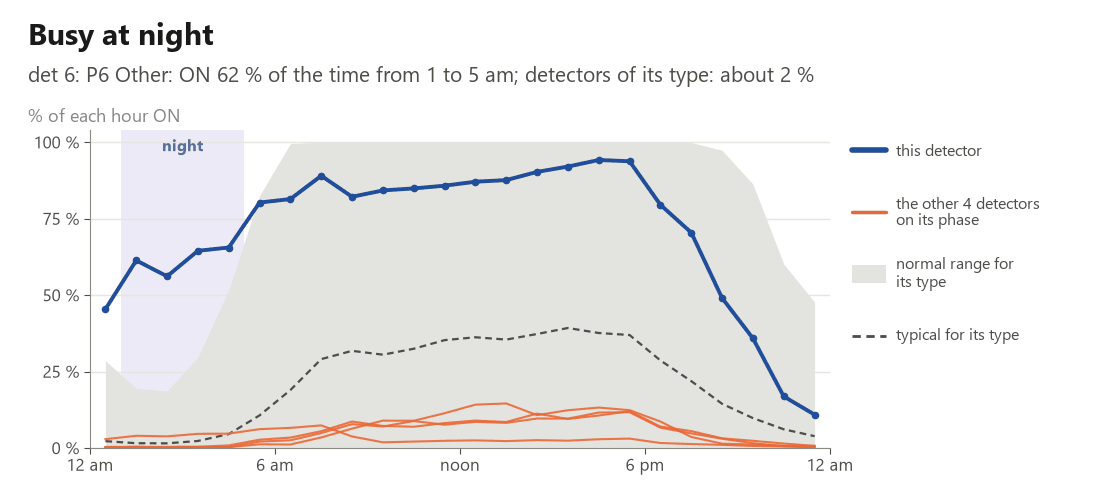
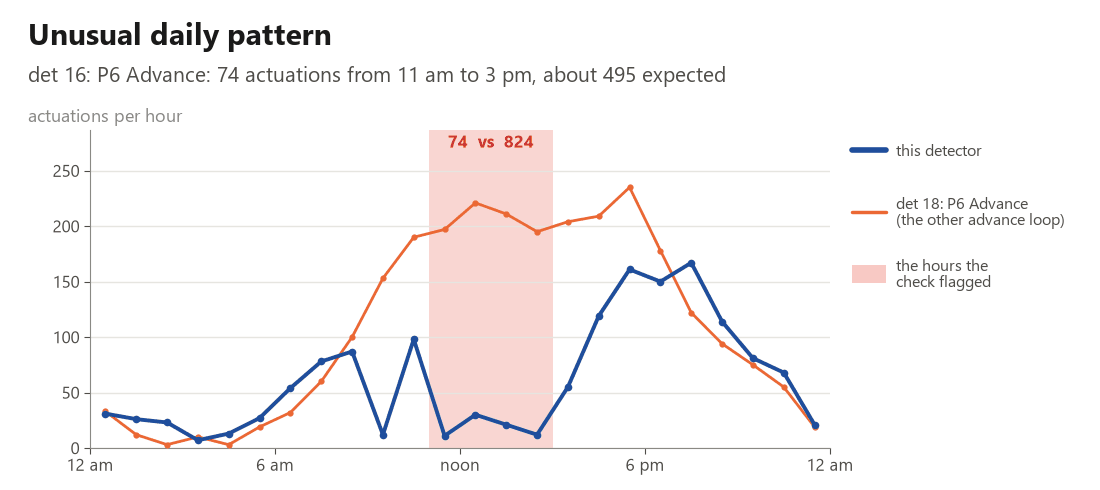
Each detector gets a status, a plain-words reason, the periods affected and the categories, judged against what is normal for its type (function x lanes x sample length). Checks: stuck on, goes silent, count drops, misses vehicles at night, erratic counts, too-fast actuations, chattering, too many for the traffic, erratic time ON, busy at night, unusual daily pattern, Count zone held ON. Bad = one strong finding, two checks agreeing, or 4+ hours of the day.
License
MIT
1 maintainer

Metadata
1 maintainer
Release files for atspm-detector 1.0.0
For a detailed explanation of source distributions (sdists) and built distributions (wheels), please see the package formats documentation.
Source distribution (sdist)
| File | Size | Uploaded | |
|---|---|---|---|
| atspm_detector-1.0.0.tar.gz | 5.6 MB | Details |
Built distribution (wheel)
| File | Interpreter | ABI | Platform | Reset |
|---|---|---|---|---|
| atspm_detector-1.0.0-py3-none-any.whl | Python 3 | none | any | Details |
Total release size: 11.3 MB
Release files / atspm_detector-1.0.0.tar.gz
| Download URL | atspm_detector-1.0.0.tar.gz |
|---|---|
| Size | 5.6 MB |
| Tags | Source |
|
SHA-256 checksum How to use checksums |
3720968de2ae55a77cb8467939dd49d22e09bdabee6a83a0f5690859f9a653b1
|
|
BLAKE2b-256 checksum How to use checksums |
3a1f944f86c1a4d0cba22baa89640b64444fa5a15a625d22a26a55b3db8e7f1c
|
| Upload date | |
|
Uploaded using Trusted Publishing? What is trusted publishing? |
Yes |
| Uploaded via |
twine/7.0.0 CPython/3.13.14
|
Provenance
Provenance describes where a file came from. On PyPI, provenance is shared via attestations, which provide a verifiable record of the build or publishing details. View details, limitations and caveats.


PyPI Publish Attestation
PyPI verified that this artifact, at this checksum, originated from the publisher listed below.
Signed by GitHub Actions, verified by PyPI on Oct 8, 2026.
Transparency logRelease files / atspm_detector-1.0.0-py3-none-any.whl
| Download URL | atspm_detector-1.0.0-py3-none-any.whl |
|---|---|
| Size | 5.7 MB |
| Tags | Python 3 |
|
SHA-256 checksum How to use checksums |
09e315b772f016df6e844d7a0f3a190eaaee7cabdbbd1d1e6dd541a8b676b182
|
|
BLAKE2b-256 checksum How to use checksums |
f38575e63f238b617d1ee65d789042ffc6822629d41709c86a114a41efd585e4
|
| Upload date | |
|
Uploaded using Trusted Publishing? What is trusted publishing? |
Yes |
| Uploaded via |
twine/7.0.0 CPython/3.13.14
|
Provenance
Provenance describes where a file came from. On PyPI, provenance is shared via attestations, which provide a verifiable record of the build or publishing details. View details, limitations and caveats.
PyPI Publish Attestation
PyPI verified that this artifact, at this checksum, originated from the publisher listed below.
Signed by GitHub Actions, verified by PyPI on Oct 8, 2026.
Transparency log













