
 █████╗ ████████╗████████╗███████╗   ███╗   ███╗   ██████╗ ████████╗███████╗
██╔══██╗╚══██╔══╝╚══██╔══╝██╔════╝   ████╗ ████║   ██╔══██╗╚══██╔══╝██╔════╝
███████║   ██║      ██║   █████╗     ██╔████╔██║   ██████╔╝   ██║   ███████╗
██╔══██║   ██║      ██║   ██╔══╝     ██║╚██╔╝██║   ██╔═══╝    ██║   ╚════██║
██║  ██║██╗██║██╗   ██║██╗███████╗██╗██║ ╚═╝ ██║██╗██║██╗     ██║██╗███████║██╗
╚═╝  ╚═╝╚═╝╚═╝╚═╝   ╚═╝╚═╝╚══════╝╚═╝╚═╝     ╚═╝╚═╝╚═╝╚═╝     ╚═╝╚═╝╚══════╝╚═╝
ATTEMPTS - 𝗔dd 𝗧imestamps 𝗧o 𝗘ach one of 𝗠y 𝗣rint statemen𝗧𝗦
A simple yet customizable Python package to automatically replace your print statements with timestamped versions.
It supports replacing the default 'print()', keeping all of its default options, or use the built-in "printt()" command, that accepts all the same arguments as "print()".
You can also choose to use different colors for your timestamps.
Installation
To install, run
pip install attempts
Usage
Import the package and initialize with init().
The only mandatory parameter is 'replace_print'.
  import attempts
  import time

  attempts.init(replace_print=True)

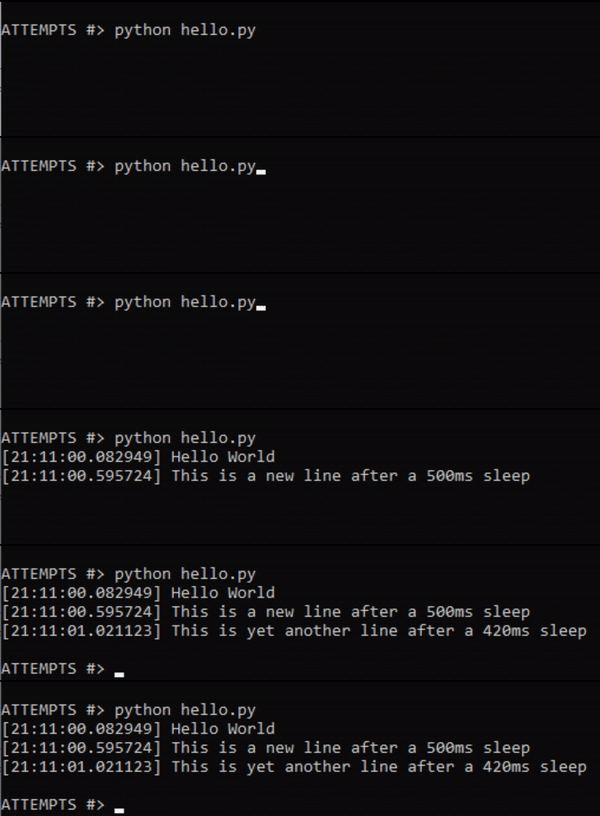
  print("Hello World")
  time.sleep(0.5)
  print("This is a new line after a 500ms sleep")
  time.sleep(0.42)
  print("This is yet another line after a 420ms sleep")
Demo
Basic demo:
Color Demo:
Parameters
replace_print: bool
The only mandatory parameter.
If set to False, will not replace the default 'print()'.
Instead, you'll need to use 'printt()' to output timestamped messages.
If set to True, will replace all calls of 'print()' with the timestamped version.
timestamp_start: str
The character at the start of the timestamp.
Default: '[' - Square Bracket
timestamp_end: str
The character at the end of the timestamp.
Default: ']' - Square Bracket
timestamp_format: str
A string containing the format of the timestamp. It uses any strings formats accepted by the strftime() method.
Default: '%H:%M:%S.%f' - Hours, minutes, seconds and microseconds.
Available Codes:
| Code | Meaning | Example |
|---|---|---|
| %a | Abbreviated weekday name. | Sun, Mon, ... |
| %A | Full weekday name. | Sunday, Monday, ... |
| %w | Weekday as a decimal number. | 0, 1, ..., 6 |
| %d | Day of the month as a zero-padded decimal. | 01, 02, ..., 31 |
| %-d | Day of the month as a decimal number. | 1, 2, ..., 30 |
| %b | Abbreviated month name. | Jan, Feb, ..., Dec |
| %B | Full month name. | January, February, ... |
| %m | Month as a zero-padded decimal number. | 01, 02, ..., 12 |
| %-m | Month as a decimal number. | 1, 2, ..., 12 |
| %y | Year without century as a zero-padded decimal number. | 00, 01, ..., 99 |
| %-y | Year without century as a decimal number. | 0, 1, ..., 99 |
| %Y | Year with century as a decimal number. | 2013, 2019 etc. |
| %H | Hour (24-hour clock) as a zero-padded decimal number. | 00, 01, ..., 23 |
| %-H | Hour (24-hour clock) as a decimal number. | 0, 1, ..., 23 |
| %I | Hour (12-hour clock) as a zero-padded decimal number. | 01, 02, ..., 12 |
| %-I | Hour (12-hour clock) as a decimal number. | 1, 2, ... 12 |
| %p | Locale’s AM or PM. | AM, PM |
| %M | Minute as a zero-padded decimal number. | 00, 01, ..., 59 |
| %-M | Minute as a decimal number. | 0, 1, ..., 59 |
| %S | Second as a zero-padded decimal number. | 00, 01, ..., 59 |
| %-S | Second as a decimal number. | 0, 1, ..., 59 |
| %f | Microsecond as a decimal number, zero-padded on the left. | 000000 - 999999 |
| %z | UTC offset in the form +HHMM or -HHMM. | |
| %Z | Time zone name. | |
| %j | Day of the year as a zero-padded decimal number. | 001, 002, ..., 366 |
| %-j | Day of the year as a decimal number. | 1, 2, ..., 366 |
| %U | Week number of the year (Sunday as the first day of the week). All days in a new year preceding the first Sunday are considered to be in week 0. | 00, 01, ..., 53 |
| %W | Week number of the year (Monday as the first day of the week). All days in a new year preceding the first Monday are considered to be in week 0. | 00, 01, ..., 53 |
| %c | Locale’s appropriate date and time representation. | Mon Sep 30 07:06:05 2013 |
| %x | Locale’s appropriate date representation. | 09/30/13 |
| %X | Locale’s appropriate time representation. | 07:06:05 |
| %% | A literal '%' character. | % |
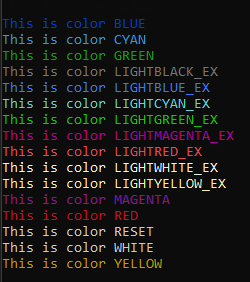
timestamp_color: str
The color of the text.
Uses the Colorama package. Please see the project for compatibility details: https://pypi.org/project/colorama/
Available colors:
BLACK
BLUE
CYAN
GREEN
MAGENTA
RED
WHITE
YELLOW
LIGHTBLACK_EX
LIGHTBLUE_EX
LIGHTCYAN_EX
LIGHTGREEN_EX
LIGHTMAGENTA_EX
LIGHTRED_EX
LIGHTWHITE_EX
LIGHTYELLOW_EX
ROADMAP
- Add option to benchmark using a key and output time delta
- Add option to store timestamps in memory, given a variable limit, to optmize memory usage
- Add option to output a formatted table with outputs
License
1 maintainer

Metadata
1 maintainer
Release files for attempts 0.2.2
For a detailed explanation of source distributions (sdists) and built distributions (wheels), please see the package formats documentation.
Source distribution (sdist)
| File | Size | Uploaded | |
|---|---|---|---|
| attempts-0.2.2.tar.gz | 4.9 kB | Details |
Built distribution (wheel)
| File | Interpreter | ABI | Platform | Reset |
|---|---|---|---|---|
| attempts-0.2.2-py3-none-any.whl | Python 3 | none | any | Details |
Total release size: 9.9 kB
Release files / attempts-0.2.2.tar.gz
| Download URL | attempts-0.2.2.tar.gz |
|---|---|
| Size | 4.9 kB |
| Tags | Source |
|
SHA-256 checksum How to use checksums |
4d06ab6d58b832a81031e1138ebfd08c40b9347fa4ca082453ba32b568b0eeed
|
|
BLAKE2b-256 checksum How to use checksums |
d9bee16d1655ff3678276a9ea2d0ce649296f7b7bb5e3d087d686685d50114c4
|
| Upload date | |
|
Uploaded using Trusted Publishing? What is trusted publishing? |
Yes |
| Uploaded via |
twine/5.1.1 CPython/3.12.5
|
Release files / attempts-0.2.2-py3-none-any.whl
| Download URL | attempts-0.2.2-py3-none-any.whl |
|---|---|
| Size | 5.0 kB |
| Tags | Python 3 |
|
SHA-256 checksum How to use checksums |
18fe28b1a890a3aa5a068b562790df2dcc9e04d5735928a35d97f28ffec8e80b
|
|
BLAKE2b-256 checksum How to use checksums |
96f2e86a1ab0d0b48e57d8185d17502f54fbbf5ce191abc1d34bbb021f17f42c
|
| Upload date | |
|
Uploaded using Trusted Publishing? What is trusted publishing? |
Yes |
| Uploaded via |
twine/5.1.1 CPython/3.12.5
|














