
atv 🌱




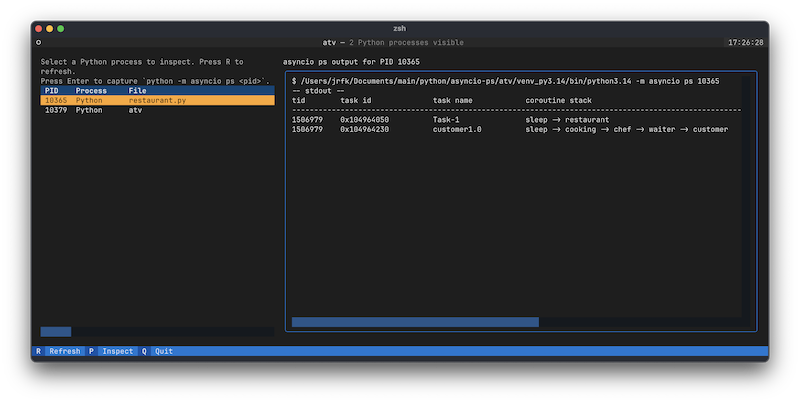
atv(async task viewer) is a CLI for exploring Python asyncio processes with a Textual UI. It starts by listing Python processes running locally, and we plan to integrate execution of asyncio ps / pstree and call-graph visualization.
Setup
cd atv
uv sync
uv sync installs the specified dependencies (textual, psutil) into your local environment.
Usage
uv run atv
Shortcuts:
R– Refresh the process list (the table shows PID / Process / File / Command Line)Q– ExitEnter/P– Runpython -m asyncio psfor the selected PID and display the result in the right pane
Using uvx
Once released, you'll be able to launch it with a one-liner.
uvx atv
If you want to test uvx behavior during local development, run the following in the project root.
uvx --from . atv
Roadmap
- View that periodically runs
python -m asyncio psfor the selected process - Visualization for
asyncio pstree/format_call_graph - Snapshot capture and diff comparison
- Integration with the FastAPI demo (retrieve task information via the API)
License
This project is licensed under the MIT License. See LICENSE for details.
1 maintainer

Metadata
1 maintainer
Release files for atv 0.1.2
For a detailed explanation of source distributions (sdists) and built distributions (wheels), please see the package formats documentation.
Source distribution (sdist)
| File | Size | Uploaded | Provenance | Actions |
|---|---|---|---|---|
| atv-0.1.2.tar.gz | 11.0 kB | With provenance | Details for atv-0.1.2.tar.gz |
Built distribution (wheel)
| File | Interpreter | ABI | Platform | Actions Reset |
|---|---|---|---|---|
| atv-0.1.2-py3-none-any.whl | Python 3 | none | any | Details for atv-0.1.2-py3-none-any.whl |
Total release size: 18.9 kB
Release files / atv-0.1.2.tar.gz
| Download URL | atv-0.1.2.tar.gz |
|---|---|
| Size | 11.0 kB |
| Tags | Source |
|
SHA-256 checksum How to use checksums |
7383f7c3b450b3b93e3c5f0adc48799f264e34342275e9b64c001f0153b53f7d
|
|
BLAKE2b-256 checksum How to use checksums |
8a6786eeeb75ba0160c6094f1ac69cb99ea1618dd498a6c3199b260df81bde16
|
| Upload date | |
|
Uploaded using Trusted Publishing? What is trusted publishing? |
Yes |
| Uploaded via |
twine/6.1.0 CPython/3.13.7
|
Provenance
Provenance describes where a file came from. On PyPI, provenance is shared via attestations, which provide a verifiable record of the build or publishing details. View details, limitations and caveats.


PyPI Publish Attestation
PyPI verified that this artifact, at this checksum, originated from the publisher listed below.
Signed by GitHub Actions, verified by PyPI on Oct 3, 2025.
Transparency logRelease files / atv-0.1.2-py3-none-any.whl
| Download URL | atv-0.1.2-py3-none-any.whl |
|---|---|
| Size | 7.9 kB |
| Tags | Python 3 |
|
SHA-256 checksum How to use checksums |
dab34d3110b58835e93f3e291965d069f5d4f20b208169e371801028cfb29ec9
|
|
BLAKE2b-256 checksum How to use checksums |
b904794b9b3a472f0414a82edfcff409baf48d137e01de3860537d0fea20b0c4
|
| Upload date | |
|
Uploaded using Trusted Publishing? What is trusted publishing? |
Yes |
| Uploaded via |
twine/6.1.0 CPython/3.13.7
|
Provenance
Provenance describes where a file came from. On PyPI, provenance is shared via attestations, which provide a verifiable record of the build or publishing details. View details, limitations and caveats.
PyPI Publish Attestation
PyPI verified that this artifact, at this checksum, originated from the publisher listed below.
Signed by GitHub Actions, verified by PyPI on Oct 3, 2025.
Transparency logSecurity for atv 0.1.2
Provenance
Provenance describes where a file came from. On PyPI, provenance is shared via attestations, which provide a verifiable record of the build or publishing details. View details, limitations and caveats.
Full provenance
All 2 files in this release have been uploaded with provenance metadata.
Attestation for atv-0.1.2.tar.gz
PyPI Publish Attestation
PyPI verified that this artifact, at this checksum, originated from the publisher listed below.
Signed by GitHub Actions, verified by PyPI on Oct 3, 2025.
Transparency logA note on package security
PyPI is a repository for distributing packages, not a service for auditing them. While third-party security researchers and our staff do their best to detect and remove malicious packages, PyPI cannot guarantee the quality, security or suitability of any given package.
To learn more about protecting yourself from malicious actors, visit our package security documentation.














