
AudioCut
MP3/FLAC/WAV audio cutter- cutting audio files visually
Version 1.0.3
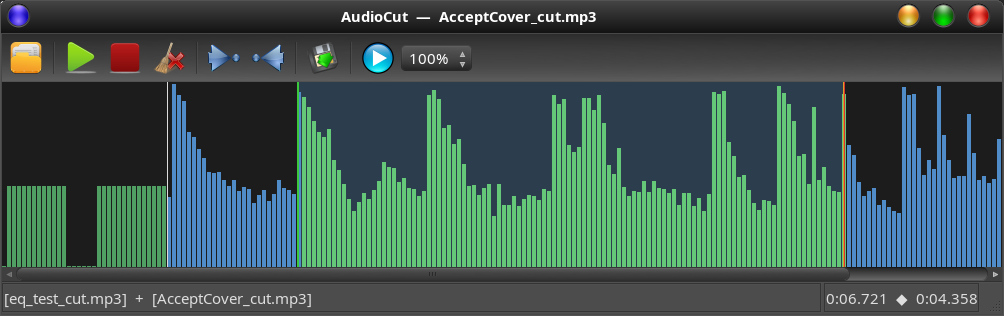
Audio cutter and joiner for Linux, based on ffmpeg. Cuts and joins audio files — optionally prepending or appending additional clips around the main selection.
Supported input formats: mp3, flac, wav, ogg, aac, m4a, wma. Supported output formats: mp3, flac, wav, ogg, aac, m4a.
The current version is written in Python 3 and uses the Qt6 widget kit.
Prerequisites
- ffmpeg ≥ 3.x
- python3-pyqt6
- python3-numpy
Features
- Display a scrollable, zoomable waveform of the loaded file
- Set precise in- and out-points to define the segment to keep
- Highlighted selection region; clear it with the Clear selection button
- Prepend or append a second audio clip around the main cut
- Preview the full assembly before saving
- Save the result via ffmpeg — re-encoded to a common sample rate and channel count when mixing sources
- Waveform auto-scrolls with a 10 % edge margin during cursor drag and playback
- Playback speed selector: 25 %, 50 %, 75 %, or 100 %
- When a selection is active, Play is scoped to that region — pause and resume stay within it
How to cut
- Open an audio file with the Open toolbar button.
- The waveform loads automatically. Use the scrollbar or mouse wheel to scroll.
- Play the file with the Play button and click anywhere on the waveform to move the cursor.
- At the desired start of your cut, press Start cut (green flag icon). This sets the in-point.
- At the desired end of your cut, press Stop cut (red flag icon). This sets the out-point.
- The selected region is highlighted in the waveform.
- Press Save As… to export. The output file contains only the selected segment.
If no in- or out-point is set the entire file is exported unchanged.
How to prepend or append a clip
AudioCut lets you glue an extra clip before (prepend) or after (append) the main cut in a single pass.
To prepend a clip:
- Load and cut your main file first (see above).
- Press the Add before toolbar button.
- A file dialog opens — select the audio clip you want to place in front.
- The waveform switches to the new clip. Set in- and out-points to define the part of that clip to use (leave them unset to use the whole file).
- Press Save As… to confirm the clip and return to the main view. The prepend segment appears in green at the left of the waveform.
- Press Cancel (✕) to discard the clip and return without changes.
While selecting the clip the main file's cut markers disappear — they are saved internally and restored when you confirm or cancel.
To append a clip:
- Same steps as above, but press Add after instead.
- The confirmed append segment appears in amber at the right of the waveform.
Same applies: the main cut markers are hidden during clip selection and restored afterwards.
Both a prepend and an append can be active at the same time. The status bar lists all active segments.
Prepend and append are single slots: confirming a new prepend (or append) replaces the previous one.
Previewing the assembly: Press Play when prepend or append clips are active. AudioCut builds a temporary WAV mix of all segments and plays it back end-to-end so you can hear the full result before saving.
Saving the assembly: Press Save As… from the main view. All active segments (prepend → main cut → append) are joined by ffmpeg into the chosen output file.
Install
Dependencies on Arch / Manjaro
sudo pacman -S python-pyqt6 python-numpy ffmpeg
Dependencies on Debian / Ubuntu / Mint
sudo apt --no-install-recommends install python3-pyqt6 python3-numpy ffmpeg
Manual install (from release tarball)
Download the latest release tarball, extract it and run the install script as root:
sudo ./install.sh
This copies the application to /opt/audiocut/ and creates a launcher at /usr/bin/audiocut.
Note: the script does not install dependencies — install them first using the commands above for your distro.
To uninstall:
sudo ./uninstall.sh
Run from source
git clone https://github.com/kanehekili/AudioCut.git
cd AudioCut
python3 src/AudioCut.py
Logs are written to src/AudioCut.log when running from source, otherwise to ~/.config/AudioCut/AudioCut.log.
Set GTK Theme for this Qt application
If you are running a desktop environment with GTK/GNOME (as opposed to LXQt or KDE) you might need to set QT_QPA_PLATFORMTHEME:
- Depending on the distro and version this variable may be one of:
gtk2,qt6ct,fusion,gtk3
Changes
17.07.2026
- Open a file directly from the command line:
audiocut <file>(relative paths are resolved against the current directory; the file must exist) - Waveform now advances page-wise: when the cursor reaches the edge margin, the view jumps ahead and the cursor continues from the left margin
- Set the Qt desktop file name so the correct icon and title are shown under Wayland
- Internal cleanup: removed unused drag-finished signal and audio player helpers
- Repository:
__pycache__is no longer tracked by git
10.05.2026
- Clear selection button (clears in/out markers without affecting the cut)
- Waveform edge-scroll: auto-scrolls when cursor enters the 10 % margin on either side, during both drag and playback
- Playback speed dropdown: 25 %, 50 %, 75 %, 100 %
- Selection-scoped playback: Play starts at the in-point and stops at the out-point; pause/resume stay within the selection
- After saving, cursor and scroll reset to the very beginning of the waveform
08.05.2026
- Initial release
1 maintainer

Download files
Download the file for your platform. If you're not sure which to choose, learn more about installing packages.
Source Distribution
Built Distribution
Filter files by name, interpreter, ABI, and platform.
If you're not sure about the file name format, learn more about wheel file names.
Copy a direct link to the current filters
File details
Details for the file audiocut-1.0.3.tar.gz.
File metadata
- Download URL: audiocut-1.0.3.tar.gz
- Upload date:
- Size: 583.9 kB
- Tags: Source
- Uploaded using Trusted Publishing? No
- Uploaded via:
twine/6.2.0 CPython/3.14.5
File hashes
| Algorithm | Hash digest | |
|---|---|---|
| SHA256 |
c610584a017420b013bc45ba1704a1709ce5f6c5f1e2fcbff9f0ce775e613845
|
|
| MD5 |
8ff4926fcbc25b975c1977f7d59c62d7
|
|
| BLAKE2b-256 |
375cd4d8a490b3a3c20a2bcd122d8cb33a9860759feaff653671b2e7b38716e9
|
File details
Details for the file audiocut-1.0.3-py3-none-any.whl.
File metadata
- Download URL: audiocut-1.0.3-py3-none-any.whl
- Upload date:
- Size: 581.8 kB
- Tags: Python 3
- Uploaded using Trusted Publishing? No
- Uploaded via:
twine/6.2.0 CPython/3.14.5
File hashes
| Algorithm | Hash digest | |
|---|---|---|
| SHA256 |
83d32718ea0203de7293e6b6c62067a92c786d069867fa73cb1b95869fdf4fb5
|
|
| MD5 |
f4375cbf9c8192baa1c8c3ab8eed36a0
|
|
| BLAKE2b-256 |
380a907eca9dc4209aacc5dab34ab6d9a17db86c98570b1f9012361a991dc5e1
|














