
An audio/acoustic activity detection and audio segmentation tool

Project description





auditok is a lightweight, dependency-free audio activity detection library for Python. It splits audio streams into events by thresholding signal energy (no models or training data required).
Use it for voice activity detection, silence removal, audio segmentation, or any task where you need to find “where the sound is” in an audio stream. It works with files, microphone input, and streams, supports mono and multi-channel audio, and runs from a few lines of Python or the command line.
Full documentation is available on Read the Docs.
Installation
auditok requires Python 3.8 or higher. The core library depends only on numpy.
pip install auditokFor plotting, audio playback, and progress bars:
pip install auditok[all]Note: Processing non-WAV formats (MP3, OGG, FLAC, video files, etc.) requires ffmpeg to be installed on your system.
API at a glance
Function |
Purpose |
Key parameters |
|---|---|---|
split() |
Detect and yield audio events as a generator |
min_dur, max_dur, max_silence, energy_threshold |
trim() |
Remove leading and trailing silence |
min_dur, max_silence, energy_threshold |
fix_pauses() |
Normalize pauses between events to a fixed duration |
silence_duration, min_dur, max_silence, energy_threshold |
split_and_plot() |
Split and visualize results (matplotlib or interactive Jupyter widget) |
split params + interactive, save_as |
load() |
Load audio from file, bytes, or mic into an AudioRegion |
sr, sw, ch |
All functions accept file paths, raw bytes, AudioRegion objects, or None (to read from the microphone). split(), trim(), fix_pauses(), and split_and_plot() are also available as AudioRegion methods.
Basic usage
import auditok

# split returns a generator of AudioRegion objects
audio_events = auditok.split(
    "audio.wav",
    min_dur=0.2,     # minimum duration of a valid audio event in seconds
    max_dur=4,       # maximum duration of an event
    max_silence=0.3, # maximum tolerated silence within an event
    energy_threshold=55 # detection threshold
)

for i, r in enumerate(audio_events):
    # AudioRegions returned by split have start and end attributes
    print(f"Event {i}: {r.start:.3f}s -- {r.end:.3f}s")

    # play the audio event
    r.play(progress_bar=True)

    # save the event with start and end times in the filename
    filename = r.save("event_{start:.3f}-{end:.3f}.wav")
    print(f"Event saved as: {filename}")
Example output:
Event 0: 0.700s -- 1.400s
Event saved as: event_0.700-1.400.wav
Event 1: 3.800s -- 4.500s
Event saved as: event_3.800-4.500.wav
...
Trim silence
import auditok

# Remove leading and trailing silence
trimmed = auditok.trim("audio.wav", energy_threshold=55)
trimmed.save("trimmed.wav")
Normalize pauses
import auditok

# Replace all pauses with exactly 0.5s of silence
cleaned = auditok.fix_pauses("audio.wav", silence_duration=0.5)
cleaned.save("cleaned.wav")
Improving detection boundaries
Energy-based detection can clip the natural onset and fade-out of speech, where the signal rises gradually from or falls back into silence. The max_leading_silence and max_trailing_silence parameters let you extend detection boundaries to capture these transitions:
events = auditok.split(
    "audio.wav",
    max_leading_silence=0.2,   # prepend up to 200ms before each event
    max_trailing_silence=0.15, # keep up to 150ms of silence after each event
)
Values of 0.1 – 0.3 seconds typically work well. These parameters are available on split(), trim(), fix_pauses(), and their AudioRegion method counterparts, as well as on the command line (-l / --max-leading-silence and -g / --max-trailing-silence).
Split and plot
Visualize the audio signal with detected events:
import auditok

import auditok
audio = auditok.load("audio.wav")
events = audio.split_and_plot(max_leading_silence=0.1,
                              max_trailing_silence=0.1) # or region.splitp(...)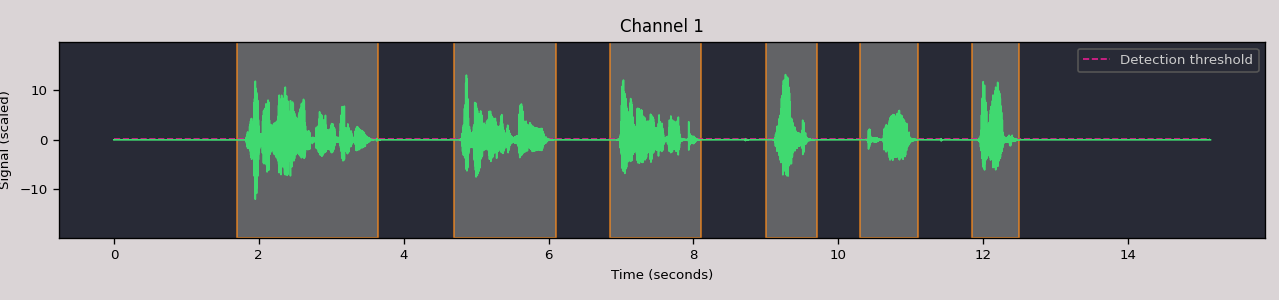
Interactive widget in Jupyter
Pass interactive=True to split_and_plot to get an HTML5/Canvas/WebAudio widget with clickable detection regions and inline playback:
events = audio.split_and_plot(interactive=True,
                              max_leading_silence=0.1,
                              max_trailing_silence=0.1)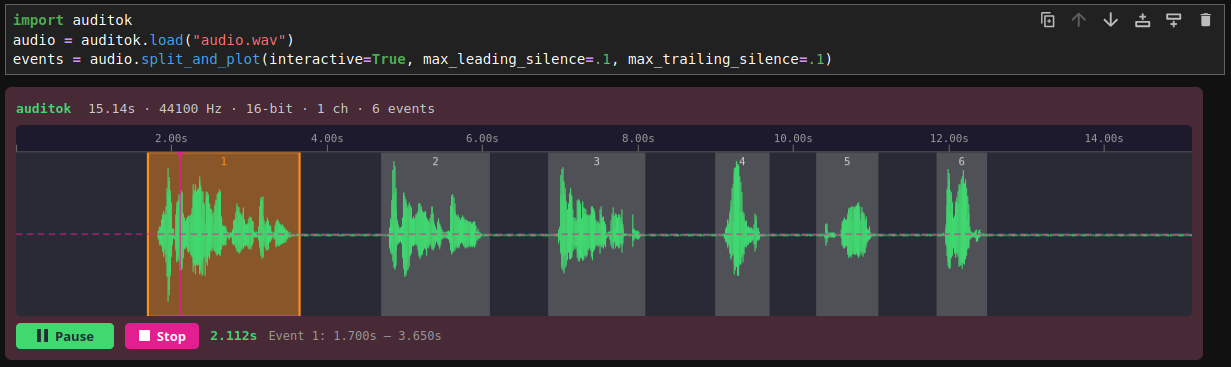
Working with AudioRegion
AudioRegion is the central data structure. It wraps raw audio bytes with metadata (sampling rate, sample width, channels) and provides a rich API for slicing, combining, and exporting audio.
import auditok

region = auditok.load("audio.wav")

# Time-based slicing (returns a new AudioRegion)
first_five_seconds = region.sec[0:5]
middle = region.ms[1500:3000]  # milliseconds

# Concatenation
combined = region1 + region2

# Repetition
repeated = region * 3

# Playback
region.play(progress_bar=True)

# Save with template placeholders
region.save("output_{start:.3f}-{end:.3f}.wav")

# Export as numpy array: shape (channels, samples)
x = region.numpy()
assert x.shape[0] == region.channels
assert x.shape[1] == len(region)
In Jupyter notebooks, AudioRegion objects render as inline HTML5 audio players automatically.
Command line
auditok provides three subcommands: split (default), trim, and fix-pauses. All three support file input and microphone recording.
Split audio into events
# Split a file (default subcommand, both forms are equivalent)
auditok split audio.wav -e 55 -n 0.5 -m 10 -s 0.3
# Or simply
auditok audio.wav -e 55 -n 0.5 -m 10 -s 0.3

# Save detected events to individual files
auditok audio.wav -o "event_{id}_{start:.3f}-{end:.3f}.wav"

# Stream from microphone
auditok
Trim silence
# Remove leading and trailing silence
auditok trim audio.wav -o trimmed.wav

# Record from microphone, trim, and save
auditok trim -o trimmed.wav
Normalize pauses
# Replace all pauses with 0.5s of silence
auditok fix-pauses audio.wav -o cleaned.wav -d 0.5

# Record from microphone, normalize pauses, and save
auditok fix-pauses -o cleaned.wav -d 0.5
Common options
-e, --energy-threshold   Detection threshold [default: 50]
-n, --min-duration       Minimum event duration in seconds [default: 0.2]
-m, --max-duration       Maximum event duration in seconds (split only) [default: 5]
-s, --max-silence        Max silence within an event [default: 0.3]
-l, --max-leading-silence  Silence to retain before events [default: 0]
-g, --max-trailing-silence Trailing silence to keep [default: all]
Limitations
auditok uses energy-based detection. It works well in low-noise environments – podcasts, language lessons, recordings in quiet rooms – where the signal is clearly above the background noise.
It does not distinguish speech from other sounds (music, claps, environmental noise), and the energy threshold is static. Manual tuning per recording may be needed for best results.
License
MIT.
Release history Release notifications | RSS feed


Download files
Download the file for your platform. If you're not sure which to choose, learn more about installing packages.
Source Distribution
Built Distribution
Filter files by name, interpreter, ABI, and platform.
If you're not sure about the file name format, learn more about wheel file names.
Copy a direct link to the current filters
File details
Details for the file auditok-0.4.0.tar.gz.
File metadata
- Download URL: auditok-0.4.0.tar.gz
- Upload date:
- Size: 106.2 kB
- Tags: Source
- Uploaded using Trusted Publishing? No
- Uploaded via: twine/6.2.0 CPython/3.14.3
File hashes
| Algorithm | Hash digest | |
|---|---|---|
| SHA256 |
01680e24e12da72357621ab2c35c81ec5cda27de2534f59634cd5035c93b5573
|
|
| MD5 |
482dfd284655c1a452e6468eb75ef887
|
|
| BLAKE2b-256 |
1bdd99151eeb18e4e7af76c67b432a1e8d052ca10b5fdc7b39d4c5aaff63af06
|
File details
Details for the file auditok-0.4.0-py3-none-any.whl.
File metadata
- Download URL: auditok-0.4.0-py3-none-any.whl
- Upload date:
- Size: 65.7 kB
- Tags: Python 3
- Uploaded using Trusted Publishing? No
- Uploaded via: twine/6.2.0 CPython/3.14.3
File hashes
| Algorithm | Hash digest | |
|---|---|---|
| SHA256 |
2e42c2a0a80f461d2d90a0cba30033ed5f73041648f206cbd9a8c63e2406b69c
|
|
| MD5 |
73d3c2b91453ef16cfda205e2f688c46
|
|
| BLAKE2b-256 |
3ad46cf21c98678629c94c7285d750c76a45ed8aeb4c2b3391bbfde9f154a065
|






