
Unofficial audl api

Project description
AUDL API



Unofficial AUDL api for python users
To install: pip install audl
Requirements
- Python 3.7+
- pandas, requests, lxml, html5lib
Usage
How to get player profile
from audl.stats.endpoints.playerprofile import PlayerProfile

# Fetching dataframe from "https://theaudl.com/league/players/cbrock"
player = PlayerProfile('cbrock')
career = player.get_career_stats()
reg = player.get_regular_seasons_career()
playoffs = player.get_playoffs_career()
season = player.get_season_games_stats(2019)
games_stats = player.get_career_games_stats()
player_metadata = player.get_personal_information()
How to get Team Stats
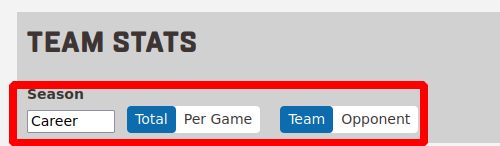
Season=['career', 2022, ..., 2012] Per=['total', 'game'] Team=['team', 'opponent']
from audl.stats.endpoints.teamstats import TeamStats

# fetching from "https://theaudl.com/stats/team"
team_stats = TeamStats('career', 'game', 'opponent') # TeamStats(season, per, team)
df = team_stats.get_table()
How to get Player Stats
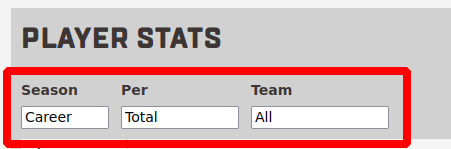
Season=['career', 2022, ..., 2012] Per=['total', 'game', 'points', 'possessions', 'minutes']
from audl.stats.endpoints.playerstats import PlayerStats

# from "https://theaudl.com/stats/player-stats"
playerstats = PlayerStats('career', 'total', 'breeze').fetch_table()  # PlayerStats(season, per, team)

# save to CSV
playerstats_obj = PlayerStats('career', 'total', 'breeze')
playerstats_obj.download_stats_as_dataframe('output/player_stats.csv')
How to fetch season schedule
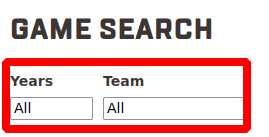
from audl.stats.endpoints.seasonschedule import SeasonSchedule, TeamSeasonSchedule, AllSchedule, TeamSeasonAgainstOpponentSchedule

# Fetch complete season schedule from "https://theaudl.com/league/game-search"
season_schedule = SeasonSchedule(2022).get_schedule()
team_season_schedule = TeamSeasonSchedule(2022, 'royal').get_schedule()
all_schedule = AllSchedule().get_schedule()
team_season_against_opponent = TeamSeasonAgainstOpponentSchedule(2022, 'royal', 'rush').get_schedule()
How to get game statistics
Game IDs follow the format YYYY-MM-DD-AWAY-HOME (e.g. 2021-06-05-RAL-ATL is the
June 5 2021 game where Raleigh visited Atlanta).
from audl.stats.endpoints.gamestats import GameStats

# Fetching Box Scores from "https://theaudl.com/stats/game/2021-06-05-RAL-ATL"
game = GameStats("2021-06-05-RAL-ATL")
teams = game.get_teams_metadata()
players = game.get_players_metadata()
game_metadata = game.get_game_metadata()
team_stats = game.get_team_stats()
roster = game.get_roster_stats()
boxscores = game.get_boxscores()
events = game.get_events()
all_events = game.get_all_events()           # raw home + away events as dict
events_seq = game.get_events_sequential()    # events in sequential point order
point_results = game.get_point_results()     # offense/defense lineups and outcome per point
lineup_by_points = game.get_lineup_by_points()
throw_selection = game.get_throw_selection()
thrower_receiver_count = game.get_thrower_receiver_count(True)
lineup = game.get_lineup_frequency(True)
teamates = game.get_teamates_selection('ataylor', True)
df_throws = game.get_throws_dataframe()

# print game events
game.print_team_events(True)
game.print_team_events(False)
How to get Team Game Stats
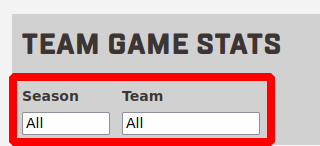
from audl.stats.endpoints.teamgamestats import AllTeamGameStats, SeasonGameStats, TeamSeasonGameStats

team_season = TeamSeasonGameStats(2022, 'royal').get_game_stats()
all_games = AllTeamGameStats().get_game_stats()
season_games = SeasonGameStats(2022).get_game_stats()
Examples
Jupyter notebooks with worked examples are in the examples/ directory:
Release history Release notifications | RSS feed


Download files
Download the file for your platform. If you're not sure which to choose, learn more about installing packages.
Source Distribution
Built Distribution
Filter files by name, interpreter, ABI, and platform.
If you're not sure about the file name format, learn more about wheel file names.
Copy a direct link to the current filters
File details
Details for the file audl-0.0.19.tar.gz.
File metadata
- Download URL: audl-0.0.19.tar.gz
- Upload date:
- Size: 30.4 kB
- Tags: Source
- Uploaded using Trusted Publishing? No
- Uploaded via: twine/6.2.0 CPython/3.13.7
File hashes
| Algorithm | Hash digest | |
|---|---|---|
| SHA256 |
dcdecd240787d4c396eb8f4096bc6b8101bbdd26f618969e795f4599e51a555f
|
|
| MD5 |
afc6d0635ea5cf914160c0677f0a0749
|
|
| BLAKE2b-256 |
6851df49c75a0869b263e43e135ba0ebd997ab2f29ad312855299b13ee6b5c2f
|
File details
Details for the file audl-0.0.19-py3-none-any.whl.
File metadata
- Download URL: audl-0.0.19-py3-none-any.whl
- Upload date:
- Size: 36.4 kB
- Tags: Python 3
- Uploaded using Trusted Publishing? No
- Uploaded via: twine/6.2.0 CPython/3.13.7
File hashes
| Algorithm | Hash digest | |
|---|---|---|
| SHA256 |
69d7d77a4b2e17a12c4e2a201a0b0e0d355987685042f2cfa3ecd164df92db6f
|
|
| MD5 |
fad7a6f7c84b797c91f0874d4c576166
|
|
| BLAKE2b-256 |
eacc5b4c7ec0280d3c4b504796e03fa04350c41d855126f1b8ef1d7f20d3a1f9
|






