
AugmentedCarpentryPy for the Augmented Carpentry research at IBOIS, EPFL.

Project description



This is the repo containing the necessary code to export acims execution files for the Augmented Carpentry (AC) software. This is a research thesis project from the Laboratory of Timber Constructions (IBOIS) at the Swiss Federal Institute of Technology in Lausanne (EPFL). It is an Augmented Reality (AR) application that helps operators to integrate ordinary tools (e.g. power drills, circular saws and chainsaws) into digitally guided woodworking to obtain live computed feedback. The aim is to suppress 2D execution drawings and markings and empower the worker with precise and real-time guidance to replicate even a complex digital designs with manual tools.
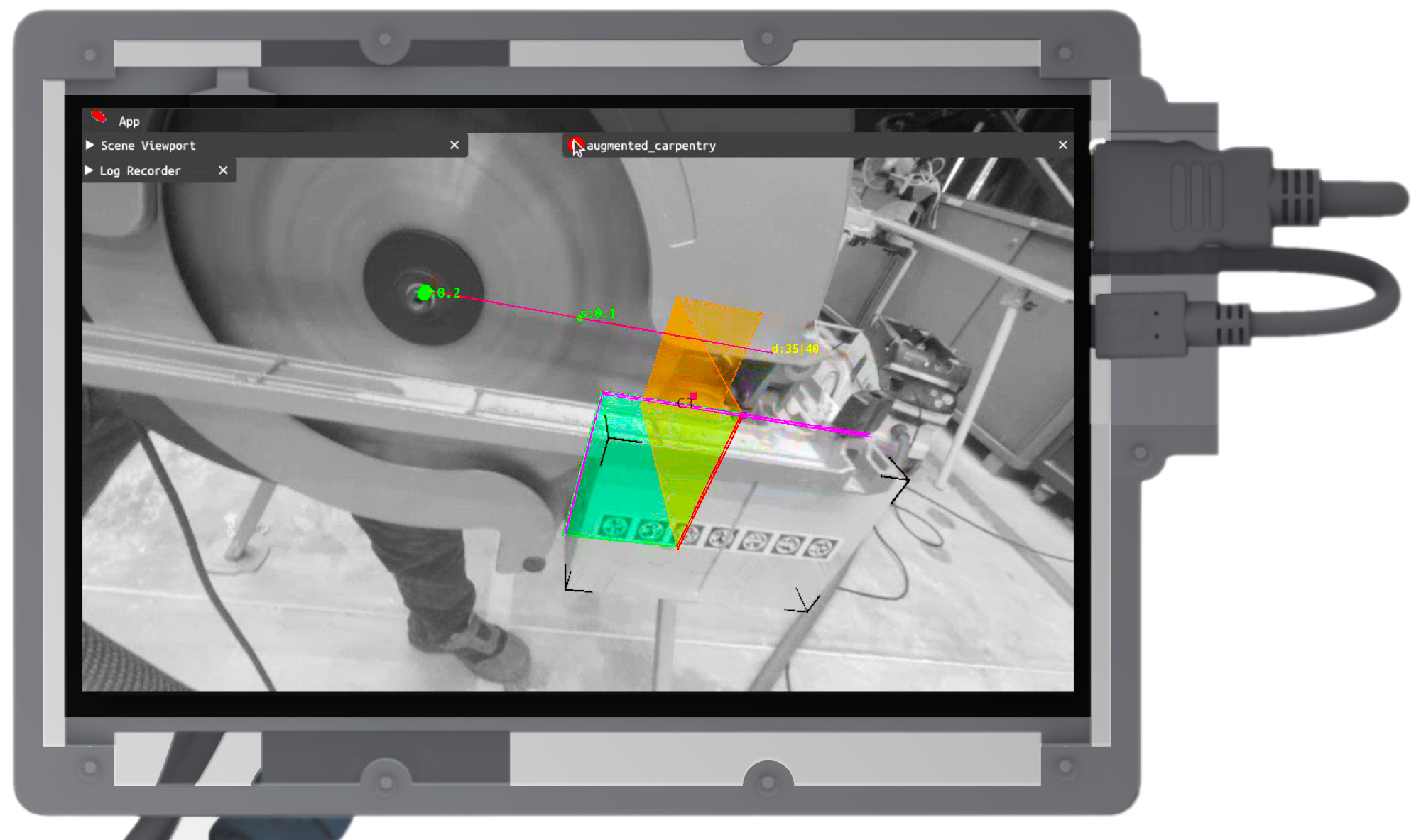
Here's a capture from the AC system in action. Visit the documentation for more info and instructions, here:
Go to the repository of the C++ project to download the full software: Augmented Carpentry.
Computing unit, interface and sensors
AC works on x64 machines running on Ubuntu 22.04 LTS and a simple monocular camera. For a quick start, you can use a laptop and your webcam. If you want to build on a touch screen, you can use the WaveShare WS170120 and follow the instructions below:
To config the touch screen on the pc follow these steps first. Be sure to switch the display on, plug the mini-USB and finally plug the HDMI cable.
Set the display properties in the config.ini properties (to find them run the commands xinput for the name and xrandr for the connection type).
The following specs works on the X11 display server. If you are using wayland and wanting to switch to X11 follow this link.
[MonitorSpecs]
monitor_name = WaveShare WS170120
monitor_link_t = HDMI
monitor_resolution = 1280 x 720
[!IMPORTANT] You can use any other touch screen, just make sure to set the correct specs in the
config.inifile.
[!WARNING] Wayland display and touchscreen are not compatible yet as the touchscreen register for the main display and not the small display.
[MonitorSpecs]
LinkMode = XWAYLAND1
Name = Virtual core pointer
Resolution = 1280 x 720
[!TIP] You can build AC with the touch screen or on a non-touch screen. To do so set ON or OFF the CMake option
DEPLOY_ON_TOUCHlater when configuring the build:cmake -S . -B build -DDEPLOY_ON_TOUCH=ON.
Wood working tools
AC is designed to be machine independent, it is only dependent on the toolheads (e.g.: drill bits, circular saw blades and chainsaw boards). You can find a list of the available toolheads here. If you want to add your own, open a Pull Request to the repo TTool and follow the Wiki.
Stickers
The last thing you need is a set of STags. These are the markers that help the camera understand its position and orientation to the timber beam. You can find them as 450 stripes for a total of 21149 tags are available in batches of 50 stripes with an A0 format, ready to print (better as stickers) and can be downloaded here. They are made to be print as stickers, but if you want to generate your own you can find a script here.
Quickstart
Software Requirements
AC is build and tested for UNIX x64 machines running on Ubuntu 22.04 LTS. It does not exploit GPU acceleration and can run on a laptop or a desktop. The software is built with C++.
First refresh the package list and install the necessary dependencies:
apt-get -qq update && apt-get -qq -y install g++ cmake git git-lfs
And here's the dependecies for the project:
apt-get -qq update && apt-get -qq -y install \
wget \
curl \
unzip \
xvfb \
freeglut3-dev \
libfreetype-dev \
libassimp-dev \
libboost-all-dev \
libeigen3-dev \
libglew-dev \
libglfw3-dev \
libglm-dev \
libgmp-dev \
libgoogle-glog-dev \
libmpfr-dev \
libimgui-dev \
libopencv-dev
3 Build & Run
Donwnload the repo first:
git clone --recurse-submodules https://github.com/ibois-epfl/augmented-carpentry.git
AC can be built either on a touch screen or on a non-touch screen like your laptop.
Time to build.. If you are deploying on a touch monitor set the flag -DDEPLOY_ON_TOUCH=ON, you can config:
cd augmented-carpentry
cmake -S . -B build
cmake --build build
To run the code:
./build/bin/AC
While running the code, make sure that config.ini and assets/ exists in the current directory. If errors related to config present, please reconfigure the config.ini by copy-pasting the content from /assets/default_config.ini.
That's it your are running Augmented Carpentry🪚!
4 How to use
Follow our online documentation to learn how to use the AC.
How to cite
To cite the software follow the following BibTeX entry:
@software{AugmentedCarpentrySoftware2024,
    title = {{Augmented Carpentry Software}},
    author = {Andrea Settimi, Hong-Bin Yang, Naravich Chutisilp, Nazgul Zholmagambetova, Florian Aymanns, Edward Andò and Nicolas Richart},
    year = {2024},
    doi = {10.5281/zenodo.14191429},
    url = {https://github.com/ibois-epfl/augmented-carpentry}
}
or the associated Zenodo DOI:

To cite the research follow the the BibTeX entry linked to the publication:
incoming
Disclaimer
This software is provided "as-is" as a prototype, without any warranties, express or implied, including but not limited to fitness for a particular purpose or non-infringement. The user assumes full responsibility for the use of the software, and we are not liable for any damages, losses, or misuse arising from its use. By using this software, you agree to these terms.
Release history Release notifications | RSS feed


Download files
Download the file for your platform. If you're not sure which to choose, learn more about installing packages.
Source Distribution
Built Distribution
Filter files by name, interpreter, ABI, and platform.
If you're not sure about the file name format, learn more about wheel file names.
Copy a direct link to the current filters
File details
Details for the file augmented_carpentry_py-1.0.0.tar.gz.
File metadata
- Download URL: augmented_carpentry_py-1.0.0.tar.gz
- Upload date:
- Size: 14.4 kB
- Tags: Source
- Uploaded using Trusted Publishing? No
- Uploaded via: twine/6.1.0 CPython/3.9.2
File hashes
| Algorithm | Hash digest | |
|---|---|---|
| SHA256 |
260dc0b216fcfcf70df3aec7de03147c2590df6da3426b75066a845eee6bce2d
|
|
| MD5 |
59c67f3f822e76aa726d95a8277a2f11
|
|
| BLAKE2b-256 |
5a4c4d09b25a84f2032003ad46365b65c06291f57fd9c254c731fa43b930dd44
|
File details
Details for the file augmented_carpentry_py-1.0.0-py3-none-any.whl.
File metadata
- Download URL: augmented_carpentry_py-1.0.0-py3-none-any.whl
- Upload date:
- Size: 18.0 kB
- Tags: Python 3
- Uploaded using Trusted Publishing? No
- Uploaded via: twine/6.1.0 CPython/3.9.2
File hashes
| Algorithm | Hash digest | |
|---|---|---|
| SHA256 |
6ce3a542537a9d4fbf1cfe224d59d269c653f0beb48975c46529eee6fc87d9cf
|
|
| MD5 |
b4c0d03f7c3cb2a5e5d54eb22231ca92
|
|
| BLAKE2b-256 |
fef594e8ac2bedef660ab16d5e3640493b1e755053b6774aa1cc35a75e509512
|






