

A Frame Stack Sampler for CPython













Synopsis •
Installation •
Usage •
Cheat sheet •
Compatibility •
Why 

This is the nicest profiler I’ve found for Python. It’s
cross-platform, doesn’t need me to change the code that’s being profiled, and
its output can be piped directly into flamegraph.pl. I just used it
to pinpoint a gross misuse of SQLAlchemy at work that’s run in some code at the
end of each day, and now I can go home earlier.
-- gthm on lobste.rs
If people are looking for a profiler, Austin looks pretty
cool. Check it out!
-- Michael Kennedy on Python Bytes 180
 on
on 
Synopsis
Austin is a Python frame stack sampler for CPython written in pure C. Samples are collected by reading the CPython interpreter virtual memory space to retrieve information about the currently running threads along with the stack of the frames that are being executed. Hence, one can use Austin to easily make powerful statistical profilers that have minimal impact on the target application and that don't require any instrumentation.
The key features of Austin are:
- Zero instrumentation;
- Minimal impact;
- Fast and lightweight;
- Time and memory profiling;
- Built-in support for multi-process applications (e.g.
mod_wsgi).
The simplest way to turn Austin into a full-fledged profiler is to use together with the VS Code extension or combine it with FlameGraph or Speedscope. However, Austin's binary output can be piped into any other external or custom tools for further processing. Look, for instance, at the following Python TUI
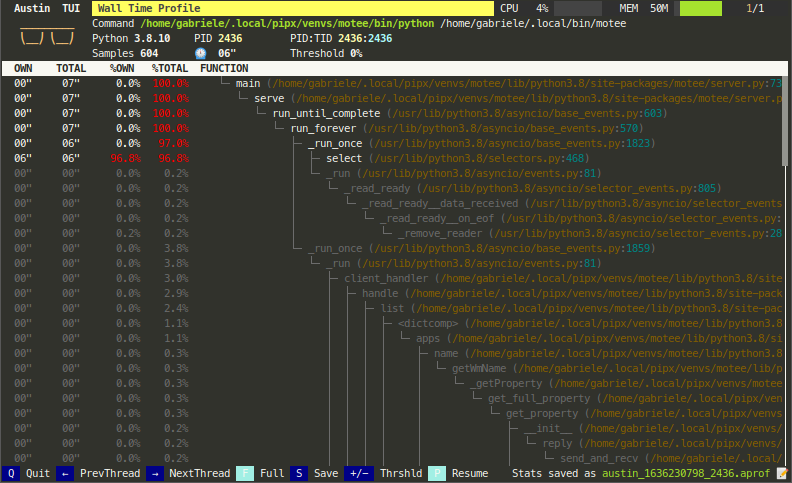
Check out A Survey of Open-Source Python Profilers by Peter Norton for a general overview of Austin.
Keep reading for more tool ideas and examples!
💜
Austin is a free and open-source project. A lot of
effort goes into its development to ensure the best performance and that it
stays up-to-date with the latest Python releases. If you find it useful,
consider sponsoring this
project.
🙏
Installation
Austin is available to install from PyPI and from the major software repositories of the most popular platforms. Check out the latest release page for pre-compiled binaries and installation packages.
On all supported platforms and architectures, Austin can be installed from PyPI
with pip or pipx via the commands
pip install austin-dist
or
pipx install austin-dist
On Linux, it can be installed using autotools or as a snap from the Snap
Store. The latter will automatically perform the
steps of the autotools method with a single command. On distributions derived
from Debian, Austin can be installed from the official repositories with
apt. Anaconda users can install Austin from Conda Forge.
On Windows, Austin can be easily installed from the command line using either Chocolatey or Scoop. Alternatively, you can download the installer from the latest release page.
On macOS, Austin can be easily installed from the command line using Homebrew. Anaconda users can install Austin from Conda Forge.
For any other platforms, compiling Austin from sources is as easy as cloning the repository and running the C compiler. The Releases page has many pre-compiled binaries that are ready to be uncompressed and used.
With autotools
Installing Austin using autotools amounts to the usual ./configure, make
and make install finger gymnastic. The only dependency is the standard C
library. Before proceeding with the steps below, make sure that the autotools
are installed on your system. Refer to your distro's documentation for details
on how to do so.
git clone --depth=1 https://github.com/P403n1x87/austin.git && cd austin
autoreconf --install
./configure
make
make install
NOTE Some Linux distributions, like Manjaro, might require the execution of
automake --add-missingbefore./configure.
Alternatively, sources can be compiled with just a C compiler (see below).
From the Snap Store
Austin can be installed on many major Linux distributions from the Snap Store with the following command
sudo snap install austin --classic
On Debian and Derivatives
On March 30 2019 Austin was accepted into the official Debian repositories and
can therefore be installed with the apt utility.
sudo apt update -y && sudo apt install austin -y
On macOS
Austin can be installed on macOS using Homebrew:
brew install austin
From Chocolatey
To install Austin from Chocolatey, run the following command from the command line or from PowerShell
choco install austin
To upgrade run the following command from the command line or from PowerShell:
choco upgrade austin
From Scoop
To install Austin using Scoop, run the following command from the command line or PowerShell
scoop install austin
To upgrade run the following command from the command line or PowerShell:
scoop update
From Conda Forge
Anaconda users on Linux and macOS can install Austin from Conda Forge with the command
conda install -c conda-forge austin
From Sources without autotools
To install Austin from sources using the GNU C compiler, without autotools,
clone the repository with
git clone --depth=1 https://github.com/P403n1x87/austin.git
On Linux, one can then use the command
gcc -O3 -Os -Wall -pthread src/*.c -o src/austin
whereas on macOS it is enough to run
gcc -O3 -Os -Wall src/*.c -o src/austin
On Windows, the -lpsapi -lntdll -ldbghelp switches are needed
gcc -O3 -Os -Wall -lpsapi -lntdll -ldbghelp src/*.c -o src/austin
Add -DDEBUG if you need a more verbose log. This is useful if you encounter a
bug with Austin and you want to report it here.
Usage
Usage: austin [-CcfgmnP?V] [-x n_sec] [-i n_us] [-o FILE] [-p PID] [-t n_ms]
               [-w PID] command [ARG...]

Austin is a frame stack sampler for CPython that is used to extract profiling
data out of a running Python process (and all its children, if required) that
requires no instrumentation and has practically no impact on the tracee.

Options:
  -C, --children              Attach to child processes.
  -c, --cpu                   Sample on-CPU stacks only.
  -x, --exposure <n_sec>      Sample for n_sec seconds only.
  -f, --full                  Produce the full set of metrics (time +mem -mem).
  -g, --gc                    Sample the garbage collector state.
  -i, --interval <n_us>       Sampling interval in microseconds (default is
                              100). Accepted units: s, ms, us.
  -m, --memory                Profile memory usage.
  -n, --native                Collect native call stacks alongside Python
                              stacks.
  -o, --output <FILE>         Specify an output file for the collected samples.
  -p, --pid <PID>             Attach to the process with the given PID.
  -P, --pipe                  Pipe mode. Use when piping Austin output.
  -t, --timeout <n_ms>        Start up wait time in milliseconds (default is
                              3000). Accepted units: s, ms.
  -w, --where <PID>           Dump the stacks of all the threads within the
                              process with the given PID.
  -?, --help                  Give this help list.
      --usage                 Give a short usage message.
  -V, --version               Print program version.

Report bugs at https://github.com/P403n1x87/austin/issues
Austin generates binary output in the MOJO format. This is a compact binary
representation of the collected data that can be processed by the mojo2austin
tool that comes with the austin-python Python package to produce the more
commonly used collapsed stack format. The MOJO format can also be converted to
the Speedscope JSON format using the austin2speedscope tool that also comes
with the austin-python Python package.
If you prefer command-line tools such as Brendan Gregg's
flamegraph.pl to generate flame graph visualisations, you first
need to convert Austin's MOJO output to collapsed stack format with the
mojo2austin utility from the austin-python package:
pip install austin-python
mojo2austin profile.mojo /dev/stdout | flamegraph.pl > profile.svg
Open profile.svg in a browser to explore the interactive flame graph.
Environment variables
Some behaviour of Austin can be configured via environment variables.
| Variable | Effect |
|---|---|
AUSTIN_NO_LOGGING |
Disables all log messages (since Austin 3.4.0). |
AUSTIN_PAGE_SIZE_CAP |
Cap the page size used to perform remote reads (since Austin 4.0.0). |
Column-level Location Information
Since Python 3.11, code objects carry finer-grained location information at the column level. When using the binary MOJO format, Austin can extract this extra location information when profiling code running with versions of the interpreter that expose this data.
Since Austin 3.5.0.
Memory and Full Metrics
When profiling in memory mode with the -m or --memory switch, the metric
value associated with each stack is the memory delta between samples, measured
in bytes. In full mode (-f or --full switches), each sample will include
both a time and memory metric, plus the information of whether the stack was on
CPU. This is useful if you want to collect wall-time/CPU-time and memory
profiles in a single run.
Multi-process Applications
Austin can be told to profile multi-process applications with the -C or
--children switch. This way Austin will look for new children of the parent
process.
Sub-interpreters
Austin has support for Python applications that make use of sub-interpreters. This means that Austin will sample all the sub-interpreters that are running within each process making up the Python application.
Since Austin 3.6.0.
Thread Names
Austin reports Python threads by the name they have in the threading module
(e.g. MainThread), whenever this can be resolved. Threads that are not known
to the threading module, like those created by native extensions, are
reported by their thread ID.
Since Austin 4.1.0.
Garbage Collector Sampling
Austin can sample the Python garbage collector state. If the -g/--gc option
is passed, Austin will mark each collected sample that was taken while the
garbage collector was collecting. This gives you a measure of how busy the
Python GC is during a run.
Since Austin 3.1.0.
Where?
If you are only interested in what is currently happening inside a Python
process, you can have a quick overview printed on the terminal with the
-w/--where option. This takes the PID of the process whose threads you want to
inspect, e.g.
sudo austin -w `pgrep -f my-running-python-app`
Below is an example of what the output looks like
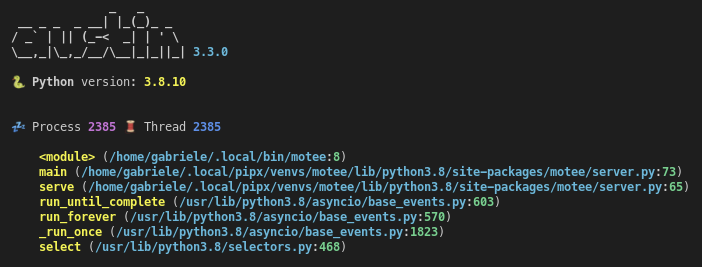
This works with the -C/--children option too. The emojis to the left indicate
whether the thread is active or sleeping and whether the process is a child or
not.
Since Austin 3.3.0.
Asyncio Support
For applications running on CPython 3.14 or later, Austin can also track the
asyncio task graph: each event loop's own tasks, the coroutine chain each
task is currently suspended at or executing, and the await relationships
between tasks.
When profiling, the collected samples are attributed to the task that is running on the sampled thread, and the stacks of the suspended tasks are reported together with the await relationships between tasks. This allows tools like the Austin VS Code extension to reconstruct a task-level view of the application that also accounts for the time tasks spend waiting.
With -w/--where, tasks are rendered as a tree nested under the thread whose
event loop owns them, so you can see at a glance which coroutines each task
is waiting on. Tasks whose owning thread has since terminated are listed
separately as orphaned.
Since Austin 4.1.0.
Sampling Accuracy
Austin can sample stacks very rapidly, guaranteeing high accuracy, as well as allowing to reach very high sampling rates, if required. This makes Austin suitable for profiling applications in production with almost no compromise between accuracy and performance.
Native Frame Stack
If you want observability into the native frame stacks, you can pass the
-n/--native option to collect native call stacks alongside the Python ones,
e.g.
austin -n -i 1ms -o profile.mojo python myscript.py
Native frames are interleaved with the Python frames that they belong to, and are reported with the path of the binary they come from and the name of the function, resolved from the binary's symbol table. In native mode, Austin also samples threads that are not running any Python code, like those created by native extensions, to give a more comprehensive view of what is running within a Python process. The where option also supports native mode.
Native mode is available on Linux (x86_64 and aarch64), macOS and Windows (x86_64), and requires no additional dependencies. On any other platforms or architectures, the option is ignored with a warning.
Since Austin 4.1.0.
The austinp variant
On Linux, the austinp variant of austin provides an alternative native
mode, which also supports architectures other than x86_64 and aarch64, as well
as the sampling of kernel call stacks. It can be obtained by compiling the
source with -DAUSTINP, or from the released binaries.
austinp makes use of ptrace to halt the application and grab a
snapshot of the call stack with libunwind. If you are compiling austinp from
sources make sure that you have the development version of the libunwind
library available on your system, for example on Ubuntu,
sudo apt install libunwind-dev binutils-dev
and compile with
gcc -O3 -Os -Wall -pthread src/*.c -DAUSTINP -lunwind-ptrace -lunwind-generic -lbfd -o src/austinp
then use as per normal. The extra -k/--kernel option is available with
austinp which allows sampling kernel call stacks as well.
The austinp-resolve tool from the austin-python Python package can be used
to resolve the VM addresses to source and line numbers, provided that the
referenced binaries have DWARF debug symbols. Internally, the tool uses
addr2line(1) to determine the source name and line number given an address,
when possible.
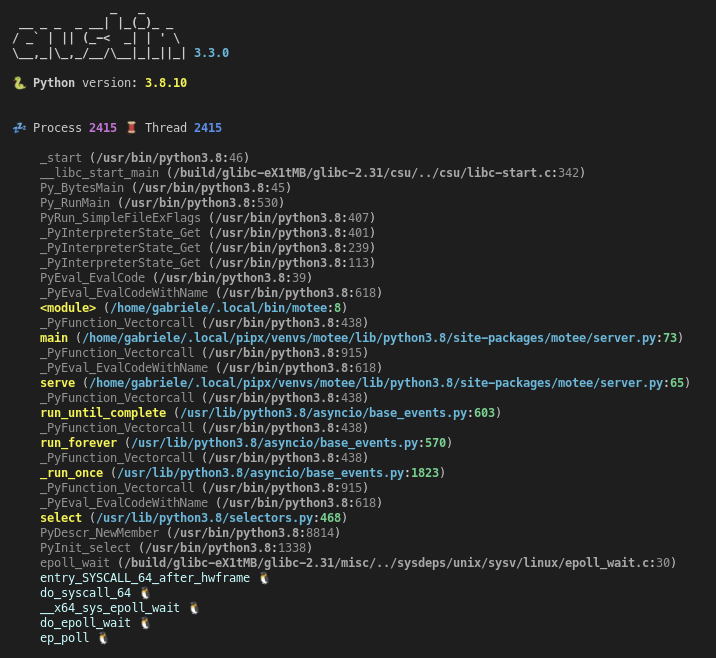
The where option is also available for the austinp variant and will
show both native and Python frames. Highlighting helps tell frames apart. The
-k option outputs Linux kernel frames too, as shown in this example
Logging
Austin uses syslog on Linux and macOS, and %TEMP%\austin.log on Windows
for log messages, so make sure to watch these to get execution details and
statistics. Bad frames are output together with the other frames. The error
rate depends on the workload: it is generally low, but it can be higher for
applications whose stacks change very rapidly, e.g. with many short calls or
deep recursion.
Logging can be disabled using environment variables.
Cheat sheet
All the above Austin options and arguments are summarised in a cheat sheet that you can find in the doc folder in either the SVG, PDF or PNG format

Compatibility
Austin supports Python 3.10 through 3.15, including free-threaded builds, and has been tested on the following platforms and architectures
|
|
|
|
|---|---|---|---|
| x86_64 | ✓ | ✓ | ✓ |
| i686 | ✓ | ||
| armv7 | ✓ | ||
| arm64 | ✓ | ✓ | |
| ppc64le | ✓ |
If you are looking for support for older versions of CPython, the following table summarises the compatibility of Austin with CPython versions
| CPython Versions | Austin Version |
|---|---|
| 2.3-2.7, 3.3-3.11 | 3.5 |
| 3.8-3.13 | 3.7 |
| 3.9-3.14 | 4.0 |
| 3.10-3.15, (incl. free-threaded) | 4.1 |
Because of platform-specific details, Austin usage may vary slightly. Below are further compatibility details to be aware of.
On Linux
Austin requires the CAP_SYS_PTRACE capability to attach to an external
process. This means that you will have to either use sudo when attaching to
a running Python process or grant the CAP_SYS_PTRACE capability to the Austin
binary with, e.g.
sudo setcap cap_sys_ptrace+ep `which austin`
To use Austin with Docker, the --cap-add SYS_PTRACE option needs to be passed
when starting a container.
On MacOS
Due to the System Integrity Protection, introduced in MacOS with El
Capitan, and the Hardened Runtime, introduced in Mojave,
Austin cannot profile Python processes that use an executable located in the
/bin folder, or code-signed, even with sudo. This is the case for the
system-provided version of Python, and the one installed with the official
installers from python.org. Other installation methods,
like pyenv or Anaconda or
Homebrew are known to work with
Austin, out of the box.
To use Austin with Python from the official installer, you could remove the signature from the binaries with
codesign --remove-signature /Library/Frameworks/Python.framework/Versions/<M.m>/bin/python3
codesign --remove-signature /Library/Frameworks/Python.framework/Versions/<M.m>/Resources/Python.app/Contents/MacOS/Python
Alternatively, you could self-sign the Austin binary with the Debugging Tool Entitlement, as done for debugging tools like GDB. However, this method has not been tested.
Austin requires the use of
sudoto work on MacOS. To avoid having to type the password every time you use Austin, consider adding a rule to thesudoersfile, e.g.yourusername ALL = (root) NOPASSWD: /usr/local/bin/austin
Why Austin
When there already are similar tools out there, it's normal to wonder why one should be interested in yet another one. So here is a list of features that currently distinguish Austin.
-
Written in pure C Austin is written in pure C code. There are no dependencies on third-party libraries except for the standard C library and the API provided by the Operating System.
-
Just a sampler Austin is just a frame stack sampler. It looks into a running Python application at regular intervals of time and dumps whatever frame stack it finds. The samples can then be analysed at a later time so that Austin can sample at rates higher than other non-C alternatives that perform some aggregations at run-time.
-
Compact output, powerful tools Austin uses the compact MOJO binary format, which can be easily parsed with the
austin-pythonpackage, or converted to other popular formats. You can then go and build your own tool to analyse Austin's output. You could even make a player that replays the application execution in slow motion, so that you can see what has happened in temporal order. -
Small size Austin compiles to a single binary executable of just a bunch of KB.
-
Easy to maintain Occasionally, the Python C API changes and Austin will need to be adjusted to new releases. However, given that Austin, like CPython, is written in C, implementing the new changes is rather straight-forward.
Examples
To profile a Python script, run Austin with the command
austin -o profile.mojo python myscript.py
To profile a running Python application, attach Austin to it with the
-p/--pid option, e.g.
austin -o profile.mojo -p <pid>
where <pid> is the process ID of the running Python application you want to
profile. If you also want to profile the child processes of the target
application, add the -C/--children option to the command line:
austin -o profile.mojo -Cp <pid>
For example, to profile an Apache2 WSGI application, one can attach Austin to the web server with
austin -Cp `pgrep apache2 | head -n 1` > profile.mojo
Any child processes will be automatically detected as they are created and Austin will sample them too.
IDE Extensions
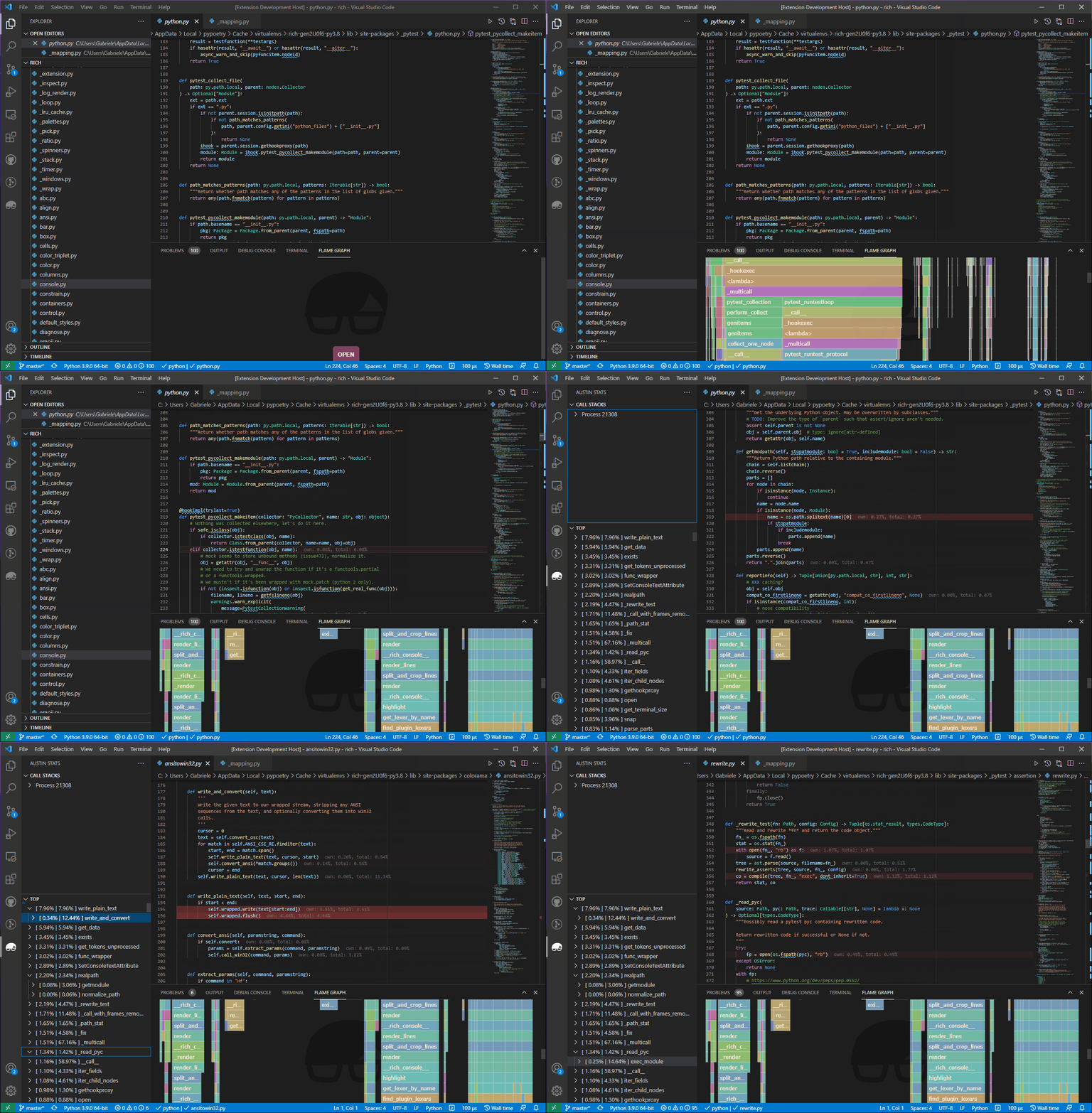
It is easy to write your own extension for your favourite text editor. This, for example, is a demo of a Visual Studio Code extension that highlights the most hit lines of code straight into the editor
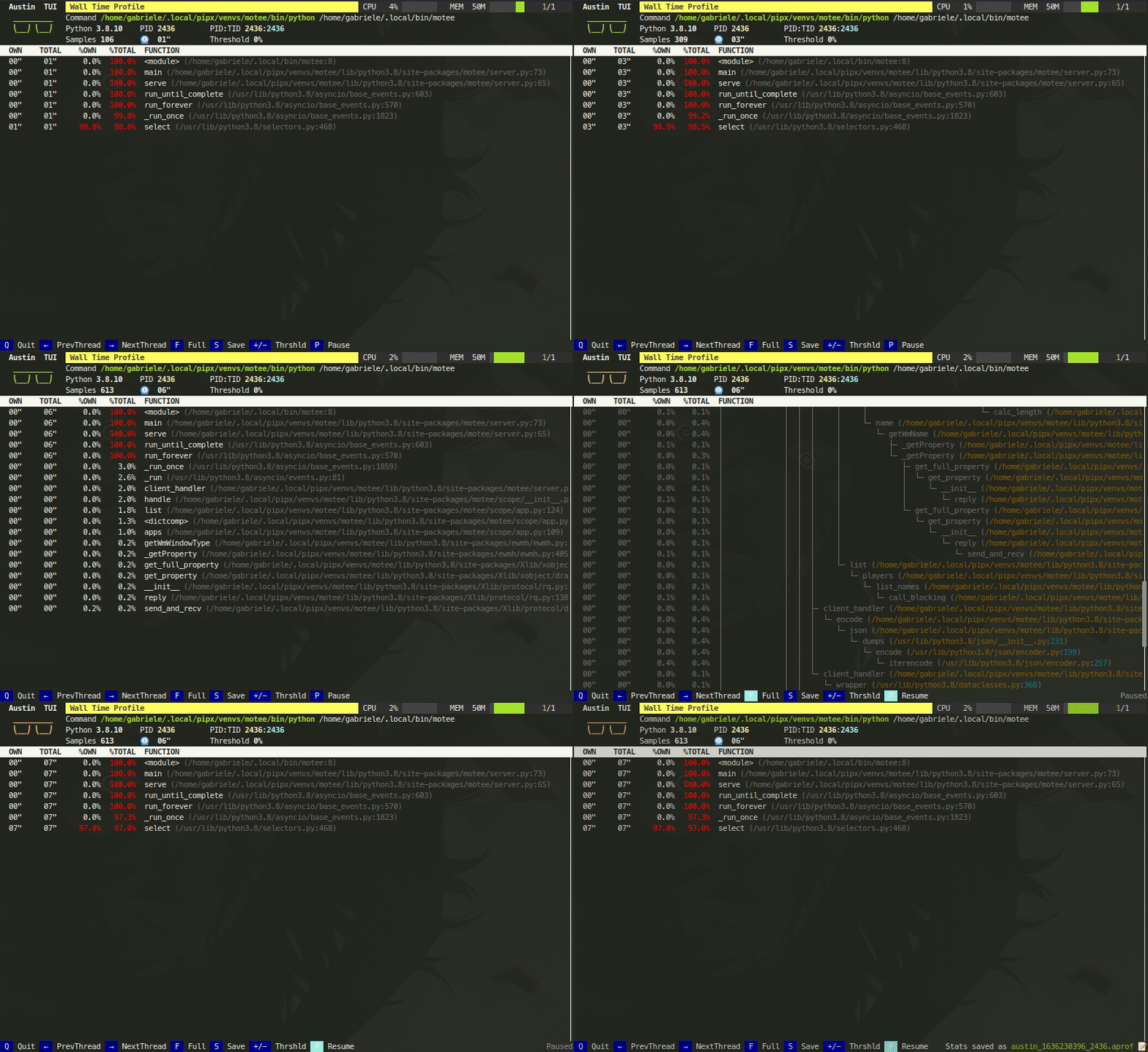
Austin TUI
The Austin TUI is a text-based user interface for Austin that gives you a top-like view of what is currently running inside a Python application. It is most useful for scripts that have long-running procedures as you can see where execution is at without tracing instructions in your code. You can also save the collected data from within the TUI and feed it to Flame Graph for visualisation, or convert it to the pprof format.
If you want to give it a go you can install it using pip with
pip install austin-tui --upgrade
and run it with
austin-tui [OPTION...] command [ARG...]
with the same command line as Austin. Please note that the austin binary
should be available from within the PATH environment variable in order for the
TUI to work.
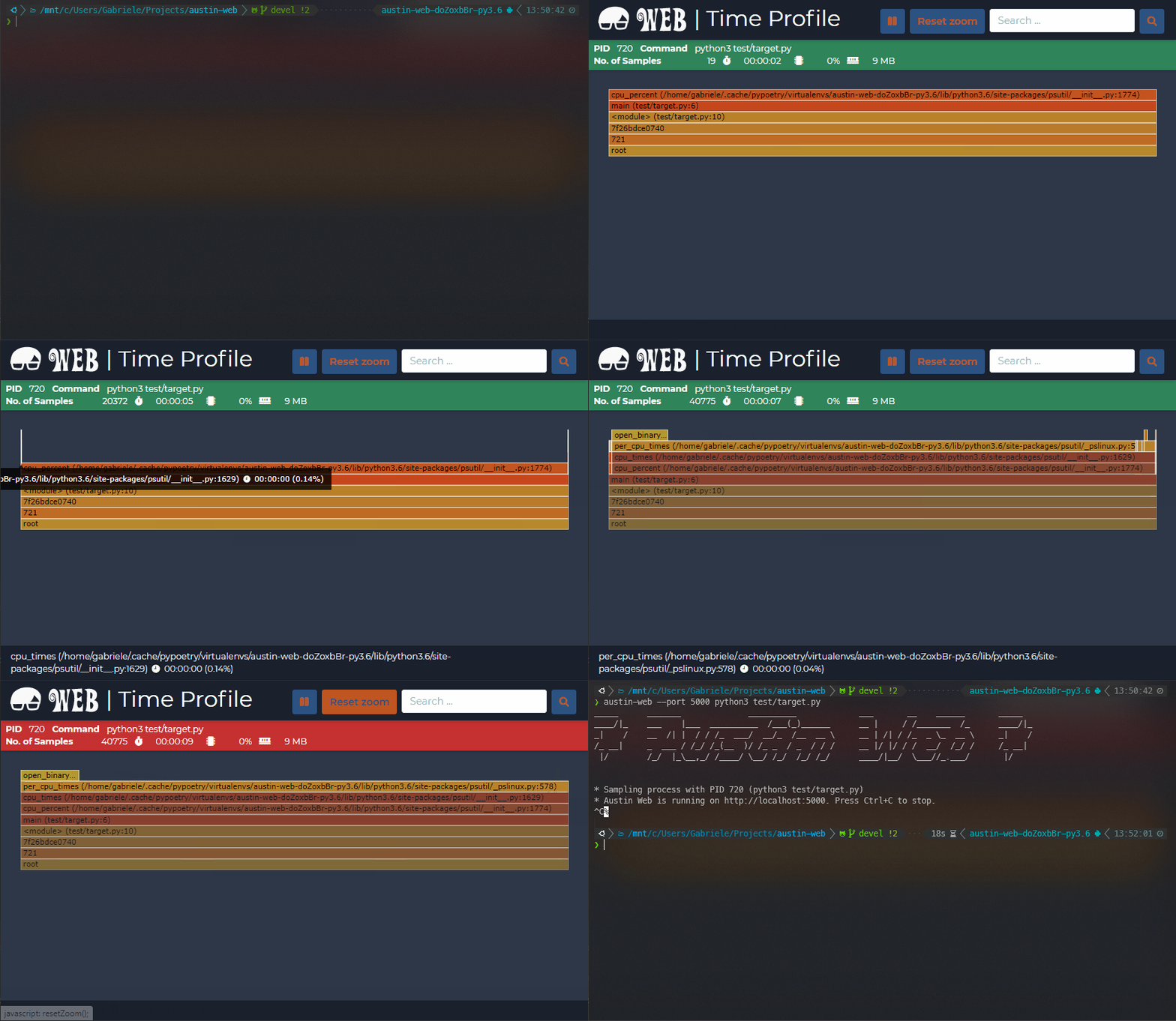
Austin Web
Austin Web is a web application that wraps around Austin. At its core, Austin
Web is based on d3-flame-graph to display a live flame graph in the browser,
that refreshes every 3 seconds with newly collected samples. Austin Web can also
be used for remote profiling by setting the --host and --port options.
If you want to give it a go you can install it using pip with
pip install austin-web --upgrade
and run it with
austin-web [OPTION...] command [ARG...]
with the same command line as Austin. This starts a simple HTTP server that
serves on localhost by default. When no explicit port is given, Austin Web
will use an ephemeral one.
Please note that the austin binary should be available from within the PATH
environment variable in order for Austin Web to work.
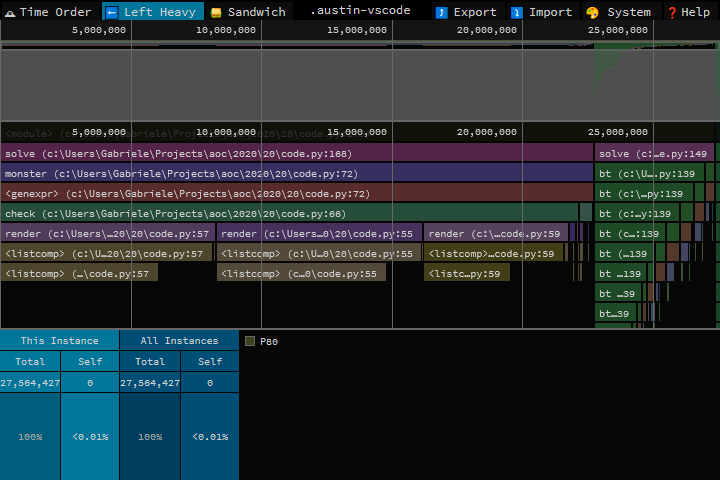
Speedscope
Austin's MOJO output can be converted to the Speedscope JSON format with the
austin2speedscope utility that comes with the austin-python package.
If you want to give it a go you can install it using pip with
pip install austin-python --upgrade
and run it with
austin2speedscope [-h] [--indent INDENT] [-V] input output
where input is a file containing the output from Austin and output is the
name of the JSON file to use to save the result of the conversion, ready to be
used on Speedscope.
Google pprof
Austin's format can also be converted to the Google pprof format using the
austin2pprof utility that comes with austin-python. If you want to give it
a go you can install it using pip with
pip install austin-python --upgrade
and run it with
austin2pprof [-h] [-V] input output
where input is a file containing the output from Austin and output is the
name of the protobuf file to use to save the result of the conversion, ready to
be used with Google's pprof tools.
Contribute
If you like Austin and you find it useful, there are ways for you to contribute.
If you want to help with the development, then have a look at the open issues and have a look at the contributing guidelines before you open a pull request.
You can also contribute to the development of the Austin by becoming a sponsor and/or by buying me a coffee on BMC or by chipping in a few pennies on PayPal.Me.
1 maintainer

Metadata
1 maintainer
Release files for austin-dist 4.1.0
For a detailed explanation of source distributions (sdists) and built distributions (wheels), please see the package formats documentation.
Built distributions (wheels)
Total release size: 7.6 MB
Release files / austin_dist-4.1.0-py3.cp313t.cp314t-none-win_amd64.whl
| Download URL | austin_dist-4.1.0-py3.cp313t.cp314t-none-win_amd64.whl |
|---|---|
| Size | 80.8 kB |
| Tags | CPython 3.13 free-threading CPython 3.14 free-threading Python 3 Windows x86-64 |
|
SHA-256 checksum How to use checksums |
62dbabfef5471dbfdf26443c2775f74fc9830f14e29a2a7de9d0e718f35ef5a5
|
|
BLAKE2b-256 checksum How to use checksums |
0bdc8f463efbbb8562f44a2d2b1b619063e30fd0a1a52640ac722acc94c52953
|
| Upload date | |
|
Uploaded using Trusted Publishing? What is trusted publishing? |
No |
| Uploaded via |
twine/6.2.0 CPython/3.13.16
|
Release files / austin_dist-4.1.0-py3.cp313t.cp314t-none-manylinux_2_39_x86_64.whl
| Download URL | austin_dist-4.1.0-py3.cp313t.cp314t-none-manylinux_2_39_x86_64.whl |
|---|---|
| Size | 1.1 MB |
| Tags | CPython 3.13 free-threading CPython 3.14 free-threading Linux glibc 2.39+ x86-64 Python 3 |
|
SHA-256 checksum How to use checksums |
7e7fa753779a8f3cbc175105c55364636f9b35e6054ced57ef52223e1176c3e6
|
|
BLAKE2b-256 checksum How to use checksums |
e2f8f67e054573f0116d66a8ea2816a6599f29fcda2d328adaa3671c65b5d56e
|
| Upload date | |
|
Uploaded using Trusted Publishing? What is trusted publishing? |
No |
| Uploaded via |
twine/6.2.0 CPython/3.13.16
|
Release files / austin_dist-4.1.0-py3.cp313t.cp314t-none-manylinux_2_39_aarch64.whl
| Download URL | austin_dist-4.1.0-py3.cp313t.cp314t-none-manylinux_2_39_aarch64.whl |
|---|---|
| Size | 1.1 MB |
| Tags | CPython 3.13 free-threading CPython 3.14 free-threading Linux glibc 2.39+ ARM64 Python 3 |
|
SHA-256 checksum How to use checksums |
7e86848231f91e0fb0385488c987660e6e27dbd20df590500b6600b981e437c6
|
|
BLAKE2b-256 checksum How to use checksums |
a5f6dd5abff56f39b3ec7639a34efc5ca34194f5c42dc7953cf39104c90bf822
|
| Upload date | |
|
Uploaded using Trusted Publishing? What is trusted publishing? |
No |
| Uploaded via |
twine/6.2.0 CPython/3.13.16
|
Release files / austin_dist-4.1.0-py3.cp313t.cp314t-none-manylinux_2_28_x86_64.whl
| Download URL | austin_dist-4.1.0-py3.cp313t.cp314t-none-manylinux_2_28_x86_64.whl |
|---|---|
| Size | 769.9 kB |
| Tags | CPython 3.13 free-threading CPython 3.14 free-threading Linux glibc 2.28+ x86-64 Python 3 |
|
SHA-256 checksum How to use checksums |
3234ed8afee91f58a663d4faffec6d4bff539e9a0c271d4f632e172e901cc831
|
|
BLAKE2b-256 checksum How to use checksums |
f8b5c839d2fa6a5d12316ecc7e75d97a913980d2b63d62b99a0945d19aac98ad
|
| Upload date | |
|
Uploaded using Trusted Publishing? What is trusted publishing? |
No |
| Uploaded via |
twine/6.2.0 CPython/3.13.16
|
Release files / austin_dist-4.1.0-py3.cp313t.cp314t-none-manylinux_2_28_aarch64.whl
| Download URL | austin_dist-4.1.0-py3.cp313t.cp314t-none-manylinux_2_28_aarch64.whl |
|---|---|
| Size | 941.3 kB |
| Tags | CPython 3.13 free-threading CPython 3.14 free-threading Linux glibc 2.28+ ARM64 Python 3 |
|
SHA-256 checksum How to use checksums |
fc4598ae65cf2f40431650a04a54cdca15c7c9f7fce4f2236e8ad6b207694287
|
|
BLAKE2b-256 checksum How to use checksums |
ff0122836d05d7f0cbe95399b36892b4dd4ee79267d8ff2ebcd197da209819a4
|
| Upload date | |
|
Uploaded using Trusted Publishing? What is trusted publishing? |
No |
| Uploaded via |
twine/6.2.0 CPython/3.13.16
|
Release files / austin_dist-4.1.0-py3.cp313t.cp314t-none-manylinux_2_17_x86_64.manylinux2014_x86_64.whl
| Download URL | austin_dist-4.1.0-py3.cp313t.cp314t-none-manylinux_2_17_x86_64.manylinux2014_x86_64.whl |
|---|---|
| Size | 693.5 kB |
| Tags | CPython 3.13 free-threading CPython 3.14 free-threading Linux glibc 2.17+ x86-64 Python 3 |
|
SHA-256 checksum How to use checksums |
1d5813edfdff8ce6e65ff512c0ed8b6eecd7e8c0f73edf9e38f34a1737f8715b
|
|
BLAKE2b-256 checksum How to use checksums |
69192acb640b8b2a5b462fb6cf062ad87ae9539ad9afca5663214b1f2e8a5d00
|
| Upload date | |
|
Uploaded using Trusted Publishing? What is trusted publishing? |
No |
| Uploaded via |
twine/6.2.0 CPython/3.13.17
|
Release files / austin_dist-4.1.0-py3.cp313t.cp314t-none-manylinux_2_17_aarch64.manylinux2014_aarch64.whl
| Download URL | austin_dist-4.1.0-py3.cp313t.cp314t-none-manylinux_2_17_aarch64.manylinux2014_aarch64.whl |
|---|---|
| Size | 809.4 kB |
| Tags | CPython 3.13 free-threading CPython 3.14 free-threading Linux glibc 2.17+ ARM64 Python 3 |
|
SHA-256 checksum How to use checksums |
86713e400c90c5f1de5f69ce6fc41afd03c751835d2434371ab097f0c7d38509
|
|
BLAKE2b-256 checksum How to use checksums |
45dbcb7cbe092f939add47660a7323ea803fb72cd8d7b0277f820c25b454fbd5
|
| Upload date | |
|
Uploaded using Trusted Publishing? What is trusted publishing? |
No |
| Uploaded via |
twine/6.2.0 CPython/3.13.16
|
Release files / austin_dist-4.1.0-py3.cp313t.cp314t-none-macosx_11_0_x86_64.whl
| Download URL | austin_dist-4.1.0-py3.cp313t.cp314t-none-macosx_11_0_x86_64.whl |
|---|---|
| Size | 72.7 kB |
| Tags | CPython 3.13 free-threading CPython 3.14 free-threading Python 3 macOS 11.0+ x86-64 |
|
SHA-256 checksum How to use checksums |
fbd5e85d98ba9248779581e9220e170fa7cd6d978e84395b30121965df75e7c0
|
|
BLAKE2b-256 checksum How to use checksums |
227838a5aaf09df7bfe0f0aecf072b9ae3e9481f88fab98bdc6a2f95902fbbdc
|
| Upload date | |
|
Uploaded using Trusted Publishing? What is trusted publishing? |
No |
| Uploaded via |
twine/6.2.0 CPython/3.13.16
|
Release files / austin_dist-4.1.0-py3.cp313t.cp314t-none-macosx_11_0_arm64.whl
| Download URL | austin_dist-4.1.0-py3.cp313t.cp314t-none-macosx_11_0_arm64.whl |
|---|---|
| Size | 70.0 kB |
| Tags | CPython 3.13 free-threading CPython 3.14 free-threading Python 3 macOS 11.0+ ARM64 |
|
SHA-256 checksum How to use checksums |
8ed2372c7f87ea8977ff2608b1cbd9da7e7dddabe5c4ede71f7624e4f4d69aff
|
|
BLAKE2b-256 checksum How to use checksums |
f0858a0aec753cd09fb325dafd2319aff5573e11e92e529052b9b0de698a4c99
|
| Upload date | |
|
Uploaded using Trusted Publishing? What is trusted publishing? |
No |
| Uploaded via |
twine/6.2.0 CPython/3.13.16
|
Release files / austin_dist-4.1.0-py3-none-musllinux_1_2_x86_64.whl
| Download URL | austin_dist-4.1.0-py3-none-musllinux_1_2_x86_64.whl |
|---|---|
| Size | 74.4 kB |
| Tags | Linux musl 1.2+ x86-64 Python 3 |
|
SHA-256 checksum How to use checksums |
b7cfcaf83f18344a5b5a61d2591a6583e166367385807f8ecd5f9eac44f06ce4
|
|
BLAKE2b-256 checksum How to use checksums |
3b6ca062a9563bfcd16d5923e9033473572bb5d8b89f4ee106e0374c5cfde1fe
|
| Upload date | |
|
Uploaded using Trusted Publishing? What is trusted publishing? |
No |
| Uploaded via |
twine/6.2.0 CPython/3.13.16
|
Release files / austin_dist-4.1.0-py3-none-musllinux_1_2_ppc64le.whl
| Download URL | austin_dist-4.1.0-py3-none-musllinux_1_2_ppc64le.whl |
|---|---|
| Size | 71.0 kB |
| Tags | Linux musl 1.2+ PowerPC 64-le Python 3 |
|
SHA-256 checksum How to use checksums |
1cc526f0e77c8a427a430a792009d079e8b8fbda12b872ac3b2b30688300f7c9
|
|
BLAKE2b-256 checksum How to use checksums |
58d7c617e0522dd1178f196af2dfdb9f35aca1278ef7c29ecb67d5cd025c563c
|
| Upload date | |
|
Uploaded using Trusted Publishing? What is trusted publishing? |
No |
| Uploaded via |
twine/6.2.0 CPython/3.10.22
|
Release files / austin_dist-4.1.0-py3-none-musllinux_1_2_armv7l.whl
| Download URL | austin_dist-4.1.0-py3-none-musllinux_1_2_armv7l.whl |
|---|---|
| Size | 69.2 kB |
| Tags | Linux musl 1.2+ ARMv7l Python 3 |
|
SHA-256 checksum How to use checksums |
5c5095752dfe468f345be96c17e58c2c2b55d5975047e1da4b499f092c757b3c
|
|
BLAKE2b-256 checksum How to use checksums |
e3ca662e4f121f0b88c3bdf095e5f74eaf798fd5df93728236e139bc3660f135
|
| Upload date | |
|
Uploaded using Trusted Publishing? What is trusted publishing? |
No |
| Uploaded via |
twine/6.2.0 CPython/3.10.22
|
Release files / austin_dist-4.1.0-py3-none-musllinux_1_2_aarch64.whl
| Download URL | austin_dist-4.1.0-py3-none-musllinux_1_2_aarch64.whl |
|---|---|
| Size | 75.1 kB |
| Tags | Linux musl 1.2+ ARM64 Python 3 |
|
SHA-256 checksum How to use checksums |
26654bdf37fa335dc9b0683dcd0e79fa38741070b1f78d07d4a75ac90570cfd6
|
|
BLAKE2b-256 checksum How to use checksums |
a82f6b0646f73fb5d8fba4d5e3fa84f2bf5cdda1d333d8057d6521c16b70cbf3
|
| Upload date | |
|
Uploaded using Trusted Publishing? What is trusted publishing? |
No |
| Uploaded via |
twine/6.2.0 CPython/3.13.16
|
Release files / austin_dist-4.1.0-py3-none-manylinux_2_31_armv7l.whl
| Download URL | austin_dist-4.1.0-py3-none-manylinux_2_31_armv7l.whl |
|---|---|
| Size | 571.6 kB |
| Tags | Linux glibc 2.31+ ARMv7l Python 3 |
|
SHA-256 checksum How to use checksums |
b929781af92c1820f464133ef23766a2958b364767ceb7c69ad8790a198b8824
|
|
BLAKE2b-256 checksum How to use checksums |
528100b922a0738999c71598709390bb4e9c5603163eddd5e2651cb1eed58561
|
| Upload date | |
|
Uploaded using Trusted Publishing? What is trusted publishing? |
No |
| Uploaded via |
twine/6.2.0 CPython/3.10.22
|
Release files / austin_dist-4.1.0-py3-none-manylinux_2_28_ppc64le.whl
| Download URL | austin_dist-4.1.0-py3-none-manylinux_2_28_ppc64le.whl |
|---|---|
| Size | 1.2 MB |
| Tags | Linux glibc 2.28+ PowerPC 64-le Python 3 |
|
SHA-256 checksum How to use checksums |
158f19a721fad3e9451c25c2e5d3443ef675e65fef52ea9ff7002dc2f5f60eda
|
|
BLAKE2b-256 checksum How to use checksums |
a68afd9b99e772dd7c61540d8eef3dcb44059ad2bdee102bb0b49c504e688f32
|
| Upload date | |
|
Uploaded using Trusted Publishing? What is trusted publishing? |
No |
| Uploaded via |
twine/6.2.0 CPython/3.10.22
|
Security for austin-dist 4.1.0
Provenance
Provenance describes where a file came from. On PyPI, provenance is shared via attestations, which provide a verifiable record of the build or publishing details. View details, limitations and caveats.
No provenance found
None of the files in this release were uploaded with provenance metadata.
A note on package security
PyPI is a repository for distributing packages, not a service for auditing them. While third-party security researchers and our staff do their best to detect and remove malicious packages, PyPI cannot guarantee the quality, security or suitability of any given package.
To learn more about protecting yourself from malicious actors, visit our package security documentation.














