
My identity card copy
Easily watermark and hide information in copies of your (german) identity card!
🇩🇪 German language information is below.
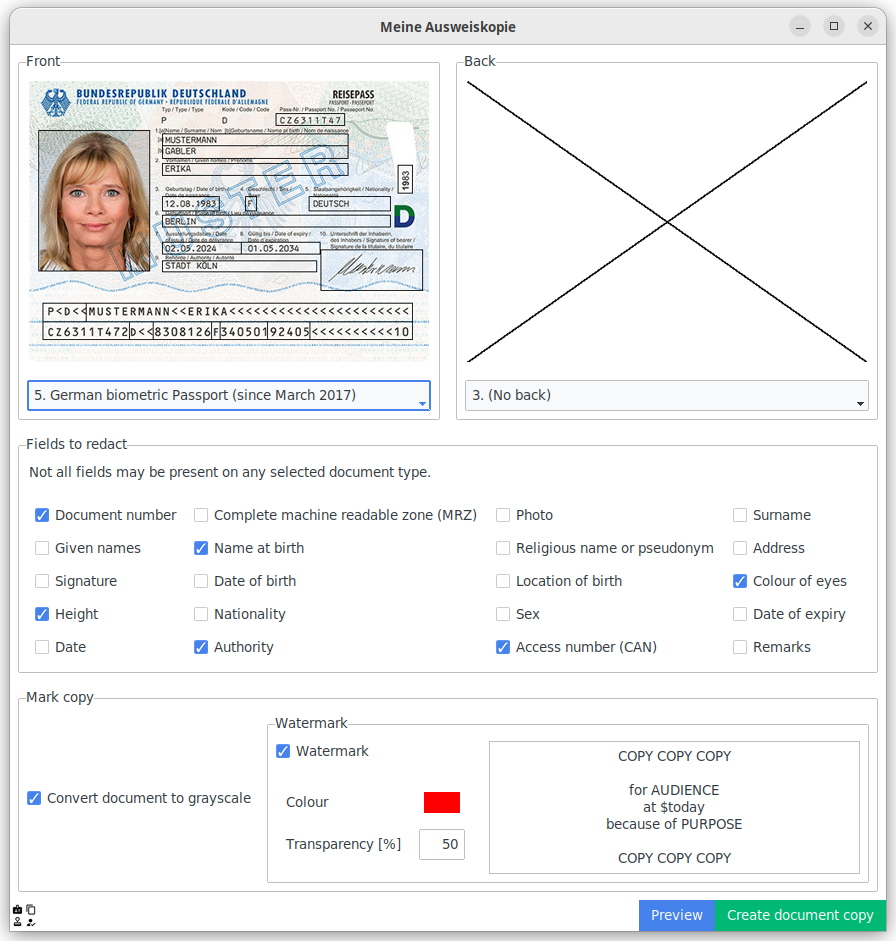
| Before | After |
|---|---|
 |
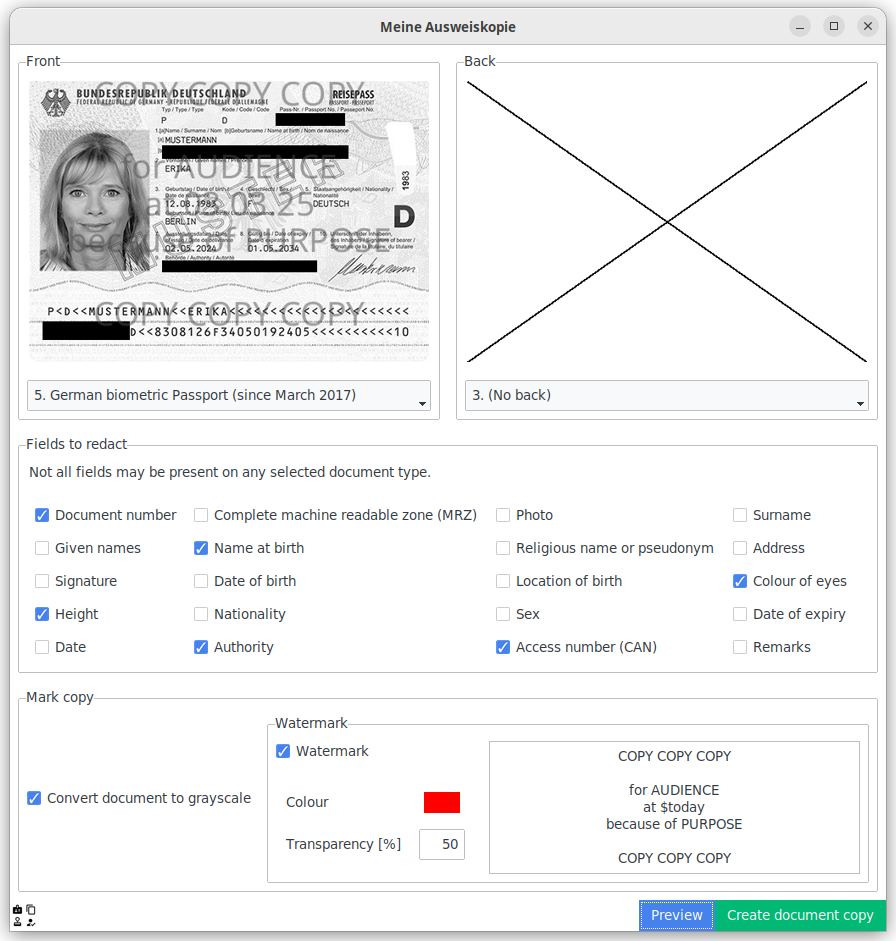 |
This tool allows watermarking copies of german identity documents. You can also blacken information your recipient does not need (like the document number or CAN).
Currently, this tool supports the following identity documents:
- German identity cards (Personalausweis):
- Current version with EU and biometric icon (issued since the 2nd August 2021)
- Previous version with a dedicated field for the name at birth (issued from 19th December 2019 to 1st August 2021)
- Previous version without a dedicated field for the name at birth (issued until 19th December 2019)
- Temporary German identity cards (Vorläufiger Personalausweis) issued on paper
- Regular biometric German passports
Installation
Select the most suitable installation option for you below.
Flatpak for Linux
On Linux, you can install this application independent of your distribution with flatpak. Follow the initial setup guide if you haven't installed flatpak yet.
You can install it via the command line:
flatpak install in.varb.Ausweiskopie
Afterwards, you can run it with:
flatpak run in.varb.Ausweiskopie
Alternatively, visit the store page for further details:

Binaries on GitHub Releases for Windows
You can download the latest Windows binaries from the releases page. The binaries work without installation.
From PyPI

Install with pip:
pip install ausweiskopie
You can now run it with python -m ausweiskopie.
Your Python installation must have the tkinter.
Optional features:
- Modern theme: This application will make use of ttkbootstrap if available. Just run
pip install ausweiskopie[modern] - XDG Desktop Portals (native file open/save-as dialogs on Linux): If your desktop manager provides XDG portals, just install
pip install ausweiskopie[portals]. - Drag-and-Drop: If your Tk/Tcl environment has the
tkdndextension, Drag-and-drop support is automatically enabled.
Meine Ausweiskopie
Ausweiskopien schwärzen und einfach kenntlich machen.
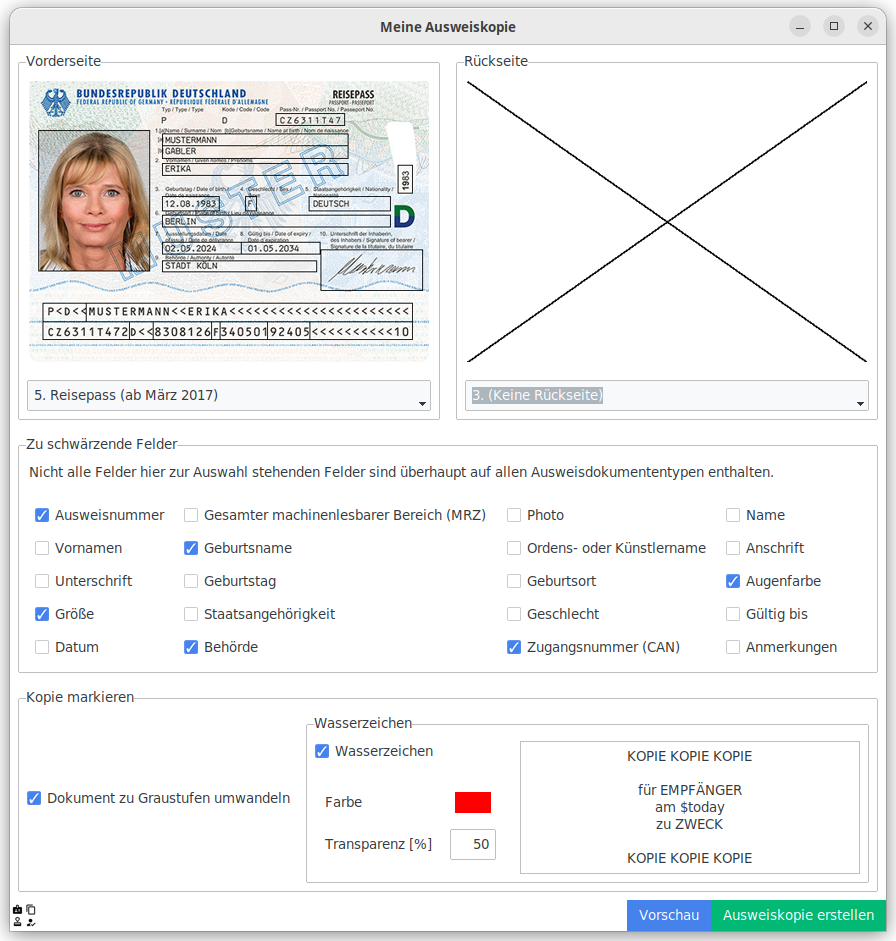
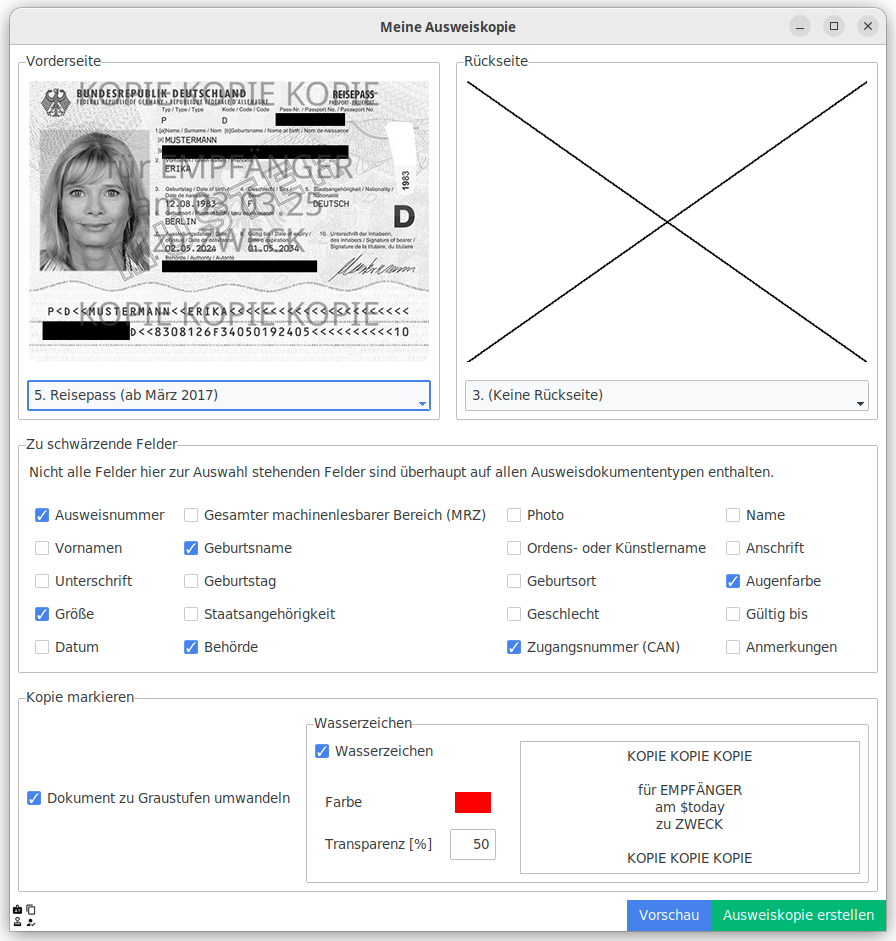
| Vorher | Nacher |
|---|---|
 |
 |
Nach § 20 PAuswG gilt:
(2) Der Ausweis darf nur vom Ausweisinhaber oder von anderen Personen mit Zustimmung des Ausweisinhabers in der Weise abgelichtet werden, dass die Ablichtung eindeutig und dauerhaft als Kopie erkennbar ist. Andere Personen als der Ausweisinhaber dürfen die Kopie nicht an Dritte weitergeben.
Dieses Werkzeug ermöglicht es eine Ausweiskopie als Kopie und eindeutigem Wasserzeichen zu kennzeichnen. Für den Adressaten unwichtige Daten (z. B. die CAN oder die Ausweisnummer) können geschwärzt werden.
Folgende Ausweistypen werden unterstützt:
- Vorläufiger Personalausweis
- Neuer Personalausweis:
- Aktuelle Fassung ab 2. August 2021 (mit EU-Logo und Biometriesymbol auf der Vorderseite)
- Neuer Personalausweis mit gekennzeichnetem Geburtsnamen (ausgestellt vom 19. Dezember 2019 bis 1. August 2021)
- Neuer Personalausweis (ursprüngliche Fassung)
- Deutscher Reisepass (in Fassung ab 2017)
Installation
Flatpak für Linux
Unter Linux kann die Anwendung unabhängig von der Linuxdistribution mittels Flatpak installiert werden. Sollte Flatpak noch nicht installiert sein, folge der Einrichtungsanleitung.
Danach kann "Meine Ausweiskopie" mittels Kommandozeile installiert werden:
flatpak install in.varb.Ausweiskopie
Nach der Installation kann sie wie folgt ausgeführt werden:
flatpak run in.varb.Ausweiskopie
Für weitere Details besuche die Marktplatzseite:

Windows-Dateien unter den GitHub Releases
Die neusten Pakete findest du unter Releases. Du kannst die Anwendung direkt ohne Installation ausführen.
Von PyPI
Du kannst die Anwendung auch mittels pip installieren:
pip install ausweiskopie
Deine Python-Installation muss tkinter installiert haben.
Optionale-Features:
- Modernes Look-and-Feel: Mittels ttkbootstrap kann der Anwendung ein modernes Aussehen übergestülpt werden, zur Installation
pip install ausweiskopie[modern]ausführen. - XDK Desktop Portals (Natives Datei-Öffenen-/Speichern-Unter unter Linux): Die meisten Desktop-Umgebungen stellen diese mittlerweile bereit. Zur Installation
pip install ausweiskopie[portals]durchführen. - Drag-and-Drop: Wenn
tkdndin deiner Tk/Tcl-Installation vorhanden ist, funktioniert Drag-und-Drop von Bildern.
1 maintainer

Download files
Download the file for your platform. If you're not sure which to choose, learn more about installing packages.
Source Distribution
Built Distribution
Filter files by name, interpreter, ABI, and platform.
If you're not sure about the file name format, learn more about wheel file names.
Copy a direct link to the current filters
File details
Details for the file ausweiskopie-0.1.4.tar.gz.
File metadata
- Download URL: ausweiskopie-0.1.4.tar.gz
- Upload date:
- Size: 5.8 MB
- Tags: Source
- Uploaded using Trusted Publishing? Yes
- Uploaded via:
twine/6.1.0 CPython/3.12.9
File hashes
| Algorithm | Hash digest | |
|---|---|---|
| SHA256 |
9d0df60231476a5cdb4641424029a514e8da0222684b3c9323762f87a226adb2
|
|
| MD5 |
ebe60c8d13a6dbc4f12ba0e4460db1b1
|
|
| BLAKE2b-256 |
7aaa9a9b40b9f3fe12f89bc34a08492fffbac63980fe9bc0979dc3bf24cdafa1
|
Provenance
The following attestation bundles were made for ausweiskopie-0.1.4.tar.gz:
Publisher:
publish-to-test-pypi.yml on Varbin/ausweiskopie
-
Statement:
-
Statement type:
https://in-toto.io/Statement/v1 -
Predicate type:
https://docs.pypi.org/attestations/publish/v1 -
Subject name:
ausweiskopie-0.1.4.tar.gz -
Subject digest:
9d0df60231476a5cdb4641424029a514e8da0222684b3c9323762f87a226adb2 - Sigstore transparency entry: 181836004
- Sigstore integration time:
-
Permalink:
Varbin/ausweiskopie@8ad75809c8c2328494cf491927449fb840477968 -
Branch / Tag:
refs/tags/v0.1.4 - Owner: https://github.com/Varbin
-
Access:
public
-
Token Issuer:
https://token.actions.githubusercontent.com -
Runner Environment:
github-hosted -
Publication workflow:
publish-to-test-pypi.yml@8ad75809c8c2328494cf491927449fb840477968 -
Trigger Event:
push
-
Statement type:
File details
Details for the file ausweiskopie-0.1.4-py3-none-any.whl.
File metadata
- Download URL: ausweiskopie-0.1.4-py3-none-any.whl
- Upload date:
- Size: 4.5 MB
- Tags: Python 3
- Uploaded using Trusted Publishing? Yes
- Uploaded via:
twine/6.1.0 CPython/3.12.9
File hashes
| Algorithm | Hash digest | |
|---|---|---|
| SHA256 |
f2465bc60cd72010b928e26c252c534e1c3b16d7014d48e0ce78d215ff98d2d4
|
|
| MD5 |
b59a99b3c6cce6a4920270b29e01f705
|
|
| BLAKE2b-256 |
0c5e959a5135386c22e528d3f44793e2a77ba8abd94ac7fc4cdb7972620036c2
|
Provenance
The following attestation bundles were made for ausweiskopie-0.1.4-py3-none-any.whl:
Publisher:
publish-to-test-pypi.yml on Varbin/ausweiskopie
-
Statement:
-
Statement type:
https://in-toto.io/Statement/v1 -
Predicate type:
https://docs.pypi.org/attestations/publish/v1 -
Subject name:
ausweiskopie-0.1.4-py3-none-any.whl -
Subject digest:
f2465bc60cd72010b928e26c252c534e1c3b16d7014d48e0ce78d215ff98d2d4 - Sigstore transparency entry: 181836010
- Sigstore integration time:
-
Permalink:
Varbin/ausweiskopie@8ad75809c8c2328494cf491927449fb840477968 -
Branch / Tag:
refs/tags/v0.1.4 - Owner: https://github.com/Varbin
-
Access:
public
-
Token Issuer:
https://token.actions.githubusercontent.com -
Runner Environment:
github-hosted -
Publication workflow:
publish-to-test-pypi.yml@8ad75809c8c2328494cf491927449fb840477968 -
Trigger Event:
push
-
Statement type:














