
auth-ingress
A small server-rendered FastAPI portal that authenticates internal users before allowing them to enter downstream services that do not implement their own login flow.
Portal preview
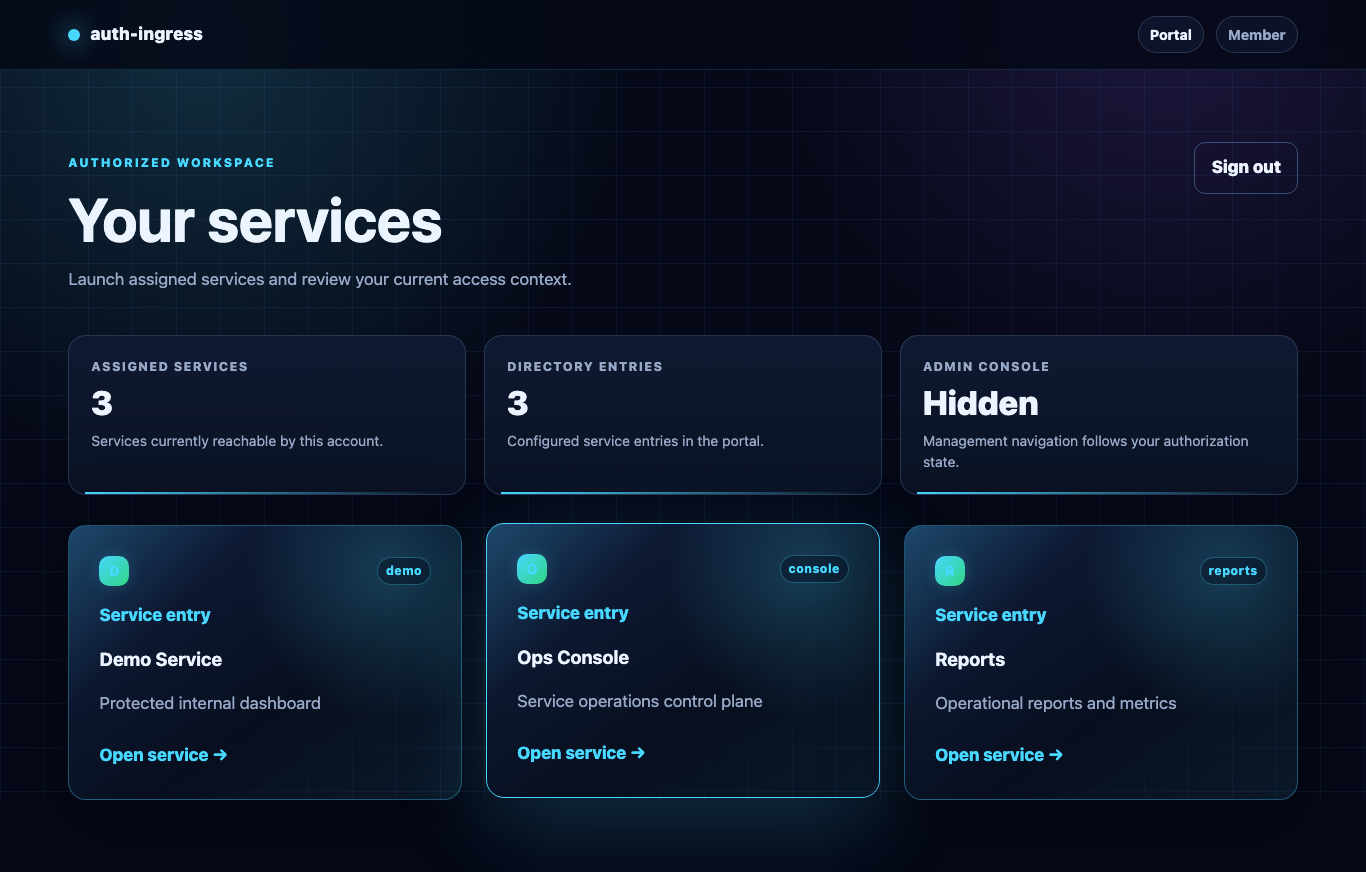
Install from PyPI
auth-ingress requires Python 3.12 or newer. Install a stable release in a virtual environment and pin the version in managed deployments:
python -m venv .venv
source .venv/bin/activate
python -m pip install "auth-ingress==0.4.0"
auth-ingress --help
The distribution name is auth-ingress, the Python import namespace is
auth_ingress, and the preferred command is auth-ingress:
from auth_ingress.main import create_app
Rename compatibility
auth-ingress is the current product, package, repository, command, and
operator-facing configuration identity. The previous distribution name
auth-entry-portal, command auth-portal, and AUTH_PORTAL_* configuration
prefix may still appear in historical release notes, old automation, audit
evidence, and migration examples. During the migration window:
- use
auth-ingressfor new installs and current documentation; auth-portalremains available as a compatibility command;AUTH_INGRESS_*settings take precedence when both prefixes are present;AUTH_PORTAL_*settings are still accepted when the preferred key is absent;auth_ingressis the Python import namespace for runtime code;- cookie names and signed-token salts may retain old internal labels to avoid breaking active sessions or historical evidence.
Before first use, configure a high-entropy secret and an explicit database URL, then initialize the schema:
export AUTH_INGRESS_SECRET_KEY="replace-with-a-high-entropy-secret"
export AUTH_INGRESS_DATABASE_URL="sqlite:////absolute/path/auth_ingress.db"
auth-ingress init-db
auth-ingress serve --host 127.0.0.1 --port 8000
Upgrade only after reviewing CHANGELOG.md, then install the exact new version and rerun application smoke checks:
python -m pip install --upgrade "auth-ingress==<new-version>"
auth-ingress --help
Verify the installed version with
python -m pip show auth-ingress. Remove the package with
python -m pip uninstall auth-ingress; database files and external
configuration are intentionally retained and must be removed separately if no
longer needed.
Trust boundary
The portal is an access-control boundary only when downstream services are
reachable exclusively from the portal or a trusted internal network. Never
configure a publicly reachable downstream URL: users who know it could bypass
the portal. Destinations are restricted to loopback, private IP addresses,
.internal hosts, and local mock:// demo targets. Embedded credentials, query
parameters, and fragments are rejected.
Credentials are Argon2-hashed. Browser cookies contain only a signed opaque
reference to a server-side session and use HttpOnly and SameSite protections.
Production deployments must set AUTH_INGRESS_SECRET_KEY to a high-entropy value,
enable AUTH_INGRESS_SECURE_COOKIES=true, terminate TLS, and protect the SQLite
file at the operating-system level.
Setup and operation
For a production-style first installation, create the first administrator with the one-time local bootstrap command. It prompts twice without echoing or accepting the password as an argument:
uv run auth-ingress bootstrap-admin \
  --email admin@example.com \
  --display-name "Administrator"
uv run auth-ingress serve --host 127.0.0.1 --port 8000
Before bootstrap, sign-in displays local setup guidance and never exposes a registration form. Repeating the command after any identity exists makes no change. If setup fails before completion, correct the reported non-secret input or storage problem and safely retry the same command.
For disposable development data only:
uv sync --extra test
uv run auth-ingress init-db
uv run auth-ingress seed-demo
uv run auth-ingress serve --host 127.0.0.1 --port 8000
Configuration uses these environment variables:
AUTH_INGRESS_DATABASE_URLAUTH_INGRESS_SECRET_KEYAUTH_INGRESS_SESSION_COOKIEAUTH_INGRESS_SESSION_TTLAUTH_INGRESS_SECURE_COOKIESAUTH_INGRESS_RATE_LIMIT_ATTEMPTSAUTH_INGRESS_RATE_LIMIT_WINDOWAUTH_INGRESS_AUDIT_RETENTION_DAYS(minimum/default: 90)AUTH_INGRESS_PASSWORD_RESET_TTL(minimum: 300 seconds; default: 1800)AUTH_INGRESS_SMTP_HOST,AUTH_INGRESS_SMTP_PORT,AUTH_INGRESS_SMTP_SENDERAUTH_INGRESS_SMTP_USERNAME,AUTH_INGRESS_SMTP_PASSWORD,AUTH_INGRESS_SMTP_STARTTLSAUTH_INGRESS_SMTP_TIMEOUTAUTH_INGRESS_USER_PAGE_SIZE(10–100; default: 50)AUTH_INGRESS_MANAGEMENT_RATE_LIMIT_ATTEMPTS,AUTH_INGRESS_MANAGEMENT_RATE_LIMIT_WINDOWAUTH_INGRESS_DOWNSTREAM_TIMEOUT
Demo accounts use the addresses shown by the seed implementation. seed-demo
prompts for each password, or reads the local-only
AUTH_INGRESS_DEMO_ADMIN_PASSWORD, AUTH_INGRESS_DEMO_MEMBER_PASSWORD, and
AUTH_INGRESS_DEMO_OUTSIDER_PASSWORD values. Each must contain at least 12
characters. The CLI deliberately does not print credentials. Remove all demo
accounts and unset these variables before deployment.
Administrators manage users at /admin/users or with auth-ingress users.
Memberships remain the only per-user access-list input; user detail explains all
groups granting each service. Page and CLI mutations preview first and reject a
stale user revision. Creating a user generates a one-time temporary password
that is shown only in the create response; the user must change it immediately
after first sign-in. Later password resets can still use configured SMTP links;
reset secrets are stored only as digests and never shown to an operator.
Deactivation is the reversible soft-delete path; permanent removal deletes the
user account and authentication state while retaining audit history. See
docs/user-management.md for commands, exit codes,
conflict recovery, lifecycle controls, and delivery troubleshooting.
Audit and recovery
Sign-in attempts, sign-out, allowed and denied service entry, and administrative changes create structured database audit events. Context is allowlisted to a correlation ID and coarse client category; passwords, cookies, session IDs, secrets, request bodies, and unnecessary personal data are excluded. Retain events for at least 90 days and back up the database according to organizational policy.
If a downstream service fails, the portal returns a generic unavailable response without retrying unsafe requests or exposing internal details. Operators should use the response correlation ID and audit events to investigate. Revoke access by disabling a user, removing group membership, disabling a service, or revoking its active sessions; authorization is re-evaluated on every protected request.
Health and monitoring
GET /healthz is the public liveness check. It returns HTTP 200 with a minimal
JSON body containing status: "alive" and a UTC checked_at timestamp. It does
not require a session and does not create cookies, CSRF values, audit records, or
other authentication artifacts.
GET /readyz is the public readiness check. It performs bounded local checks for
storage, installation state, identity workflows, service catalog availability,
and audit diagnostics. It returns HTTP 200 only when readiness is healthy; it
returns HTTP 503 for setup_required, degraded, or unavailable. The public
response includes only broad status, timestamp, reason, correlation ID when
available, and check keys with broad states. It never probes downstream services
and does not expose users, groups, service targets, database details, raw
exceptions, secrets, tokens, cookies, credentials, or private configuration.
Active administrators can review detailed but still redacted indicators at
/admin/monitoring. The page shows overall health, evaluated categories, last
evaluation time, severity, summaries, and safe recommended actions. Non-admin
and signed-out requests are denied before detailed indicators are evaluated or
rendered.
Readiness state changes emit a redacted health_state_changed application log
with previous status, current status, broad reason, timestamp, and correlation ID
when available. Repeated checks in the same state stay quiet and routine health
polling does not create security audit records.
Full web-app proxy deployment
Full proxy mode gives every service an isolated browser origin. Production deployments require:
- A dedicated portal host configured with
AUTH_INGRESS_HOST. - Wildcard DNS and TLS for
*.AUTH_INGRESS_PROXY_BASE_DOMAIN. AUTH_INGRESS_PROXY_SCHEME=httpsand secure cookies.- Private network routing from the portal to every downstream destination; downstream services must remain unreachable from user networks.
- A narrow comma-separated
AUTH_INGRESS_TRUSTED_DOWNSTREAM_NETWORKSvalue. - Explicit request/response byte limits, launch-ticket lifetime, upstream timeout, and WebSocket maximum lifetime appropriate to the deployment.
Relevant settings are AUTH_INGRESS_PROXY_BASE_DOMAIN,
AUTH_INGRESS_PROXY_SCHEME, AUTH_INGRESS_PROXY_COOKIE,
AUTH_INGRESS_PROXY_LAUNCH_TTL, AUTH_INGRESS_PROXY_MAX_REQUEST_BYTES,
AUTH_INGRESS_PROXY_MAX_RESPONSE_BYTES,
AUTH_INGRESS_PROXY_WEBSOCKET_LIFETIME, and
AUTH_INGRESS_TRUSTED_DOWNSTREAM_NETWORKS.
Enable proxy mode per service only after its compatibility check succeeds. Applications should use relative or root-relative URLs, or be configured with their public service origin. Fixed private origins embedded in JavaScript are not rewritten. Roll back by disabling proxy mode for the service; the legacy simple entry flow remains available for non-proxy service entries.
Validation
uv run pytest
The full manual journey is documented in
specs/002-full-web-app-proxy/quickstart.md.
1 maintainer

Metadata
1 maintainer
Release files for auth-ingress 0.4.0
For a detailed explanation of source distributions (sdists) and built distributions (wheels), please see the package formats documentation.
Source distribution (sdist)
| File | Size | Uploaded | Provenance | Actions |
|---|---|---|---|---|
| auth_ingress-0.4.0.tar.gz | 114.7 kB | With provenance | Details for auth_ingress-0.4.0.tar.gz |
Built distribution (wheel)
| File | Interpreter | ABI | Platform | Actions Reset |
|---|---|---|---|---|
| auth_ingress-0.4.0-py3-none-any.whl | Python 3 | none | any | Details for auth_ingress-0.4.0-py3-none-any.whl |
Total release size: 211.4 kB
Release files / auth_ingress-0.4.0.tar.gz
| Download URL | auth_ingress-0.4.0.tar.gz |
|---|---|
| Size | 114.7 kB |
| Tags | Source |
|
SHA-256 checksum How to use checksums |
58ad3615dbd59b80e384b2faa20ffc62bcbe68628cd715769361ae6d97cee2de
|
|
BLAKE2b-256 checksum How to use checksums |
8f9eaa325dd00491829dfd979e88235a339b653d00b7cddafada8814105a3396
|
| Upload date | |
|
Uploaded using Trusted Publishing? What is trusted publishing? |
Yes |
| Uploaded via |
twine/6.1.0 CPython/3.13.13
|
Provenance
Provenance describes where a file came from. On PyPI, provenance is shared via attestations, which provide a verifiable record of the build or publishing details. View details, limitations and caveats.


PyPI Publish Attestation
PyPI verified that this artifact, at this checksum, originated from the publisher listed below.
Signed by GitHub Actions, verified by PyPI on Jul 19, 2026.
Transparency logRelease files / auth_ingress-0.4.0-py3-none-any.whl
| Download URL | auth_ingress-0.4.0-py3-none-any.whl |
|---|---|
| Size | 96.7 kB |
| Tags | Python 3 |
|
SHA-256 checksum How to use checksums |
9708bc1633baefb7575f828d2023f3e0d00c34d568d2d5320f7d4e4471f653f1
|
|
BLAKE2b-256 checksum How to use checksums |
c5d6fcfad7302689f9404716592ea6e4f0767e48a4a0cb209ddb3fbfd460c7c4
|
| Upload date | |
|
Uploaded using Trusted Publishing? What is trusted publishing? |
Yes |
| Uploaded via |
twine/6.1.0 CPython/3.13.13
|
Provenance
Provenance describes where a file came from. On PyPI, provenance is shared via attestations, which provide a verifiable record of the build or publishing details. View details, limitations and caveats.
PyPI Publish Attestation
PyPI verified that this artifact, at this checksum, originated from the publisher listed below.
Signed by GitHub Actions, verified by PyPI on Jul 19, 2026.
Transparency logSecurity for auth-ingress 0.4.0
Provenance
Provenance describes where a file came from. On PyPI, provenance is shared via attestations, which provide a verifiable record of the build or publishing details. View details, limitations and caveats.
Full provenance
Both files in this release have been uploaded with provenance metadata.
Attestation for auth_ingress-0.4.0.tar.gz
PyPI Publish Attestation
PyPI verified that this artifact, at this checksum, originated from the publisher listed below.
Signed by GitHub Actions, verified by PyPI on Jul 19, 2026.
Transparency logA note on package security
PyPI is a repository for distributing packages, not a service for auditing them. While third-party security researchers and our staff do their best to detect and remove malicious packages, PyPI cannot guarantee the quality, security or suitability of any given package.
To learn more about protecting yourself from malicious actors, visit our package security documentation.














