
A portable local authentication library for AI agents and developer tools

Project description






Credential broker and vault for AI Agents
Docs · Website · Discord · Issues
An open-source credential broker that sits between your agents and the services they call. Instead of sharing credentials with every agent, log in once via OAuth2 or API keys. Authsome stores credentials securely and injects them via an HTTP proxy. You get one place to manage access, rotate keys, and see what every agent is doing.
Bundled providers out of the box — OAuth2 and API key. See the full list.
Demo
https://github.com/user-attachments/assets/27f9b229-baf4-4889-be9a-378a133654dc
Why Agents Need Authsome
Agents run beyond interactive sessions. They live in CI, over SSH, in cron jobs, in background workers, and in parallel pipelines. They need API access that survives without a human in the loop.
Hardcoded environment tokens leak or go stale, and building auth flow logic, token storage, refresh handling, and per-provider config into every project rebuilds the same plumbing every time.
Authsome is the credential broker agents call at runtime.
- No credential sprawl. One encrypted store. Every provider, every agent, one place.
- Agents never see credentials. Auth is handled outside the agent process — no exfiltration risk, no secrets in environment variables.
- No browser required at runtime. Setup can use browser PKCE, device code, or a browser bridge for secure API key entry. After that, agents run headlessly.
How It Works
The CLI is the agent's interface: setup once, then inject fresh credentials whenever a tool runs.

Authenticate once:
authsome login github
# This opens a browser on user's machine
# user completes login without sharing the creds with the agent.
Then agents get valid credentials on demand when they try to access external services.
All they need to do is use authsome run -- before the command they want to run:
authsome run -- curl -s "https://api.github.com/user/repos?per_page=10"
# runs behind an auth proxy that injects headers at request time
# without exposing secrets in the child process environment.
# matched automatically via provider api_url (e.g. api.openai.com)
Credentials are encrypted at rest and refreshed before expiry.
Why Authsome
| authsome | Hardcoded env tokens | DIY | |
|---|---|---|---|
| Automatic token refresh | ✅ | ❌ | build it |
| OAuth2 + API keys | ✅ | ❌ | build it |
| Runtime headless use | ✅ | ✅ | varies |
| Built-in providers, zero config | ✅ | ❌ | ❌ |
| Multi-account per provider | ✅ | ❌ | build it |
| Agents never see credentials | ✅ | ❌ | build it |
Authsome gives agents one command for a valid token, without scattering long-lived secrets across every project.
Install
Requires Python 3.13+.
uv tool install authsome
Self-hosting
Run a persistent daemon in Docker — no Python required on the host:
docker compose up -d
export AUTHSOME_BASE_URL=http://localhost:7998
See the self-hosting guide for volume backup, TLS termination, and environment variable reference.
Quick Start
Add the authsome skill to your agent (claude, codex, cursor, hermes, etc.):
npx skills add agentrhq/authsome
And try a sample task that requires access to external services:
Star the repo agentrhq/authsome
Get my last 5 emails from gmail
Check my stripe balance
The agent will use authsome to login into external services and perform the task.
Agent Integrations
Authsome ships with adapters for the most common agent frameworks and CLIs:
Full list at authsome.ai/docs/integrations.
Community
- Discord for questions, help, and showing what you're building.
- GitHub Issues for bugs and feature requests.
Roadmap
See authsome.ai/docs/roadmap for what's shipped, what's next, and what's out of scope.
Contributing
- Found a bug? Open an issue
- Have an idea? Start a discussion
- Want to contribute? Read CONTRIBUTING.md for development setup, testing, and the engineering principles we follow.
Links
- Website: authsome.ai
- Docs: authsome.ai/docs
- Discord: discord.gg/9YP2C9tvMp
- Issues: github.com/agentrhq/authsome/issues
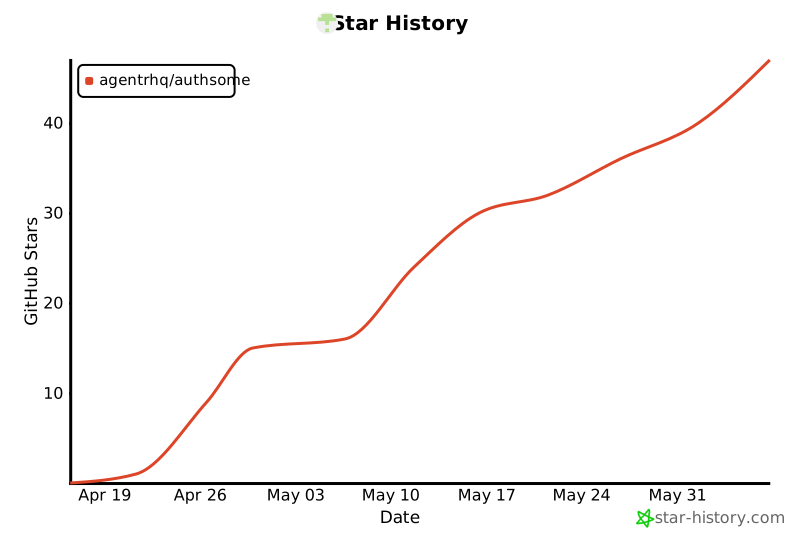
Star History
License
MIT. See LICENSE.
Release history Release notifications | RSS feed


Download files
Download the file for your platform. If you're not sure which to choose, learn more about installing packages.
Source Distribution
Built Distribution
Filter files by name, interpreter, ABI, and platform.
If you're not sure about the file name format, learn more about wheel file names.
Copy a direct link to the current filters
File details
Details for the file authsome-0.6.4.tar.gz.
File metadata
- Download URL: authsome-0.6.4.tar.gz
- Upload date:
- Size: 67.1 MB
- Tags: Source
- Uploaded using Trusted Publishing? Yes
- Uploaded via: uv/0.11.19 {"installer":{"name":"uv","version":"0.11.19","subcommand":["publish"]},"python":null,"implementation":{"name":null,"version":null},"distro":{"name":"Ubuntu","version":"24.04","id":"noble","libc":null},"system":{"name":null,"release":null},"cpu":null,"openssl_version":null,"setuptools_version":null,"rustc_version":null,"ci":true}
File hashes
| Algorithm | Hash digest | |
|---|---|---|
| SHA256 |
092cb686bd71389eeb6a2382c4c88c15d0e97b9ca7861e783628aa33bf4ba93b
|
|
| MD5 |
a04259918b4df1c9d94a12bfbecdad8a
|
|
| BLAKE2b-256 |
6ee4f2881d35a94f9a80173562f176f35de4b612a390a31e01dd78b3d71cd180
|
File details
Details for the file authsome-0.6.4-py3-none-any.whl.
File metadata
- Download URL: authsome-0.6.4-py3-none-any.whl
- Upload date:
- Size: 819.4 kB
- Tags: Python 3
- Uploaded using Trusted Publishing? Yes
- Uploaded via: uv/0.11.19 {"installer":{"name":"uv","version":"0.11.19","subcommand":["publish"]},"python":null,"implementation":{"name":null,"version":null},"distro":{"name":"Ubuntu","version":"24.04","id":"noble","libc":null},"system":{"name":null,"release":null},"cpu":null,"openssl_version":null,"setuptools_version":null,"rustc_version":null,"ci":true}
File hashes
| Algorithm | Hash digest | |
|---|---|---|
| SHA256 |
6dcada5045fc43aef4d70ca425ca2bf72cc7a0c1ec01877f7abd2b51811fbe24
|
|
| MD5 |
4e5e438514349a3799ad5c91e9bb3326
|
|
| BLAKE2b-256 |
8bdda4bdf01c26c694da37b87a5858ea9af53d7eac9662cba66f90789f98a4b2
|






