
Auto3D




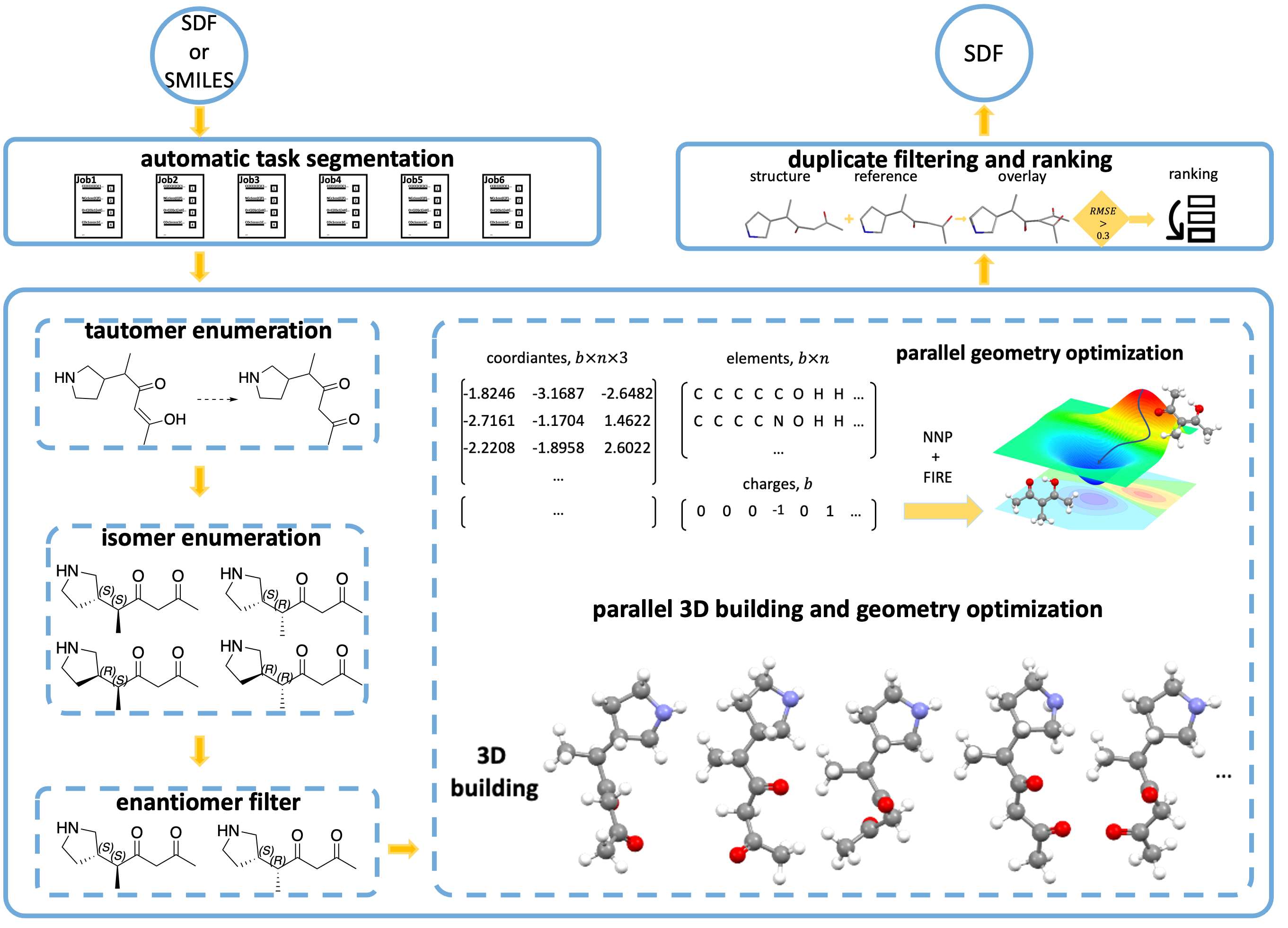
SMILES in, low-energy 3D conformers out. Auto3D enumerates tautomers and stereoisomers, embeds and optimizes them with a neural network potential (AIMNet2, ANI2x, ANI2xt), removes duplicates, and ranks what is left by energy — in one command, or one function call.
pip install Auto3D
auto3d run molecules.smi --k=1
That writes molecules_<timestamp>/molecules_out.sdf: the lowest-energy
conformer per input molecule, each carrying its energy.
Installation
pip install Auto3D                # core: AIMNet2 engines
pip install "Auto3D[ani,ase]"     # + torchani (ANI2x/ANI2xt) and ase (thermochemistry)
Requires Python ≥ 3.11 and PyTorch ≥ 2.8. For GPU acceleration, install a
CUDA-enabled PyTorch build first. AIMNet2 weights download to ~/.cache/aimnet
on first use, so the first run needs network access.
Using conda? Install Auto3D itself with pip, even inside a conda env.
Starting with 3.1.1, the conda-forge package no longer requires aimnet
(which cannot be packaged for conda-forge — its dependency
nvalchemi-toolkit-ops is pip-only). The conda package ships with the ANI2x
and ANI2xt engines and ASE thermochemistry working out of the box; add the
default AIMNet2 engine with one pip command inside the environment:
conda install -c conda-forge auto3d   # once the 3.1.1 feedstock update lands
pip install aimnet                    # adds the AIMNet2 engines
If conda-forge still shows an older version, install with pip inside a conda
environment instead — installation.yml sets up the supported combination:
conda env create --file installation.yml --name auto3D
conda activate auto3D          # pip installs Auto3D[ani,ase] into it
Details: Building the conda package.
Quick start
Command line
auto3d run molecules.smi --k=5          # top-5 conformers per molecule
auto3d run molecules.smi --window=3.0   # or everything within 3 kcal/mol
auto3d run molecules.smi --k=5 --no-gpu # CPU only
Exactly one of --k or --window is required. GPU is used by default, and
requesting it with no visible CUDA device is a fatal error, not a fallback —
pass --no-gpu on a CPU-only machine.
Python
from Auto3D import Auto3DOptions, main

config = Auto3DOptions(path="molecules.smi", k=1)
output_path = main(config)
main() returns a WorkflowResult, which is the output path (it subclasses
str) and also carries n_molecules, n_conformers, and failures.
For batches of ≤150 molecules, skip the job directory and get RDKit molecules straight back:
from Auto3D import Auto3DOptions, smiles2mols

mols = smiles2mols(["CCO", "CCCO", "c1ccccc1"], Auto3DOptions(k=1, use_gpu=False))
for mol in mols:
    print(mol.GetProp("_Name"), mol.GetProp("E_tot"), "Hartree")
What you get
A run creates <stem>_<timestamp>/ next to the input, containing the output SDF
and an Auto3D.log. Each conformer in the SDF carries:
| Property | Meaning |
|---|---|
E_tot / E_tot(Hartree) |
Total energy, Hartree |
E_rel(kcal/mol) |
Energy relative to the best conformer of that molecule |
_Name, ID |
Molecule name and a stable identifier |
fmax, Converged, Dropped_Oscillating |
Optimizer diagnostics |
The input SMILES is not written to the output — join on _Name/ID against
your input file.
Beyond conformer generation
Each of these wraps a Python API function and has a matching notebook in
example/.
| Command | Does | Python API |
|---|---|---|
auto3d run |
Generate conformers from SMILES/SDF | main, smiles2mols |
auto3d energy |
Single-point energy for an SDF | calc_spe |
auto3d optimize |
Geometry-optimize an existing SDF | opt_geometry |
auto3d thermo |
Enthalpy / entropy / Gibbs (needs ase) |
calc_thermo |
auto3d tautomers |
Enumerate and rank stable tautomers | get_stable_tautomers |
auto3d validate |
Check an input file without running | — |
auto3d config init|show|validate |
Manage YAML configs | — |
auto3d models list|info|test |
Inspect and smoke-test engines | — |
All commands except models list take -v/--verbose, the only way to get a
traceback. --json is available on run, validate, and the four property
commands. Exit codes: 0 success, 2 config/input error, 4 GPU requested but
unavailable, 6 partial success, 130 interrupted.
Engines
| Engine | Networks/step | Elements |
|---|---|---|
| AIMNET (default) | 1 | H, B, C, N, O, F, Si, P, S, Cl, As, Se, Br, I |
| aimnet2-2025, aimnet2-nse, aimnet2-pd, … | 1 | as above (aimnet2-pd swaps As for Pd) |
| ANI2x | 8 (ensemble) | H, C, N, O, F, S, Cl |
| ANI2xt | 1 | H, C, N, O, F, S, Cl |
Select with --engine or optimizing_engine. AIMNet2 models come from the
aimnet package and are
sha256-validated on download; auto3d models list shows what is available.
optimizing_engine also accepts a path to a
custom NNP.
No engine speed benchmark is maintained in this repository, so the table reports how many networks each engine evaluates per step rather than a speed ranking. Time your own workload before choosing.
Key parameters
| Parameter | Default | Description |
|---|---|---|
k |
— | Top-k conformers per molecule |
window |
— | Energy window, kcal/mol — exactly one of k/window is required |
optimizing_engine |
AIMNET |
Engine name, registry name, or path to a custom model |
use_gpu |
True |
GPU acceleration; missing CUDA device is fatal, not a fallback |
gpu_idx |
0 |
CUDA index, or a list for multi-GPU |
enumerate_tautomer |
False |
Enumerate tautomers |
enumerate_isomer |
True |
Enumerate stereoisomers |
threshold |
0.3 |
RMSD threshold for duplicate removal, Å |
opt_steps |
2000 |
Maximum optimization steps |
convergence_threshold |
0.01 |
Force convergence threshold, eV/Å |
Full list: CLI reference · API reference
Upgrading from 2.x
AIMNet2 is now served by the aimnet package rather than bundled .jpt files,
and the default AIMNet2 energies differ from 2.x (the registry .pt externalizes
D3 dispersion), so conformer rankings may shift slightly. The thermochemistry SDF
property S_hartree is now S_hartree_per_K. Python ≥ 3.11 and PyTorch ≥ 2.8 are
required. See the migration guide.
Documentation
auto3d.readthedocs.io · Installation · Quickstart · CLI · API · Custom NNPs · Troubleshooting · Notebooks
Citation
@article{liu2022auto3d,
    title={Auto3D: Automatic generation of the low-energy 3D structures with ANI neural network potentials},
    author={Liu, Zhen and Zubatiuk, Tetiana and Roitberg, Adrian and Isayev, Olexandr},
    journal={Journal of Chemical Information and Modeling},
    volume={62},
    number={22},
    pages={5373--5382},
    year={2022},
    publisher={ACS Publications},
    doi={10.1021/acs.jcim.2c00817}
}
Contributing
Issues · Discussions · CONTRIBUTING.md
License
MIT — see LICENSE.


Release files for Auto3D 3.2.0
For a detailed explanation of source distributions (sdists) and built distributions (wheels), please see the package formats documentation.
Source distribution (sdist)
| File | Size | Uploaded | |
|---|---|---|---|
| auto3d-3.2.0.tar.gz | 7.3 MB | Details |
Built distribution (wheel)
| File | Interpreter | ABI | Platform | Reset |
|---|---|---|---|---|
| auto3d-3.2.0-py3-none-any.whl | Python 3 | none | any | Details |
Total release size: 14.2 MB
Release files / auto3d-3.2.0.tar.gz
| Download URL | auto3d-3.2.0.tar.gz |
|---|---|
| Size | 7.3 MB |
| Tags | Source |
|
SHA-256 checksum How to use checksums |
2624cbc81f8a3b064e4ddfa70b147267686279d22e86fd512abc6ba08ec0ea6b
|
|
BLAKE2b-256 checksum How to use checksums |
bf1c6086a25a278544aafc5f1da1942eaabd51b3cd173e0bbfd58c7324ce6db2
|
| Upload date | |
|
Uploaded using Trusted Publishing? What is trusted publishing? |
Yes |
| Uploaded via |
twine/7.0.0 CPython/3.13.14
|
Provenance
Provenance describes where a file came from. On PyPI, provenance is shared via attestations, which provide a verifiable record of the build or publishing details. View details, limitations and caveats.


PyPI Publish Attestation
PyPI verified that this artifact, at this checksum, originated from the publisher listed below.
Signed by GitHub Actions, verified by PyPI on Oct 10, 2026.
Transparency logRelease files / auto3d-3.2.0-py3-none-any.whl
| Download URL | auto3d-3.2.0-py3-none-any.whl |
|---|---|
| Size | 6.9 MB |
| Tags | Python 3 |
|
SHA-256 checksum How to use checksums |
66dcc8b4c0f4dd3820e4a85920345740746138f92b03afe6516d0838381bbd20
|
|
BLAKE2b-256 checksum How to use checksums |
b0d8aeb3411813a8e57ac7f0e35054f30eb7a302b66dd8ba942ad0e723d7e7f6
|
| Upload date | |
|
Uploaded using Trusted Publishing? What is trusted publishing? |
Yes |
| Uploaded via |
twine/7.0.0 CPython/3.13.14
|
Provenance
Provenance describes where a file came from. On PyPI, provenance is shared via attestations, which provide a verifiable record of the build or publishing details. View details, limitations and caveats.
PyPI Publish Attestation
PyPI verified that this artifact, at this checksum, originated from the publisher listed below.
Signed by GitHub Actions, verified by PyPI on Oct 10, 2026.
Transparency log













