
Automation for ArcGIS Pro toolboxes, script tools, and documentation from Python objects.

Project description
autobox
Automation for ArcGIS Pro toolboxes, script tools, and documentation from
Python objects. autobox generates the modern ArcGIS Pro Toolbox format (.atbx)
and has support for Script Tools, Parameters, Dependencies, Filters,
Toolsets, and documentation. Pure Python package and cross-platform (no dependencies).
Installation
autobox is available from the Python Package Index.
Python Compatibility
The autobox library is compatible with Python 3.11 to 3.14. Developed and
tested on macOS and Windows, should be fine on Linux too.
Usage
autobox can be used to:
- Create a
Toolboxand save to.atbxformat - Create a
Toolsetand add to aToolboxorToolset - Create a
ScriptToolwithParametersand add to aToolboxorToolset - Add an
ExecutionScriptto aScriptTool - Add an optional
ValidationScriptto aScriptTool - Create and add a
Filterto aParameter - Add a dependency to a
Parameter - Add documentation to
Toolbox,ScriptTool, andParameter
Create a Toolbox
Create an empty Toolbox in the home folder:
from pathlib import Path
from autobox import Toolbox

# Creates an empty Toolbox
tbx = Toolbox(name='demonstration', label='Demonstration Toolbox', alias='demo')

# Save the toolbox to disk, overwrite is False by default
tbx_path = tbx.save(Path.home(), overwrite=True)
Create a ScriptTool
Create a ScriptTool in the root of the Toolbox
from pathlib import Path
from autobox import ScriptTool, Toolbox
from autobox.parameter import FeatureClassParameter, LongParameter

# Create Simple Script Tool
points = FeatureClassParameter(label='Random Points')
sample_size = LongParameter(label='Sample Size', is_required=False)
poly = FeatureClassParameter(label='Bounding Boxes')
out = FeatureClassParameter(label='Output Feature Class', is_input=False)
tool = ScriptTool(name='SimpleScriptTool', label='Simple Script Tool')
for param in points, sample_size, poly, out:
    tool.add_parameter(param)

tbx = Toolbox(name='demonstration')
tbx.add_script_tool(tool)
tbx_path = tbx.save(Path.home(), overwrite=True)
This generates a ScriptTool that looks like this:
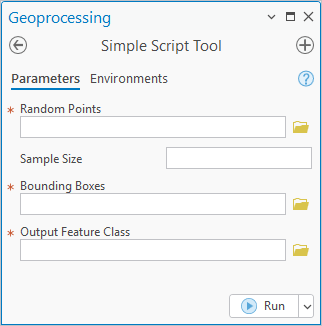
Or create a ScriptTool inside of a Toolset:
from pathlib import Path
from autobox import ScriptTool, Toolbox, Toolset
from autobox.parameter import FeatureClassParameter, LongParameter

# Create Simple Script Tool
points = FeatureClassParameter(label='Random Points')
sample_size = LongParameter(label='Sample Size', is_required=False)
poly = FeatureClassParameter(label='Bounding Boxes')
out = FeatureClassParameter(label='Output Feature Class', is_input=False)
tool = ScriptTool(name='SimpleScriptTool', label='Simple Script Tool')
for param in points, sample_size, poly, out:
    tool.add_parameter(param)

# Create a Toolset, add the tool to the Toolset
toolset = Toolset(name='Overlay Tools')
toolset.add_script_tool(tool)

tbx = Toolbox(name='demonstration')
# Add Toolset to the Toolbox
tbx.add_toolset(toolset)
tbx_path = tbx.save(Path.home(), overwrite=True)
The ScriptTool looks the same but now there is an Overlay Tools Toolset in the Toolbox:
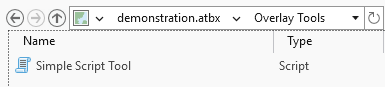
Empty Toolsets are not persisted unless the Toolset (or a child Toolset of
the Toolset) contains a ScriptTool. In this example the Toolbox will be empty:
from pathlib import Path
from autobox import Toolbox, Toolset

toolset = Toolset(name='Overlay Tools')
tbx = Toolbox(name='demonstration')
tbx.add_toolset(toolset)
tbx_path = tbx.save(Path.home(), overwrite=True)
Add Documentation
Documentation can be added to a Toolbox, ScriptTool, or Parameter. On a Toolbox:
Toolbox Documentation
from autobox import Toolbox

tbx = Toolbox(name='demonstration', label='Demonstration Toolbox', alias='demo',
              description='Here is where a longer description of the Toolbox can be included.')
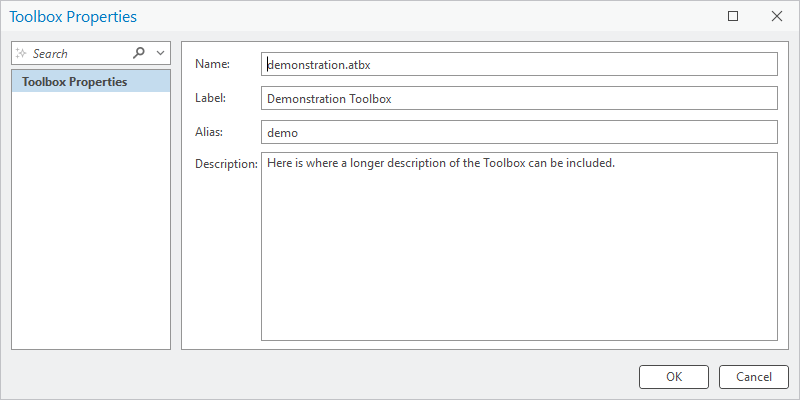
ScriptTool Documentation
There are couple ways to document a ScriptTool using description and / or summary:
from autobox import ScriptTool

tool = ScriptTool(
  name='SimpleScriptTool', label='Simple Script Tool',
  description='Use the description for a shorter plain text explanation of the Tool purpose',
  summary='The summary can hold some basic markup, <b>bold example</b>')
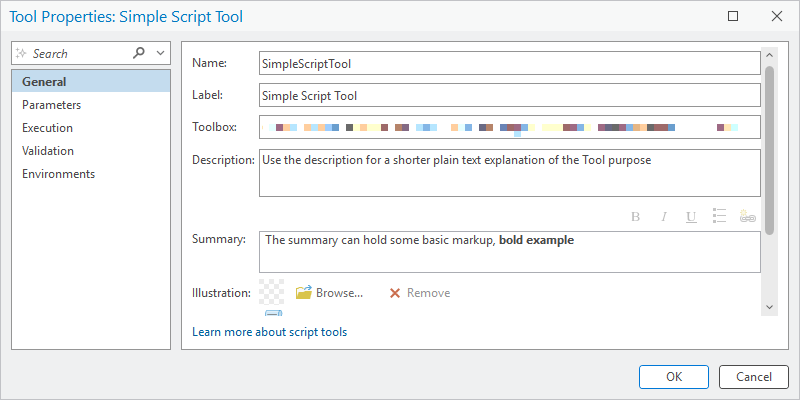
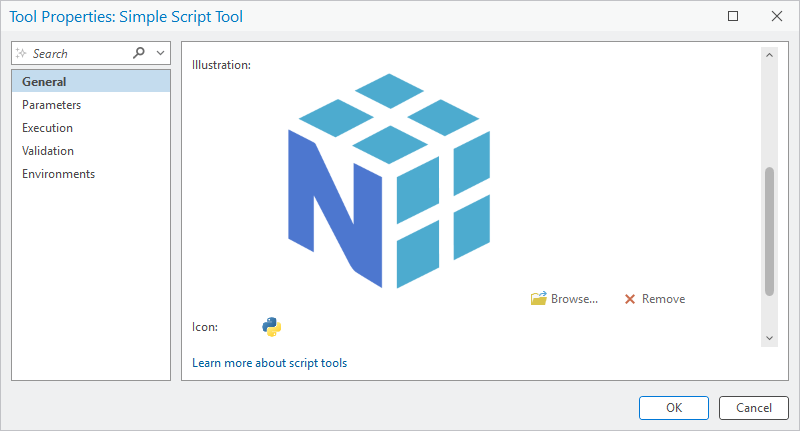
An image can also be included to show on the ScriptTool, this is done by setting the illustration property:
from pathlib import Path
from autobox import ScriptTool

tool = ScriptTool(
  name='SimpleScriptTool', label='Simple Script Tool',
  description='Use the description for a shorter plain text explanation of the Tool purpose',
  summary='The summary can hold some basic markup, <b>bold example</b>')

# NOTE only png and jpg formats are supported
tool.illustration = Path('../data/images/numpy_illustration.png')

# NOTE Icon for the Script Tool can be set too,
#  Technically not documentation but worth mentioning
tool.icon = Path('../data/images/python_icon.png')
Parameter Documentation
Each individual Parameter also supports documentation via description which can be plain text or contain basic markup
from autobox.parameter import FeatureClassParameter

points = FeatureClassParameter(
    label='Random Points',
    description='Select a feature class with randomly spaced '
                'points over the area of interest')

Extended Example
This example shows use of Filters, setting a dependency Parameter, using a category
for grouping parameters, and setting default value.
from pathlib import Path
from autobox import ScriptTool, Toolbox, Toolset
from autobox.default import LinearUnitValue
from autobox.enum import GeometryType, LinearUnit
from autobox.filter import (
    FeatureClassTypeFilter, LinearUnitFilter, LongRangeFilter)
from autobox.parameter import (
    FeatureClassParameter, LinearUnitParameter, LongParameter)


# NOTE only allow for point and multi point feature classes
points = FeatureClassParameter(
    label='Random Points',
    description='Select a feature class with randomly spaced '
                'points over the area of interest')
points.filter = FeatureClassTypeFilter((GeometryType.POINT, GeometryType.MULTIPOINT))

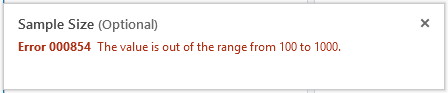
# NOTE keep the sample size between 100 and 1000 with default of 500
sample_size = LongParameter(
    label='Sample Size', category='Pieces of Flair', is_required=False,
    default_value=500)
sample_size.filter = LongRangeFilter(minimum=100, maximum=1000)

# NOTE use of default value based on non-primitive data type
buffer_units = LinearUnitParameter(
    label='Buffer Units', category='Pieces of Flair', is_required=False,
    default_value=LinearUnitValue(value=100, unit=LinearUnit.METERS))
# NOTE use of dependency
buffer_units.dependency = points
buffer_units.filter = LinearUnitFilter((LinearUnit.METERS, LinearUnit.FEET))

# NOTE only allow for polygon feature classes
poly = FeatureClassParameter(label='Bounding Boxes')
poly.filter = FeatureClassTypeFilter(GeometryType.POLYGON)

out = FeatureClassParameter(label='Output Feature Class', is_input=False)

tool = ScriptTool(
  name='SimpleScriptTool', label='Simple Script Tool',
  description='Use the description for a shorter plain text explanation of the Tool purpose',
  summary='The summary can hold some basic markup, <b>bold example</b>')
for param in points, sample_size, buffer_units, poly, out:
    tool.add_parameter(param)

# Create a Toolset, add the tool to the Toolset
toolset = Toolset(name='Overlay Tools')
toolset.add_script_tool(tool)

tbx = Toolbox(name='demonstration', label='Demonstration Toolbox', alias='demo',
              description='Here is where a longer description of the Toolbox can be included.')
tbx.add_toolset(toolset)
tbx_path = tbx.save(Path.home(), overwrite=True)
The result of this snippet is a ScriptTool which looks like:
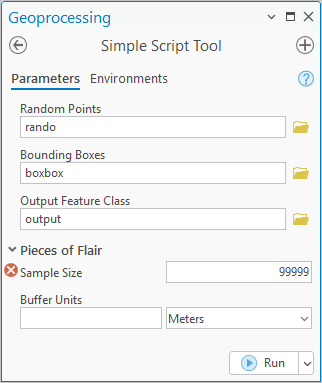
Notice the error message because the Sample Size is out of range:
Execution and Validation Scripts
For completeness, here are a few examples of setting the ExecutionScript and ValidationScript.
The ExecutionScript will almost always be needed and the ValidationScript is likely optional
for most use cases. Use the class methods from_code and from_file to construct an instance.
from pathlib import Path
from autobox import ExecutionScript, ScriptTool, ValidationScript

# NOTE example adding from a code snippet
tool = ScriptTool(name='SimpleScriptTool', label='Simple Script Tool')
tool.execution_script = ExecutionScript.from_code('print("Hello World")')

# NOTE example adding from a file and choosing to embed
tool = ScriptTool(name='SimpleScriptTool', label='Simple Script Tool')
tool.execution_script = ExecutionScript.from_file(
  Path('../data/scripts/subfolder/example.py'), embed=True)
# NOTE validator scripts are always embedded
tool.validation_script = ValidationScript.from_file(Path('../data/scripts/validator.py'))
License
Release History
v0.4.0
- Implement
__str__and__repr__methods in support of debugging and serialization - Add support for
__hash__and__eq__operators - Implement
__deepcopy__on default value, filter, and parameter objects - Ensure
ABCMetais set on abstract classes - Update
__all__and added__all__across the package - Expose more attributes on objects via readonly properties
- Tested with Python 3.14
- TOML modernization for license file reference
v0.3.1
- Fix
filtertype hint onFieldParameterandArealUnitParameter
v0.3.0
- Enforce
BooleanParameterto be required, ensure value is serialized as text - Allow
DatasetTypeParameterto used withdependencyonFieldParameter - Enable dependency on
CalculatorExpressionParameter - Add and Improve handling for single and multi value
default_valueon:ArealUnitParameterDateParameterDbaseTableParameterDoubleParameterCoordinateSystemParameterEnvelopeParameterFileParameterFolderParameterLinearUnitParameterLongParameterMapDocumentParameterPointParameterPrjFileParameterShapeFileParameterSpatialReferenceParameterStringParameterTextFileParameterTimeUnitParameter
- Add handling for
default_value(single value only) on:AnalysisCellSizeParameterBooleanParameterCalculatorExpressionParameterCellSizeXYParameterEncryptedStringParameterExtentParameterMDomainParameterSACellSizeParameterSQLExpressionParameterStringHiddenParameterXYDomainParameterZDomainParameter
v0.2.1
- Fix failing test on Windows, incorrect parametrization
v0.2.0
- Added support for symbology (via layer file) on parameters
- Include type tuples in
enumfor Rational Numbers, Integers, Numbers, Strings, and Identifiers - Extend dependency types to include
FeatureRecordSetLayerParameterandRecordSetParameteron:AreaUnitParameterFieldParameterLinearUnitParameterSQLExpressionParameter
- Add dependency types to:
FieldMappingParameterGAValueTableParameterNAHierarchySettingsParameterNetworkTravelModeParameter
- Enable following parameters to be used as a derived parameter:
BooleanParameterDateParameterDatasetParameterDoubleParameterLongParameterSpatialReferenceParameter
- Added new filters
TimeUnitFilterandTravelModeUnitTypeFilter Parametertypes added in this release:DataFileParameterDiagramLayerParameterFeatureRecordSetLayerParameterFieldInfoParameterFieldMappingParameterGALayerParameterGASearchNeighborhoodParameterGAValueTableParameterGeodatasetTypeParameterGeometricNetworkParameterKMLLayerParameterMDomainParameterNAClassFieldMapParameterNAHierarchySettingsParameterNALayerParameterNetworkDataSourceParameterNetworkDatasetLayerParameterRandomNumberGeneratorParameterRasterBuilderParameterRecordSetParameterSAExtractValuesParameterSAFuzzyFunctionParameterSAGDBEnvCompressionParameterSAGDBEnvPyramidParameterSAGDBEnvStatisticsParameterSAGDBEnvTileSizeParameterSAHorizontalFactorParameterSANeighborhoodParameterSARadiusParameterSARemapParameterSASemiVariogramParameterSATimeConfigurationParameterSATopoFeaturesParameterSATransformationFunctionParameterSAVerticalFactorParameterSAWeightedOverlayTableParameterSAWeightedSumParameterSchematicDatasetParameterSchematicDiagramClassParameterSchematicDiagramParameterSchematicFolderParameterSchematicLayerParameterTerrainLayerParameterTimeUnitParameterTopologyLayerParameterValueTableParameterVectorLayerParameterXYDomainParameterZDomainParameter
v0.1.0
- initial release
- Create a
Toolboxand save to.atbxformat - Create a
Toolsetand add to aToolboxorToolset - Create a
ScriptToolwithParametersand add to aToolboxorToolset - Add an
ExecutionScriptto aScriptTool - Add an optional
ValidationScriptto aScriptTool - Add a dependency to a
Parameter - Add documentation to
Toolbox,ScriptTool, andParameter - Create and add a
Filterto aParameter, filters include:ArealUnitFilterDoubleRangeFilterDoubleValueFilterFeatureClassTypeFilterFileTypeFilterLinearUnitFilterLongRangeFilterLongValueFilterStringValueFilterWorkspaceTypeFilter
Parametertypes added in this release:AnalysisCellSizeParameterArealUnitParameterBooleanParameterCadDrawingDatasetParameterCalculatorExpressionParameterCatalogLayerParameterCellSizeXYParameterCoordinateSystemParameterCoverageFeatureClassParameterCoverageParameterDataElementParameterDatasetTypeParameterDateParameterDbaseTableParameterDoubleParameterEncryptedStringParameterEnvelopeParameterExtentParameterFeatureClassParameterFeatureDatasetParameterFeatureLayerParameterFieldParameterFileParameterFolderParameterGPLayerParameterGroupLayerParameterLasDatasetLayerParameterLasDatasetParameterLayerFileParameterLinearUnitParameterLongParameterMapDocumentParameterMapParameterMosaicDatasetParameterMosaicLayerParameterNetworkDatasetParameterPointParameterPrjFileParameterRasterBandParameterRasterCalculatorExpressionParameterRasterDataLayerParameterRasterDatasetParameterRasterLayerParameterRelationshipClassParameterSACellSizeParameterSQLExpressionParameterShapeFileParameterSpatialReferenceParameterStringHiddenParameterStringParameterTableParameterTableViewParameterTextfileParameterTinLayerParameterTinParameterTopologyParameterWorkspaceParameter


Download files
Download the file for your platform. If you're not sure which to choose, learn more about installing packages.
Source Distributions
Built Distribution
Filter files by name, interpreter, ABI, and platform.
If you're not sure about the file name format, learn more about wheel file names.
Copy a direct link to the current filters
File details
Details for the file autobox-0.4.0-py3-none-any.whl.
File metadata
- Download URL: autobox-0.4.0-py3-none-any.whl
- Upload date:
- Size: 46.5 kB
- Tags: Python 3
- Uploaded using Trusted Publishing? No
- Uploaded via: twine/6.1.0 CPython/3.13.7
File hashes
| Algorithm | Hash digest | |
|---|---|---|
| SHA256 |
f234524becacd44c7e6a7bdd0e8319bcc92edc23bf41982c5fb312278f2bf760
|
|
| MD5 |
1ad737c3873ecb870f08afbd214f42e2
|
|
| BLAKE2b-256 |
c602b94275d0916ca4d3587c7fc8c34972e58d25691a7e37cee1b3f01761868d
|






