
PyAutoCTI: Charge Transfer Inefficiency Modeling
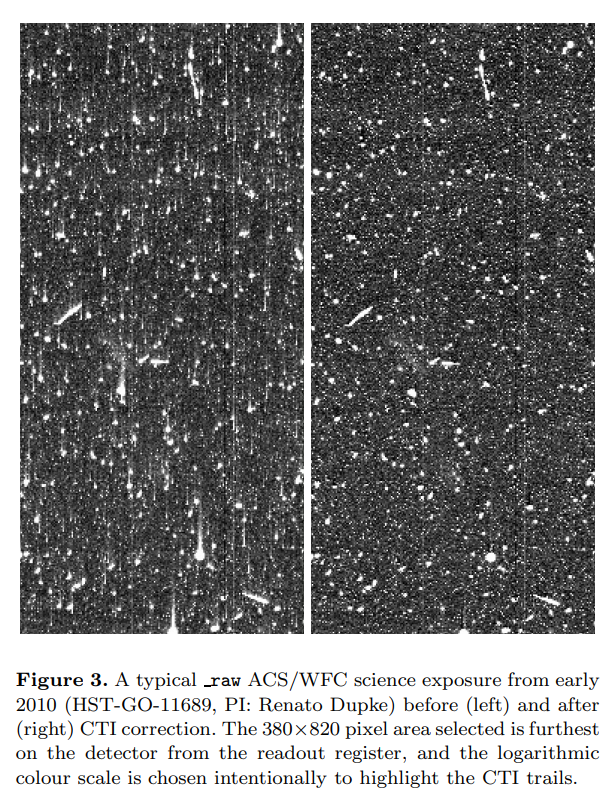
PyAutoCTI lets you simulate, calibrate and correct charge transfer inefficiency (CTI) in CCD detectors. CTI occurs when defects in the detector trap and release electrons during readout, leaving trails in the image.
Getting Started
Explore It Yourself
What is CTI? — learn about CTI and how it affects your data.
Install PyAutoCTI — get set up on your computer.
Find examples — explore simulation, calibration and correction in the workspace.
Explore with AI
The PyAutoCTI AI Assistant helps you learn about CTI and work through calibration examples through conversation. To get started, paste this prompt into your AI coding agent:
I want to learn about CTI and use PyAutoCTI
(https://github.com/PyAutoLabs/PyAutoCTI) with the
autocti_assistant (https://github.com/PyAutoLabs/autocti_assistant).

First clone the assistant repository, cd into it and follow its AGENTS.md.
Explain CTI, then guide me through the introductory calibration demonstration.
See AI Options for tools and setup guidance.
Learn About CTI
The overview examples introduce parallel and serial charge transfer, charge injection data, and how to fit and calibrate a CTI model.
The PyAutoCTI documentation covers the software’s features and how to use them in your own analysis. PyAutoCTI uses arCTIc to simulate charge transfer through the detector.
Community and Contributing
Ask questions, suggest improvements and share your work in PyAutoLabs Discussions.
To contribute, see the contribution guide.
Citations
If you use PyAutoCTI in your research, see the citation guide.
License
See the license.


Release files for autocti 2026.11.12.1
For a detailed explanation of source distributions (sdists) and built distributions (wheels), please see the package formats documentation.
Source distribution (sdist)
| File | Size | Uploaded | Provenance | Actions |
|---|---|---|---|---|
| autocti-2026.11.12.1.tar.gz | 4.5 MB | Without provenance | Details for autocti-2026.11.12.1.tar.gz |
Built distribution (wheel)
| File | Interpreter | ABI | Platform | Actions Reset |
|---|---|---|---|---|
| autocti-2026.11.12.1-py3-none-any.whl | Python 3 | none | any | Details for autocti-2026.11.12.1-py3-none-any.whl |
Total release size: 4.7 MB
Release files / autocti-2026.11.12.1.tar.gz
| Download URL | autocti-2026.11.12.1.tar.gz |
|---|---|
| Size | 4.5 MB |
| Tags | Source |
|
SHA-256 checksum How to use checksums |
8f4d5f1edb50315bedac2f6d4f4eb3c55853c057655d422e0d4294defcd65a85
|
|
BLAKE2b-256 checksum How to use checksums |
d287af91708436fee6536351e606f47dd83045b5bdcfcd8a74800460cb6f53ea
|
| Upload date | |
|
Uploaded using Trusted Publishing? What is trusted publishing? |
No |
| Uploaded via |
twine/6.0.1 CPython/3.12.16
|
Release files / autocti-2026.11.12.1-py3-none-any.whl
| Download URL | autocti-2026.11.12.1-py3-none-any.whl |
|---|---|
| Size | 169.3 kB |
| Tags | Python 3 |
|
SHA-256 checksum How to use checksums |
a36bd9c1ed1c9930d87573d31153332c9ed2a162f3e92316a0352765e891e8d5
|
|
BLAKE2b-256 checksum How to use checksums |
2663ddfd800ef559b504bfb7b599576840cbf8e4c7d463c982954657c01588cd
|
| Upload date | |
|
Uploaded using Trusted Publishing? What is trusted publishing? |
No |
| Uploaded via |
twine/6.0.1 CPython/3.12.16
|
Security for autocti 2026.11.12.1
Provenance
Provenance describes where a file came from. On PyPI, provenance is shared via attestations, which provide a verifiable record of the build or publishing details. View details, limitations and caveats.
No provenance found
None of the files in this release were uploaded with provenance metadata.
A note on package security
PyPI is a repository for distributing packages, not a service for auditing them. While third-party security researchers and our staff do their best to detect and remove malicious packages, PyPI cannot guarantee the quality, security or suitability of any given package.
To learn more about protecting yourself from malicious actors, visit our package security documentation.














