
autoevolve
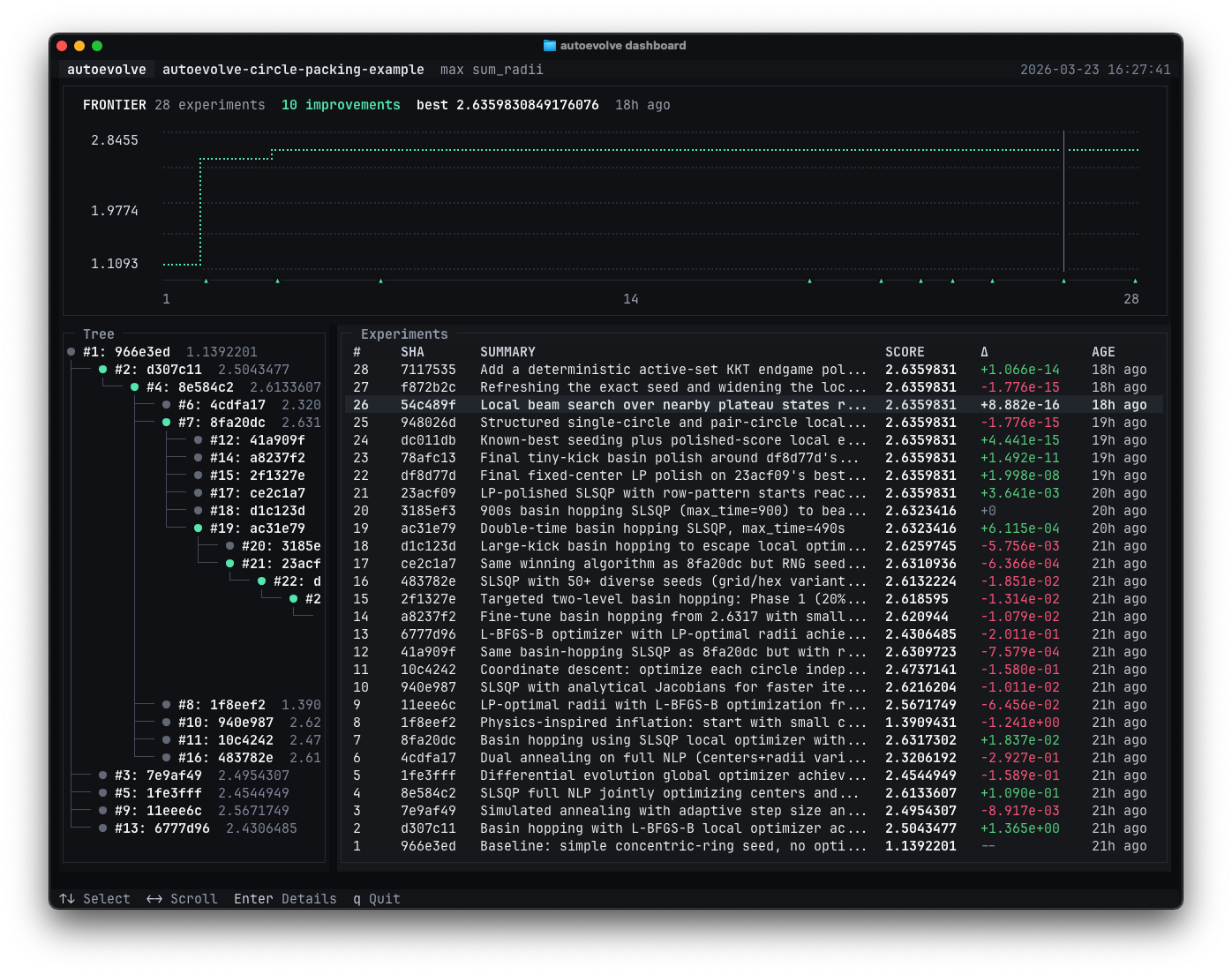
autoevolve lets coding agents run git-backed experiment loops autonomously. It gives agents a lightweight workflow for branching, recording results, and comparing experiments without needing heavy external dependencies, databases, or services.
Initialize it inside a project, let it set up the files your coding agents need, and then let the agents iterate through experiments, branch into new research directions, and explore ideas on their own.
[!NOTE]
autoevolvecan create many experiment branches and worktrees. Try it in a repo where extra git history won’t be a problem, or use a new repo.
Install
pip install autoevolve-cli
Quickstart
1. Initialize autoevolve in an existing git repo:
autoevolve init
autoevolve init walks you through the setup for your coding harness and problem:
SKILL.mdorPROGRAM.md: the instructions your coding agent reads to useautoevolvePROBLEM.md: the goal, metric, constraints, and validation setup for your problem
For an example problem to try, see the circle packing example repo.
2. Tell your agent to read PROGRAM.md or activate the skill depending on your setup:
Read PROGRAM.md, then start working.

# If using skills
$autoevolve  # Codex
/autoevolve  # Claude Code
From there, your agent should start working in the repo as usual. This works best if your agent is running with dangerously skip permissions/yolo mode. Experiment commits will include:
EXPERIMENT.json: the structured record of the experiment, including summary, metrics, and any references to other experimentsJOURNAL.md: the narrative record of the experiment, which could include the hypothesis, changes made, outcomes, reflections, etc.
3. Start the TUI to monitor your agent's progress:
autoevolve dashboard
CLI
Here’s the CLI surface: Human commands handle setup and monitoring, Lifecycle manages experiments, and Inspect and Analytics help your agents review the experiment state.
Usage: autoevolve [OPTIONS] COMMAND [ARGS]...

  Git-backed experiment loops for coding agents.

Options:
  --help  Show this message and exit.

Human:
  init       Set up PROBLEM.md and agent instructions.
  validate   Check that the repo is ready for autoevolve.
  update     Update detected prompt files to the latest version.
  dashboard  Open the experiment dashboard.

Lifecycle:
  start      Create a managed experiment branch and worktree.
  record     Validate, commit, and remove the current managed worktree.
  clean      Remove stale managed worktrees for this repository.

Inspect:
  status     Show the current experiment status.
  log        Show experiment logs.
  show       Show experiment details.
  compare    Compare two experiments.
  lineage    Show experiment lineage around one ref.

Analytics:
  recent     List the most recent recorded experiments.
  best       List the top experiments for one metric.
  pareto     List the Pareto frontier for selected metrics.

Examples:
  autoevolve start tune-thresholds "Try a tighter threshold sweep" --from 07f1844
  autoevolve record
  autoevolve log
  autoevolve recent --limit 5
  autoevolve best --max benchmark_score --limit 5

Run "autoevolve <command> --help" for command-specific details.
1 maintainer

Metadata
1 maintainer
Release files for autoevolve-cli 0.1.1
For a detailed explanation of source distributions (sdists) and built distributions (wheels), please see the package formats documentation.
Source distribution (sdist)
| File | Size | Uploaded | |
|---|---|---|---|
| autoevolve_cli-0.1.1.tar.gz | 563.5 kB | Details |
Built distribution (wheel)
| File | Interpreter | ABI | Platform | Reset |
|---|---|---|---|---|
| autoevolve_cli-0.1.1-py3-none-any.whl | Python 3 | none | any | Details |
Total release size: 610.5 kB
Release files / autoevolve_cli-0.1.1.tar.gz
| Download URL | autoevolve_cli-0.1.1.tar.gz |
|---|---|
| Size | 563.5 kB |
| Tags | Source |
|
SHA-256 checksum How to use checksums |
c5f341e2afc110991449a3c6028256d9d78bdee4cc9ba6a763bebcc35af20e2d
|
|
BLAKE2b-256 checksum How to use checksums |
a70cb835caa8f3a16649d9089f8ead6c64c950abef259857d0da6e1b7e263957
|
| Upload date | |
|
Uploaded using Trusted Publishing? What is trusted publishing? |
Yes |
| Uploaded via |
twine/6.1.0 CPython/3.13.7
|
Provenance
Provenance describes where a file came from. On PyPI, provenance is shared via attestations, which provide a verifiable record of the build or publishing details. View details, limitations and caveats.


PyPI Publish Attestation
PyPI verified that this artifact, at this checksum, originated from the publisher listed below.
Signed by GitHub Actions, verified by PyPI on Mar 24, 2026.
Transparency logRelease files / autoevolve_cli-0.1.1-py3-none-any.whl
| Download URL | autoevolve_cli-0.1.1-py3-none-any.whl |
|---|---|
| Size | 47.0 kB |
| Tags | Python 3 |
|
SHA-256 checksum How to use checksums |
e3f1903cd147c362ea05aac8f47a0b6c70011731a7a9ee6248983ee8a21aae17
|
|
BLAKE2b-256 checksum How to use checksums |
0048474b79fec0a23bef7d26076e5a8eaa25c2e9a73005eae437fca7e9ab6367
|
| Upload date | |
|
Uploaded using Trusted Publishing? What is trusted publishing? |
Yes |
| Uploaded via |
twine/6.1.0 CPython/3.13.7
|
Provenance
Provenance describes where a file came from. On PyPI, provenance is shared via attestations, which provide a verifiable record of the build or publishing details. View details, limitations and caveats.
PyPI Publish Attestation
PyPI verified that this artifact, at this checksum, originated from the publisher listed below.
Signed by GitHub Actions, verified by PyPI on Mar 24, 2026.
Transparency log













