
This release has been yanked by its maintainers, and will be ignored by installers, except when explicitly specified.
Consider using release 1.0.1 instead.
autofit2

Few-shot text classification. Massively multilingual (50+ languages), fully automated pipeline built on setfit and SBERT embeddings.
Key Features
- Few-Shot Learning: High precision (95–99%) with a few dozen labeled examples.
- Multilingual Support: Pretrained models for 20 languages; evaluation corpora for 50+. Scalable to 100+ via Common Crawl.
- Automated Pipeline: End-to-end preprocessing, fine-tuning, evaluation, and deployment from a single JSON config.
- Reproducibility & Transparency: Model cards and CO₂ tracking for every run.
- Shortcut Detection: Flags words the model learned to rely on and optionally retrains without them (see below).
Quickstart
Train an English moderation model on a 2% sample of Davidson et al., with one benchmark target:
pip install autofit2
curl -O https://raw.githubusercontent.com/neospe/autofit2/master/examples/demo.json  # the config is moved to history/ after the run
autofit2 demo.json
pip puts the autofit2, autofit2-export and autofit2-serve commands into the active environment, so use a virtual environment (python -m venv .venv && . .venv/bin/activate), or install them as a tool with uv, in an environment of their own with the commands on your PATH:
uv tool install "autofit2[onnx]" # add dataload as well: "autofit2[onnx,dataload]"
Runs on CUDA, Apple silicon (MPS) or CPU; about 12 minutes on an M1. The dataset and the base model (all-MiniLM-L6-v2) are downloaded from the Hugging Face Hub on the first run. From a clone: pip install -e ., then autofit2 examples/demo.json works the same way (copy the config first, it is moved after the run).
Output:
history/demo.log: accuracy and F1 per target.models-out/demo-mod-en.json: model card with benchmarks, self-consistency, emissions and a bias evaluation: on neutral sentences, one per identity or occupation term (eval-data, included for 50+ languages; a localeval-data/folder takes precedence), the false positive rate and the flagged terms, and each term's received attention relative to the base model (terms the fine-tuned model attends to much more are candidates for shortcuts).models-in/demo-mod-en: the fine-tuned embedding (sentence-transformers folder), usable as a base model for custom targets.models-in/demo-mod-en.joblib: the classifier on its embeddings.
Or in a container:
docker build -t autofit2 .
docker run --rm -v "$PWD":/service autofit2 autofit2 demo.json
Serving
Export the embedding to ONNX and the classifier to a weight file, then serve them over HTTP:
pip install "autofit2[onnx]"  # or: uv tool install "autofit2[onnx]"
autofit2-export models-in/demo-mod-en onnx/demo-mod-en models-in/demo-mod-en.joblib
docker build -f packaging/Dockerfile.serve -t autofit2-serve .  # in a clone of this repository
docker run --rm -p 8080:8080 -v "$PWD/onnx":/models:ro autofit2-serve
curl -d '{"model id": "demo-mod-en", "queries": ["have a nice day"]}' localhost:8080
The reply has the probability of class 1 for each text, or with more than two classes the probability of each class ([{"hate": 0.02, "offensive": 0.11, "neither": 0.87}]); GET /health lists the models and their classes. The export checks its output against sentence-transformers and predict_proba. One container serves all exports under /models, and needs only onnxruntime, tokenizers and numpy (319 MB image). A custom model trained on a base embedding only adds a classifier, autofit2-export --heads onnx/demo-mod-en models-in/<model id>.joblib, which is picked up without a restart. Settings are listed in src/autofit2/serve.py; without Docker, MODELS=onnx autofit2-serve (or python serve.py with only packaging/requirements-serve.txt installed).
Requests are batched, which pays off on GPUs. Build with --build-arg ONNXRUNTIME="onnxruntime-gpu[cuda,cudnn]" (about 3 GB image, mostly CUDA libraries; Turing or newer, driver 580 or later) and run with --gpus all -e DEVICE=cuda -e GPUS=0,1. Older GPUs and drivers need CUDA 12, see packaging/Dockerfile.serve. On two GTX 1080 Ti, two MiniLM models served 2,900 texts per second to 32 clients, against 1,200 without batching and 220 on an 8-core CPU.
To publish and scale the models, run the container with autoops: packaging/Dockerfile.serve becomes dockerfiles/autofit2-serve/Dockerfile (next to src/autofit2/serve.py), and the service goes into the workers' compose file with Traefik labels and kop.merge-lbs=true, as in autoops' examples/dockerfiles/worker.yml. Every worker that runs the container is then picked up and load balanced automatically, with /health as the health check.
Shortcut Detection
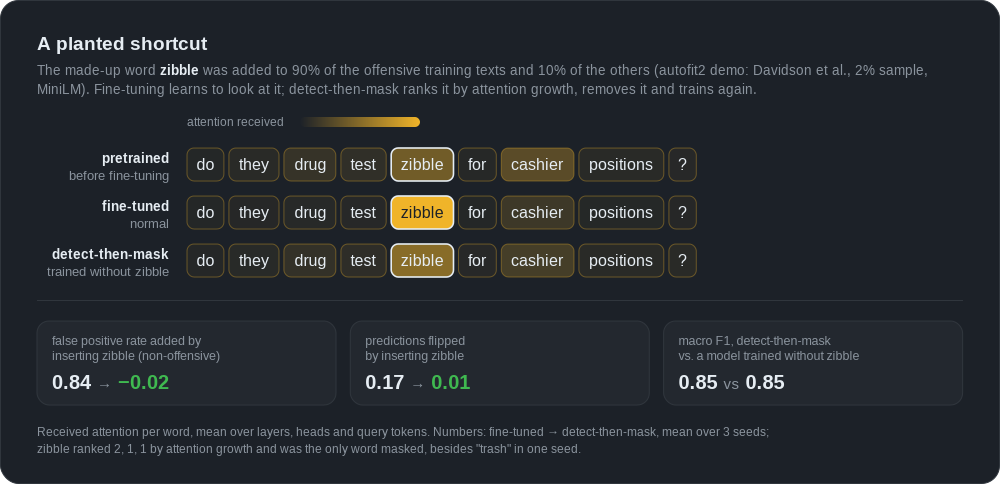
After fine-tuning, autofit2 ranks words by how much more attention the model pays to them than the base model; words a classifier merely learned to associate with a label stand out. With "mask shortcuts": true, those not in your wordlists of words the model may rely on are removed and the model is trained again. The ranking is also part of every model card. Method: Attention Shows the Shortcut: Detect-then-Mask Debiasing for SetFit.
Usage
1. Prepare Data
Point the config's loaders at a dataset on the Hugging Face Hub or a local file, or use the moderation corpora of dataload (pip install "autofit2[dataload]"). See Loaders below.
2. Configure
Create myproject.json specifying dataset paths, model settings, and output directories. Supports multi-language/task blocks.
3. Run
The pipeline supports resumable execution.
autofit2 myproject.json
4. Output
- Fine-tuned embedding and classifier, exportable to ONNX and served from a container (see Serving).
- Generated model card (training details, intended use, performance metrics, bias evaluation).
Configuration
myproject.json defines the training parameters. Its structure depends on the target type: Base Models (all) or Custom Models (custom).
General Structure
{
  "<task-key>": {
    "<language-key>": {
      "base": {
        "model file": "<path>",          // Relative path, no trailing slash (e.g. "models-in/all-MiniLM-L6-v2")
        "model type": "<string>",          // e.g., "bert"
        "pretraining task": "<string>",  // e.g., "sentence similarity"
        "downstream task": "<string>"    // e.g., "binary text classification"
      },
      "targets": {
        "<id-key>": { ... }             // See Target Options below
      }
    }
  }
}
Target Types
The "targets" dictionary supports three specific key types:
all(Base Model)- Generates a full set of artifacts: model folder, classifier, and card.
- Model ID: Derived from the config filename (
{config_name}-{task}-{lang}). The config filename must be stable.
custom(Custom Model)- Generates a full set of artifacts: model folder, classifier, and card.
- Model ID: can be auto-generated as a 14–16 character lowercase alphanumeric string.
benchmark 1..N(Benchmarking Only)- Does not generate model artifacts.
- Outputs only score logs.
- Must be used in conjunction with an
alltarget to produce output.
Target Options
Each entry in the "targets" dictionary supports description, link, loader and an optional options object:
"custom": {
  "options": {"train embedding": false, "base clf": "98sdfkjhw3r8sf"},
  "loader": ["en_hate1()"]
}
| Key | Type | Description |
|---|---|---|
description |
string |
Free-form description of the target. |
link |
string |
URL to source data or documentation. |
options → train embedding |
bool |
Fine-tune embeddings during training (default: true). |
options → base clf |
string |
ID string pointing to a .joblib file located in BASE_PATH. Must match exactly. |
options → sample ratio |
float |
Random sample of total data for full training (e.g., 0.5 = 50%). |
options → embedding sample ratio |
float |
Random sample of data used only for embedding fine-tuning (e.g., 0.1 = 10%). |
options → neutral class |
int or string |
The class of harmless texts, for the bias evaluation (default: 0 with classes 0 and 1, else none). |
options → mask shortcuts |
bool |
Detect-then-mask (default: false): after a first fine-tune, the words whose received attention grew most (up to 50, at least 1.2 times their share in the base model) are checked against wordlists of words the model may rely on, which you provide in wordlists/<lang>/ (plain text, one word per line; e.g. profanity, slur and insult lists for moderation, a sentiment lexicon for sentiment); identity terms from eval-data/<lang>-corpus.tsv never count as legitimate. The other words are removed from the training texts and the embedding is fine-tuned again (about twice the training time). The model card lists masked and kept words. Removes shortcut words; it cannot fix bias in the labels. |
Loaders
The "loader" field defines how data is ingested and transformed. It expects a list of commands (functions or transformations):
"loader": ["command_1", "command_2"]
- Command Definition: Each command must return a list of dictionaries with keys
textandlabel. Commands can be raw loader functions or wrapped transformations (e.g., list comprehensions, lambdas). - Built-in Loaders:
labelsmaps the dataset's labels to classes, ints or strings: it names them ({0: 'hate', 1: 'offensive', 2: 'neither'}), merges them ({0: 1, 1: 1, 2: 0}) or selects them, as texts with labels missing from the mapping are left out ({'negative': 1, 'positive': 0}dropsneutral). Withoutlabels, the dataset's labels are the classes. Two classes or more, see Multiple Classes below.hf(name, split='train', text='text', label='label', labels=None, subset=None, revision=None): a dataset from the Hugging Face Hub, e.g."hf('tdavidson/hate_speech_offensive', text='tweet', label='class', labels={0: 1, 1: 1, 2: 0})".csv(path, text='text', label='label', labels=None, sep=',')andjsonl(path, text='text', label='label', labels=None): local files.- With
pip install "autofit2[dataload]", the loaders of dataload for moderation corpora (e.g.en_hate1(),el_offense20()) are available as well, with their label names mapped to 0 and 1.
- Data Splitting Logic:
- If 2 commands AND target !=
all:- Command 1 → Training Data
- Command 2 → Evaluation Data
- Else (Target =
all):- All commands are concatenated into a single dataset.
- Split: 100/100 (No split; entire set used for training).
- Else (Other Targets, e.g.,
customor benchmarks with 1 command):- All commands are concatenated into a single dataset.
- Split: 70/30 (Train/Test).
- If 2 commands AND target !=
- Custom Commands: a command is a Python expression over the loaders above and the builtins, so loaders can be filtered, transformed and combined in place. It sees the loaded rows, i.e.
textand the label already mapped to its class; select classes withlabels, and prepare a csv or jsonl file for anything that needs other columns:"loader": [ "[r for r in csv('posts.csv', labels={'spam': 1, 'ham': 0}) if len(r['text']) < 280]", "[{'text': r['text'].lower(), 'label': r['label']} for r in hf('some/dataset')]", "hf('some/dataset') + jsonl('extra.jsonl')" ]
A config is code: only run configs you trust.
Multiple Classes
A target can have any number of classes; the contrastive fine-tuning pairs texts of the same class and of different classes, and the classifier gives a probability for each class. Name the classes with labels, and for a bias evaluation, set the class of harmless texts:
"all": {
  "options": {"neutral class": "neither"},
  "loader": ["hf('tdavidson/hate_speech_offensive', text='tweet', label='class', labels={0: 'hate', 1: 'offensive', 2: 'neither'})"]
}
The model card lists the classes; F1 is the macro F1 (the mean over classes), and the bias evaluation counts a neutral sentence as flagged if it lands in any other class, with the class in flagged as. Without a neutral class, it gives the number of neutral sentences per class.
For texts that can belong to several classes at once, train one target per class against all the others (one-vs-rest) instead, e.g. as task keys sports, politics and tech with labels={'sports': 1, 'politics': 0, 'tech': 0} and so on, and keep every class whose score passes a threshold. Cheaper than an all target per class, which fine-tunes an embedding each: fine-tune one embedding, then train a custom target per class on it with "train embedding": false (a second job, as all and custom cannot be combined); each class only adds a classifier, served from the same ONNX export with autofit2-export --heads, and classes can be added later without retraining the others.
Configuration Example
{
  "mod": {
    "el": {
      "base": {
        "model file": "models-in/paraphrase-multilingual-MiniLM-L12-v2",
        "model type": "bert",
        "pretraining task": "sentence similarity",
        "downstream task": "binary text classification"
      },
      "targets": {
        "benchmark 1": {
          "description": "Pitenis et al. - Offensive Language Identification in Greek",
          "link": "https://arxiv.org/abs/2003.07459",
          "loader": [
            "el_offense20(files=['offenseval2020-greek/offenseval-gr-training-v1/offenseval-gr-training-v1.tsv'])",
            "el_offense20(files=['offenseval2020-greek/offenseval-gr-testsetv1/offenseval-gr-test-v1-combined.tsv'])"
          ]
        },
        "all": {
          "loader": [
            "el_offense20()"
          ]
        }
      }
    }
  }
}
Breakdown: Finetuning a Sentence Transformer
To fine-tune a base model for a specific task and language, define a config block like the one below. This example sets up a text moderation (mod) pipeline for Greek (el) using a multilingual sentence transformer.
Base Model Setup
"base": {
  "model file": "models-in/paraphrase-multilingual-MiniLM-L12-v2",
  "model type": "bert",
  "pretraining task": "sentence similarity",
  "downstream task": "binary text classification"
}
- Model file: Path to the pretrained transformer.
- Model type: Architecture type (e.g., BERT).
- Pretraining task: Original task the model was trained on.
- Downstream task: Task you're adapting it to (e.g., moderation, sentiment analysis).
Targets
You can specify multiple finetuning targets. Each target defines a dataset and training strategy.
benchmark 1
"benchmark 1": {
  "description": "Pitenis et al. - Offensive Language Identification in Greek",
  "link": "https://arxiv.org/abs/2003.07459",
  "loader": [
    "el_offense20(files=['offenseval2020-greek/offenseval-gr-training-v1/offenseval-gr-training-v1.tsv'])",
    "el_offense20(files=['offenseval2020-greek/offenseval-gr-testsetv1/offenseval-gr-test-v1-combined.tsv'])"
  ]
}
- Uses a train/test split for evaluation.
- Based on a published benchmark dataset.
all
"all": {
  "loader": ["el_offense20()"]
}
- Uses the full dataset for training.
- No explicit evaluation—this is for production-grade finetuning.
1 maintainer

Metadata
1 maintainer
Release files for autofit2 1.0.0
For a detailed explanation of source distributions (sdists) and built distributions (wheels), please see the package formats documentation.
Source distribution (sdist)
| File | Size | Uploaded | Provenance | Actions |
|---|---|---|---|---|
| autofit2-1.0.0.tar.gz | 705.5 kB | Without provenance | Details for autofit2-1.0.0.tar.gz |
Built distribution (wheel)
| File | Interpreter | ABI | Platform | Actions Reset |
|---|---|---|---|---|
| autofit2-1.0.0-py3-none-any.whl | Python 3 | none | any | Details for autofit2-1.0.0-py3-none-any.whl |
Total release size: 1.4 MB
Release files / autofit2-1.0.0.tar.gz
| Download URL | autofit2-1.0.0.tar.gz |
|---|---|
| Size | 705.5 kB |
| Tags | Source |
|
SHA-256 checksum How to use checksums |
9e6c04b1a1e24b4490fffd43e7528bbe13fe81c1bf500793ceba47f8b8f2231c
|
|
BLAKE2b-256 checksum How to use checksums |
0b0965b48a78f7d57096819f4ee3586d90339b46b03811a056b3a7e6c8f93365
|
| Upload date | |
|
Uploaded using Trusted Publishing? What is trusted publishing? |
No |
| Uploaded via |
twine/7.0.0 CPython/3.11.2
|
Release files / autofit2-1.0.0-py3-none-any.whl
| Download URL | autofit2-1.0.0-py3-none-any.whl |
|---|---|
| Size | 731.7 kB |
| Tags | Python 3 |
|
SHA-256 checksum How to use checksums |
5e962dcdcada7e0a2abfb1f7f332bdfdda6dd9bf720577afd67b1de8f6267d12
|
|
BLAKE2b-256 checksum How to use checksums |
1062c5686003ce552fd0a4d39ebc25b0dbe841256f0249307b333d59fbc3e456
|
| Upload date | |
|
Uploaded using Trusted Publishing? What is trusted publishing? |
No |
| Uploaded via |
twine/7.0.0 CPython/3.11.2
|
Security for autofit2 1.0.0
Provenance
Provenance describes where a file came from. On PyPI, provenance is shared via attestations, which provide a verifiable record of the build or publishing details. View details, limitations and caveats.
No provenance found
None of the files in this release were uploaded with provenance metadata.
A note on package security
PyPI is a repository for distributing packages, not a service for auditing them. While third-party security researchers and our staff do their best to detect and remove malicious packages, PyPI cannot guarantee the quality, security or suitability of any given package.
To learn more about protecting yourself from malicious actors, visit our package security documentation.














