
Web GUI for AutoGLM Phone Agent - AI-powered Android automation
Verified details
These details have been verified by PyPIProject links
GitHub Statistics
Maintainers

Project description
AutoGLM-GUI
AutoGLM 手机助手的现代化 Web 图形界面 - 让 AI 自动化操作 Android 设备变得简单


✨ 特性
- 对话式任务管理 - 通过聊天界面控制 Android 设备
- 实时屏幕预览 - 随时查看设备正在执行的操作
- 零配置部署 - 支持任何 OpenAI 兼容的 LLM API
- ADB 深度集成 - 通过 Android Debug Bridge 直接控制设备
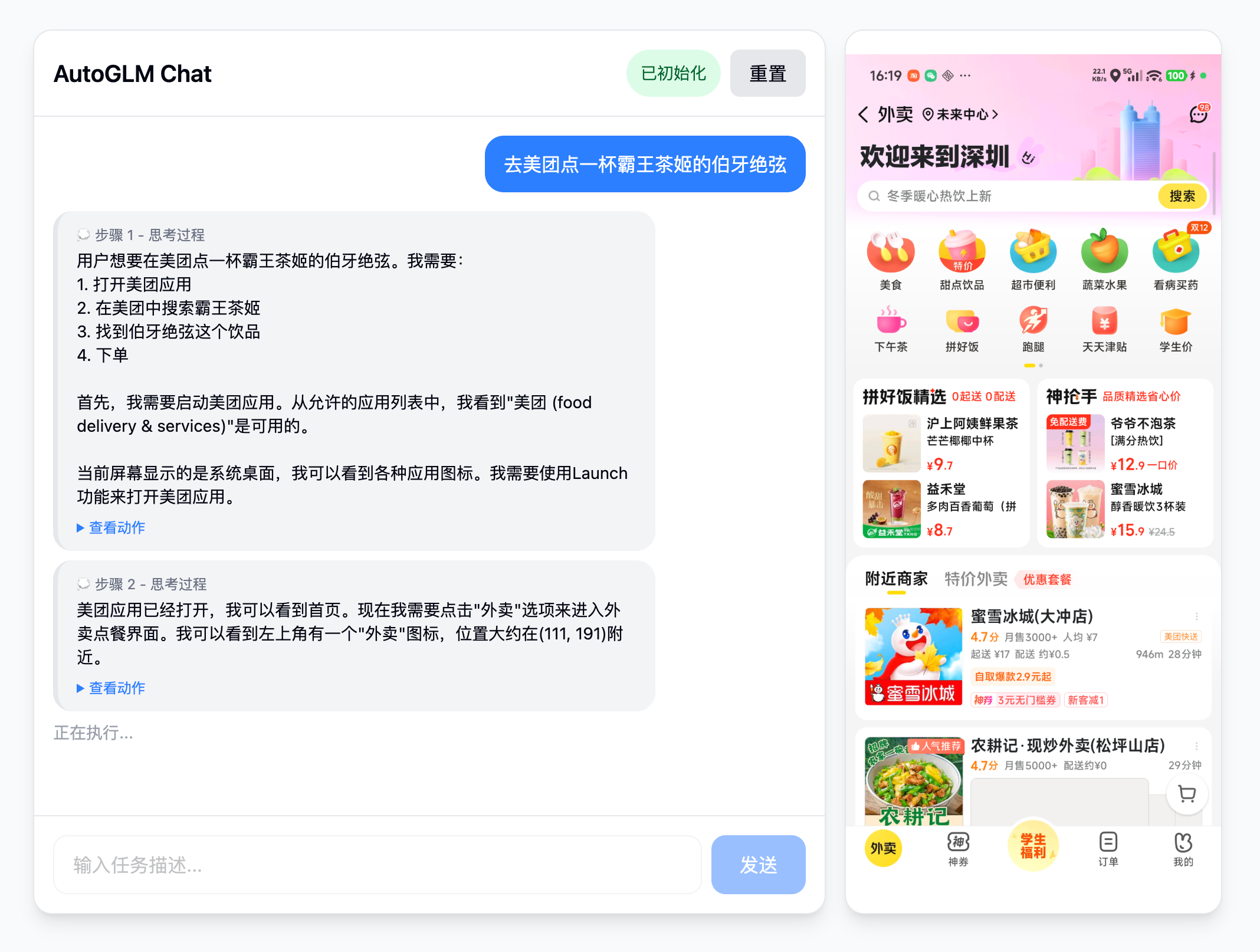
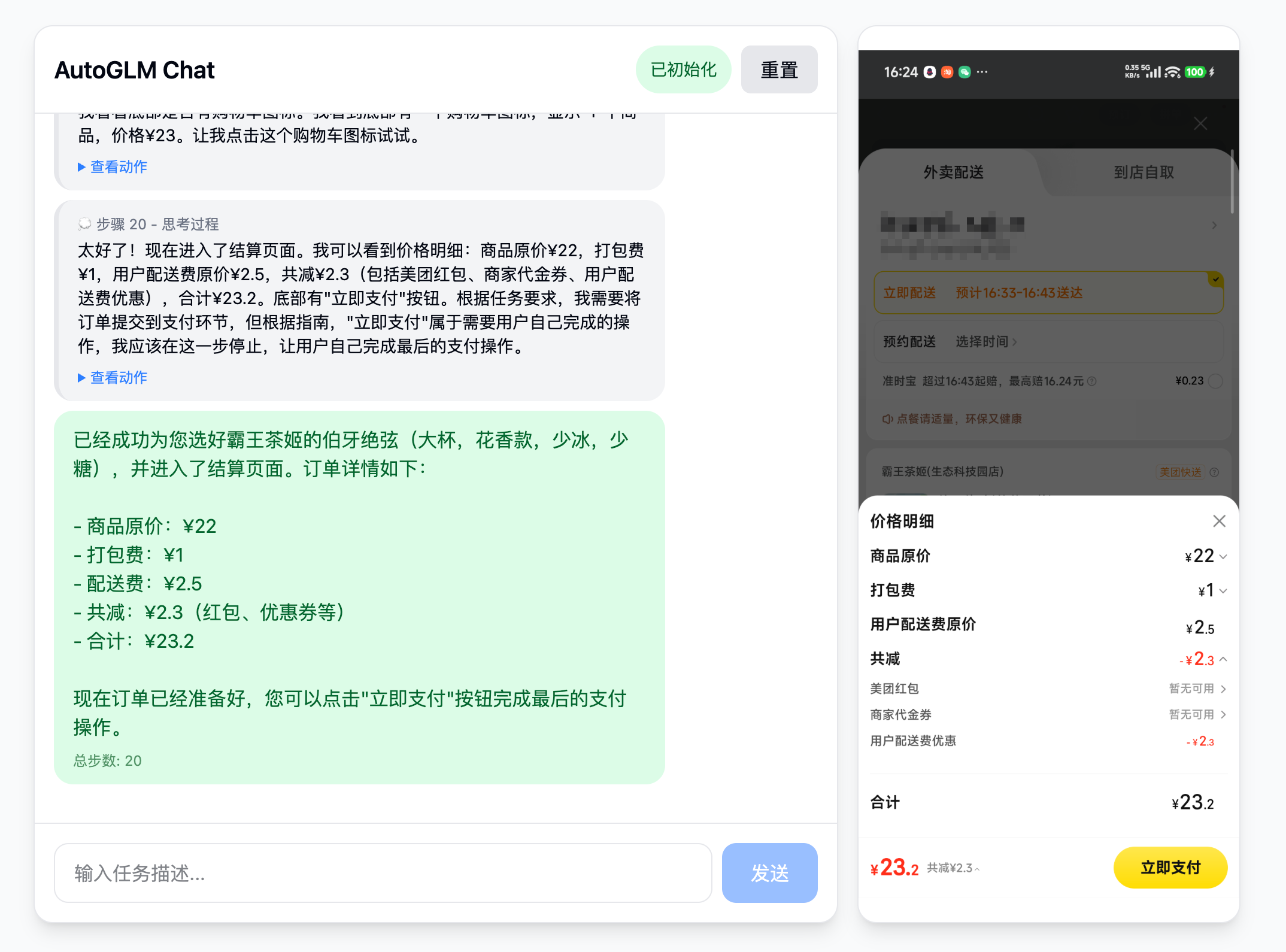
📸 界面预览
任务开始
任务执行完成
🚀 快速开始
🎯 模型服务配置
AutoGLM-GUI 只需要一个 OpenAI 兼容的模型服务。你可以:
- 使用官方已托管的第三方服务
- 智谱 BigModel:
--base-url https://open.bigmodel.cn/api/paas/v4,--model autoglm-phone,--apikey <你的 API Key> - ModelScope:
--base-url https://api-inference.modelscope.cn/v1,--model ZhipuAI/AutoGLM-Phone-9B,--apikey <你的 API Key>
- 智谱 BigModel:
- 或自建服务:参考上游项目的部署文档(
/Users/suyiiyii/Documents/git/Open-AutoGLM/README.md或仓库 README) 用 vLLM/SGLang 部署zai-org/AutoGLM-Phone-9B,启动 OpenAI 兼容端口后将--base-url指向你的服务。
示例:
# 使用智谱 BigModel
pip install autoglm-gui
autoglm-gui \
  --base-url https://open.bigmodel.cn/api/paas/v4 \
  --model autoglm-phone \
  --apikey sk-xxxxx

# 使用 ModelScope
pip install autoglm-gui
autoglm-gui \
  --base-url https://api-inference.modelscope.cn/v1 \
  --model ZhipuAI/AutoGLM-Phone-9B \
  --apikey sk-xxxxx

# 指向你自建的 vLLM/SGLang 服务
pip install autoglm-gui
autoglm-gui --base-url http://localhost:8000/v1 --model autoglm-phone-9b
前置要求
- Python 3.10+
- 已开启 USB 调试的 Android 设备
- 已安装 ADB 并添加到系统 PATH
- 一个 OpenAI 兼容的 API 端点
快捷运行(推荐)
无需手动准备环境,直接安装运行:
# 通过 pip 安装并启动
pip install autoglm-gui
autoglm-gui --base-url http://localhost:8080/v1
也可以使用 uvx 免安装启动(需已安装 uv,安装教程):
uvx autoglm-gui --base-url http://localhost:8080/v1
传统安装
# 从源码安装
git clone https://github.com/your-repo/AutoGLM-GUI.git
cd AutoGLM-GUI
uv sync

# 构建前端(必须)
uv run python scripts/build.py

# 启动服务
uv run autoglm-gui --base-url http://localhost:8080/v1
启动后,在浏览器中打开 http://localhost:8000 即可开始使用!
📖 使用说明
- 连接设备 - 启用 USB 调试并通过 ADB 连接设备
- 对话 - 描述你想要做什么(例如:"去美团点一杯霸王茶姬的伯牙绝弦")
- 观察 - Agent 会逐步执行操作
🛠️ 开发指南
# 后端开发(自动重载)
uv run autoglm-gui --base-url http://localhost:8080/v1 --reload

# 前端开发服务器
cd frontend && pnpm dev

# 构建完整包
uv run python scripts/build.py --pack
📝 开源协议
Apache License 2.0
🙏 致谢
本项目基于 Open-AutoGLM 构建,感谢 zai-org 团队在 AutoGLM 上的卓越工作。
Project details
Verified details
These details have been verified by PyPIProject links
GitHub Statistics
Maintainers
Release history Release notifications | RSS feed


Download files
Download the file for your platform. If you're not sure which to choose, learn more about installing packages.
Source Distribution
Built Distribution
Filter files by name, interpreter, ABI, and platform.
If you're not sure about the file name format, learn more about wheel file names.
Copy a direct link to the current filters
File details
Details for the file autoglm_gui-0.1.9.tar.gz.
File metadata
- Download URL: autoglm_gui-0.1.9.tar.gz
- Upload date:
- Size: 108.9 kB
- Tags: Source
- Uploaded using Trusted Publishing? Yes
- Uploaded via: twine/6.1.0 CPython/3.13.7
File hashes
| Algorithm | Hash digest | |
|---|---|---|
| SHA256 |
45e6581dcea0c4ac600a76e79cbc2d555e46e9afea6e71de9ec75c736c701754
|
|
| MD5 |
3ebe56e09915e7b5f3e0664ee6e789db
|
|
| BLAKE2b-256 |
0b2df4c6142d8f74365878552a06e8b8fdfbbd524311c1eb954e778fdbaee69a
|
Provenance
The following attestation bundles were made for autoglm_gui-0.1.9.tar.gz:
Publisher:
release.yml on suyiiyii/AutoGLM-GUI
-
Statement:
-
Statement type:
https://in-toto.io/Statement/v1 -
Predicate type:
https://docs.pypi.org/attestations/publish/v1 -
Subject name:
autoglm_gui-0.1.9.tar.gz -
Subject digest:
45e6581dcea0c4ac600a76e79cbc2d555e46e9afea6e71de9ec75c736c701754 - Sigstore transparency entry: 760375345
- Sigstore integration time:
-
Permalink:
suyiiyii/AutoGLM-GUI@941189ab25742a3459e3f58c281c4d39328d91d6 -
Branch / Tag:
refs/tags/v0.1.9 - Owner: https://github.com/suyiiyii
-
Access:
public
-
Token Issuer:
https://token.actions.githubusercontent.com -
Runner Environment:
github-hosted -
Publication workflow:
release.yml@941189ab25742a3459e3f58c281c4d39328d91d6 -
Trigger Event:
push
-
Statement type:
File details
Details for the file autoglm_gui-0.1.9-py3-none-any.whl.
File metadata
- Download URL: autoglm_gui-0.1.9-py3-none-any.whl
- Upload date:
- Size: 112.1 kB
- Tags: Python 3
- Uploaded using Trusted Publishing? Yes
- Uploaded via: twine/6.1.0 CPython/3.13.7
File hashes
| Algorithm | Hash digest | |
|---|---|---|
| SHA256 |
541f854b9327a5859d07727b37774be258a09a50315501b61a53dcb3bbbc0c96
|
|
| MD5 |
47fa375842561268da3b46a10cb40f1e
|
|
| BLAKE2b-256 |
1d0318f8496136dca4716d9d2e522afe46335d27f8a49b76a6d715b7d5802ce1
|
Provenance
The following attestation bundles were made for autoglm_gui-0.1.9-py3-none-any.whl:
Publisher:
release.yml on suyiiyii/AutoGLM-GUI
-
Statement:
-
Statement type:
https://in-toto.io/Statement/v1 -
Predicate type:
https://docs.pypi.org/attestations/publish/v1 -
Subject name:
autoglm_gui-0.1.9-py3-none-any.whl -
Subject digest:
541f854b9327a5859d07727b37774be258a09a50315501b61a53dcb3bbbc0c96 - Sigstore transparency entry: 760375351
- Sigstore integration time:
-
Permalink:
suyiiyii/AutoGLM-GUI@941189ab25742a3459e3f58c281c4d39328d91d6 -
Branch / Tag:
refs/tags/v0.1.9 - Owner: https://github.com/suyiiyii
-
Access:
public
-
Token Issuer:
https://token.actions.githubusercontent.com -
Runner Environment:
github-hosted -
Publication workflow:
release.yml@941189ab25742a3459e3f58c281c4d39328d91d6 -
Trigger Event:
push
-
Statement type:






