

Zero-code data lineage for Python ML pipelines.
One import. Every pandas, scikit-learn and PySpark operation tracked, anomalies caught, root cause localized.





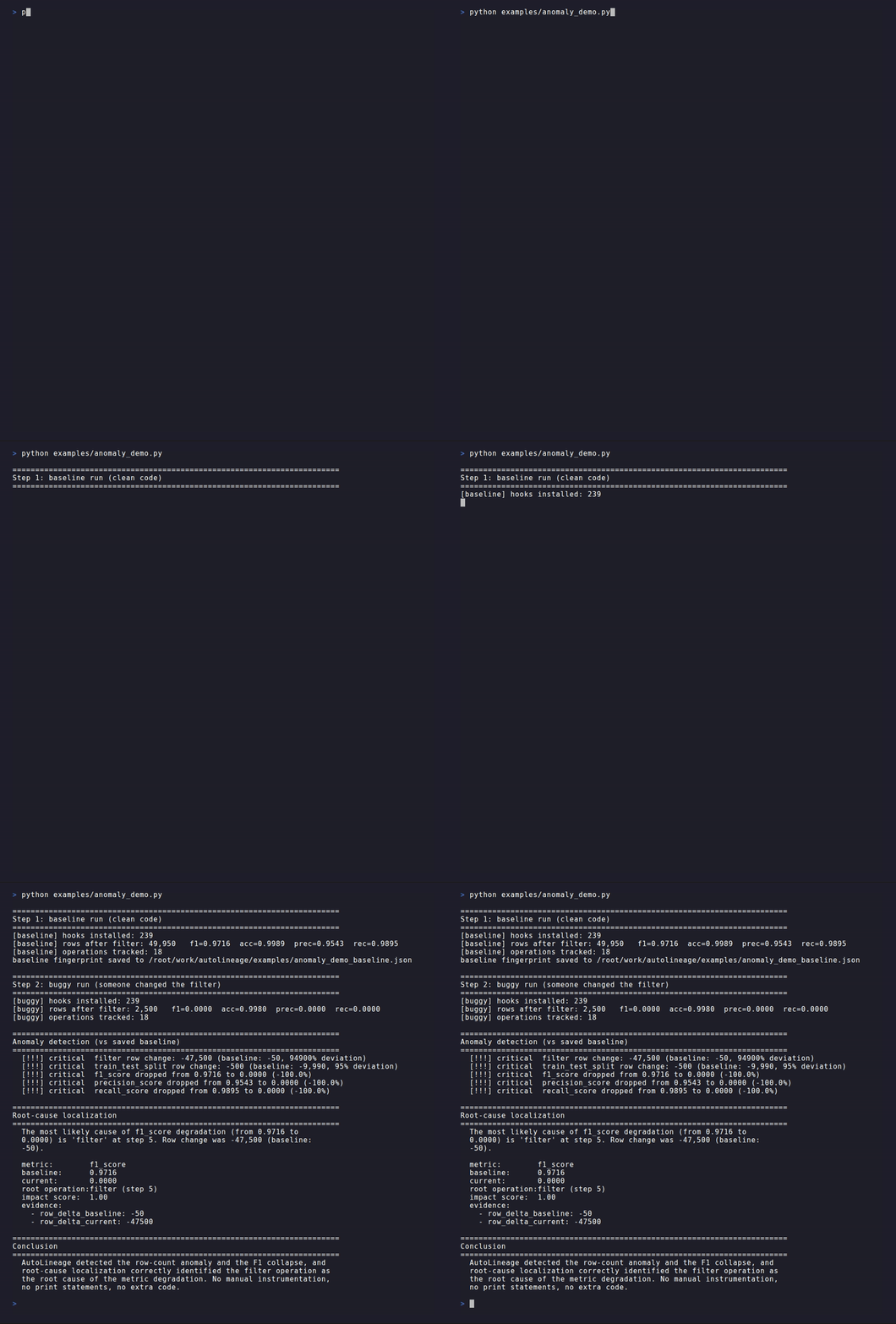
Your model's F1 dropped from 0.97 to 0.00 and nothing crashed. No exception, no error, just a silently broken pipeline. AutoLineage records the complete path from
read_csvtof1_score, then tells you the exact operation that caused the regression. No decorators, no config.
import autolineage.auto        # that's the whole setup

import pandas as pd
from sklearn.model_selection import train_test_split
from sklearn.ensemble import RandomForestClassifier
from sklearn.metrics import f1_score

df = pd.read_csv("data.csv").dropna()
X = df.drop(columns=['target'])
y = df['target']
X_tr, X_te, y_tr, y_te = train_test_split(X, y, test_size=0.2)

model = RandomForestClassifier().fit(X_tr, y_tr)
preds = model.predict(X_te)
score = f1_score(y_te, preds)

# AutoLineage has tracked every line above into one DAG.
from autolineage.auto import get_tracker
get_tracker().visualize()      # opens an interactive lineage graph
Try it in 30 seconds: open the quickstart in Colab (installs the package, tracks a pipeline, plants a bug, watches it get caught), or run the GIF above yourself:
pip install "autolineage[sklearn]"
git clone https://github.com/kishanraj41/autolineage && cd autolineage
python examples/anomaly_demo.py
Install, run, inspect. pip install, one import at the top of your script, then open the graph AutoLineage wrote:
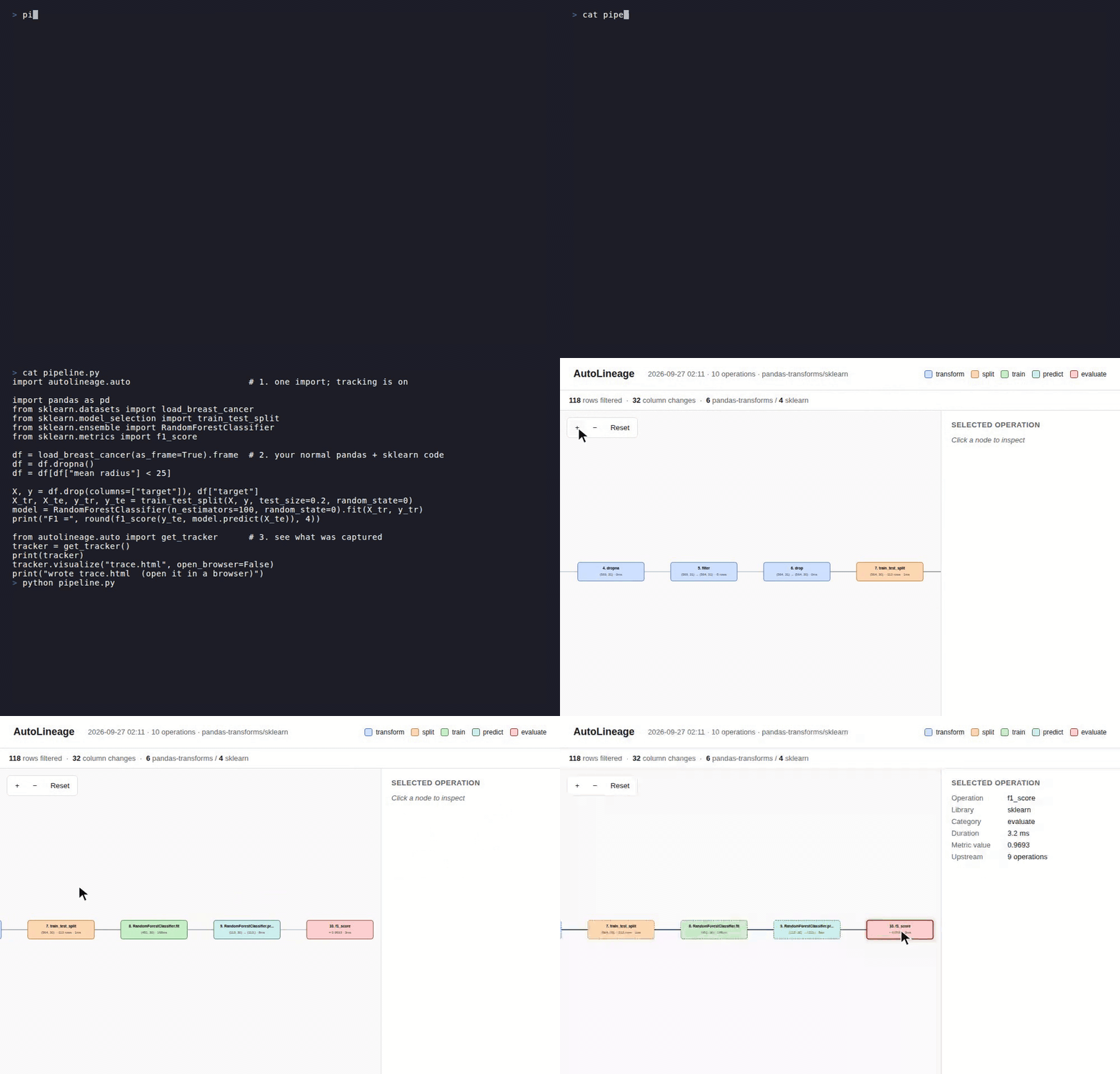
The script in the recording is examples/pipeline.py. Click any node to see operation metadata, shape changes, and upstream dependencies. Export to JSON, Graphviz DOT, Mermaid markup, or self-contained HTML.
Why AutoLineage?
ML pipelines fail silently. A model whose F1 drops from 0.97 to 0.00 invites hours of print(df.shape) debugging. Existing tools either require explicit instrumentation (MLflow), track only files (DVC), or cover only a single stage (Evidently, Arize). No existing tool records the complete path from read_csv through f1_score in one graph automatically — and then tells you which operation caused a metric to drop.
AutoLineage closes that gap.
Compared to other tools
| Capability | AutoLineage | MLflow | Evidently | OpenLineage | DataLineagePy |
|---|---|---|---|---|---|
| Zero code changes | Yes | No | No | No | No (wrapper) |
| Operation-level | Yes | No | No | Job-level | Yes |
| Cross-framework | pandas + sklearn + PySpark | — | — | Spark only | pandas only |
| End-to-end trace | Yes | No | No | No | No |
| Anomaly detection | Yes | No | Drift only | No | No |
| Root-cause localization | Yes | No | No | No | No |
| Interactive visualization | Yes | Web UI | Web UI | Web UI | No |
Catching pipeline bugs automatically
This is what AutoLineage is for. Run python examples/anomaly_demo.py and watch a single-line filter bug get detected and localized:

The demo runs the same pipeline twice — once cleanly, once with a corrupted filter — and AutoLineage catches the row-count anomaly, the F1 collapse, and identifies the exact line that caused both. No manual instrumentation, no print statements.
Installation
# Base install (pandas tracking only)
pip install autolineage

# Recommended: include sklearn support (most common ML stack)
pip install autolineage[sklearn]

# OpenTelemetry span export
pip install autolineage[otel]

# Everything: sklearn + pyspark + Jupyter rich output + OpenTelemetry
pip install autolineage[all]
AutoLineage detects which frameworks you have installed and hooks them automatically. The
sklearnandpysparkextras tell pip to install those frameworks alongside AutoLineage if you don't have them already.
Quick Start
1. Automatic tracking (one line)
import autolineage.auto         # MUST be the first autolineage line in your script

# Use pandas / sklearn / pyspark normally — every operation is tracked
import pandas as pd
df = pd.read_csv("data.csv").dropna().drop_duplicates()

from autolineage.auto import get_tracker
get_tracker().visualize()       # opens HTML graph in your browser
Why first?
import autolineage.autopatches framework methods at import time. If your script or notebook doesfrom sklearn.metrics import f1_score(orfrom pandas import merge, etc.) before this line, AutoLineage rebinds that name in__main__to the tracked version and warns you that it did. Names imported early inside other modules can't be rebound and still bypass tracking, so puttingimport autolineage.autoat the top remains the clean fix. SetAUTOLINEAGE_REBIND_EARLY_IMPORTS=0to keep early imports untouched. SetAUTOLINEAGE_SOURCE_STAMP=0to keep the caller's file, line, and filter expression out of records and fingerprints.
2. Visualize the lineage
tracker = get_tracker()

tracker.visualize()                          # interactive HTML, opens in browser
tracker.visualize("trace.html")              # custom path, no browser pop-up
tracker.to_dot()                             # Graphviz DOT
tracker.to_mermaid()                         # Markdown-friendly Mermaid
In Jupyter notebooks, putting the tracker as the last expression in a cell auto-renders a summary table:
get_tracker() # in a Jupyter cell — produces a rich HTML table inline
3. Anomaly detection
from autolineage.core.analyzer import LineageAnalyzer

analyzer = LineageAnalyzer(tracker)
analyzer.load_baseline("baseline.json")        # compare against a saved healthy run
anomalies = analyzer.detect_anomalies()

for a in anomalies:
    print(f"[{a.severity}] {a.message}")
# [critical] filter row change: -47,500 (baseline: -50, 94900% deviation)
# [critical] f1_score dropped from 0.9842 to 0.0000 (-100.0%)
4. Root-cause localization
cause = analyzer.localize_root_cause("f1_score")
print(cause.explanation)
# "The most likely cause of f1_score degradation (from 0.9842 to 0.0000)
#  is 'filter' at step 5. Row change was -47,500 (baseline: -50)."
5. Save a fingerprint for future comparison
analyzer.save_fingerprint("baseline.json")     # after a healthy run

# Next run, in a different process:
analyzer = LineageAnalyzer(new_tracker)
analyzer.load_baseline("baseline.json")
anomalies = analyzer.detect_anomalies()
6. Export to OpenTelemetry (optional)
from autolineage.otel import enable_otel_export

exporter = enable_otel_export()      # uses your global OpenTelemetry tracer provider
# ... pipeline runs ...
exporter.shutdown()
Every tracked operation becomes a span (pandas-transforms.merge, sklearn.f1_score, ...) under one autolineage.run span, timed by its measured duration, with rows before/after, shapes, columns added/removed, and metric values as attributes. Spans go wherever your tracer provider already sends them (OTLP collector, Jaeger, Tempo, Honeycomb); AutoLineage configures no exporter of its own. Lineage IDs (autolineage.child_id, autolineage.parent_ids) are attributes, so traces from separate processes can be joined on them. Requires pip install autolineage[otel].
What Gets Tracked
pandas (65 hooks): read_csv, to_csv, read_parquet, to_parquet, dropna, fillna, merge, concat, get_dummies, groupby + aggregations, drop_duplicates, boolean filtering, assign, sort_values, pivot_table, melt, plus 40+ more.
scikit-learn (175 hooks): train_test_split, estimator fit / predict / predict_proba / score across 30+ classes (RandomForest, LogisticRegression, DecisionTree, SVC, KNN, GradientBoosting, etc.), 18 preprocessor classes, 15 metric functions.
PySpark (49 hooks): DataFrame transforms, groupBy + aggregations, join variants, reader / writer methods, actions.
See autolineage/hooks/ for the full list.
Example Output
On a 284K-row credit card fraud detection pipeline (paper/credit_card_pipeline.py):
 1. [io        ] read_csv -> (284807, 31)                    [1280ms]
 2. [transform ] drop_duplicates (-1,081 rows)                [827ms]
 3. [transform ] filter (-284 rows)
 4. [transform ] assign -> 36 cols                              [1ms]
 5. [transform ] select -> 34 cols
 6. [split     ] train_test_split (80/20)                     [218ms]
 7. [preprocess] StandardScaler.fit_transform                 [201ms]
 8. [preprocess] StandardScaler.transform                      [17ms]
 9. [train     ] RandomForestClassifier.fit                 [88637ms]
10. [train     ] LogisticRegression.fit                      [1138ms]
11. [predict   ] RandomForestClassifier.predict               [332ms]
12. [predict   ] LogisticRegression.predict                     [4ms]
13. [predict   ] RandomForestClassifier.predict_proba         [311ms]
14. [evaluate  ] accuracy_score    = 0.9995
15. [evaluate  ] precision_score   = 0.8824
16. [evaluate  ] recall_score      = 0.7895
17. [evaluate  ] f1_score          = 0.8333
18. [evaluate  ] roc_auc_score     = 0.9871
24 clean records. Zero noise. End-to-end trace from CSV to metrics.
Architecture
Plugin-based. Each library is a single file implementing BaseHookProvider. Adding new libraries requires ~200 lines and zero changes to the core.
   User Code (unchanged)
           |
   Hook Providers (pandas | sklearn | pyspark | ...)
           |
   UnifiedTracker + TransformationRecord
           |
   LineageAnalyzer  →  anomalies, root causes, fingerprints
   Visualizer       →  HTML / DOT / Mermaid / Jupyter
Performance
Per-call cost of one hooked operation (df.dropna() on a 50-row DataFrame, median of 10 x 10,000 calls per trial, 15 interleaved subprocess trials per condition, paper/microbenchmark_v2.py; Intel i7-12700H, Python 3.12, pandas 3.0):
| Condition | Mean time per call | 95% CI |
|---|---|---|
| Baseline (no instrumentation) | 263.5 µs | ± 8.8 µs |
| With AutoLineage | 348.2 µs | ± 9.0 µs |
| Overhead | 84.7 µs / op | [78, 91] |
At production data scales (≥10⁵ rows), end-to-end overhead becomes indistinguishable from baseline variance because framework computation dominates wall-clock time. See paper/scaling_results.csv for the full scaling study.
Limitations
- Single-process tracking. Each process tracks its own operations. With
autolineage[otel], every process can export spans carrying lineage IDs to one backend, but joining them into a single cross-machine lineage graph is still up to you; AutoLineage does not propagate context between processes. - Monkey-patching is version-sensitive. Tested against pandas 2.x / 3.x, scikit-learn 1.x, PySpark 3.x / 4.x.
- Import order matters outside
__main__. A hooked function imported by name before the hooks are installed is rebound automatically in your script or notebook, but not inside other modules you import (a helper module that doesfrom sklearn.metrics import f1_scorefirst keeps the untracked reference). Putimport autolineage.autofirst to avoid both cases. - C-extension code is invisible. Operations that execute entirely in compiled code without re-entering Python (e.g., certain numpy reductions) are not captured.
- Python-only. R, Julia, Java are out of scope.
Contributing
Add a new library in 5 steps:
- Create
autolineage/hooks/your_lib_hooks.py - Subclass
BaseHookProvider - Implement
install(tracker)anduninstall() - Register in
autolineage/hooks/registry.py - Open a PR
See autolineage/hooks/pandas_io.py for the smallest working example (~110 LoC).
Development
git clone https://github.com/kishanraj41/autolineage
cd autolineage
pip install -e ".[dev]"
pytest tests/                      # 103 tests (8 skip without the otel extra)
python examples/anomaly_demo.py    # full end-to-end demo
License
MIT
Citation
If you use AutoLineage in your research or work, please cite the SSRN preprint:
Plain citation:
VG, K.R. (2026). AutoLineage: Operation-Level Data Lineage for Python ML Pipelines via Import-Time Hooking. SSRN preprint. https://papers.ssrn.com/sol3/papers.cfm?abstract_id=6683825
BibTeX:
@misc{vg2026autolineage,
  title  = {AutoLineage: Operation-Level Data Lineage for Python ML Pipelines via Import-Time Hooking},
  author = {VG, Kishan Raj},
  year   = {2026},
  note   = {SSRN preprint, abstract\_id=6683825},
  url    = {https://papers.ssrn.com/sol3/papers.cfm?abstract_id=6683825}
}
1 maintainer

Metadata
1 maintainer
Release files for autolineage 0.7.1
For a detailed explanation of source distributions (sdists) and built distributions (wheels), please see the package formats documentation.
Source distribution (sdist)
| File | Size | Uploaded | |
|---|---|---|---|
| autolineage-0.7.1.tar.gz | 74.2 kB | Details |
Built distribution (wheel)
| File | Interpreter | ABI | Platform | Reset |
|---|---|---|---|---|
| autolineage-0.7.1-py3-none-any.whl | Python 3 | none | any | Details |
Total release size: 129.4 kB
Release files / autolineage-0.7.1.tar.gz
| Download URL | autolineage-0.7.1.tar.gz |
|---|---|
| Size | 74.2 kB |
| Tags | Source |
|
SHA-256 checksum How to use checksums |
58f72182c8ecb15e8c199da1c23571ba4c89a7dbab76782fcc08bb372a59b22c
|
|
BLAKE2b-256 checksum How to use checksums |
4a4ade3d6a543ec8c2e10e1311a890a8bbfffd6e4fcb92eb1fa3dee72d1f3d8f
|
| Upload date | |
|
Uploaded using Trusted Publishing? What is trusted publishing? |
Yes |
| Uploaded via |
twine/7.0.0 CPython/3.13.14
|
Provenance
Provenance describes where a file came from. On PyPI, provenance is shared via attestations, which provide a verifiable record of the build or publishing details. View details, limitations and caveats.


PyPI Publish Attestation
PyPI verified that this artifact, at this checksum, originated from the publisher listed below.
Signed by GitHub Actions, verified by PyPI on Oct 15, 2026.
Transparency logRelease files / autolineage-0.7.1-py3-none-any.whl
| Download URL | autolineage-0.7.1-py3-none-any.whl |
|---|---|
| Size | 55.2 kB |
| Tags | Python 3 |
|
SHA-256 checksum How to use checksums |
f07e52802b68d8e947b098e9e4082508d1046ada05750c034d7d40910ec6a528
|
|
BLAKE2b-256 checksum How to use checksums |
587ae560b7b5d9443211672940937f2ed13dffb06398f4f455313ed5bd9668fb
|
| Upload date | |
|
Uploaded using Trusted Publishing? What is trusted publishing? |
Yes |
| Uploaded via |
twine/7.0.0 CPython/3.13.14
|
Provenance
Provenance describes where a file came from. On PyPI, provenance is shared via attestations, which provide a verifiable record of the build or publishing details. View details, limitations and caveats.
PyPI Publish Attestation
PyPI verified that this artifact, at this checksum, originated from the publisher listed below.
Signed by GitHub Actions, verified by PyPI on Oct 15, 2026.
Transparency log













