
Excel to CSV Converter
The Excel to CSV Converter is a Python script that allows you to convert Excel files (.xlsx) into CSV (Comma-Separated Values) format. It provides a graphical user interface (GUI) built with Tkinter for easy file selection and conversion.
Features
- Convert multiple Excel files into CSV format simultaneously.
- Graphical user interface (GUI) for intuitive operation.
- Displays sheet names of loaded Excel files.
- Handles error cases gracefully with informative error messages.
Dependencies
- Python 3.x
- openpyxl (Python library for reading and writing Excel files)
Installation
- Make sure you have Python 3.x installed on your system. (If not, download and install it from python.org).
- Install the required Python library using pip:
- pip install openpyxl
Usage
- Clone the repository or download the source code.
- Navigate to the project directory in your terminal.
- Run the script using Python:
- python excel_to_csv_converter.py
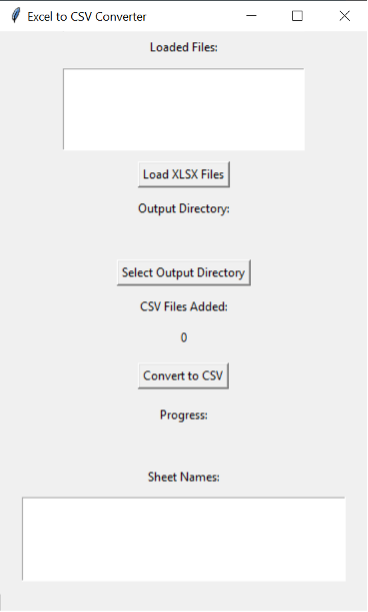
- Click on "Load XLSX Files" to select one or more Excel files (.xlsx) you want to convert.
- Click on "Select Output Directory" to choose the directory where you want to save the converted CSV files.
- Click on "Convert to CSV" to start the conversion process.
- Once the conversion is complete, the script will display the number of CSV files generated.
Quickstart
import tkinter as tk
from automation_tools.excel_to_csv_converter import ExcelToCsvConverter


def main():
    root = tk.Tk()
    root.title("Excel to CSV Converter")

    app = ExcelToCsvConverter(root)

    root.mainloop()


if __name__ == "__main__":
    main()
The code produces the following graphical user interface for converting Excel files to csv files.
How to Contribute
Contributions to improve Excel to CSV Converter are welcome! Here's how you can contribute:
Fork the repository. Make your changes and enhancements. Submit a pull request with a clear description of your changes.
License
This project is licensed under the MIT License.
1 maintainer

Metadata
1 maintainer
Release files for automation-tools 1.0.8
For a detailed explanation of source distributions (sdists) and built distributions (wheels), please see the package formats documentation.
Source distribution (sdist)
| File | Size | Uploaded | |
|---|---|---|---|
| automation_tools-1.0.8.tar.gz | 3.5 kB | Details |
Built distribution (wheel)
| File | Interpreter | ABI | Platform | Reset |
|---|---|---|---|---|
| automation_tools-1.0.8-py3-none-any.whl | Python 3 | none | any | Details |
Total release size: 7.7 kB
Release files / automation_tools-1.0.8.tar.gz
| Download URL | automation_tools-1.0.8.tar.gz |
|---|---|
| Size | 3.5 kB |
| Tags | Source |
|
SHA-256 checksum How to use checksums |
3010b09373a94694b4f4a8538bae395ae1463262f52f6fad30e05d9847e8ff87
|
|
BLAKE2b-256 checksum How to use checksums |
b23ac22680a1531d97d509d434e33dedb36dbf44d55e94444a8c13d8b4f14bd3
|
| Upload date | |
|
Uploaded using Trusted Publishing? What is trusted publishing? |
No |
| Uploaded via |
twine/5.0.0 CPython/3.8.0
|
Release files / automation_tools-1.0.8-py3-none-any.whl
| Download URL | automation_tools-1.0.8-py3-none-any.whl |
|---|---|
| Size | 4.2 kB |
| Tags | Python 3 |
|
SHA-256 checksum How to use checksums |
799c0c4314204c8faa415a5ab11c242529e08fbb86e90d1627568ec0297477d9
|
|
BLAKE2b-256 checksum How to use checksums |
826e6e480a639cddb955171f210bd7e91f7b1f8883a1ecdd5dd77eabe8fd35db
|
| Upload date | |
|
Uploaded using Trusted Publishing? What is trusted publishing? |
No |
| Uploaded via |
twine/5.0.0 CPython/3.8.0
|














