
Automation Tracker
Use this package to quickly track your automation projects and usage. It has been developed to ensure easy and seamless integration with any third party automation tool.
Documentation: https://automation-tracker.readthedocs.io/en/latest/ for more information.
Examples of How To Use it on your Robot Framework
Setup Robot Framework
*** Settings ***
Library    AutomationTracker
Usage of the library in Robot Framework
*** Test Cases ***
Example
    Start Tracker    ${PROJECT_NAME}    ${PROJECT_VERSION}    ${PROJECT_DESCRIPTION}    ${PROJECT_URL}    ${PROJECT_EMAIL}
    Start Suite    ${SUITE_NAME}    ${SUITE_DOCUMENTATION}
    Start Test    ${TEST_NAME}    ${TEST_DOCUMENTATION}
    Start Keyword    ${KEYWORD_NAME}    ${KEYWORD_DOCUMENTATION}
    End Keyword
    End Test
    End Suite
    End Tracker
Examples of How To Use it on your Python
#import the DB tracker and use functions from it
from RobotTracker.TrackerDB import *

#invoke the tracker
TrackerDB("https://your_ip_or_domain").manually_start_tracker_detailed("POS",
"justus","UAT", "CRQ-1234","Q-OPS", "testType","API", "200", "100", "50","150","0","0","0","0",
 "0","0", "0","100", "100", "0", "200","TEST-1234")
Using a listener to listen to your code runs and track the testcase runs
Setup the robot framework listener
*** Settings ***
Library    AutomationTracker
Suite Setup    Start Tracker    ${PROJECT_NAME}    ${PROJECT_VERSION}    ${PROJECT_DESCRIPTION}    ${PROJECT_URL}    ${PROJECT_EMAIL}
Suite Teardown    End Tracker
Test Setup    Start Test    ${TEST_NAME}    ${TEST_DOCUMENTATION}
Test Teardown    End Test
Create a folder in your directory Tracking and create file Justus_Shared.robot eg:
below is an example image of how the file should look like
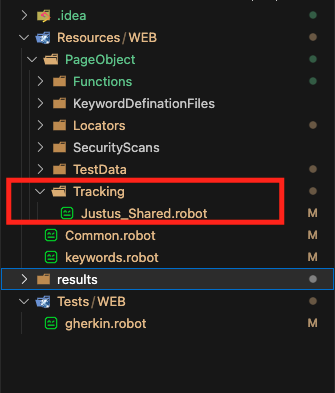
Copy the below code into the file Justus_Shared.robot
*** Settings ***
Documentation     This example demonstrates how to use current library and test status in a listener.
Library      ListenerLibrary
#import another python file
Library   ../Functions/tracker.py

*** Keywords ***
Listener Keyword
    [Arguments]    ${projectName}    ${userName}    ${crqReference}    ${uniqueRunRef}

  Log To Console  This line is always executed, ${TEST NAME} : ${TEST STATUS}
  # https://robotframework.org/robotframework/latest/RobotFrameworkUserGuide.html#automatic-variables

  #send request to track testcase
  tracker.Track Test Case  ${TEST NAME}    ${TEST STATUS}    ${projectName}    ${userName}    ${crqReference}    ${uniqueRunRef}

  IF  "${TEST STATUS}" == "FAIL"
  Log To Console  **********This line is only executed when the test failed.**********
    Another Keyword
  END

Another Keyword
  Log To Console  This keyword only gets called by the listner when the test failed.

Teardown Keyword
  Log To Console  The teardown is called after the Listener Keyword, ${TEST NAME}: ${TEST STATUS}
  IF  "${TEST STATUS}" == "FAIL"
    Yet Another Keyword
  END

Yet Another Keyword
  Log To Console  This keyword only gets called by the teardown when the test failed.
Create 'tracker.py' inside your Functions folder and copy the below code into it
Please contact mwangijustus12@gmail.com for the source code or be part of the development team.
1 maintainer

Metadata
1 maintainer
Release files for automation-tracker 1.0.0.4
For a detailed explanation of source distributions (sdists) and built distributions (wheels), please see the package formats documentation.
Source distribution (sdist)
| File | Size | Uploaded | Provenance | |
|---|---|---|---|---|
| automation-tracker-1.0.0.4.tar.gz | 5.2 kB | Without provenance | Details |
Built distribution (wheel)
| File | Interpreter | ABI | Platform | Reset |
|---|---|---|---|---|
| automation_tracker-1.0.0.4-py3-none-any.whl | Python 3 | none | any | Details |
Total release size: 11.8 kB
Release files / automation-tracker-1.0.0.4.tar.gz
| Download URL | automation-tracker-1.0.0.4.tar.gz |
|---|---|
| Size | 5.2 kB |
| Tags | Source |
|
SHA-256 checksum How to use checksums |
70f43b84ed83debb71c37663d10e40298c5a2995faf92de9afb1f4a230c9bbf8
|
|
BLAKE2b-256 checksum How to use checksums |
01b48c88e9d87eca04d3dd2b29a3d949739c71d537be49459d9acceb27484ebf
|
| Upload date | |
|
Uploaded using Trusted Publishing? What is trusted publishing? |
No |
| Uploaded via |
twine/4.0.2 CPython/3.10.8
|
Release files / automation_tracker-1.0.0.4-py3-none-any.whl
| Download URL | automation_tracker-1.0.0.4-py3-none-any.whl |
|---|---|
| Size | 6.6 kB |
| Tags | Python 3 |
|
SHA-256 checksum How to use checksums |
987b140a984cec339a5e09fe2c014f02554a5273de4517e66f5bb3aa993454ac
|
|
BLAKE2b-256 checksum How to use checksums |
cb338465c51ee2b58216664246bc4bcc8db72ee12b25264e1f3dbfd23d141413
|
| Upload date | |
|
Uploaded using Trusted Publishing? What is trusted publishing? |
No |
| Uploaded via |
twine/4.0.2 CPython/3.10.8
|
Security for automation-tracker 1.0.0.4
Provenance
Provenance describes where a file came from. On PyPI, provenance is shared via attestations, which provide a verifiable record of the build or publishing details. View details, limitations and caveats.
No provenance found
None of the files in this release were uploaded with provenance metadata.
A note on package security
PyPI is a repository for distributing packages, not a service for auditing them. While third-party security researchers and our staff do their best to detect and remove malicious packages, PyPI cannot guarantee the quality, security or suitability of any given package.














