
AutoMower-BLE
This is an unofficial reverse engineered Husqvarna Automower Connect BLE library. This allows connecting and controlling an Automower without any accounts, cloud or network connection.
<a href="https://liberapay.com/alistair23/donate"><img alt="Donate using Liberapay" src="https://liberapay.com/assets/widgets/donate.svg"></a>
This library is written with the intent of integrating into Home Assistant, but it can be used independently as well.
Details on how this was developed are available at: https://www.alistair23.me/2024/01/06/reverse-engineering-automower-ble
This was developed and tested against a Automower 305, but it should work on all Automowers. If you are able to test on different models please do and report any results back.
Installation
This library can be installed by
pip3 install automower-ble
Please note that the library is under active development and that the code on github might not be released for pip.
Testing Connections
You can test querying data with the following
python3 ./mower.py --address D8:B6:73:40:07:37
You can uncomment parts of async def main(mower) to send commands, or send commands using parameters:
python3 ./mower.py --address D8:B6:73:40:07:37 --command park
Where command is one of: park pause override resume
(override will run for 3hrs)
To get the address, the ble_scanner.py script can be run.
Unit testing for developers
Unit tests are found in the /tests/ folder.
You can run the unit tests with pytest. Install it by pip3 install pytest. In the root path, just run
pytest
PIN codes with Flymo or similar
Some models (Easilife Go and other brands that use Husqvarna internal boards) don't have an option to disable PIN. They accept the pin by pressing the sequence of buttons on the mower and on the app when setting up the pairing. The PIN sequence is translated to digits like this:
On/OFF Power button = 1
Go/Schedule button = 2
Go button = 3
Park button = 4
See below image from operators manual. Which indicates the default pin would be 1234
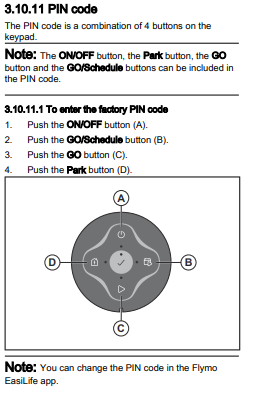
This is specific to Flymo units, so PIN mapping may be different.
Debugging logs on an Android phone
You can get Bluetooth debug logs from an Android phone which will help development for new features, unknown codes or implementation of extra devices. To debug you need to enable developer mode on your Android handset/tablet (and have the manufacturer app installed to communicate with your mower)
To enable debug mode on Android:
- Go into settings and System (Sometimes this is in About phone). Look for the "Build number" entry.
- Tap this several times, onscreen you should then see a note confirming by tapping 7 times developer mode will be enabled.
- Once enabled, click BACK and you'll see a "Developer Options" menu. In there scroll to find "Enable Bluetooth HCI snoop log".
- Set "Enable Bluetooth HCI snoop log" to "Enabled"
- Turn bluetooth OFF then back ON to enable the logging.
Go into your mower app and carry out the commands, making a note of precise time you send the command to the mower. Once you've captured the commands, to retrieve the log you can either grab it using your phones file browser. The file location is /data/misc/bluetooth/logs The filename is btsnoop_hci.log (This varies, for example Samsung phones store them elsewhere)
An alternative is to use the adb via usb to retrieve the log. Plug your phone in via usb and use adb to download your bug report: adb bugreport MyFilename (This will generate a bugreport and save it as MyFilename.zip) Extract that zip file and the bluetooth HCI snoop file is in FS/data/log/bt/btsnoop_hci.log
These bluetooth hci snoop files (btsnoop_hci.log) are in wireshark file format so use wireshark to view them. You can then see the commands sent and received from your mower and can then decode/investigate the commands.
1 maintainer

Metadata
1 maintainer
Release files for automower-ble 0.2.10
For a detailed explanation of source distributions (sdists) and built distributions (wheels), please see the package formats documentation.
Source distribution (sdist)
| File | Size | Uploaded | Provenance | Actions |
|---|---|---|---|---|
| automower_ble-0.2.10.tar.gz | 42.3 kB | Without provenance | Details for automower_ble-0.2.10.tar.gz |
Release files / automower_ble-0.2.10.tar.gz
| Download URL | automower_ble-0.2.10.tar.gz |
|---|---|
| Size | 42.3 kB |
| Tags | Source |
|
SHA-256 checksum How to use checksums |
62579ea662676fcf59e99adad1685b34263444c9f512d8b31a3bfec8ffb34236
|
|
BLAKE2b-256 checksum How to use checksums |
879be5457281bc7a318b2ac7adfe4e094fb52b8cd76d174975e90ad9458f33c3
|
| Upload date | |
|
Uploaded using Trusted Publishing? What is trusted publishing? |
No |
| Uploaded via |
twine/6.2.0 CPython/3.14.8
|
Security for automower-ble 0.2.10
Provenance
Provenance describes where a file came from. On PyPI, provenance is shared via attestations, which provide a verifiable record of the build or publishing details. View details, limitations and caveats.
No provenance found
None of the files in this release were uploaded with provenance metadata.
A note on package security
PyPI is a repository for distributing packages, not a service for auditing them. While third-party security researchers and our staff do their best to detect and remove malicious packages, PyPI cannot guarantee the quality, security or suitability of any given package.
To learn more about protecting yourself from malicious actors, visit our package security documentation.














