
Autonode Diagrams
The Python Diagrams project is an excellent resource for drawing technical diagrams using code, allowing diagrams to be version controlled easily and you to spend time writing content rather than fussing over formatting.
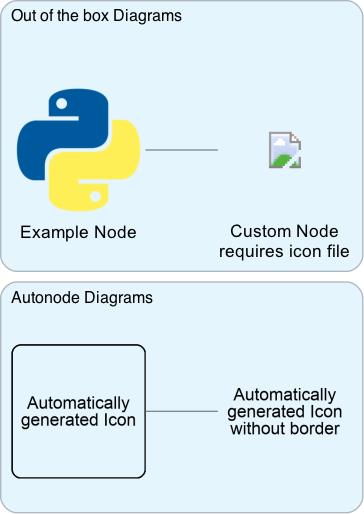
However, one current limitation is that all nodes of the diagram must have both a label and an icon to be displayed. Although Diagrams comes with a large number of relevant node types and corresponding icons pre-installed, and the custom node allows you to extend this even further, sometimes you don't have a suitable icon for the node available, or you want to quickly generate a diagram and worry about populating the icons later.
This package extends the Diagram's Custom Node and automatically generates an icon based on the text in the node's label if no icon is provided. It is designed to be used in conjunction with, not as a replacement to, Diagrams.
Quick Start
Most of this code is taken from the Diagram's Quick Start guide plus Custom nodes with remote icons guide. This is to show how Autonode Diagram's Icon class integrates seamlessly with the rest of the regular Python Diagram's functionality, allowing the two to be used side-by-side.
from diagrams import Diagram
from diagrams.programming.language import Python
from diagrams.custom import Custom
from autonode_diagrams import Icon
from urllib.request import urlretrieve

with Diagram("Quick Start", show=False):
    # Get a remote PNG to prove that autonode_diagrams.Icon can also work just like normal diagrams.custom.Custom
    emoji_url = "https://openmoji.org/php/download_asset.php?type=emoji&emoji_hexcode=2728&emoji_variant=color"
    emoji_fp = "./sparkle.png"
    urlretrieve(emoji_url, emoji_fp) # You can delete this file later

    Icon("Just a label, no icon given", border=True) >> Python("Autonode Diagrams") >> Icon("Something beautiful", emoji_fp)
Prerequisites
1 maintainer

Metadata
1 maintainer
Release files for autonode-diagrams 1.0.4
For a detailed explanation of source distributions (sdists) and built distributions (wheels), please see the package formats documentation.
Source distribution (sdist)
| File | Size | Uploaded | |
|---|---|---|---|
| autonode_diagrams-1.0.4.tar.gz | 16.4 kB | Details |
Built distribution (wheel)
| File | Interpreter | ABI | Platform | Reset |
|---|---|---|---|---|
| autonode_diagrams-1.0.4-py3-none-any.whl | Python 3 | none | any | Details |
Total release size: 33.1 kB
Release files / autonode_diagrams-1.0.4.tar.gz
| Download URL | autonode_diagrams-1.0.4.tar.gz |
|---|---|
| Size | 16.4 kB |
| Tags | Source |
|
SHA-256 checksum How to use checksums |
87d63fb92dd171ec1c70b552f0a9eb7b3e5fcce937610de3ee3d76d99daf8994
|
|
BLAKE2b-256 checksum How to use checksums |
665eb97ffab59e500fb08c7419b19d991b6b5bd4fec13ab9954a66c5df83a571
|
| Upload date | |
|
Uploaded using Trusted Publishing? What is trusted publishing? |
No |
| Uploaded via |
poetry/1.3.2 CPython/3.10.2 Darwin/22.5.0
|
Release files / autonode_diagrams-1.0.4-py3-none-any.whl
| Download URL | autonode_diagrams-1.0.4-py3-none-any.whl |
|---|---|
| Size | 16.7 kB |
| Tags | Python 3 |
|
SHA-256 checksum How to use checksums |
42a994748107a2ea54fbe96a50a3afb6bb45a21c04c9a5956380d0494a02c825
|
|
BLAKE2b-256 checksum How to use checksums |
0b3d6a7505bf206e8103048cd5e8482635bc9b4d97bb376bc6423b64c01122c5
|
| Upload date | |
|
Uploaded using Trusted Publishing? What is trusted publishing? |
No |
| Uploaded via |
poetry/1.3.2 CPython/3.10.2 Darwin/22.5.0
|














