
AutoPWN Suite is a project for scanning vulnerabilities and exploiting systems automatically.

Project description
AutoPWN Suite
AutoPWN Suite is a project for scanning vulnerabilities and exploiting systems automatically.








Features
- Fully automatic! (Use
-yflag to enable) - Detect network IP range without any user input.
- Vulnerability detection based on version.
- Web app vulnerability testing. (LFI, XSS, SQLI)
- Get information about the vulnerability right from your terminal.
- Automatically download exploit related with vulnerability.
- Noise mode for creating a noise on the network.
- Evasion mode for being sneaky.
- Automatically decide which scan types to use based on privilege.
- Easy to read output.
- Specify your arguments using a config file.
- Send scan results via webhook or email.
- Works on Windows, MacOS and Linux.
How does it work?
AutoPWN Suite uses nmap TCP-SYN scan to enumerate the host and detect the version of softwares running on it. After gathering enough information about the host, AutoPWN Suite automatically generates a list of "keywords" to search NIST vulnerability database.
Visit "PWN Spot!" for more information.
Demo
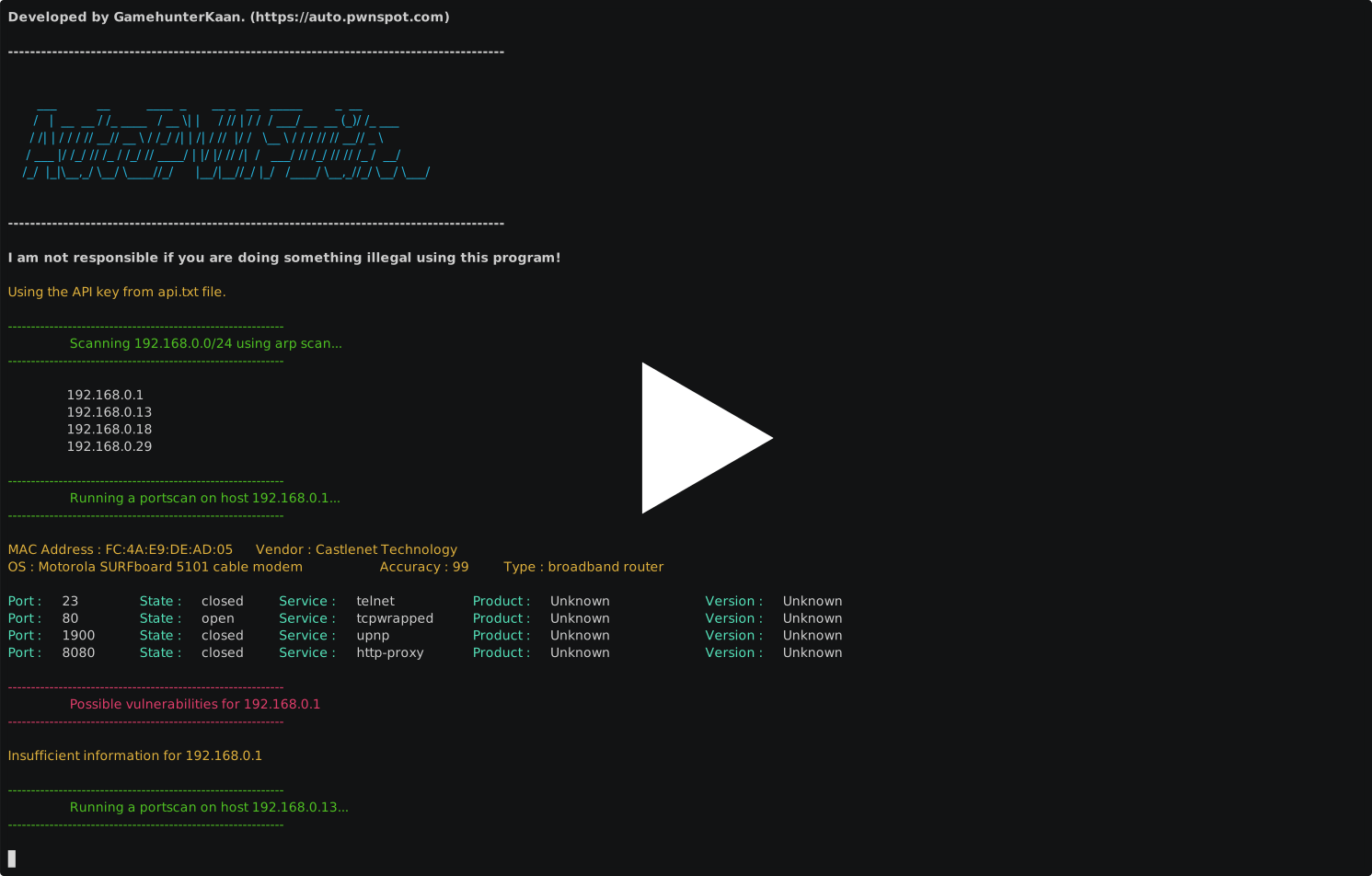
AutoPWN Suite has a very user friendly easy to read output.
Installation
You can install it using pip. (sudo recommended)
sudo pip install autopwn-suite
OR
You can clone the repo.
git clone https://github.com/GamehunterKaan/AutoPWN-Suite.git
cd AutoPWN-Suite
sudo pip install -r requirements.txt
OR
You can download debian (deb) package from releases.
sudo pip install requests rich python-nmap bs4 distro
sudo apt-get install ./autopwn-suite_2.0.0.deb
OR
You can use Google Cloud Shell.

Usage
Running with root privileges (sudo) is always recommended.
Automatic mode (This is the intended way of using AutoPWN Suite)
autopwn-suite -y
Help Menu
$ autopwn-suite -h

usage: autopwn.py [-h] [-v] [-y] [-c CONFIG] [-nc] [-t TARGET] [-hf HOST_FILE] [-sd] [-st {arp,ping}] [-nf NMAP_FLAGS] [-s {0,1,2,3,4,5}] [-ht HOST_TIMEOUT] [-a API] [-m {evade,noise,normal}] [-nt TIMEOUT]
                  [-o OUTPUT] [-ot {html,txt,svg}] [-rp {email,webhook}] [-rpe EMAIL] [-rpep PASSWORD] [-rpet EMAIL] [-rpef EMAIL] [-rpes SERVER] [-rpesp PORT] [-rpw WEBHOOK]

AutoPWN Suite | A project for scanning vulnerabilities and exploiting systems automatically.

options:
  -h, --help            show this help message and exit
  -v, --version         Print version and exit.
  -y, --yes-please      Don't ask for anything. (Full automatic mode)
  -c CONFIG, --config CONFIG
                        Specify a config file to use. (Default : None)
  -nc, --no-color       Disable colors.

Scanning:
  Options for scanning

  -t TARGET, --target TARGET
                        Target range to scan. This argument overwrites the hostfile argument. (192.168.0.1 or 192.168.0.0/24)
  -hf HOST_FILE, --host-file HOST_FILE
                        File containing a list of hosts to scan.
  -sd, --skip-discovery
                        Skips the host discovery phase.
  -st {arp,ping}, --scan-type {arp,ping}
                        Scan type.
  -nf NMAP_FLAGS, --nmap-flags NMAP_FLAGS
                        Custom nmap flags to use for portscan. (Has to be specified like : -nf="-O")
  -s {0,1,2,3,4,5}, --speed {0,1,2,3,4,5}
                        Scan speed. (Default : 3)
  -ht HOST_TIMEOUT, --host-timeout HOST_TIMEOUT
                        Timeout for every host. (Default :240)
  -a API, --api API     Specify API key for vulnerability detection for faster scanning. (Default : None)
  -m {evade,noise,normal}, --mode {evade,noise,normal}
                        Scan mode.
  -nt TIMEOUT, --noise-timeout TIMEOUT
                        Noise mode timeout.

Reporting:
  Options for reporting

  -o OUTPUT, --output OUTPUT
                        Output file name. (Default : autopwn.log)
  -ot {html,txt,svg}, --output-type {html,txt,svg}
                        Output file type. (Default : html)
  -rp {email,webhook}, --report {email,webhook}
                        Report sending method.
  -rpe EMAIL, --report-email EMAIL
                        Email address to use for sending report.
  -rpep PASSWORD, --report-email-password PASSWORD
                        Password of the email report is going to be sent from.
  -rpet EMAIL, --report-email-to EMAIL
                        Email address to send report to.
  -rpef EMAIL, --report-email-from EMAIL
                        Email to send from.
  -rpes SERVER, --report-email-server SERVER
                        Email server to use for sending report.
  -rpesp PORT, --report-email-server-port PORT
                        Port of the email server.
  -rpw WEBHOOK, --report-webhook WEBHOOK
                        Webhook to use for sending report.
Currently working on
- Option to use as a module.
- Web app dirbusting.
TODO
Do you have a cool feature idea? Create a feature request!
- 20 Completed.
- Web app dirbusting.
- Arch Linux package for Arch based systems like BlackArch and ArchAttack.
- Function to brute force common services like
ssh,vnc,ftpetc. - GUI interface.
- Daemon mode.
- Option to use as a module.
Contributing to AutoPWN Suite
I would be glad if you are willing to contribute this project. I am looking forward to merge your pull request unless its something that is not needed or just a personal preference. Also minor changes and bug fixes will not be merged. Please create an issue for those and I will do it myself. Click here for more info!
Legal
You may not rent or lease, distribute, modify, sell or transfer the software to a third party. AutoPWN Suite is free for distribution, and modification with the condition that credit is provided to the creator and not used for commercial use. You may not use software for illegal or nefarious purposes. No liability for consequential damages to the maximum extent permitted by all applicable laws.
Support or Contact
Having trouble using this tool? You can reach me out on discord, create an issue or create a discussion!
Support & Hire Me!
If you want to support my work and also get your job done you can hire me on Fiverr! I do various things such as website pentesting, python programming, cleaning malware, PC optimization, file recovery and mentoring.
Release history Release notifications | RSS feed


Download files
Download the file for your platform. If you're not sure which to choose, learn more about installing packages.
Source Distribution
Built Distribution
Filter files by name, interpreter, ABI, and platform.
If you're not sure about the file name format, learn more about wheel file names.
Copy a direct link to the current filters
File details
Details for the file autopwn-suite-2.0.1.tar.gz.
File metadata
- Download URL: autopwn-suite-2.0.1.tar.gz
- Upload date:
- Size: 31.0 kB
- Tags: Source
- Uploaded using Trusted Publishing? No
- Uploaded via: twine/4.0.1 CPython/3.9.2
File hashes
| Algorithm | Hash digest | |
|---|---|---|
| SHA256 |
7f1328f736e206265c5ab271c361550553def47bd9bce965da60ad3db3c01502
|
|
| MD5 |
e1e72d1241a4288d85c2f193e1c719f0
|
|
| BLAKE2b-256 |
d15868bb3b495bd5aca18024dce00e569d4528cc0d791168ac68cfb604456824
|
File details
Details for the file autopwn_suite-2.0.1-py3-none-any.whl.
File metadata
- Download URL: autopwn_suite-2.0.1-py3-none-any.whl
- Upload date:
- Size: 46.5 kB
- Tags: Python 3
- Uploaded using Trusted Publishing? No
- Uploaded via: twine/4.0.1 CPython/3.9.2
File hashes
| Algorithm | Hash digest | |
|---|---|---|
| SHA256 |
36a387b2cac249cb5eb862bfd1ffbb3aa3924b5df9b03e2368a556d4ff7db6dc
|
|
| MD5 |
aa4289654a234699a0536f5290ff4c6f
|
|
| BLAKE2b-256 |
df1158a4b39a0049ee6a0f66f2709707ceaf9809de2f275cfaf77d2955087ae1
|






