
AutoSH / ah




卧槽,命令忘了怎么办!
别急:一句中文,秒出命令。
AutoSH(ah)是给中文程序员的终端 AI 助手。在 zsh 里写中文,按一下就出命令。
天下苦 Bash 久已,快来 ah 一下。
两种模式
| 快捷键 | 模式 | 效果 |
|---|---|---|
Ctrl+G |
极速 | 直接出命令,一步到位 |
Ctrl+/ |
选择 | 弹出三个候选 + 中文解释,看懂了选 |
Ctrl+/在部分终端里等价于Ctrl+_;如果Ctrl+/没反应,用Ctrl+_触发同一个选择模式。
$ docker 清理无用镜像         # ← 在终端里直接写中文
# 按 Ctrl+G → 直接变成:
$ docker system prune -f      # ← 回车就跑
安装
一键安装:
curl -fsSL https://wang-h.github.io/autosh/install.sh | bash
从 PyPI 安装:
uv tool install autosh-ah
# 或: pip install autosh-ah
从 GitHub 安装:
uv tool install git+https://github.com/wang-h/autosh.git
# 或: pip install git+https://github.com/wang-h/autosh.git
然后配 Key + 切模型 + 注入 Shell:
ah config set api_key <your-api-key>
ah config set provider deepseek   # 支持: kimi / minimax / qwen / glm
ah init zsh                       # 或 ah init bash
source ~/.zshrc
装完就可以在终端里用了——zsh 和 bash 都支持,ah init 会自动识别。
使用
装完就能用,zsh 和 bash 都行。直接在终端里写中文,按快捷键:
# Ctrl+G → 极速,直接出
$ docker 清理无用镜像        # 你写的
$ docker system prune -f     # ah 替换的,回车就跑

# Ctrl+/ → 三选一,带解释
$ git 回退上一次提交
  [1] git reset --soft HEAD~1  撤销提交但保留修改
  [2] git reset --mixed HEAD~1  撤销提交和暂存
  [3] git revert HEAD           生成新提交来撤销
  Pick [1-3]: █                 # 回车默认选 1
命令
| 命令 | 说明 |
|---|---|
ah init <zsh|bash> |
安装 Shell 集成 |
ah config |
查看当前配置 |
ah config set <key> <value> |
设置配置项(切 provider 一键切模型) |
ah suggest <中文描述> |
直接生成命令建议 |
ah daemon <start|status|stop> |
管理本地常驻进程(默认自动启动) |
ah doctor |
检查环境配置 |
ah doctor --keys |
测试当前终端实际收到的快捷键编码 |
配置
~/.autosh/config.yaml:
provider: deepseek
model: deepseek-v4-flash
base_url: https://api.deepseek.com/anthropic
api_key: sk-xxx
| 配置项 | 说明 |
|---|---|
provider |
AI 提供商:deepseek / kimi / minimax / qwen / glm |
model |
模型名称(切 provider 自动更新) |
base_url |
API 地址(切 provider 自动更新) |
api_key |
API 密钥 |
ah config set provider kimi      # 切到 Kimi
ah config set provider deepseek  # 切回来
自定义快捷键
zsh 编辑 ~/.autosh/autosh.zsh:
bindkey -M emacs '^G' autosh-fast
bindkey -M viins '^G' autosh-fast
bindkey -M emacs '^_' autosh-pick
bindkey -M viins '^_' autosh-pick
bash 编辑 ~/.autosh/autosh.bash:
bind -m emacs -x '"\C-g": _autosh_fast'
bind -m vi-insert -x '"\C-g": _autosh_fast'
bind -m emacs -x '"\C-_": _autosh_pick'
bind -m vi-insert -x '"\C-_": _autosh_pick'
原理
读取当前命令行缓冲区 → 发送给 AI API → 模型生成命令 → 替换回命令行。不上传命令历史。
环境要求
- Python 3.11+
- zsh 或 bash
- 任一提供商 API Key(DeepSeek / Kimi / MiniMax / Qwen / GLM)
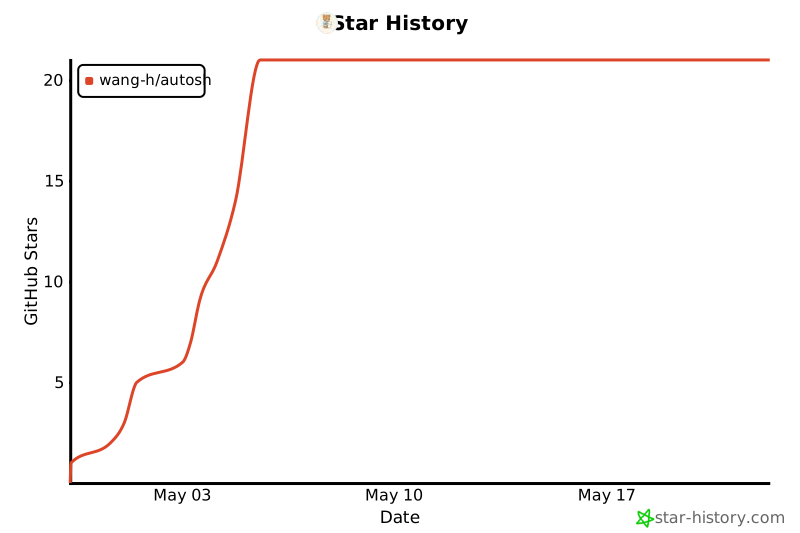
Star History
License
MIT
1 maintainer

Metadata
1 maintainer
Release files for autosh-ah 0.1.3
For a detailed explanation of source distributions (sdists) and built distributions (wheels), please see the package formats documentation.
Source distribution (sdist)
| File | Size | Uploaded | Provenance | |
|---|---|---|---|---|
| autosh_ah-0.1.3.tar.gz | 37.4 kB | Without provenance | Details |
Built distribution (wheel)
| File | Interpreter | ABI | Platform | Reset |
|---|---|---|---|---|
| autosh_ah-0.1.3-py3-none-any.whl | Python 3 | none | any | Details |
Total release size: 52.9 kB
Release files / autosh_ah-0.1.3.tar.gz
| Download URL | autosh_ah-0.1.3.tar.gz |
|---|---|
| Size | 37.4 kB |
| Tags | Source |
|
SHA-256 checksum How to use checksums |
535866af1c38473e6374aabe247a0e3e89cd7ff7f65d793041343ca34b40a0dc
|
|
BLAKE2b-256 checksum How to use checksums |
bae7e39fc33fb1aa5dd8b45d4b68d273fd06510b522803faf34a101b3b93b227
|
| Upload date | |
|
Uploaded using Trusted Publishing? What is trusted publishing? |
No |
| Uploaded via |
uv/0.9.27 {"installer":{"name":"uv","version":"0.9.27","subcommand":["publish"]},"python":null,"implementation":{"name":null,"version":null},"distro":{"name":"macOS","version":null,"id":null,"libc":null},"system":{"name":null,"release":null},"cpu":null,"openssl_version":null,"setuptools_version":null,"rustc_version":null,"ci":null}
|
Release files / autosh_ah-0.1.3-py3-none-any.whl
| Download URL | autosh_ah-0.1.3-py3-none-any.whl |
|---|---|
| Size | 15.5 kB |
| Tags | Python 3 |
|
SHA-256 checksum How to use checksums |
15cc21f090771978ee7c83889f75d277d2416ec9a1039db205d31ff376d05e45
|
|
BLAKE2b-256 checksum How to use checksums |
d0eda411c9c4ef2b08c78c9b080409b78c08adb77e3f09f6e175ff7c9f6a16c8
|
| Upload date | |
|
Uploaded using Trusted Publishing? What is trusted publishing? |
No |
| Uploaded via |
uv/0.9.27 {"installer":{"name":"uv","version":"0.9.27","subcommand":["publish"]},"python":null,"implementation":{"name":null,"version":null},"distro":{"name":"macOS","version":null,"id":null,"libc":null},"system":{"name":null,"release":null},"cpu":null,"openssl_version":null,"setuptools_version":null,"rustc_version":null,"ci":null}
|
Security for autosh-ah 0.1.3
Provenance
Provenance describes where a file came from. On PyPI, provenance is shared via attestations, which provide a verifiable record of the build or publishing details. View details, limitations and caveats.
No provenance found
None of the files in this release were uploaded with provenance metadata.
A note on package security
PyPI is a repository for distributing packages, not a service for auditing them. While third-party security researchers and our staff do their best to detect and remove malicious packages, PyPI cannot guarantee the quality, security or suitability of any given package.
To learn more about protecting yourself from malicious actors, visit our package security documentation.














