
SPICE: Sparse and Interpretable Cognitive Equations


Project description
Computational Discovery of Sparse and Interpretable Cognitive Equations (SPICE)

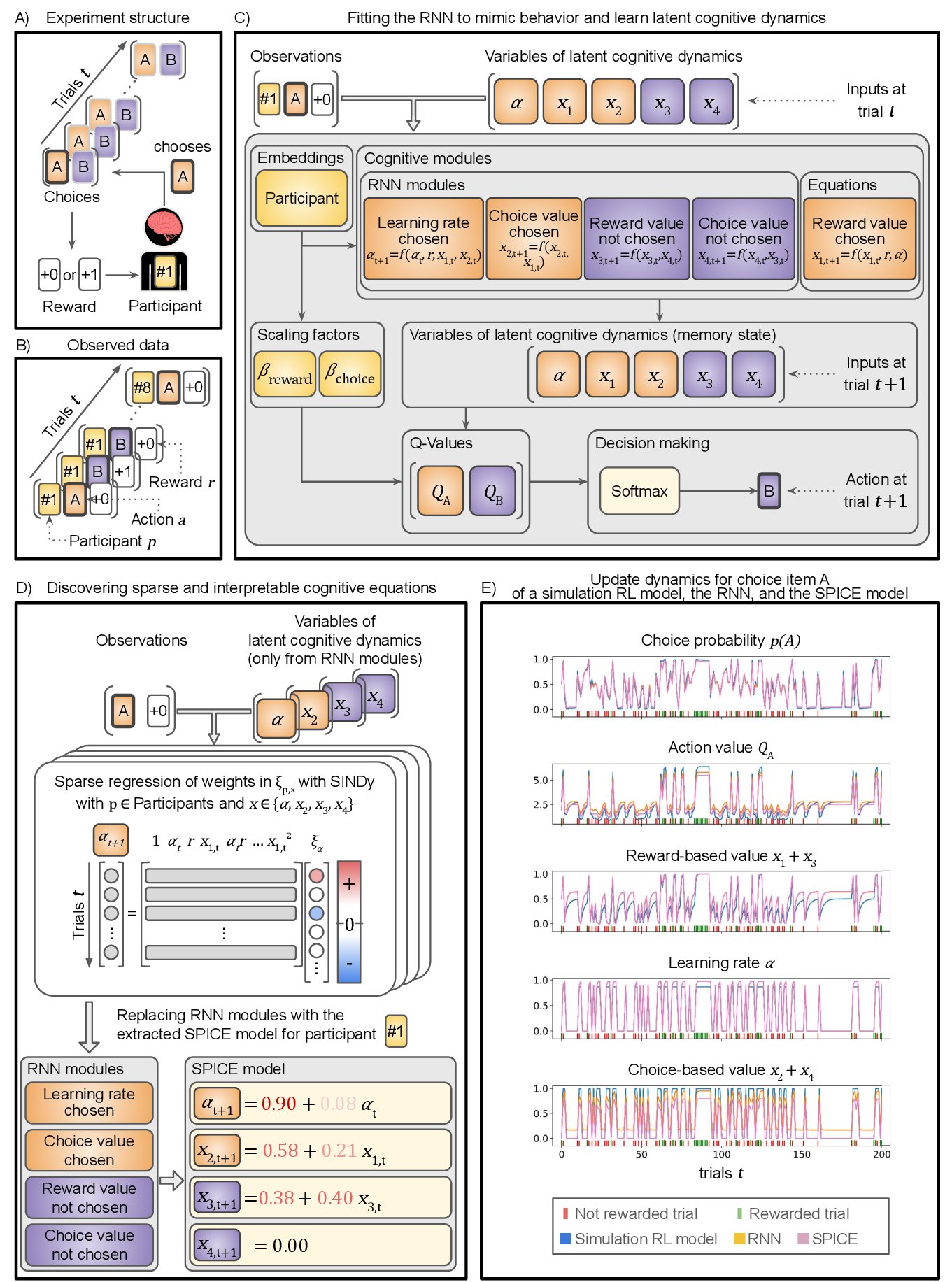
SPICE is a framework for automating scientific practice in cognitive science and is based on a two cornerstones:
-
A task-specific RNN is trained to predict human behavior and thus learn implicitly latent cognitive mechanisms.
-
Sparse Identification of nonlinear Dynamics (SINDy; an equation discovery algorithm) is used to obtain mathematically interpretable equations for the learned cognitive mechanisms.
📚 Documentation: https://whyhardt.github.io/SPICE/
The resulting model with the neural-network architecture but with equations instead of RNN modules is called SPICE model. An overview is given in Figure 1.
This README file gives an overview on how to install and run SPICE as a scikit-learn estimator. To learn how to use SPICE in more comprehensive scenarios, you can go to tutorials.
Installation
You can install SPICE using pip:
pip install autospice
or, you can clone this repository and install it locally from the root folder:
pip install -e .
Features
- Scikit-learn compatible estimator interface
- Customizable network architecture for identifying complex cognitive mechanisms
- Participant embeddings for identifying individual differences
- Precoded models for simple Rescorla-Wagner, forgetting mechanism, choise perseveration and parcitipant embeddings
Quick Start
from spice.estimator import SpiceEstimator
from spice.precoded import RescorlaWagnerRNN, RESCOLA_WAGNER_CONFIG
from spice.resources.bandits import BanditsDrift, AgentQ, create_dataset

# Simulate dataset from a two-armed bandit task with a Q agent
environment = BanditsDrift(sigma=0.2, n_actions=2)

agent = AgentQ(
    n_actions=2,
    alpha_reward=0.6,  # Learning rate for positive rewards
    alpha_penalty=0.6,  # Learning rate for negative rewards
    forget_rate=0.3,
)

dataset, _, _ = create_dataset(
    agent=agent,
    environment=environment,
    n_trials=200,
    n_sessions=256,
)

# Create and fit SPICE model
spice_estimator = SpiceEstimator(
    rnn_class=RescorlaWagnerRNN,
    spice_config=RESCOLA_WAGNER_CONFIG,
    save_path_rnn='rnn_model.pkl',   # (Optional) File path (.pkl) to save RNN model after training
    save_path_spice='spice_model.pkl', # (Optional) File path (.pkl) to save SPICE model after training
    verbose=True,
)

spice_estimator.fit(dataset.xs, dataset.ys)

# Get learned SPICE features
features = spice_estimator.spice_agent.get_spice_features()
for id, feat in features.items():
    print(f"\nAgent {id}:")
    for model_name, (feat_names, coeffs) in feat.items():
        print(f"  {model_name}:")
        for name, coeff in zip(feat_names, coeffs):
            print(f"    {name}: {coeff}")

# Predict behavior
pred_rnn, pred_spice = spice_estimator.predict(dataset.xs)

print("\nPrediction shapes:")
print(f"RNN predictions: {pred_rnn.shape}")
print(f"SPICE predictions: {pred_spice.shape}")
Saving and loading models
In addition to specifying save paths when creating the SpiceEstimator, you can also save an existing estimator's models, or load from save files:
# Save trained model to file
spice_estimator.save_spice(path_rnn='rnn_model.pkl', path_spice='spice_model.pkl')

# Load saved model
loaded_spice = SpiceEstimator.load_spice(path_rnn='rnn_model.pkl', path_spice='spice_model.pkl')

# Use loaded model for predictions
pred_rnn, pred_spice = loaded_spice.predict(dataset.xs)
Requirements
See requirements.txt for a complete list of dependencies.
License
This project is licensed under the MIT License - see the LICENSE file for details.
Citation
If you use this package in your research, please cite:
@software{spice2025,
  title = {SPICE: Sparse and Interpretable Cognitive Equations},
  year = {2025},
  author = {Weinhardt, Daniel},
  url = {https://github.com/whyhardt/SPICE}
}
Release history Release notifications | RSS feed


Download files
Download the file for your platform. If you're not sure which to choose, learn more about installing packages.
Source Distribution
Built Distribution
Filter files by name, interpreter, ABI, and platform.
If you're not sure about the file name format, learn more about wheel file names.
Copy a direct link to the current filters
File details
Details for the file autospice-0.1.99.tar.gz.
File metadata
- Download URL: autospice-0.1.99.tar.gz
- Upload date:
- Size: 724.9 kB
- Tags: Source
- Uploaded using Trusted Publishing? No
- Uploaded via: twine/6.2.0 CPython/3.11.13
File hashes
| Algorithm | Hash digest | |
|---|---|---|
| SHA256 |
478b08f05c1ebcea9d288680daff834864bc9943586d058bee5e3e8cf3b8b31d
|
|
| MD5 |
662de6c2edbf032c84d620dec381ab9c
|
|
| BLAKE2b-256 |
0908baf53113064708e1bd116632daff629dc1e073f2be91b32e691bb1744f47
|
File details
Details for the file autospice-0.1.99-py3-none-any.whl.
File metadata
- Download URL: autospice-0.1.99-py3-none-any.whl
- Upload date:
- Size: 67.4 kB
- Tags: Python 3
- Uploaded using Trusted Publishing? No
- Uploaded via: twine/6.2.0 CPython/3.11.13
File hashes
| Algorithm | Hash digest | |
|---|---|---|
| SHA256 |
841b7193cdad41e87456f92fa06137959c3cf2d3d94c47c9abd09565a158529b
|
|
| MD5 |
be3c883b72e364162ef934aaf79c041c
|
|
| BLAKE2b-256 |
cc3feb84e28656745e6fb4b7410e1547f01609c9fd25b9d9e09b1cbf8318448e
|






