
AutoTD


autoTD 是一个用于 BUAA TD 打卡流程管理与执行的 Python CLI 工具。
Quickstart
# 1) 安装 PyPI 包
pip install autotd-buaa

# 2) 初始化本地配置目录(默认 ~/.autoTD)
autotd init
CLI 端
# 3) 准备至少一张打卡图片并导入
autotd image add ~/images/image1.jpg

# 4) 添加用户(quick 模式自动填充学院路机位组合)
autotd user add 2xxxxxxx --quick 学院路

# 5) 启动打卡流程
#    - autotd run       : 后台持续运行
#    - autotd run --once: 前台仅执行一轮
autotd run [--once]
状态与 TD 次数查询
# 查看当前后台运行状态与今日执行进度
autotd status

# 查看某个学号当前缓存的 TD 次数(不访问服务器)
autotd user count 2xxxxxxx

# 实时查询服务器并刷新本地 TD 次数缓存
autotd user count 2xxxxxxx --refresh
Web 端
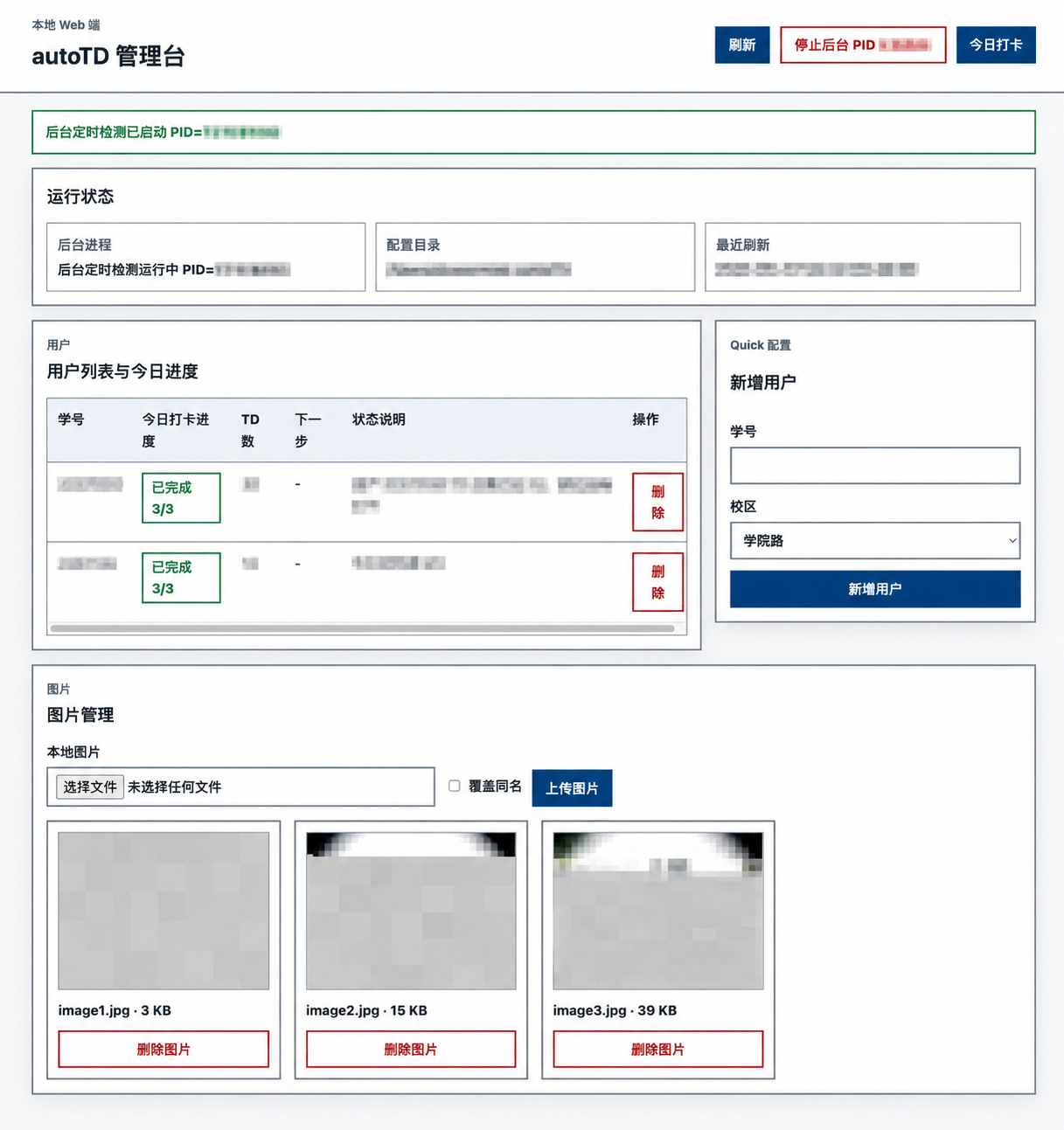
autotd ui
autotd ui 会打开本地 Web 管理端,可查看用户列表、今日打卡进度、TD 数和后台 PID,支持 quick 新增/删除用户、运行或停止后台进程、今日打卡,以及上传、预览和删除图片。
PATH(Windows / macOS / Linux)
若安装后提示 ... is not on PATH 且 autotd 不可用,可先用:
python -m auto_td.cli init
再按系统把用户脚本目录加入 PATH(执行后重开终端):
# Windows (PowerShell)
$d = py -c "import sysconfig; print(sysconfig.get_path('scripts','nt_user'))"; [Environment]::SetEnvironmentVariable("Path", [Environment]::GetEnvironmentVariable("Path","User") + ";" + $d, "User")
# macOS (zsh)
echo 'export PATH="$(python3 -m site --user-base)/bin:$PATH"' >> ~/.zprofile && source ~/.zprofile
# Linux (bash)
echo 'export PATH="$(python3 -m site --user-base)/bin:$PATH"' >> ~/.bashrc && source ~/.bashrc
验证:
autotd --help
1 maintainer

Metadata
1 maintainer
Release files for autotd-buaa 0.1.15.post1
For a detailed explanation of source distributions (sdists) and built distributions (wheels), please see the package formats documentation.
Source distribution (sdist)
| File | Size | Uploaded | Provenance | Actions |
|---|---|---|---|---|
| autotd_buaa-0.1.15.post1.tar.gz | 43.3 kB | Without provenance | Details for autotd_buaa-0.1.15.post1.tar.gz |
Built distribution (wheel)
| File | Interpreter | ABI | Platform | Actions Reset |
|---|---|---|---|---|
| autotd_buaa-0.1.15.post1-py3-none-any.whl | Python 3 | none | any | Details for autotd_buaa-0.1.15.post1-py3-none-any.whl |
Total release size: 82.3 kB
Release files / autotd_buaa-0.1.15.post1.tar.gz
| Download URL | autotd_buaa-0.1.15.post1.tar.gz |
|---|---|
| Size | 43.3 kB |
| Tags | Source |
|
SHA-256 checksum How to use checksums |
bebc32dbf51859d3bbdda4499a98136c334e013f3b12368147fee962efa93fcf
|
|
BLAKE2b-256 checksum How to use checksums |
de75ae9f0c4130538610dd42f35a72fbc7d7cbba98be0604cc47e502291a8066
|
| Upload date | |
|
Uploaded using Trusted Publishing? What is trusted publishing? |
No |
| Uploaded via |
twine/6.2.0 CPython/3.12.13
|
Release files / autotd_buaa-0.1.15.post1-py3-none-any.whl
| Download URL | autotd_buaa-0.1.15.post1-py3-none-any.whl |
|---|---|
| Size | 39.0 kB |
| Tags | Python 3 |
|
SHA-256 checksum How to use checksums |
e5ddc15f6894f57aef7cfca62e36fd1417d0d7185673e2462018e942e4f7cc20
|
|
BLAKE2b-256 checksum How to use checksums |
48a05ae53e341bfd82bae211af4279c6eba6af02c2689a613be63b5e6d54c57a
|
| Upload date | |
|
Uploaded using Trusted Publishing? What is trusted publishing? |
No |
| Uploaded via |
twine/6.2.0 CPython/3.12.13
|
Security for autotd-buaa 0.1.15.post1
Provenance
Provenance describes where a file came from. On PyPI, provenance is shared via attestations, which provide a verifiable record of the build or publishing details. View details, limitations and caveats.
No provenance found
None of the files in this release were uploaded with provenance metadata.
A note on package security
PyPI is a repository for distributing packages, not a service for auditing them. While third-party security researchers and our staff do their best to detect and remove malicious packages, PyPI cannot guarantee the quality, security or suitability of any given package.
To learn more about protecting yourself from malicious actors, visit our package security documentation.














