
Browser automation for AI agents with API collection support

Project description





🌤️ Want to skip the setup? Use our cloud for faster, scalable, stealth-enabled browser automation!
🤖 LLM Quickstart
- Direct your favorite coding agent (Cursor, Claude Code, etc) to Agents.md
- Prompt away!
👋 Human Quickstart
1. Create environment and install Browser-Use with uv (Python>=3.11):
uv init && uv add autotester-use && uv sync
# uvx browser-use install  # Run if you don't have Chromium installed
2. [Optional] Get your API key from Browser Use Cloud:
# .env
BROWSER_USE_API_KEY=your-key
# GOOGLE_API_KEY=your-key
# ANTHROPIC_API_KEY=your-key
3. Run your first agent:
from browser_use import Agent, Browser, ChatBrowserUse
# from browser_use import ChatGoogle  # ChatGoogle(model='gemini-3-flash-preview')
# from browser_use import ChatAnthropic  # ChatAnthropic(model='claude-sonnet-4-6')
import asyncio

async def main():
    browser = Browser(
        # use_cloud=True,  # Use a stealth browser on Browser Use Cloud
    )

    agent = Agent(
        task="Find the number of stars of the browser-use repo",
        llm=ChatBrowserUse(),
        # llm=ChatGoogle(model='gemini-3-flash-preview'),
        # llm=ChatAnthropic(model='claude-sonnet-4-6'),
        browser=browser,
    )
    await agent.run()

if __name__ == "__main__":
    asyncio.run(main())
Check out the library docs and the cloud docs for more!
Open Source vs Cloud

We benchmark Browser Use across 100 real-world browser tasks. Full benchmark is open source: browser-use/benchmark.
Use the Open-Source Agent
- You need custom tools or deep code-level integration
- We recommend pairing with our cloud browsers for leading stealth, proxy rotation, and scaling
- Or self-host the open-source agent fully on your own machines
Use the Fully-Hosted Cloud Agent (recommended)
- Much more powerful agent for complex tasks (see plot above)
- Easiest way to start and scale
- Best stealth with proxy rotation and captcha solving
- 1000+ integrations (Gmail, Slack, Notion, and more)
- Persistent filesystem and memory
Demos
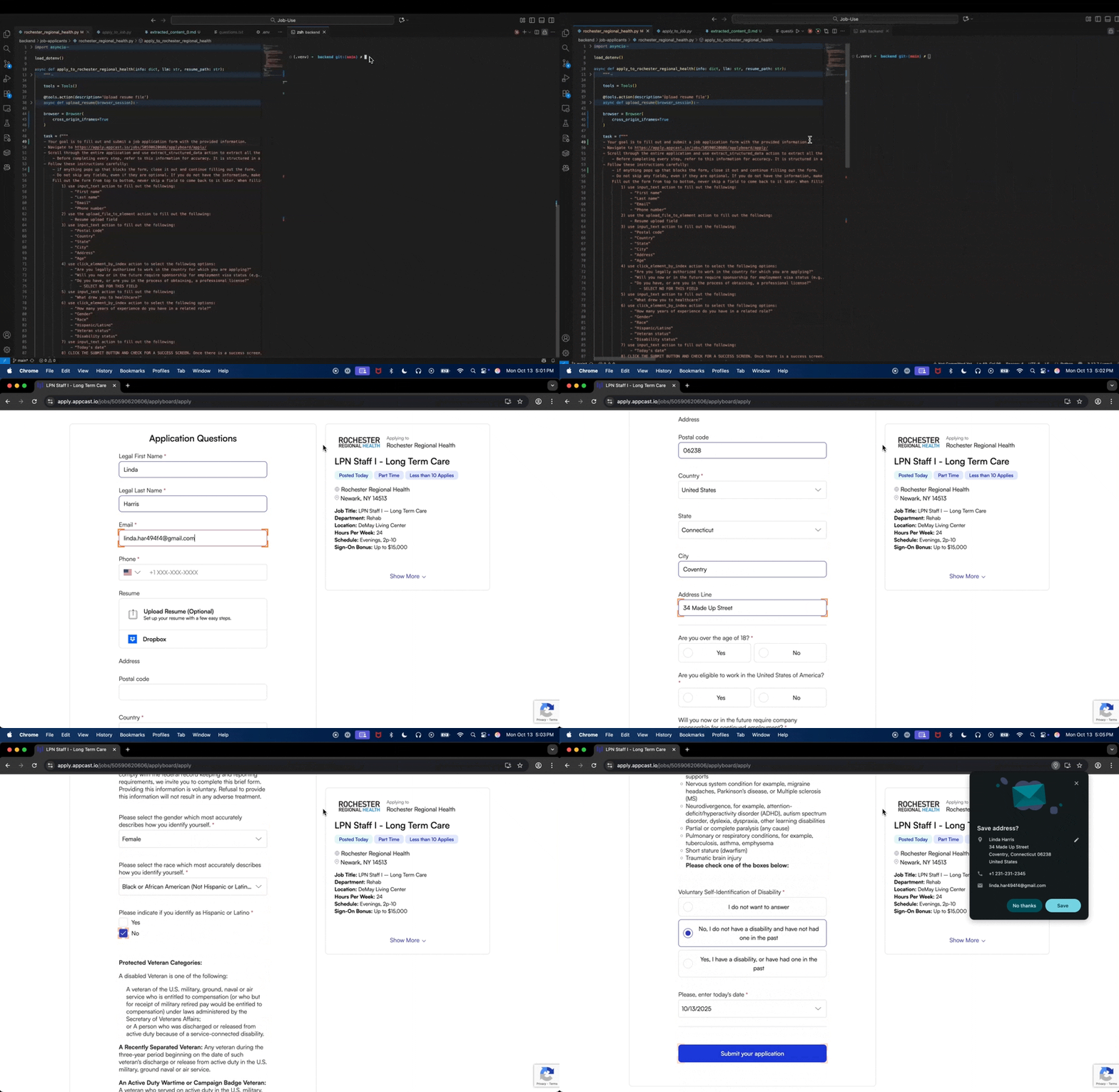
📋 Form-Filling
Task = "Fill in this job application with my resume and information."
🍎 Grocery-Shopping
Task = "Put this list of items into my instacart."
https://github.com/user-attachments/assets/a6813fa7-4a7c-40a6-b4aa-382bf88b1850
💻 Personal-Assistant.
Task = "Help me find parts for a custom PC."
https://github.com/user-attachments/assets/ac34f75c-057a-43ef-ad06-5b2c9d42bf06
💡See more examples here ↗ and give us a star!
🚀 Template Quickstart
Want to get started even faster? Generate a ready-to-run template:
uvx browser-use init --template default
This creates a browser_use_default.py file with a working example. Available templates:
default- Minimal setup to get started quicklyadvanced- All configuration options with detailed commentstools- Examples of custom tools and extending the agent
You can also specify a custom output path:
uvx browser-use init --template default --output my_agent.py
💻 CLI
Fast, persistent browser automation from the command line:
browser-use open https://example.com    # Navigate to URL
browser-use state                       # See clickable elements
browser-use click 5                     # Click element by index
browser-use type "Hello"                # Type text
browser-use screenshot page.png         # Take screenshot
browser-use close                       # Close browser
The CLI keeps the browser running between commands for fast iteration. See CLI docs for all commands.
Claude Code Skill
For Claude Code, install the skill to enable AI-assisted browser automation:
mkdir -p ~/.claude/skills/browser-use
curl -o ~/.claude/skills/browser-use/SKILL.md \
  https://raw.githubusercontent.com/browser-use/browser-use/main/skills/browser-use/SKILL.md
Integrations, hosting, custom tools, MCP, and more on our Docs ↗
FAQ
What's the best model to use?
We optimized ChatBrowserUse() specifically for browser automation tasks. On avg it completes tasks 3-5x faster than other models with SOTA accuracy.
Pricing (per 1M tokens):
- Input tokens: $0.20
- Cached input tokens: $0.02
- Output tokens: $2.00
For other LLM providers, see our supported models documentation.
Should I use the Browser Use system prompt with the open-source preview model?
Yes. If you use ChatBrowserUse(model='browser-use/bu-30b-a3b-preview') with a normal Agent(...), Browser Use still sends its default agent system prompt for you.
You do not need to add a separate custom "Browser Use system message" just because you switched to the open-source preview model. Only use extend_system_message or override_system_message when you intentionally want to customize the default behavior for your task.
If you want the best default speed/accuracy, we still recommend the newer hosted bu-* models. If you want the open-source preview model, the setup stays the same apart from the model= value.
Can I use custom tools with the agent?
Yes! You can add custom tools to extend the agent's capabilities:
from browser_use import Tools

tools = Tools()

@tools.action(description='Description of what this tool does.')
def custom_tool(param: str) -> str:
    return f"Result: {param}"

agent = Agent(
    task="Your task",
    llm=llm,
    browser=browser,
    tools=tools,
)
Can I use this for free?
Yes! Browser-Use is open source and free to use. You only need to choose an LLM provider (like OpenAI, Google, ChatBrowserUse, or run local models with Ollama).
Terms of Service
This open-source library is licensed under the MIT License. For Browser Use services & data policy, see our Terms of Service and Privacy Policy.
How do I handle authentication?
Check out our authentication examples:
- Using real browser profiles - Reuse your existing Chrome profile with saved logins
- If you want to use temporary accounts with inbox, choose AgentMail
- To sync your auth profile with the remote browser, run
curl -fsSL https://browser-use.com/profile.sh | BROWSER_USE_API_KEY=XXXX sh(replace XXXX with your API key)
These examples show how to maintain sessions and handle authentication seamlessly.
How do I solve CAPTCHAs?
For CAPTCHA handling, you need better browser fingerprinting and proxies. Use Browser Use Cloud which provides stealth browsers designed to avoid detection and CAPTCHA challenges.
How do I go into production?
Chrome can consume a lot of memory, and running many agents in parallel can be tricky to manage.
For production use cases, use our Browser Use Cloud API which handles:
- Scalable browser infrastructure
- Memory management
- Proxy rotation
- Stealth browser fingerprinting
- High-performance parallel execution
Tell your computer what to do, and it gets it done.


Release history Release notifications | RSS feed

Download files
Download the file for your platform. If you're not sure which to choose, learn more about installing packages.
Source Distribution
Built Distribution
Filter files by name, interpreter, ABI, and platform.
If you're not sure about the file name format, learn more about wheel file names.
Copy a direct link to the current filters
File details
Details for the file autotester_use-0.12.6.post1.tar.gz.
File metadata
- Download URL: autotester_use-0.12.6.post1.tar.gz
- Upload date:
- Size: 605.0 kB
- Tags: Source
- Uploaded using Trusted Publishing? No
- Uploaded via: uv/0.6.0
File hashes
| Algorithm | Hash digest | |
|---|---|---|
| SHA256 |
a0d488b425bd6f0e862d74d45d75f4212b74378a89ed3a74b835d4c5ef565c6f
|
|
| MD5 |
a2cdd1e43f45d963f1c212cb5d04a0b1
|
|
| BLAKE2b-256 |
30970b41fe09c5c5ae6e8b1be72d102f9a4cd732c2f0716d6eef83bcf42cb6fa
|
File details
Details for the file autotester_use-0.12.6.post1-py3-none-any.whl.
File metadata
- Download URL: autotester_use-0.12.6.post1-py3-none-any.whl
- Upload date:
- Size: 716.8 kB
- Tags: Python 3
- Uploaded using Trusted Publishing? No
- Uploaded via: uv/0.6.0
File hashes
| Algorithm | Hash digest | |
|---|---|---|
| SHA256 |
5ef282cc6ee94921a6547e3f42d1308f6a0e57c90ad60b07fc19dec3552d3f8b
|
|
| MD5 |
64e5f5a834b38ea6add6fe049f76a2e3
|
|
| BLAKE2b-256 |
2097d8ff20f4c2af923d3235adb7b8246367880a2cd691bb8fcf355cd631adad
|






