
📈 AutoTrend: Local Linear Trend Extraction for Time Series



🚀 Demo: Google Colab
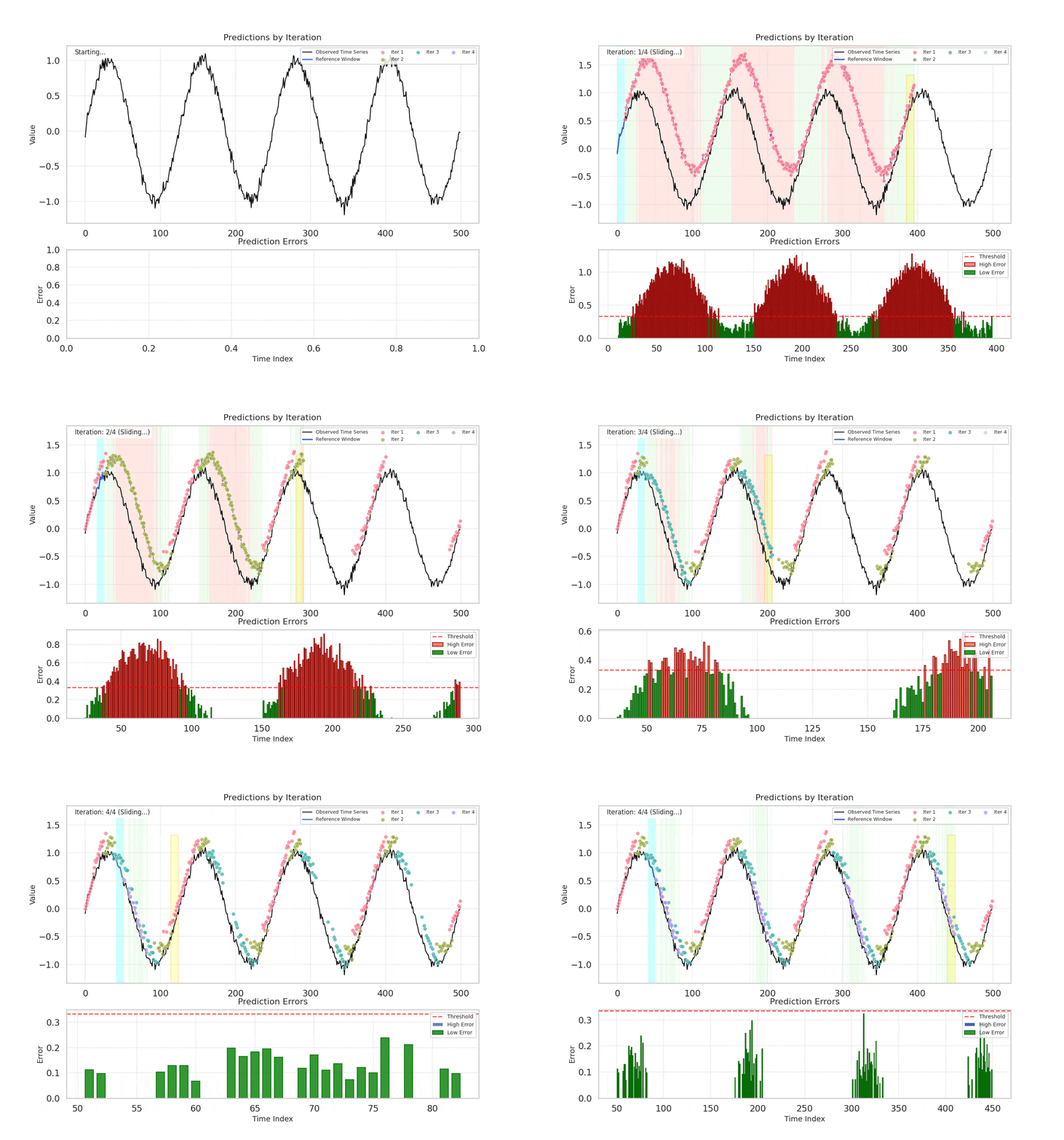
AutoTrend is a lightweight, iterative method for extracting local linear trends from time series data. Unlike traditional sliding window approaches that fit a model at every point, AutoTrend achieves computational efficiency by training a single linear regression model per focus region and extending the trend forward, measuring prediction errors without repeated model fitting.
📦 Installation
pip install autotrend
Or install from source:
git clone https://github.com/chotanansub/autotrend.git
cd autotrend
pip install -e .
🚀 Quick Start
import numpy as np
from autotrend import decompose_llt

# Generate or load your time series
sequence = np.sin(np.linspace(0, 50, 500)) + np.linspace(0, 5, 500)

# Run LLT decomposition
result = decompose_llt(
    seq=sequence,
    max_models=5,
    window_size=10,
    error_percentile=40
)

# Visualize results
result.plot_full_decomposition()

# Access results
print(f"Number of iterations: {result.get_num_iterations()}")
print(f"Trend segments: {result.get_trend_segments()}")
Output:
result.trend_marks: Array indicating which iteration labeled each pointresult.prediction_marks: Predicted values for each pointresult.models: List of LinearRegression models from each iterationresult.process_logs: Detailed logs for visualization
💡 Core Concept
The Problem
Traditional sliding window regression methods fit a new model at every time point, leading to high computational costs. Change point detection methods often require complex algorithms and parameter tuning.
The Solution
AutoTrend uses an iterative, focus-based approach:
- Single Model per Region: Train one linear regression model at the start of each focus region
- Trend Extension: Extend the trend line forward without retraining
- Error-Based Refinement: Identify high-error points and focus on them in the next iteration
- Adaptive Segmentation: Automatically discover trend boundaries based on prediction error
Key Advantages
✅ Computationally Efficient: Minimal model training compared to full sliding windows
✅ Adaptive: Automatically discovers trend boundaries without predefined change points
✅ Interpretable: Clear linear segments with explicit slopes and intercepts
✅ Flexible: Adjustable error thresholds and iteration limits
✅ Lightweight: No complex optimization or parameter search required
⚙️ Algorithm Overview
Input
- Sequence: Univariate time series
y = [y₀, y₁, ..., yₜ] - Parameters:
window_size: Size of training window (default: 5)max_models: Maximum iterations (default: 10)error_percentile: Error threshold percentile (default: 40)percentile_step: Increment per iteration (default: 0)update_threshold: Whether to update threshold each iteration (default: False)
Process
Step 1: Initialization
Define initial focus targets covering all predictable points:
focus_targets = [window_size, window_size+1, ..., T-1]
Step 2: Train Linear Model
For each iteration, train a model on the first window of the focus region:
X_train = [0, 1, ..., window_size-1]
y_train = sequence[start:end]
model = LinearRegression().fit(X_train, y_train)
Step 3: Extend Trend and Measure Error
Predict forward using the trained model's trend offset:
Δ = ŷ_window_size - y_start
ŷ_t = y_(t-window_size) + Δ
error_t = |y_t - ŷ_t|
Step 4: Segment by Error Threshold
threshold = percentile(errors, error_percentile)
low_error_points = {t | error_t ≤ threshold}
high_error_points = {t | error_t > threshold}
- Low error points: Assigned to current iteration, marked as resolved
- High error points: Become focus targets for next iteration
Step 5: Iterate
Repeat Steps 2-4 on high-error regions until:
- All points meet the error criterion, OR
- Maximum iterations reached
Output
LLTResult(
    trend_marks: np.ndarray,      # Iteration labels for each point
    prediction_marks: np.ndarray,  # Predicted values
    models: List[LinearRegression], # Trained models per iteration
    process_logs: List[Tuple]      # Detailed iteration logs
)
📂 Directory Structure
autotrend/
├── autotrend/
│   ├── __init__.py                    # Main package exports
│   ├── core/
│   │   ├── __init__.py
│   │   ├── llt_algorithm.py           # Core LLT implementation
│   │   ├── llt_result.py              # Result dataclass with plotting methods
│   │   ├── decompose_llt_class.py     # Object-based API (DecomposeLLT)
│   │   ├── functional_api.py          # Functional API (decompose_llt)
│   │   └── utility.py                 # Helper functions (extract_ranges, split_by_gap)
│   ├── data/
│   │   ├── __init__.py
│   │   ├── sythn_data/
│   │   │   ├── __init__.py
│   │   │   ├── generate_simple_wave.py          # Stationary sine wave generator
│   │   │   ├── generate_nonstationary_wave.py   # Amplitude-modulated wave generator
│   │   │   └── generate_piecewise_linear.py     # Piecewise linear sequence generator
│   │   └── datasets/                  # Future: Real-world dataset loaders
│   ├── visualization/
│   │   ├── __init__.py
│   │   ├── plot.py                    # Main plotting module
│   │   ├── plot_error.py              # Error analysis visualization
│   │   ├── plot_slope.py              # Slope comparison plots
│   │   ├── plot_full_decomposition.py # Full decomposition view
│   │   ├── plot_iteration_grid.py     # Iteration grid visualization
│   │   └── plot_model_statistics.py   # Model statistics plots
│   └── decomposition/
│       └── __init__.py                # Future: Trend-seasonal decomposition
├── demo/
│   ├── __init__.py
│   ├── demo_runner.py                 # Demo configuration and utilities
│   ├── cases/
│   │   ├── __init__.py
│   │   ├── simple_wave.py             # Sine wave demo
│   │   ├── nonstationary.py           # Non-stationary wave demo
│   │   └── piecewise_linear.py        # Piecewise linear demo
│   └── run_all.py                     # Run all demos
├── examples/
│   ├── 01_quick_start.py
│   └── 02_basic_usage.py
├── output/                            # Generated plots and logs
│   ├── simple_wave/
│   ├── nonstationary_wave/
│   └── piecewise_linear/
├── README.md
├── setup.py
├── pyproject.toml
├── requirements.txt
├── MANIFEST.in
├── update_package.sh
└── .gitignore
1 maintainer

Metadata
1 maintainer
Release files for autotrend 0.2.4
For a detailed explanation of source distributions (sdists) and built distributions (wheels), please see the package formats documentation.
Source distribution (sdist)
| File | Size | Uploaded | |
|---|---|---|---|
| autotrend-0.2.4.tar.gz | 4.3 MB | Details |
Built distribution (wheel)
| File | Interpreter | ABI | Platform | Reset |
|---|---|---|---|---|
| autotrend-0.2.4-py3-none-any.whl | Python 3 | none | any | Details |
Total release size: 4.3 MB
Release files / autotrend-0.2.4.tar.gz
| Download URL | autotrend-0.2.4.tar.gz |
|---|---|
| Size | 4.3 MB |
| Tags | Source |
|
SHA-256 checksum How to use checksums |
f35b733583213888720b25d05b2e50ae251e07bb27a03737fb8c924af7445786
|
|
BLAKE2b-256 checksum How to use checksums |
88eb09282720deebe40e12c493ac3967cf395369021ba656f1e55fc6a32550e5
|
| Upload date | |
|
Uploaded using Trusted Publishing? What is trusted publishing? |
Yes |
| Uploaded via |
twine/6.1.0 CPython/3.13.7
|
Provenance
Provenance describes where a file came from. On PyPI, provenance is shared via attestations, which provide a verifiable record of the build or publishing details. View details, limitations and caveats.


PyPI Publish Attestation
PyPI verified that this artifact, at this checksum, originated from the publisher listed below.
Signed by GitHub Actions, verified by PyPI on Oct 14, 2025.
Transparency logRelease files / autotrend-0.2.4-py3-none-any.whl
| Download URL | autotrend-0.2.4-py3-none-any.whl |
|---|---|
| Size | 34.1 kB |
| Tags | Python 3 |
|
SHA-256 checksum How to use checksums |
a46f61cf8bee1c6555e9ff6561133da271a4542582f62cab82f1b40b31390d1f
|
|
BLAKE2b-256 checksum How to use checksums |
34024033d8c594b0854cc69ef461e1f7beac353e4aa26c261f5fdb29d0f642cd
|
| Upload date | |
|
Uploaded using Trusted Publishing? What is trusted publishing? |
Yes |
| Uploaded via |
twine/6.1.0 CPython/3.13.7
|
Provenance
Provenance describes where a file came from. On PyPI, provenance is shared via attestations, which provide a verifiable record of the build or publishing details. View details, limitations and caveats.
PyPI Publish Attestation
PyPI verified that this artifact, at this checksum, originated from the publisher listed below.
Signed by GitHub Actions, verified by PyPI on Oct 14, 2025.
Transparency log













