
avenir-mcp — an unofficial MCP server for YNAB




Self-checked on every change against YNAB's API terms of 2025-05-28 (naming, attribution, YNAB's own image, a personal token for its owner only, the hourly limit); a weekly job turns the badge red when YNAB changes its terms. Listed by YNAB in its Works with YNAB directory, among third-party apps. Not endorsed by YNAB.
Built and tested against YNAB's API v1.87.0. A weekly YNAB API drift check compares it with the live specification and fails when YNAB publishes a new version.













🇬🇧 avenir-mcp (avenir is French for the future) lets an AI agent read your YNAB plan and help you plan what comes next.
🇫🇷 avenir-mcp permet à un agent IA de lire votre plan YNAB et de vous aider à préparer la suite.
Ask Claude — or any MCP client — about your plan in plain words: where the money went, what still needs a category, whether an account matches the bank, when money would run out. Every change is previewed, confirmed by you, and can be undone.
📖 Documentation: https://avenir-mcp.pages.dev/avenir-mcp/
English · Français · Español · Deutsch · Nederlands
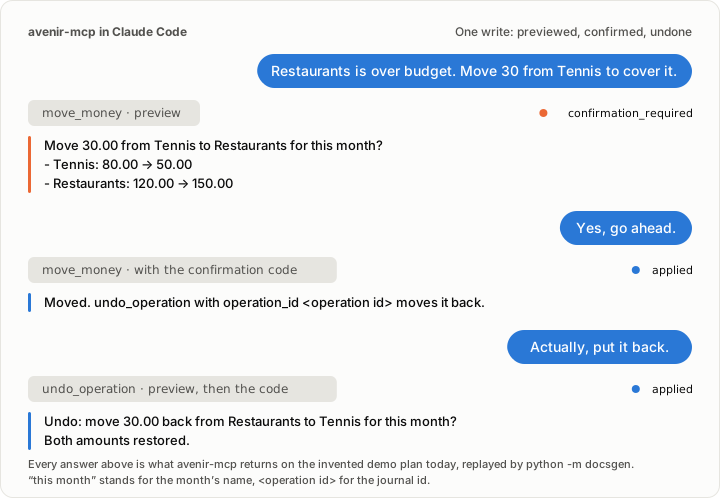
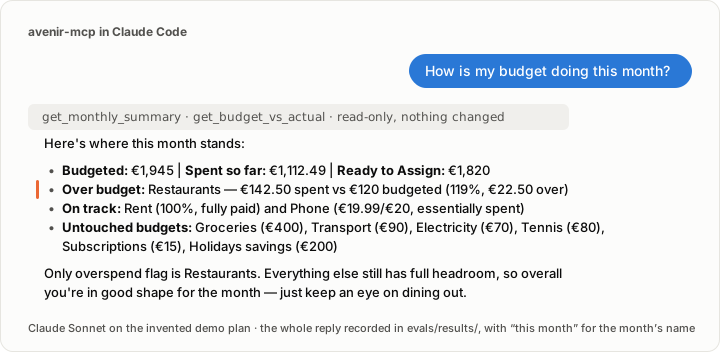
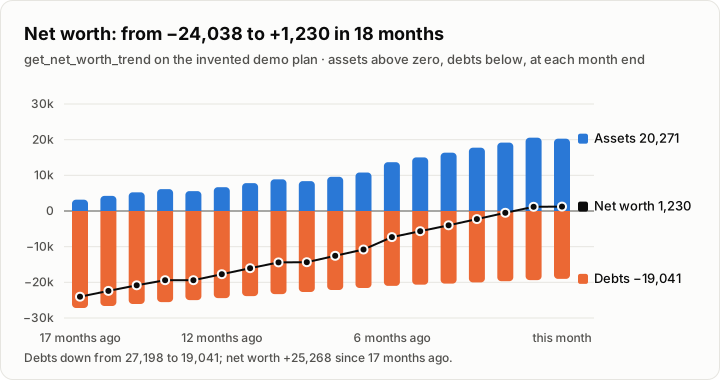
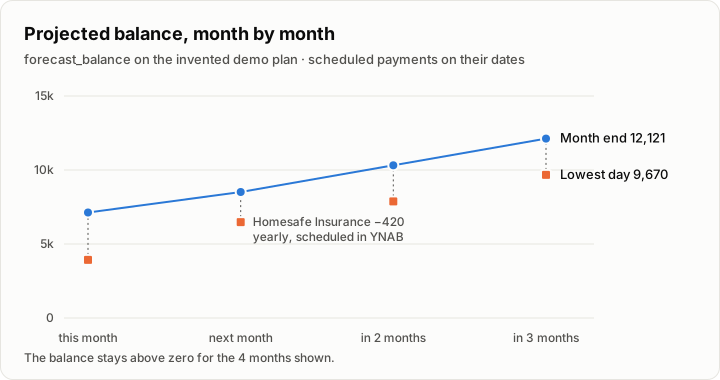
All four come from the invented demo plan: the write above is replayed by python -m docsgen,
so every line of it is what avenir-mcp answers today; then a real reply of Claude Sonnet, and
the net worth and the forecast the documentation shows. The demo plays for thirty seconds and
holds its last frame, which tells the whole story on its own: a reader whose system asks for
less motion, or a viewer that does not animate, sees that frame instead.
Unofficial project. We are not affiliated, associated, or in any way officially connected with YNAB or any of its subsidiaries or affiliates. The official YNAB website can be found at https://www.ynab.com. The names YNAB and You Need A Budget, as well as related names, tradenames, marks, trademarks, emblems, and images are registered trademarks of YNAB. They are named here only to say which service avenir-mcp works with.
avenir-mcp is for personal use on your own machine, with your own YNAB token. Running it as a public or shared server is not supported. It is provided as is, without warranty, and is not financial advice: you remain responsible for the changes you confirm. See the legal notice.
Why avenir-mcp
- Tools for tasks, not endpoints. Classify a month of transactions, reconcile an account, forecast your balance: one tool each, not a wrapper of YNAB's API.
- Read-only by default. Tools that change your plan exist only when you enable them.
- Preview, confirm, undo. Every write shows what will change and waits for your
yes;
undo_operationreverts it. - Answers an agent can read. Currency units, short typed answers, pagination, errors that say what to fix, bank text treated as untrusted.
- Verified. 100 % line and branch coverage, and an evaluation where a real agent works on an invented plan: 25/25 tasks.
Install
You need a YNAB personal access token (YNAB → Account Settings → Developer Settings → New Token), and, except with the Claude Desktop extension, uv.

One click installs avenir-mcp read-only in Claude Desktop: open
Settings → Extensions and drag the avenir-mcp.mcpb the button downloads onto that
screen, then paste your token, which the extension keeps out of sight. Add
AVENIR_MCP_WRITE=1, or tick Allow changes to your plans in the extension, to allow
changes.
On Windows, or if a terminal is not where you are at home, the extension is the way in: no uv, no command, no file to edit. Numbered steps, from the download to a first answer: Install the Claude Desktop extension. The extension is attached by the release workflow, so a release published before that job existed carries none: while the latest release is one of those, the button gives GitHub's Not Found page, and installing by hand, below, is what works until the next release. The releases say which assets each one carries.
Cursor, LM Studio and VS Code install it read-only in one click too, from the buttons on the Install page. A README cannot carry those: GitHub drops a link an editor opens, so the button would lead nowhere.
Or by hand:
# Claude Code
claude mcp add avenir-mcp --env YNAB_API_KEY=your-token --env AVENIR_MCP_WRITE=1 -- uvx avenir-mcp
// Claude Desktop, Cursor: the mcpServers block of the client's configuration
{
  "mcpServers": {
    "avenir-mcp": {
      "command": "uvx",
      "args": ["avenir-mcp"],
      "env": { "YNAB_API_KEY": "your-token", "AVENIR_MCP_WRITE": "1" }
    }
  }
}
Drop AVENIR_MCP_WRITE to stay read-only. Other clients and every option:
Install ·
Configuration.
Claude Code plugin
plugin/ is avenir-mcp as a Claude Code plugin: Claude Code asks for your YNAB token in
the plugin's settings, keeps it out of sight, and starts the server from the plugin's own
locked environment. From a clone: claude --plugin-dir plugin.
| The plugin | What |
|---|---|
| runs | uv run --locked --project the plugin's folder, which starts the release plugin/pyproject.toml pins, and nothing else. No script of its own, no build step, no hook, no shell |
| contacts | pypi.org and files.pythonhosted.org, to install that release and the versions plugin/uv.lock pins, the first time; then api.ynab.com, with your token, as avenir-mcp always does |
| writes | the environment uv resolves inside the plugin's folder, and uv's own cache. Nothing elsewhere |
| changes in your plan | nothing. It starts avenir-mcp read-only: AVENIR_MCP_WRITE is not set, so the tools that change a plan are never registered |
What you can ask
| You ask | avenir-mcp |
|---|---|
| "Which category is overspent this month?" | get_monthly_summary — totals and overspent categories |
| "Categorise what is pending." | suggest_categories, then apply_categories after your yes |
| "Split this receipt: 81.15 groceries, 5.25 household." | split_transaction — one transaction across categories, after your yes |
| "Which transaction is my 86.40 receipt from the 12th?" | find_transactions — by dates, exact amount and account, categorised or not |
| "My bank shows 3,440.80. Does YNAB agree?" | reconcile_account — explains the gap, changes nothing until it matches |
| "Will I go below zero before December?" | forecast_balance — month by month, with its assumptions |
| "Am I paying off my debts?" | get_net_worth_trend — assets, debts and net worth at each month end |
| "If I lost my income, how long could I last?" | get_runway — months the money in the budget covers the usual spending |
| "How much of my income do I keep?" | get_savings_rate — income, spending, saved and rate, month by month |
| "Which targets are behind this month?" | get_underfunded_targets — what each still needs, most urgent first, against Ready to Assign |
| "When will my debts be paid off if I put 500 a month on them?" | get_debt_payoff_plan — avalanche or snowball, the month each debt is paid off and the interest |
| "How old is my money?" | get_age_of_money — YNAB's Age of Money month by month, and its trend |
| "Move 30 from Tennis to Restaurants." | set_category_budget, previewed and undoable |
| "Undo that." | undo_operation |
Walk-throughs with real answers: Use cases. Every tool, resource and prompt: Reference.
Development
git clone https://github.com/mathbeal/avenir-mcp && cd avenir-mcp
uv sync
just check        # lint, types, tests at 100 % coverage, vocabulary, lockfile
just docs-serve   # the documentation, live
just evaluate     # a real agent on the demo plan (uses your Claude plan)
Read AGENTS.md and CONTRIBUTING.md before opening a pull request. Security reports: SECURITY.md. Also: ARCHITECTURE.md, ROADMAP.md, GOVERNANCE.md and the code of conduct.
Privacy Policy
avenir-mcp is a program you run yourself, not a service: its publisher runs no server and receives none of your data. Your token is read from the environment, kept in memory as a secret value and sent only to YNAB; your plan's data is fetched when a tool needs it, kept in memory, and returned to your agent, which means the model provider your MCP client sends tool results to also sees it. Nothing is sold, and nothing goes to a third party this does not name. What is handled, how long it is kept and how to erase it: https://avenir-mcp.pages.dev/avenir-mcp/project/privacy/.
Licence
MIT.
1 maintainer

Metadata
1 maintainer
Release files for avenir-mcp 0.7.0
For a detailed explanation of source distributions (sdists) and built distributions (wheels), please see the package formats documentation.
Source distribution (sdist)
| File | Size | Uploaded | Provenance | |
|---|---|---|---|---|
| avenir_mcp-0.7.0.tar.gz | 259.4 kB | With provenance | Details |
Built distribution (wheel)
| File | Interpreter | ABI | Platform | Reset |
|---|---|---|---|---|
| avenir_mcp-0.7.0-py3-none-any.whl | Python 3 | none | any | Details |
Total release size: 403.2 kB
Release files / avenir_mcp-0.7.0.tar.gz
| Download URL | avenir_mcp-0.7.0.tar.gz |
|---|---|
| Size | 259.4 kB |
| Tags | Source |
|
SHA-256 checksum How to use checksums |
af1846841ce12cc293f1ba746f4ff5f94fcb3b526a50cd1b35555cbc94c23f9b
|
|
BLAKE2b-256 checksum How to use checksums |
5bd0df7c99ec8f9290f8471dc676903efbc139500622a0938f2f318342e40ca7
|
| Upload date | |
|
Uploaded using Trusted Publishing? What is trusted publishing? |
Yes |
| Uploaded via |
twine/7.0.0 CPython/3.13.14
|
Provenance
Provenance describes where a file came from. On PyPI, provenance is shared via attestations, which provide a verifiable record of the build or publishing details. View details, limitations and caveats.


PyPI Publish Attestation
PyPI verified that this artifact, at this checksum, originated from the publisher listed below.
Signed by GitHub Actions, verified by PyPI on Oct 22, 2026.
Transparency logRelease files / avenir_mcp-0.7.0-py3-none-any.whl
| Download URL | avenir_mcp-0.7.0-py3-none-any.whl |
|---|---|
| Size | 143.8 kB |
| Tags | Python 3 |
|
SHA-256 checksum How to use checksums |
b0d97a41f50abcaf1a79028eab781938bb9fb6f85cba4e9a8af8906876082a6b
|
|
BLAKE2b-256 checksum How to use checksums |
7f83d4c48bd0147849d9abb29a6efc9e131df215f50c1892b5a36a73f0f7b1cc
|
| Upload date | |
|
Uploaded using Trusted Publishing? What is trusted publishing? |
Yes |
| Uploaded via |
twine/7.0.0 CPython/3.13.14
|
Provenance
Provenance describes where a file came from. On PyPI, provenance is shared via attestations, which provide a verifiable record of the build or publishing details. View details, limitations and caveats.
PyPI Publish Attestation
PyPI verified that this artifact, at this checksum, originated from the publisher listed below.
Signed by GitHub Actions, verified by PyPI on Oct 22, 2026.
Transparency logSecurity for avenir-mcp 0.7.0
Provenance
Provenance describes where a file came from. On PyPI, provenance is shared via attestations, which provide a verifiable record of the build or publishing details. View details, limitations and caveats.
Full provenance
All 2 files in this release have been uploaded with provenance metadata.
Attestation for avenir_mcp-0.7.0.tar.gz
PyPI Publish Attestation
PyPI verified that this artifact, at this checksum, originated from the publisher listed below.
Signed by GitHub Actions, verified by PyPI on Oct 22, 2026.
Transparency logA note on package security
PyPI is a repository for distributing packages, not a service for auditing them. While third-party security researchers and our staff do their best to detect and remove malicious packages, PyPI cannot guarantee the quality, security or suitability of any given package.
To learn more about protecting yourself from malicious actors, visit our package security documentation.














