
AviAnki




Anki flashcard decks for the birds of your state or province, by sight and by sound.
Build a deck · Command line · Themes · Changelog · Contributing
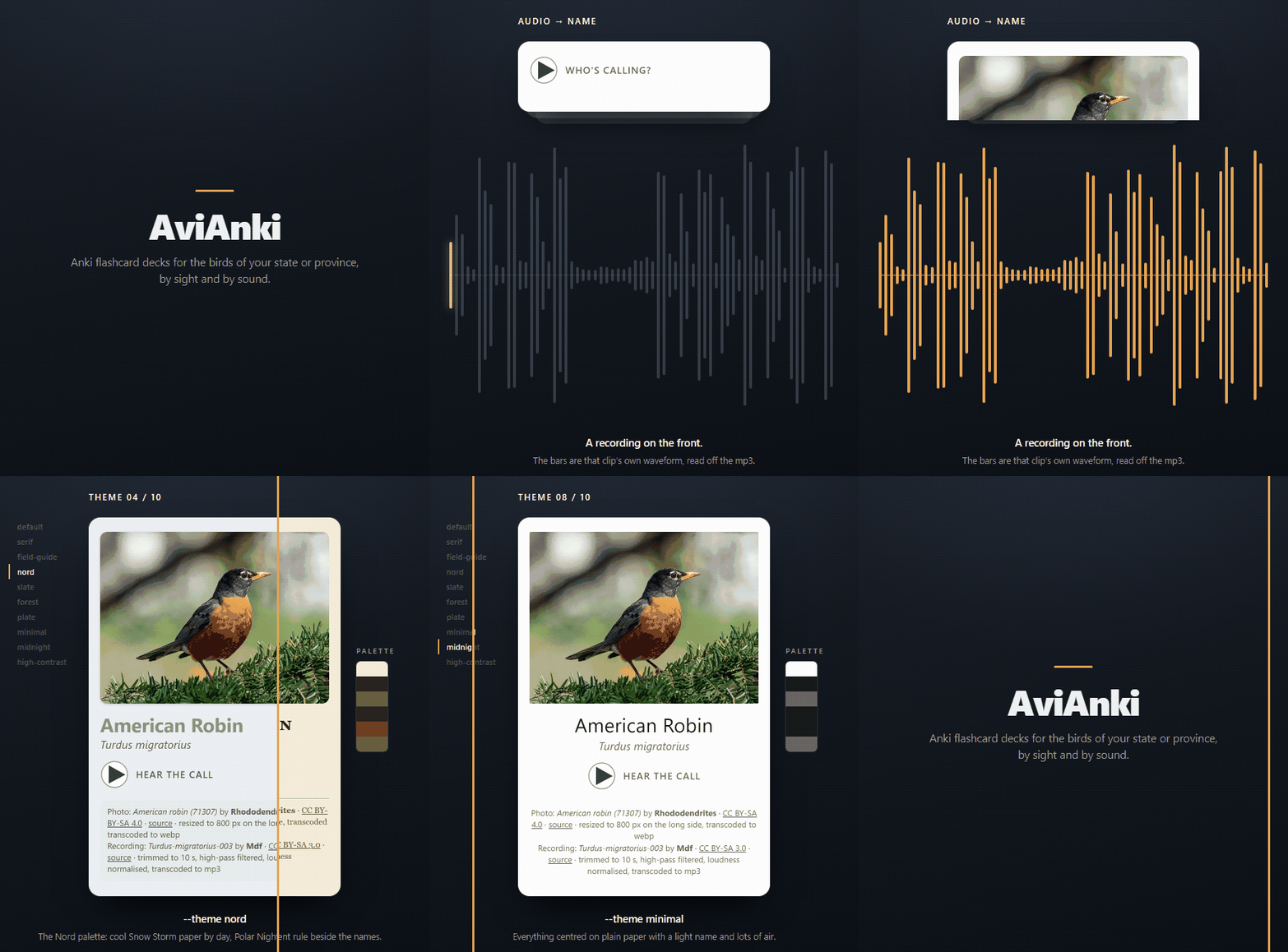
Pick where you go birding and AviAnki builds an Anki deck for its birds, most common species first: a photo or a recording on the front, the name on the answer. The media comes from a catalog rebuilt every month from freely licensed photos and recordings, so a build is a download. There is no account to make and no API key to get.
- The 100 most common species of a region, or every species the catalog holds for it (up to 400).
- Photo cards, audio cards, or one card with both.
- Ten themes built in, or your own colours and type from a TOML file.
- Every photo and recording openly licensed, with its author and licence on the answer.
- Re-import a later build of the same region and your review progress is kept.
- Any eBird region, down to a single county, from the command line.
Quick start
Open ian-costa18.github.io/AviAnki, choose your state or province, and press Build my deck. The deck is assembled in the browser: your choices are never sent to a server. The page carries the steps for opening the deck in Anki on an iPhone, an Android phone or a computer, and says where to get Anki.
The website covers the US and Canada, and a build takes about a minute. For anywhere else, or to script it, use the command line.
Cards
Every deck is built from three kinds of card; you choose which with --cards, or with the tick boxes on the website.
| Card type | --cards value |
Front |
|---|---|---|
| Photo | photo |
a photo of the bird |
| Audio | audio |
a recording of the bird |
| Photo + audio | photo-audio |
the photo and the recording |
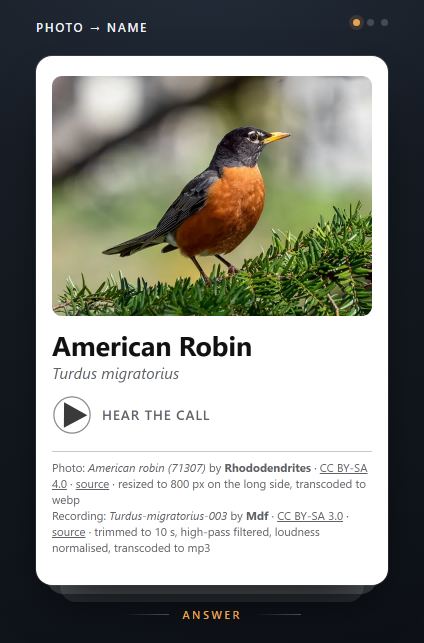
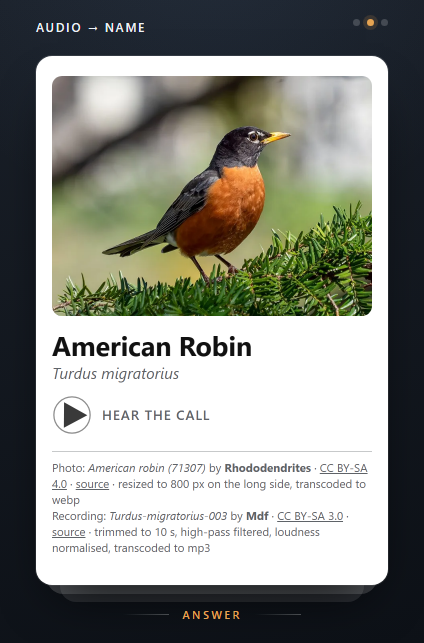
Every back is the same: the name and scientific name, the photo, the recording, and the credit for each.
The default is photo,audio. A species with no photo (or no recording) gets no photo (or audio) card, and the run says so: the summary adds a line such as "3 of the 100 birds have no recording, so they have photo cards only." for each kind that some species lack. Fronts never show the bird's name. Every answer credits the author and licence of each asset on the card.
See each card type, front and answer
| Front | Answer | |
|---|---|---|
| Photo | 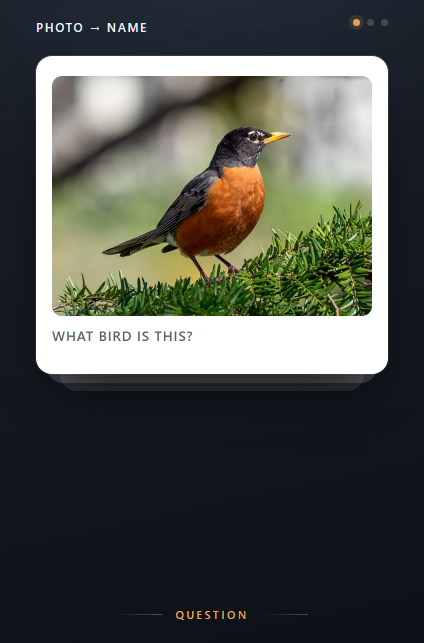 |
 |
| Audio | 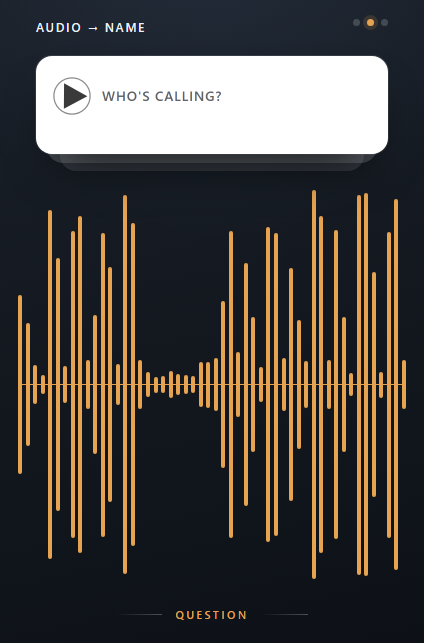 |
 |
| Photo + Audio | 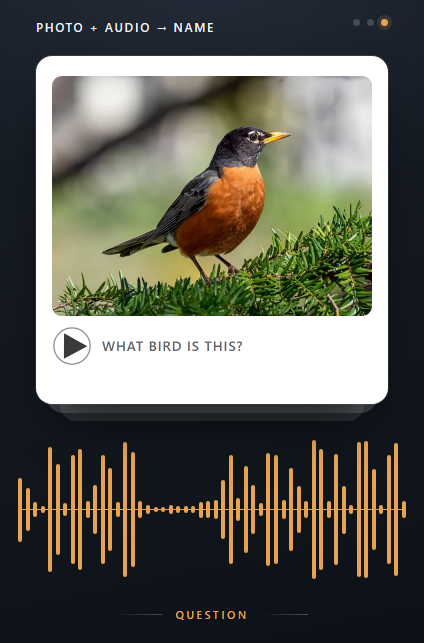 |
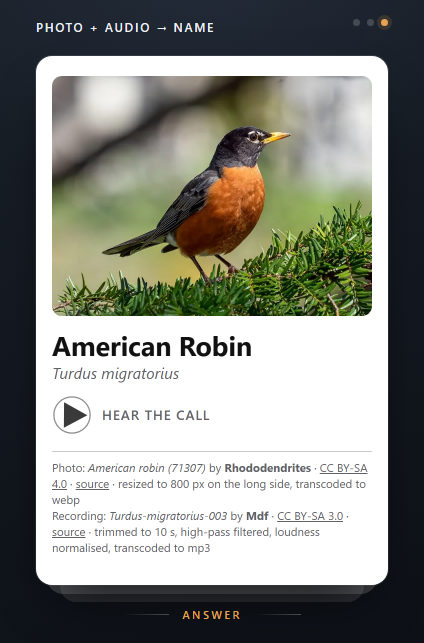 |
Rendered from the shipped templates and CSS by scripts/gen_card_shots.py, so they cannot drift from what Anki draws.
Themes
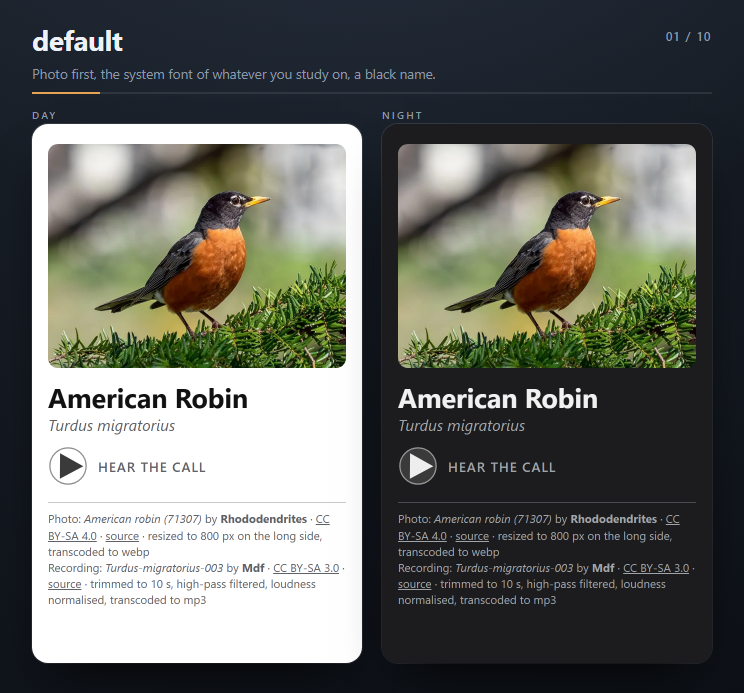
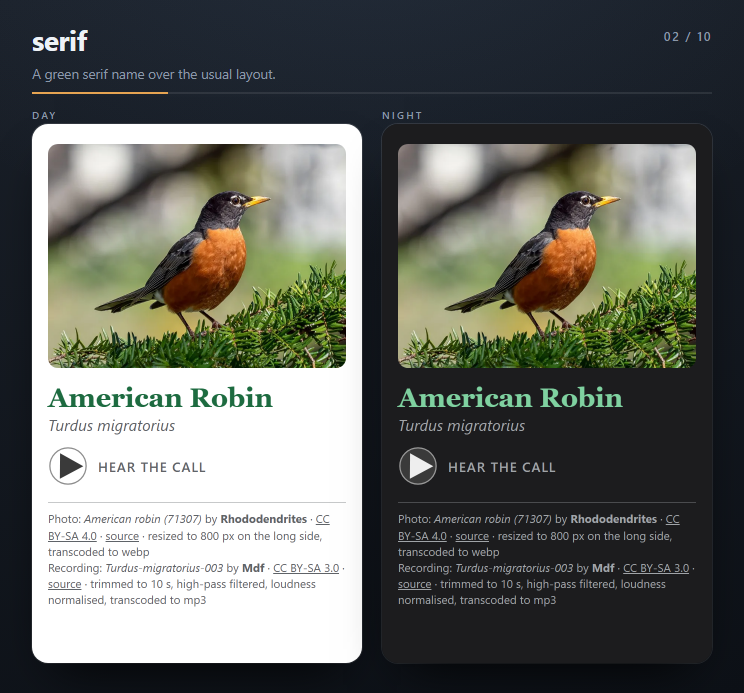
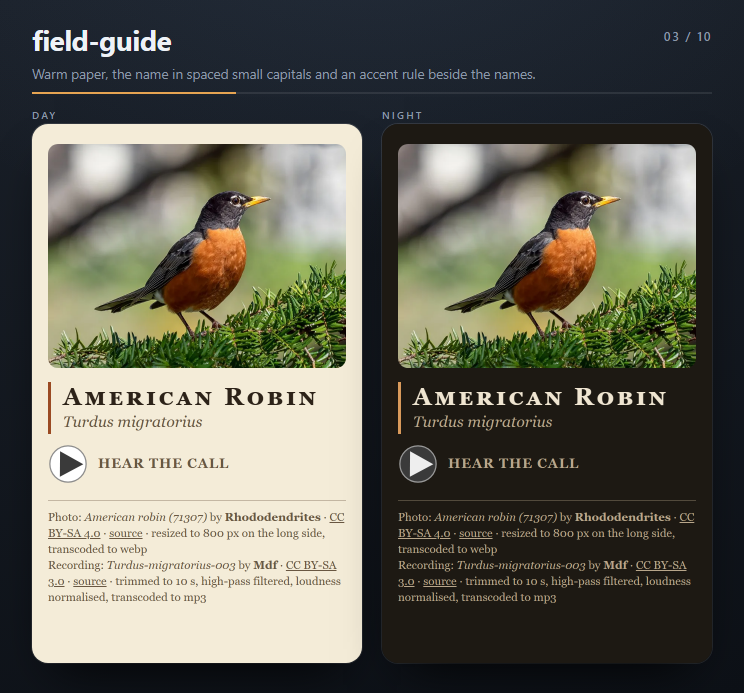
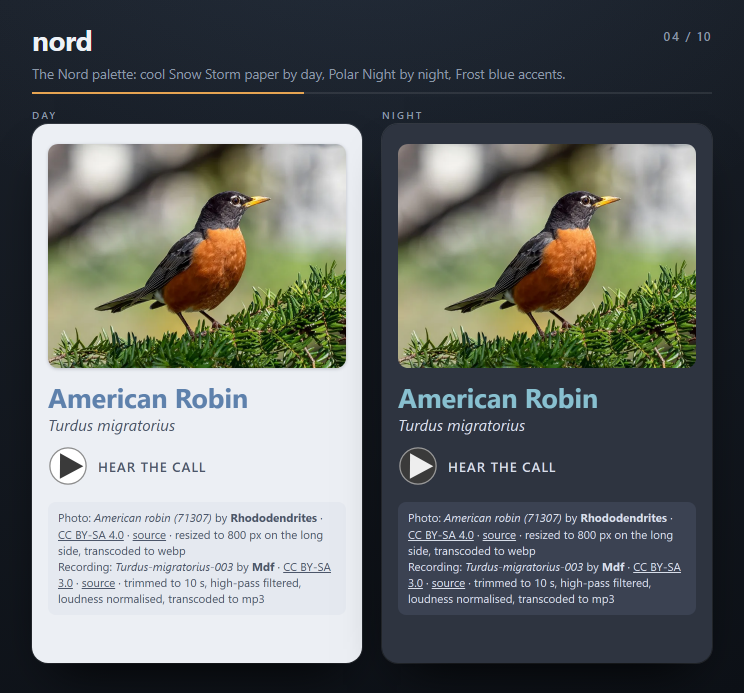
Ten themes ship with the deck. Each uses the system font of whatever you review on, follows Anki's night mode, keeps the photo in the same place on both sides, and shows the credits on every answer.
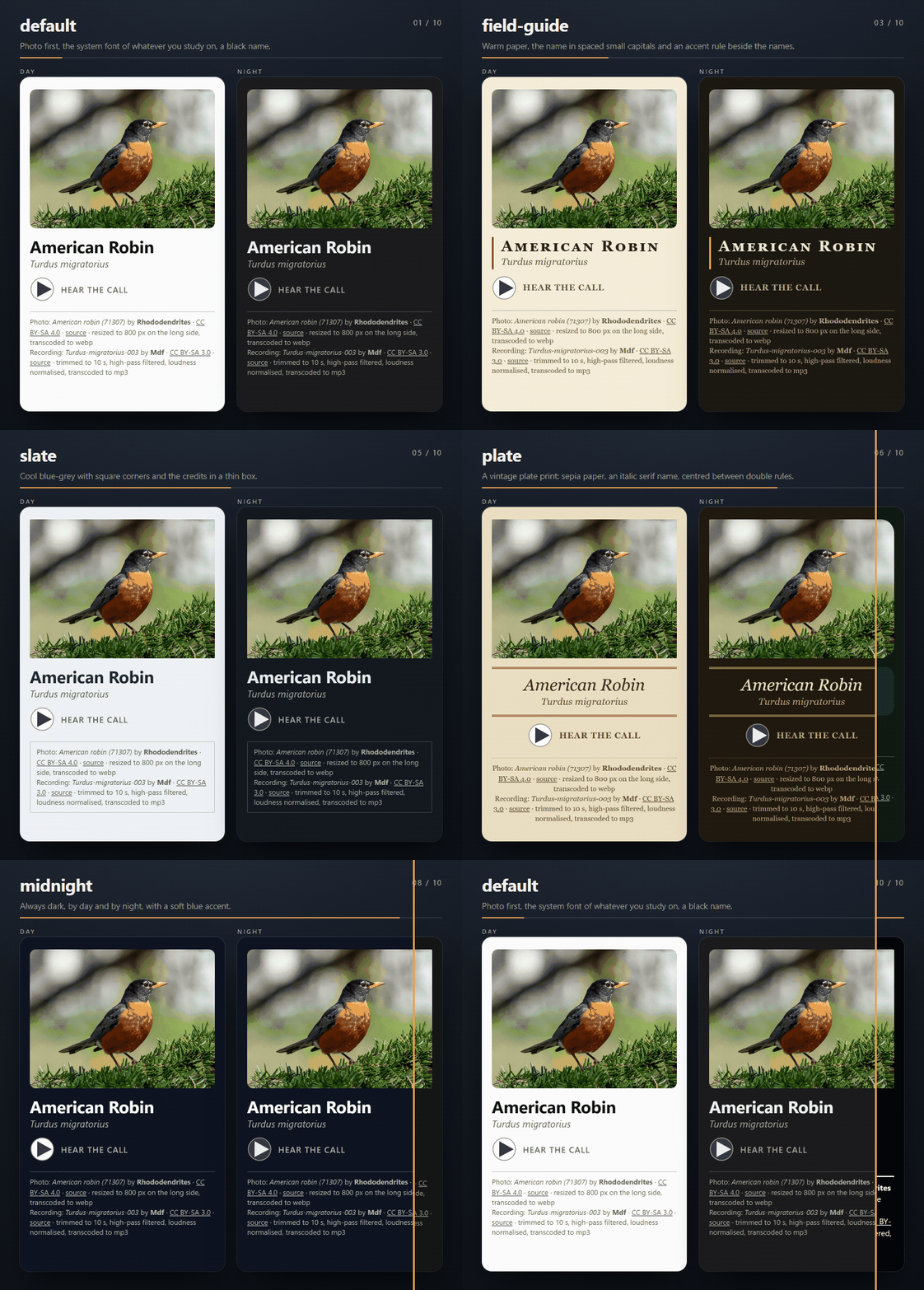
The ten themes, one by one
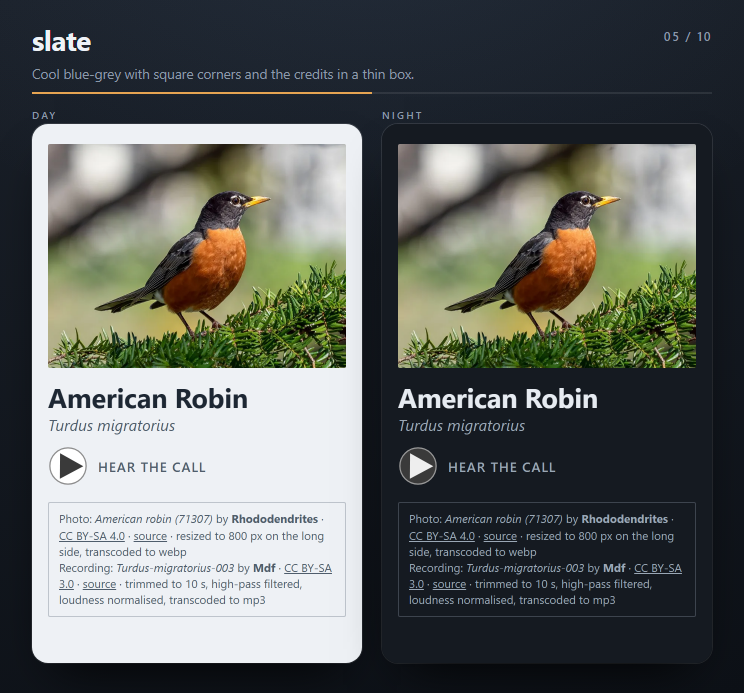
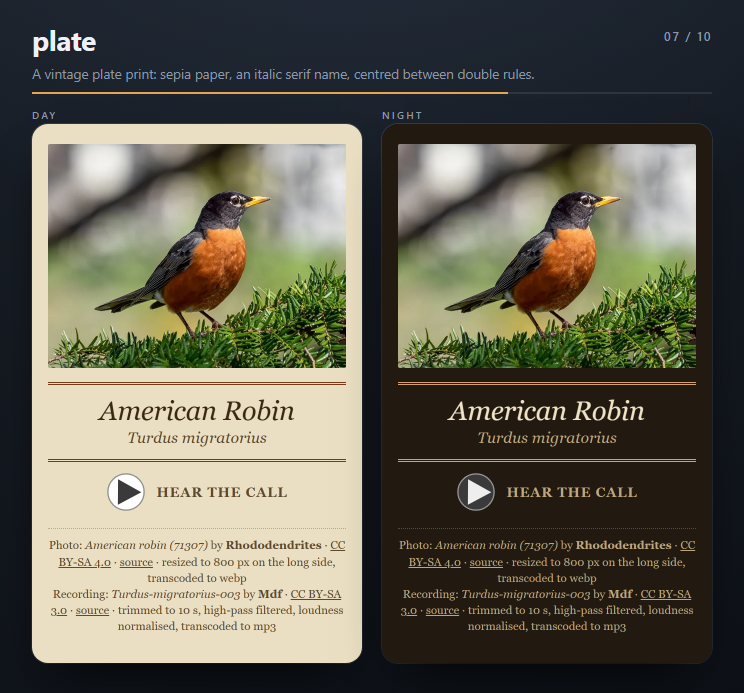
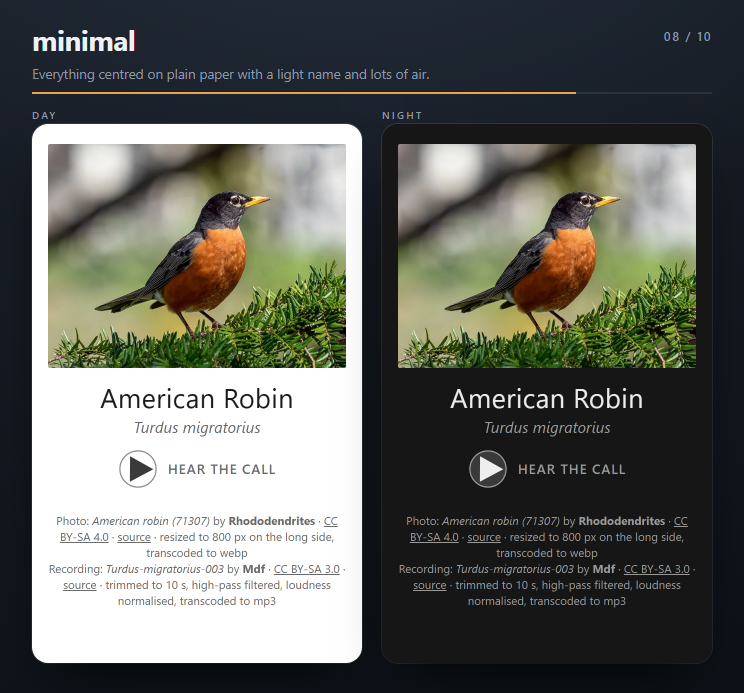
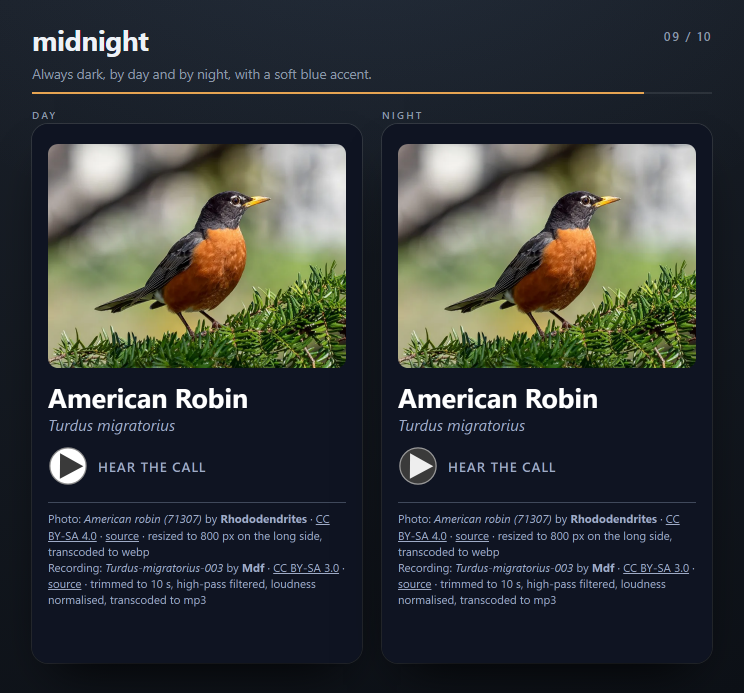
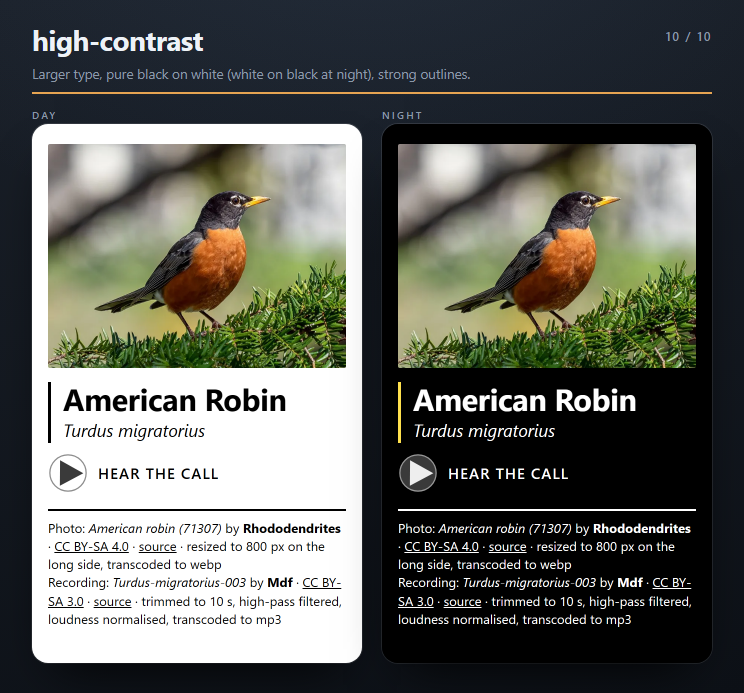
Each shot is the same answer card in day mode (left) and night mode (right).
| Theme | Day and night |
|---|---|
default — Photo first, the system font of whatever you study on, a black name |
 |
serif — A green serif name over the usual layout |
 |
field-guide — Warm paper, the name in spaced small capitals and an accent rule beside the names |
 |
nord — The Nord palette: cool Snow Storm paper by day, Polar Night by night, Frost blue accents |
 |
slate — Cool blue-grey with square corners and the credits in a thin box |
 |
forest — Sage green with round corners and the names on a soft green panel |
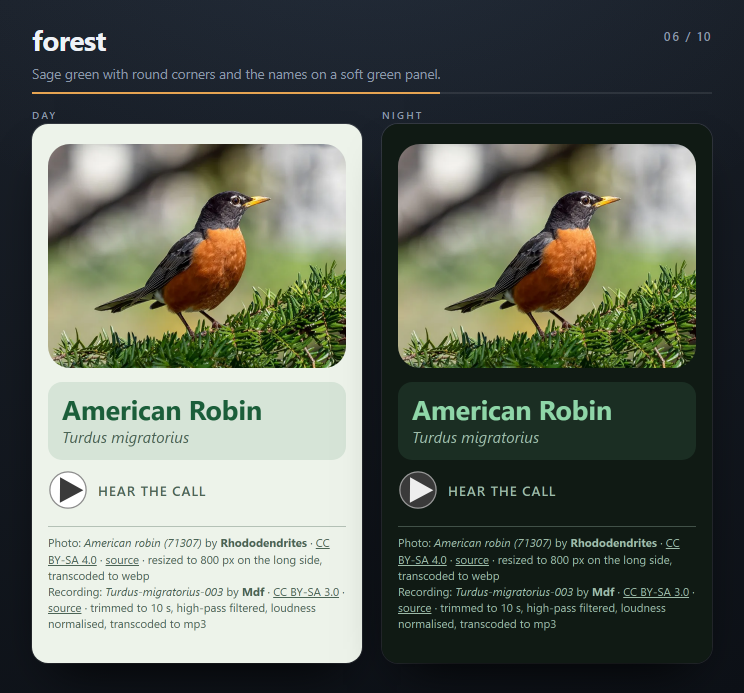 |
plate — A vintage plate print: sepia paper, an italic serif name, centred between double rules |
 |
minimal — Everything centred on plain paper with a light name and lots of air |
 |
midnight — Always dark, by day and by night, with a soft blue accent |
 |
high-contrast — Larger type, pure black on white (white on black at night), strong outlines |
 |
--name-on-photo changes the layout rather than the colours: the name sits on a dark gradient over the bottom of the photo, with the recording and credits below. The website previews both under Customize your cards, before you build.
Anki keeps one look for the whole collection. Styling belongs to the note type, so importing a deck with another --theme restyles every AviAnki card you already have, and replaces any styling you edited in Anki yourself. Your review history is kept.
A theme of your own
On the website, pick Custom… under Customize your cards, set the colours (each for day and night) and the type, and press Copy theme. Save the text in a file and build with it:
uvx avianki us-ma --theme-file my-theme.toml
A theme file is TOML. Every key is optional; a missing one keeps the default's value:
font = "rounded"        # sans, serif, rounded, mono or humanist
name_style = "caps"     # normal or caps
name_weight = "regular" # regular or bold
corners = "round"       # square, slight or round
rule = "side"           # none, or side for an accent rule beside the names

[light]
background = "#fff7e0"
text = "#3b2f00"
secondary = "#6a5a1a"
name = "#c2410c"
accent = "#e11d48"
credits = "#6a5a1a"

[night]
background = "#2a2208"
text = "#fff3c4"
secondary = "#e0cf8a"
name = "#fdba74"
accent = "#fb7185"
credits = "#e0cf8a"
Colours are six-digit hex (#rrggbb), and the other values come from the lists shown. A bad value stops the run with exit status 2 before anything is downloaded. A custom theme sets colours and type only, so it doesn't include the extra touches some built-ins have, such as nord's credit box. Nothing checks the contrast of your colours: use the website's preview.
Command line
The command line builds the same decks from the same catalog, and adds what the website leaves out: scripting, --theme-file, and any eBird region.
uvx avianki us-ma
That writes AviAnki-us-ma.apkg to the current directory; open it in Anki by double-clicking it or with File > Import. You need uv; without it, pip install avianki and then avianki us-ma does the same thing. It needs Python 3.10 or newer and runs on macOS, Linux and Windows; the deck itself works in Anki Desktop, AnkiMobile and AnkiDroid.
REGION is a catalog region: its slug (us-ma, ca-qc) or its display name (Massachusetts). If the name is not in the catalog, the error lists the closest matches.
Options
| Flag | Short | Description |
|---|---|---|
REGION |
Catalog region: slug (us-ma) or display name (Massachusetts). Required unless --ebird is given |
|
--tier TIER |
standard: the 100 most common species (default). everything: every species the catalog holds for the region (up to 400) |
|
--cards TYPES |
Comma-separated card types: photo, audio, photo-audio (default: photo,audio) |
|
--month 1-12 |
Only species likely to be seen in this month (default: all year) | |
--subdeck |
Put new notes in a subdeck named after the region (AviAnki::<Region>); see the note below |
|
--theme NAME |
How the cards look; ten built-in themes — see Themes | |
--theme-file FILE |
A custom theme in TOML, such as the website's Copy theme button gives; cannot be combined with --theme |
|
--name-on-photo |
On the answer, put the name over the bottom of the photo instead of below it; works with every theme | |
--ebird CODE |
Build from any eBird region code instead of the catalog; see Any eBird region | |
--output FILE |
-o |
Where to write the deck (default: AviAnki-<region>.apkg, or AviAnki-<CODE>.apkg with --ebird); ~ works and a missing folder is created |
--catalog-url URL_OR_DIR |
Where to read the catalog: a URL or a local directory (default: the published catalog) | |
--cache-dir DIR |
Where downloaded catalog files are kept (default: your per-user cache directory); ~ works |
|
--deck-name NAME |
The deck's name (default: AviAnki); it cannot be empty, and :: makes a subdeck; see the warning below |
|
--verbose |
-v |
Show debug output and tracebacks |
--quiet |
-q |
Show only warnings and errors; also hides the progress bar |
--version |
Print the version and exit |
-v and -q cannot be combined. The exit status is 0 when a deck was written, 1 for a network or catalog problem or when there was nothing to write, 2 for a usage error (including an output path that cannot be written, which is checked before anything is downloaded), and 130 when you cancel with Ctrl-C. The progress bar is only drawn in a terminal, so redirected output stays clean.
Changing --deck-name puts the notes into a different deck in Anki, so a later import will not update the notes you already have. Leave it alone unless you want a separate deck.
--subdeck only affects birds that are not in your collection yet. Anki leaves a bird you already have in the deck it is in, so importing with --subdeck into a collection that already holds those birds moves nothing. To reorganise existing cards, move them in Anki's card browser (select them, then Change Deck).
Examples
# The 100 most common birds of Massachusetts, photo and audio cards
uvx avianki us-ma

# Every Massachusetts species, with all three card types
uvx avianki "Massachusetts" --tier everything --cards photo,audio,photo-audio

# What Arizona birders see in May, in their own subdeck
uvx avianki us-az --month 5 --subdeck

# Photo cards only, in a chosen file
uvx avianki ca-qc --cards photo -o ~/Desktop/quebec.apkg

# Nord colours, with the name over the photo
uvx avianki us-ma --theme nord --name-on-photo

# Your own colours, from a theme file
uvx avianki us-ma --theme-file my-theme.toml

# A deck for a county, straight from eBird (needs EBIRD_API_KEY; for personal use only)
uvx --with "avianki[catalog]" avianki --ebird US-MA-017
Updating a deck
Every note has a fixed identity, so importing a newer build of the same region updates the notes you already have and keeps your review progress. Going from standard to everything adds only the extra species. Keep the default --deck-name for this to work.
Any eBird region
The catalog covers the regions listed in it. For anything else, give --ebird an eBird region code (US-MA, US-MA-017, CA-QC, MX-ROO):
EBIRD_API_KEY=your_key uvx --with "avianki[catalog]" avianki --ebird US-MA-017
- Get a free key at ebird.org/api/keygen and put it in the environment or in a
.envfile (see.env.example). Only--ebirdneeds it. - Species that are in the catalog reuse its photos and recordings. Species that are not are built on the spot, which needs the
avianki[catalog]extra. Audio for those also needs ffmpeg on yourPATHand theavianki[verify]extra (BirdNET, Python 3.11 to 3.13). Without them the run degrades to photos and says so. - The species come in eBird's order, so
standardis the first 100 that eBird returns, andeverythingis every species eBird lists for the region. - The deck is for personal use only. Every
--ebirdrun prints: "Built from eBird data for personal use. eBird's terms don't allow redistributing this deck." The catalog decks, by contrast, contain only openly licensed media and species lists.
How it works
A GitHub Actions workflow rebuilds the catalog every month: species lists per region from eBird occurrence data published through GBIF, then photos and recordings per species from Wikimedia Commons and iNaturalist under an exact licence allowlist, screened, resized, and checked with BirdNET so a recording really is the bird it claims to be. The result is a static catalog on GitHub Pages, and both the website and the CLI read it; the deck itself is assembled on your own machine either way.
- The specification — what gets built, and how
- Decision records — why it is built that way
- Credits for every asset — the catalog's own credits page
- Changelog
Credits and licences
Every photo and recording in the catalog decks is openly licensed, and the answer side of each card names the author and the licence. The catalog itself publishes a credits page listing every asset. Media comes from Wikipedia and Wikimedia Commons, with iNaturalist as a fallback; species lists are derived from eBird occurrence data published through GBIF.
Thanks to Cornell Lab of Ornithology
The species lists behind AviAnki's regions, and the eBird API used by --ebird, come from eBird, the citizen-science project of the Cornell Lab of Ornithology. Their work makes tools like this possible.
Get involved — Cornell Lab runs some of the world's largest citizen science programs. You can contribute bird sightings through eBird, join community science projects like Project FeederWatch and NestWatch, or participate in the annual Christmas Bird Count. Every observation helps researchers track bird populations and protect habitat.
Donate — Consider supporting the Cornell Lab directly: give.birds.cornell.edu.
AviAnki is not affiliated with Anki, eBird or the Cornell Lab of Ornithology.
Contributing
See CONTRIBUTING.md.
If you find AviAnki useful, you can support its development at buymeacoffee.com/IanCosta.
Licence
AviAnki is MIT licensed. The photos and recordings in the catalog keep their own licences, named on every card and listed on the credits page.
1 maintainer

Metadata
1 maintainer
Release files for avianki 1.0.0
For a detailed explanation of source distributions (sdists) and built distributions (wheels), please see the package formats documentation.
Source distribution (sdist)
| File | Size | Uploaded | |
|---|---|---|---|
| avianki-1.0.0.tar.gz | 186.2 kB | Details |
Built distribution (wheel)
| File | Interpreter | ABI | Platform | Reset |
|---|---|---|---|---|
| avianki-1.0.0-py3-none-any.whl | Python 3 | none | any | Details |
Total release size: 402.8 kB
Release files / avianki-1.0.0.tar.gz
| Download URL | avianki-1.0.0.tar.gz |
|---|---|
| Size | 186.2 kB |
| Tags | Source |
|
SHA-256 checksum How to use checksums |
168e7609d4f14d40f61d29acbcbf0c5b262bd02357c26b4e8acc9973cbcd53c1
|
|
BLAKE2b-256 checksum How to use checksums |
46a30c2f097032b217d8bda23884cf6e31f62617e1edb09920bcdc1fb4a602ad
|
| Upload date | |
|
Uploaded using Trusted Publishing? What is trusted publishing? |
Yes |
| Uploaded via |
uv/0.12.23 {"installer":{"name":"uv","version":"0.12.23","subcommand":["publish"]},"python":null,"implementation":{"name":null,"version":null},"distro":{"name":"Ubuntu","version":"24.04","id":"noble","libc":null},"system":{"name":null,"release":null},"cpu":null,"openssl_version":null,"setuptools_version":null,"rustc_version":null,"ci":true}
|
Release files / avianki-1.0.0-py3-none-any.whl
| Download URL | avianki-1.0.0-py3-none-any.whl |
|---|---|
| Size | 216.5 kB |
| Tags | Python 3 |
|
SHA-256 checksum How to use checksums |
69bb68d51571af660614335fdf03e5f9da4861b5f25420ca3f68fae8eb9dc3a7
|
|
BLAKE2b-256 checksum How to use checksums |
eda284f61cb8272ccfdfce319ad02a3f47dbf3d488e7c1469c060f5cf1aea61d
|
| Upload date | |
|
Uploaded using Trusted Publishing? What is trusted publishing? |
Yes |
| Uploaded via |
uv/0.12.23 {"installer":{"name":"uv","version":"0.12.23","subcommand":["publish"]},"python":null,"implementation":{"name":null,"version":null},"distro":{"name":"Ubuntu","version":"24.04","id":"noble","libc":null},"system":{"name":null,"release":null},"cpu":null,"openssl_version":null,"setuptools_version":null,"rustc_version":null,"ci":true}
|














