




AVICA: Automated VLBI pipeline in CASA
Accepted for publication in Astronomy & Astrophysics journal.
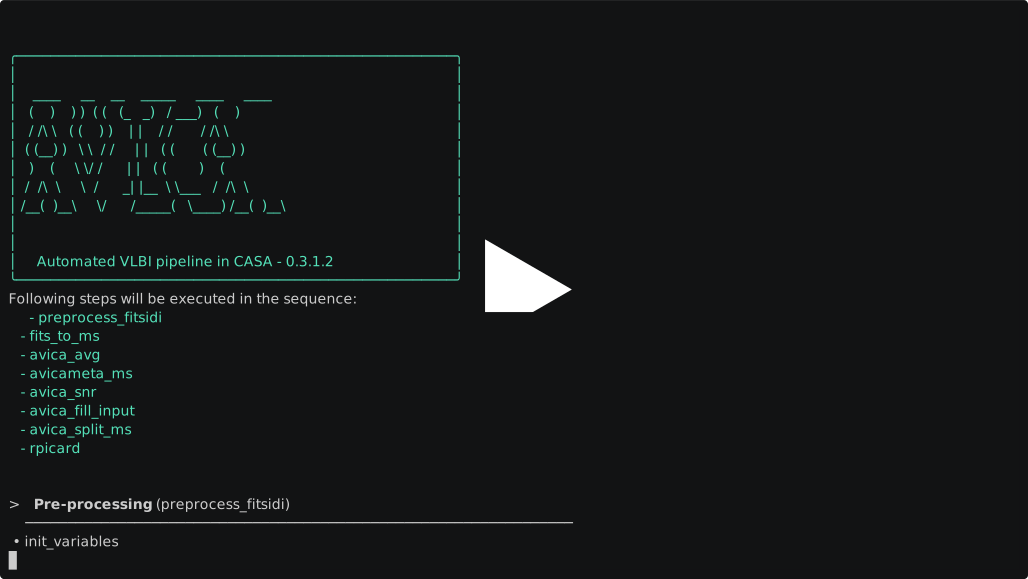
Complete demo: avikhagol.github.io/avica-demos
Contents
Installation
Requirements:
- Ubuntu 18.04+, Debian 10+, or RHEL/CentOS 8+
- Python >= 3.9
The avica package is publicly available on PyPI.
Use uv or pipx for an isolated command-line installation.
Recommended installation
Using uv:
uv tool install avica --python 3.10
Using pipx:
pipx install avica
Using pip:
pip install avica
If you install with pip, use a virtual environment unless you already manage Python packages another way.
Manual installation
Clone the repository and install it locally:
git clone https://github.com/avikhagol/avica.git
cd avica/
pip install .
Full installation script
Run install.sh as your normal user. The quickest way is to fetch
and run it in one step:
curl -LsSf https://avikhagol.github.io/avica/install.sh | bash
source "$HOME/.local/share/avica-stack/env.sh"
requires
rsync,git
The script installs AVICA using uv. If picard is already on PATH, it reuses that
installation and skips all CASA/rPICARD downloads and plotting/data setup.
Otherwise, it installs rPICARD, jiveplot (with python-pgplot==1.6.1), and monolithic CASA.
For a new rPICARD installation, set CASA_PATH to an existing CASA installation
directory (containing bin/casa and bin/mpicasa) or an archive URL:
CASA_PATH=/path/to/casa bash install.sh
Using the one-liner, place the variable after the pipe so it reaches bash,
not curl:
curl -LsSf https://avikhagol.github.io/avica/install.sh | CASA_PATH=/path/to/casa bash
If unset, the script prompts for the location. Press Enter to download:
ftp://ftp.mpifr-bonn.mpg.de/outgoing/mjanssen/casa-6.7.5-18-py3.12.el8.tar.xz
Without an interactive terminal, the same default is used. CASA_DIR and
CASA_URL are also accepted, after CASA_PATH in that order.
Set AVICA_INSTALL_DIR to change the default ~/.local/share/avica-stack
directory, or PICARD_REF to select the branch/tag of a new rPICARD clone.
Choose a CASA version that matches the selected rPICARD version.
When setting up rPICARD, the downloaded or supplied CASA directory is also saved
in AVICA's global configuration using avica pipe config --global casadir=....
The script adds an environment file to ~/.bashrc. It configures AVICA's CASA
and input-template paths when it can identify them, preserving other settings
and backing up an existing ~/.avica/avica.inp. For an existing picard command,
it reads the adjacent rPICARD your_casapath.txt when available; otherwise,
existing AVICA settings are left unchanged.
Run bash install.sh --help (or curl -LsSf https://avikhagol.github.io/avica/install.sh | bash -s -- --help
for the one-liner) for the environment options. The previous apt and
dependency-check options have been removed.
Usage
The pipeline calibration steps rely on rPicard. Follow the rPicard setup instructions first. After rPicard is configured, AVICA only needs a minimal configuration file to get started; see Configuration.
Pipeline
Run the default pipeline:
avica pipe run --fitsfilenames <file1.uvfits,file2.uvfits> --target <source-name>
The default pipeline executes these steps:
preprocess_fitsidifits_to_msphaseshiftavica_avgavicameta_msavica_snravica_fill_inputavica_split_msrpicard
You can pass one or more step names to run only part of the pipeline:
avica pipe run preprocess_fitsidi fits_to_ms --fitsfilenames <file.uvfits>
During fits_to_ms, AVICA also discovers station flag files in artifact_dirs,
folder_for_fits, the input FITS directories, and <workdir>/raw. AIPS UVFLG
files using ANT_NAME (such as EVN .flag files) are converted and added after the existing FITS-IDI/MS flags.
apply_flag_from_artifacts = True
artifact_flag_extensions = .fg;.uvflag;.uvflg;.uvfg;.flag;.flg;.uvflags;.uvflgs;.uvfgs;.flags;.flgs
artifact_flagfiles = []
Extensions are case-insensitive. A nonempty artifact_flagfiles list overrides
automatic discovery and accepts arbitrary filenames. Set
apply_flag_from_artifacts=False to disable this pass independently of
apply_flag_from_idi. Existing measurement sets are flagged only when
apply_flag_to_existing_vis=True.
Supported UVFLG fields are ANT_NAME, TIMERANG, OPCODE='FLAG', REASON,
TIMEOFF, DTIMRANG, BIF/EIF, and BCHAN/ECHAN. TIMEOFF and DTIMRANG are
in seconds and retain their nonzero settings between entries, following
AIPS UVFLG INTEXT semantics.
Malformed files and records with unsupported selectors, invalid IF/channel
ranges, absent antennas, or unrelated times are reported and skipped.
Generated commands are saved as <MS>.artifact_flags.flagcmd; its .json
sidecar records input files, row counts, skipped records and application status.
Each application saves uniquely named before_artifact_flags_* and
after_artifact_flags_* versions using CASA flagmanager. If application fails,
the step reports failure and the before-version remains available for restoration.
Source flag files are read in place and are not copied into rPICARD directories.
Common options:
| Option | Description |
|---|---|
--f, --fitsfilenames |
Comma-separated FITS-IDI file names. |
--t, --target |
Selected field or source name. |
--configfile |
Configuration file containing key=value entries. Defaults to avica.inp. |
--help |
Show the full command help. |
Pipeline results
After each step completes, AVICA appends a row to reductions/result__<target>__<project_code>__<workdir>.csv, e.g. result__J0102+5824__EY034__wd_1.csv. The project code and workdir identify which working directory (reductions/<project_code>/<workdir>/) the results belong to. Use avica pipe result to render that file:
avica pipe result --target <source-name>
This prints a progress ladder — one row per step — with status, success/fail counts, duration, and a condensed note for any failures. Full failure traces appear in panels below the table.
Common options:
| Option | Description |
|---|---|
--t, --target |
Target name; used to locate the result CSV. |
--project |
Project code; picks among result CSVs of the same target. |
--workdir |
Workdir name (wd, wd_2, ...); picks among result CSVs of the same target. |
--oneline |
Single status line — good for scripts and CI. |
--history |
Show every retry of every step, not just the latest. |
--no-detail |
Suppress the full failure panels below the table. |
--check |
Exit non-zero when any step has not fully succeeded. |
--csvfile |
Pass the CSV path directly, skipping config lookup. |
--help |
Show the full command help. |
If a target has result CSVs for several workdirs, they are listed and the newest one is shown; narrow the choice with --project / --workdir, or pass --csvfile. Result CSVs from older AVICA versions (<target>_result.csv) are still read when no new-style file exists.
The default view collapses to the most recent attempt per step; --history shows all attempts. The footer prints the command to resume from the next incomplete step.
Logs
Each avica pipe run writes its logs next to each other in the directory it is started from:
| Folder | Content |
|---|---|
avica.logs/ |
AVICA pipeline log, crash snapshots |
casa.logs/casa__log-<YYYYmmdd_HHMMSS>.log |
the single CASA log of that run (all steps, all bands) |
casa.logs/err-casa__log-<YYYYmmdd_HHMMSS>.log |
CASA worker stderr and tracebacks of failed CASA tasks |
Every CASA task is preceded by a marker line naming the step, task and visibility, so a run can be followed on the terminal:
grep -n '>>> avica' casa.logs/casa__log-*.log
A resumed run starts a new CASA log. rPicard keeps its own logs in its working directory.
Manipulating FITS-IDI
Check FITS-IDI files for known issues:
avica fitsidi_check <file.uvfits>
Useful options:
| Option | Description |
|---|---|
--fix, --no-fix |
Apply available fixes. Defaults to --no-fix. |
--desc, --no-desc |
Show issue descriptions. Defaults to --no-desc. |
--help |
Show the full command help. |
Example output:
avica fitsidi_check VLBA_VSN005412_file3.uvfits
+--------------------+---------+-------+-------+----------------+----------+
| hdu                | fixable | total | fixed | problem_code   | affected |
+==========================================================================+
| ARRAY_GEOMETRY     | 0       | 8     | 0     | []             | []       |
| ANTENNA            | 0       | 16    | 0     | []             | []       |
| FREQUENCY          | 0       | 8     | 0     | []             | []       |
| PHASE-CAL          | 0       | 12    | 0     | []             | []       |
| PRIMARY            | 1       | 10    | 0     | ["extra_byte"] | [""]     |
| SOURCE             | 0       | 8     | 0     | []             | []       |
| FLAG               | 0       | 12    | 0     | []             | []       |
| UV_DATA            | 0       | 8     | 0     | []             | []       |
| GAIN_CURVE         | 0       | 8     | 0     | []             | []       |
| SYSTEM_TEMPERATURE | 0       | 8     | 0     | []             | []       |
+--------------------+---------+-------+-------+----------------+----------+
List observation information:
avica listobs <file.uvfits>
Configuration
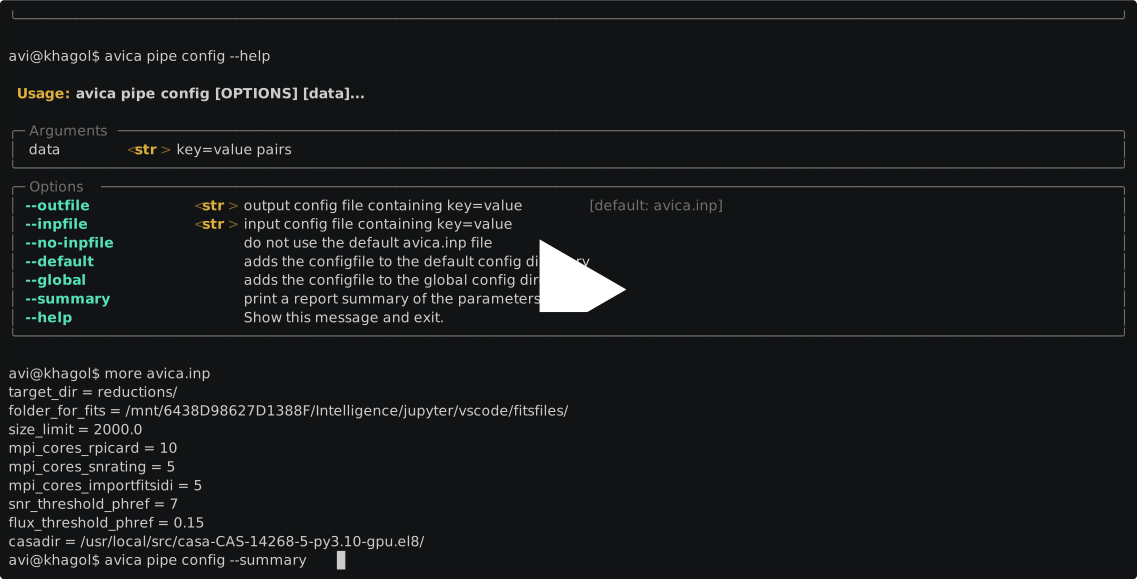
The pipeline configuration is a key=value file. By default, AVICA looks for avica.inp in the current directory. See the example configuration for a minimal setup.
Pass a custom configuration file with --configfile:
avica pipe run --configfile <path/to/config/file>
If --configfile is not provided, AVICA uses avica.inp by default.
To store defaults persistently, merge an existing file into ~/.avica/avica.inp:
avica pipe config --default --inpfile <path/to/avica.inp>
You can also set default values directly:
avica pipe config --default key=value key2=value2 key3=value3
To set global defaults in AVICA's installed directory, use --global in the same way:
avica pipe config --global --inpfile <path/to/avica.inp>
avica pipe config --global key=value key2=value2 key3=value3
Each of these commands only touches one file: --default writes to
~/.avica/avica.inp, --global writes to the installed avica.inp, and plain
avica pipe config writes to the local avica.inp (or --outfile). Only the
keys you give it are changed; everything else already in that file — other
settings, comments, # str/# int notes — stays as it was. A backup of the
old file is saved as avica.inp.bak.
To supersede the rPicard input_template files (array.inp, observation.inp, array_finetune.inp, flagging.inp, constants.inp) used by the rpicard step, point picard_input_template_update at a folder containing the parameters you want to fix:
picard_input_template_update = "path/to/folder/with/fixed/inp/files"
Parameter summary
Use --summary to print a report of every pipeline parameter, its resolved value, and where that value came from (global, user, inpfile, cli, built-in default, or runtime context). The /core and /step suffixes distinguish general parameters from step-specific overrides:
avica pipe config --summary --inpfile <path/to/avica.inp>
The summary overlays the installed global avica.inp, then ~/.avica/avica.inp, then the local avica.inp (or an explicit --inpfile), with command-line key=value overrides applied last. Later layers override matching keys and preserve other settings. --no-inpfile skips automatic local-file discovery; an explicit --inpfile is still used. Summaries do not write configuration files.
Cleaning up intermediate data
Each pipeline step can remove its own intermediate files (temporary files, superseded Measurement Sets, etc.) once it finishes. This is controlled by:
| Option | Description |
|---|---|
delete_removables |
Master switch; must be True for any cleanup to happen. Defaults to False. |
removables |
List of glob patterns (relative to the step's working directory) to delete. Can be set globally or per step as <step_name>.removables. |
rm_pre / <step_name>.rm_pre |
If True, delete the matching files before the step runs instead of after. |
rm_only |
Only perform the deletion and skip running the step itself. |
Several steps ship with sensible defaults, e.g.:
delete_removables            =   True
preprocess_fitsidi.removables    =   ["raw/*.tmp"]
rpicard.removables               =   ["wd_[SLKQXPD]/VLBI_*.ms"]
fits_to_ms.removables            =   ["*.old"]
Deletion is always confined to the step's working directory; patterns that resolve outside it are ignored.
Attribution
When using AVICA, please add a link to this repository in a footnote.
Acknowledgement
AVICA was developed within the "Search for Milli-Lenses" (SMILE) project. SMILE has received funding from the European Research Council (ERC) under the HORIZON ERC Grants 2021 programme (grant agreement No. 101040021).
1 maintainer

Metadata
1 maintainer
Release files for avica 0.3.1.17
For a detailed explanation of source distributions (sdists) and built distributions (wheels), please see the package formats documentation.
Source distribution (sdist)
| File | Size | Uploaded | |
|---|---|---|---|
| avica-0.3.1.17.tar.gz | 2.1 MB | Details |
Built distributions (wheels)
Total release size: 42.8 MB
Release files / avica-0.3.1.17.tar.gz
| Download URL | avica-0.3.1.17.tar.gz |
|---|---|
| Size | 2.1 MB |
| Tags | Source |
|
SHA-256 checksum How to use checksums |
51240ad1cd04fcf4951ec076e01be2b138f6157b464c5f92855e8eb89bcb5df0
|
|
BLAKE2b-256 checksum How to use checksums |
35e7a01fd3dd77bc9e1d3a4e3b11dec999f0dfd5ea346493726549647bbfa9df
|
| Upload date | |
|
Uploaded using Trusted Publishing? What is trusted publishing? |
Yes |
| Uploaded via |
twine/7.0.0 CPython/3.13.14
|
Provenance
Provenance describes where a file came from. On PyPI, provenance is shared via attestations, which provide a verifiable record of the build or publishing details. View details, limitations and caveats.


PyPI Publish Attestation
PyPI verified that this artifact, at this checksum, originated from the publisher listed below.
Signed by GitHub Actions, verified by PyPI on Sep 27, 2026.
Transparency logRelease files / avica-0.3.1.17-cp313-cp313-musllinux_1_2_x86_64.whl
| Download URL | avica-0.3.1.17-cp313-cp313-musllinux_1_2_x86_64.whl |
|---|---|
| Size | 3.5 MB |
| Tags | CPython 3.13 Linux musl 1.2+ x86-64 |
|
SHA-256 checksum How to use checksums |
757f87c47d0885e98ee944853e65581f8e5a252cf3da86f928b5cd60a796012d
|
|
BLAKE2b-256 checksum How to use checksums |
0850030e8d78e2da7f44466247b78a15864768d2f1696c6e58db185edb367d87
|
| Upload date | |
|
Uploaded using Trusted Publishing? What is trusted publishing? |
Yes |
| Uploaded via |
twine/7.0.0 CPython/3.13.14
|
Provenance
Provenance describes where a file came from. On PyPI, provenance is shared via attestations, which provide a verifiable record of the build or publishing details. View details, limitations and caveats.
PyPI Publish Attestation
PyPI verified that this artifact, at this checksum, originated from the publisher listed below.
Signed by GitHub Actions, verified by PyPI on Sep 27, 2026.
Transparency logRelease files / avica-0.3.1.17-cp313-cp313-manylinux_2_27_x86_64.manylinux_2_28_x86_64.whl
| Download URL | avica-0.3.1.17-cp313-cp313-manylinux_2_27_x86_64.manylinux_2_28_x86_64.whl |
|---|---|
| Size | 2.4 MB |
| Tags | CPython 3.13 Linux glibc 2.27+ x86-64 Linux glibc 2.28+ x86-64 |
|
SHA-256 checksum How to use checksums |
9e56cdfc43533cd128c054a0c07cededd48ff70e3684a45a6c9078305e385fb4
|
|
BLAKE2b-256 checksum How to use checksums |
5c6eb7997b0245d4abb3222f2ed4cb7ffa6146ce80a76b6a0badd6e2141dc5a8
|
| Upload date | |
|
Uploaded using Trusted Publishing? What is trusted publishing? |
Yes |
| Uploaded via |
twine/7.0.0 CPython/3.13.14
|
Provenance
Provenance describes where a file came from. On PyPI, provenance is shared via attestations, which provide a verifiable record of the build or publishing details. View details, limitations and caveats.
PyPI Publish Attestation
PyPI verified that this artifact, at this checksum, originated from the publisher listed below.
Signed by GitHub Actions, verified by PyPI on Sep 27, 2026.
Transparency logRelease files / avica-0.3.1.17-cp313-cp313-macosx_11_0_arm64.whl
| Download URL | avica-0.3.1.17-cp313-cp313-macosx_11_0_arm64.whl |
|---|---|
| Size | 2.3 MB |
| Tags | CPython 3.13 macOS 11.0+ ARM64 |
|
SHA-256 checksum How to use checksums |
f9b6be78bf21b441dd12e377773dba59ad43b8826f7e05f41537635320bcb99d
|
|
BLAKE2b-256 checksum How to use checksums |
0edadaca2ca3a073502991a122d3f0102ee906a91f4733afed9b632db9c2c1f1
|
| Upload date | |
|
Uploaded using Trusted Publishing? What is trusted publishing? |
Yes |
| Uploaded via |
twine/7.0.0 CPython/3.13.14
|
Provenance
Provenance describes where a file came from. On PyPI, provenance is shared via attestations, which provide a verifiable record of the build or publishing details. View details, limitations and caveats.
PyPI Publish Attestation
PyPI verified that this artifact, at this checksum, originated from the publisher listed below.
Signed by GitHub Actions, verified by PyPI on Sep 27, 2026.
Transparency logRelease files / avica-0.3.1.17-cp312-cp312-musllinux_1_2_x86_64.whl
| Download URL | avica-0.3.1.17-cp312-cp312-musllinux_1_2_x86_64.whl |
|---|---|
| Size | 3.5 MB |
| Tags | CPython 3.12 Linux musl 1.2+ x86-64 |
|
SHA-256 checksum How to use checksums |
639b462f73bd7266cca1081f8af5d0fef6b8b4e602490bbfd46388ad39815d10
|
|
BLAKE2b-256 checksum How to use checksums |
a2e33b7b7e3b66f3e2f9f99c268e105ab9d743bea640cd997f39ad67db7bbedb
|
| Upload date | |
|
Uploaded using Trusted Publishing? What is trusted publishing? |
Yes |
| Uploaded via |
twine/7.0.0 CPython/3.13.14
|
Provenance
Provenance describes where a file came from. On PyPI, provenance is shared via attestations, which provide a verifiable record of the build or publishing details. View details, limitations and caveats.
PyPI Publish Attestation
PyPI verified that this artifact, at this checksum, originated from the publisher listed below.
Signed by GitHub Actions, verified by PyPI on Sep 27, 2026.
Transparency logRelease files / avica-0.3.1.17-cp312-cp312-manylinux_2_27_x86_64.manylinux_2_28_x86_64.whl
| Download URL | avica-0.3.1.17-cp312-cp312-manylinux_2_27_x86_64.manylinux_2_28_x86_64.whl |
|---|---|
| Size | 2.4 MB |
| Tags | CPython 3.12 Linux glibc 2.27+ x86-64 Linux glibc 2.28+ x86-64 |
|
SHA-256 checksum How to use checksums |
181054e62190e82ed07adef9e45faed7147ae4e3c7d5f5b0d648125a69ed936a
|
|
BLAKE2b-256 checksum How to use checksums |
e1629a2ae3d6ac66d4c35e72c37a2fe091d5a0aa0af37d3734cab34e55dbcd3a
|
| Upload date | |
|
Uploaded using Trusted Publishing? What is trusted publishing? |
Yes |
| Uploaded via |
twine/7.0.0 CPython/3.13.14
|
Provenance
Provenance describes where a file came from. On PyPI, provenance is shared via attestations, which provide a verifiable record of the build or publishing details. View details, limitations and caveats.
PyPI Publish Attestation
PyPI verified that this artifact, at this checksum, originated from the publisher listed below.
Signed by GitHub Actions, verified by PyPI on Sep 27, 2026.
Transparency logRelease files / avica-0.3.1.17-cp312-cp312-macosx_11_0_arm64.whl
| Download URL | avica-0.3.1.17-cp312-cp312-macosx_11_0_arm64.whl |
|---|---|
| Size | 2.3 MB |
| Tags | CPython 3.12 macOS 11.0+ ARM64 |
|
SHA-256 checksum How to use checksums |
1c4bf6bfd0b691ba6747e73aacdc23758f6d9f0e49919c3c92efda709cd48643
|
|
BLAKE2b-256 checksum How to use checksums |
89743d4a9dda5a728e0719d40721d12ec55455f019f3a696b47ed757dcb19c5d
|
| Upload date | |
|
Uploaded using Trusted Publishing? What is trusted publishing? |
Yes |
| Uploaded via |
twine/7.0.0 CPython/3.13.14
|
Provenance
Provenance describes where a file came from. On PyPI, provenance is shared via attestations, which provide a verifiable record of the build or publishing details. View details, limitations and caveats.
PyPI Publish Attestation
PyPI verified that this artifact, at this checksum, originated from the publisher listed below.
Signed by GitHub Actions, verified by PyPI on Sep 27, 2026.
Transparency logRelease files / avica-0.3.1.17-cp311-cp311-musllinux_1_2_x86_64.whl
| Download URL | avica-0.3.1.17-cp311-cp311-musllinux_1_2_x86_64.whl |
|---|---|
| Size | 3.5 MB |
| Tags | CPython 3.11 Linux musl 1.2+ x86-64 |
|
SHA-256 checksum How to use checksums |
7b8b349212b186ea714e48ca1df1efd2e81941d652cb85cff534965d93abbd06
|
|
BLAKE2b-256 checksum How to use checksums |
618d9fe4e71ee7c7692a051b381deaf4fc5a5f975663e0de6e83293e85effd09
|
| Upload date | |
|
Uploaded using Trusted Publishing? What is trusted publishing? |
Yes |
| Uploaded via |
twine/7.0.0 CPython/3.13.14
|
Provenance
Provenance describes where a file came from. On PyPI, provenance is shared via attestations, which provide a verifiable record of the build or publishing details. View details, limitations and caveats.
PyPI Publish Attestation
PyPI verified that this artifact, at this checksum, originated from the publisher listed below.
Signed by GitHub Actions, verified by PyPI on Sep 27, 2026.
Transparency logRelease files / avica-0.3.1.17-cp311-cp311-manylinux_2_27_x86_64.manylinux_2_28_x86_64.whl
| Download URL | avica-0.3.1.17-cp311-cp311-manylinux_2_27_x86_64.manylinux_2_28_x86_64.whl |
|---|---|
| Size | 2.4 MB |
| Tags | CPython 3.11 Linux glibc 2.27+ x86-64 Linux glibc 2.28+ x86-64 |
|
SHA-256 checksum How to use checksums |
6d1ce1e75dbd0a72a91257aa0a07d94960c40f87b144400a33fe8ea4b48ff07c
|
|
BLAKE2b-256 checksum How to use checksums |
6e18474d105bdc52ef6632720166ad9f8e1b0b86f959ed2217493d028646072d
|
| Upload date | |
|
Uploaded using Trusted Publishing? What is trusted publishing? |
Yes |
| Uploaded via |
twine/7.0.0 CPython/3.13.14
|
Provenance
Provenance describes where a file came from. On PyPI, provenance is shared via attestations, which provide a verifiable record of the build or publishing details. View details, limitations and caveats.
PyPI Publish Attestation
PyPI verified that this artifact, at this checksum, originated from the publisher listed below.
Signed by GitHub Actions, verified by PyPI on Sep 27, 2026.
Transparency logRelease files / avica-0.3.1.17-cp311-cp311-macosx_11_0_arm64.whl
| Download URL | avica-0.3.1.17-cp311-cp311-macosx_11_0_arm64.whl |
|---|---|
| Size | 2.3 MB |
| Tags | CPython 3.11 macOS 11.0+ ARM64 |
|
SHA-256 checksum How to use checksums |
b81d145de0bfaaaf76267e43f3c2eac833239ac82465546322a4c987c36129dd
|
|
BLAKE2b-256 checksum How to use checksums |
63648cba16245c438e0ae9ba3058f8706a321cf300e502555bc319a8fa7cd85a
|
| Upload date | |
|
Uploaded using Trusted Publishing? What is trusted publishing? |
Yes |
| Uploaded via |
twine/7.0.0 CPython/3.13.14
|
Provenance
Provenance describes where a file came from. On PyPI, provenance is shared via attestations, which provide a verifiable record of the build or publishing details. View details, limitations and caveats.
PyPI Publish Attestation
PyPI verified that this artifact, at this checksum, originated from the publisher listed below.
Signed by GitHub Actions, verified by PyPI on Sep 27, 2026.
Transparency logRelease files / avica-0.3.1.17-cp310-cp310-musllinux_1_2_x86_64.whl
| Download URL | avica-0.3.1.17-cp310-cp310-musllinux_1_2_x86_64.whl |
|---|---|
| Size | 3.5 MB |
| Tags | CPython 3.10 Linux musl 1.2+ x86-64 |
|
SHA-256 checksum How to use checksums |
a61f8ce3b88bde3d9fab2a244d0a944a400147ddeaca97ad8a0d100e0d08cfbc
|
|
BLAKE2b-256 checksum How to use checksums |
2f782dda179e1b9f470b22bc6f45c40ffea002a780bde7f117bfcb0aba352fe2
|
| Upload date | |
|
Uploaded using Trusted Publishing? What is trusted publishing? |
Yes |
| Uploaded via |
twine/7.0.0 CPython/3.13.14
|
Provenance
Provenance describes where a file came from. On PyPI, provenance is shared via attestations, which provide a verifiable record of the build or publishing details. View details, limitations and caveats.
PyPI Publish Attestation
PyPI verified that this artifact, at this checksum, originated from the publisher listed below.
Signed by GitHub Actions, verified by PyPI on Sep 27, 2026.
Transparency logRelease files / avica-0.3.1.17-cp310-cp310-manylinux_2_27_x86_64.manylinux_2_28_x86_64.whl
| Download URL | avica-0.3.1.17-cp310-cp310-manylinux_2_27_x86_64.manylinux_2_28_x86_64.whl |
|---|---|
| Size | 2.4 MB |
| Tags | CPython 3.10 Linux glibc 2.27+ x86-64 Linux glibc 2.28+ x86-64 |
|
SHA-256 checksum How to use checksums |
51de2ec958b816d1277f87d80c179d6087b45644e4a14e0ec326595b42933b9c
|
|
BLAKE2b-256 checksum How to use checksums |
2d7c5b4e13b9d835117054f68ca976708ed415b268c99acb64454e997cadecca
|
| Upload date | |
|
Uploaded using Trusted Publishing? What is trusted publishing? |
Yes |
| Uploaded via |
twine/7.0.0 CPython/3.13.14
|
Provenance
Provenance describes where a file came from. On PyPI, provenance is shared via attestations, which provide a verifiable record of the build or publishing details. View details, limitations and caveats.
PyPI Publish Attestation
PyPI verified that this artifact, at this checksum, originated from the publisher listed below.
Signed by GitHub Actions, verified by PyPI on Sep 27, 2026.
Transparency logRelease files / avica-0.3.1.17-cp310-cp310-macosx_11_0_arm64.whl
| Download URL | avica-0.3.1.17-cp310-cp310-macosx_11_0_arm64.whl |
|---|---|
| Size | 2.3 MB |
| Tags | CPython 3.10 macOS 11.0+ ARM64 |
|
SHA-256 checksum How to use checksums |
7afef4b08a023488c6b7026a1755307e3b9171c0159f510d1c6265527147f799
|
|
BLAKE2b-256 checksum How to use checksums |
7a17bc0f84065d07a6e3a210758c50323ebf39ba5df37ed2b0a59cf3d2415cdd
|
| Upload date | |
|
Uploaded using Trusted Publishing? What is trusted publishing? |
Yes |
| Uploaded via |
twine/7.0.0 CPython/3.13.14
|
Provenance
Provenance describes where a file came from. On PyPI, provenance is shared via attestations, which provide a verifiable record of the build or publishing details. View details, limitations and caveats.
PyPI Publish Attestation
PyPI verified that this artifact, at this checksum, originated from the publisher listed below.
Signed by GitHub Actions, verified by PyPI on Sep 27, 2026.
Transparency logRelease files / avica-0.3.1.17-cp39-cp39-musllinux_1_2_x86_64.whl
| Download URL | avica-0.3.1.17-cp39-cp39-musllinux_1_2_x86_64.whl |
|---|---|
| Size | 3.5 MB |
| Tags | CPython 3.9 Linux musl 1.2+ x86-64 |
|
SHA-256 checksum How to use checksums |
3fa107fec34bc7fcd0d7bd0baf95f56ba516a9876891781fcf6ba24f8b5715d8
|
|
BLAKE2b-256 checksum How to use checksums |
d1fe5ccce37d7d359ea537678afb52804e657f4927f2feab61097bbd8a247744
|
| Upload date | |
|
Uploaded using Trusted Publishing? What is trusted publishing? |
Yes |
| Uploaded via |
twine/7.0.0 CPython/3.13.14
|
Provenance
Provenance describes where a file came from. On PyPI, provenance is shared via attestations, which provide a verifiable record of the build or publishing details. View details, limitations and caveats.
PyPI Publish Attestation
PyPI verified that this artifact, at this checksum, originated from the publisher listed below.
Signed by GitHub Actions, verified by PyPI on Sep 27, 2026.
Transparency logRelease files / avica-0.3.1.17-cp39-cp39-manylinux_2_27_x86_64.manylinux_2_28_x86_64.whl
| Download URL | avica-0.3.1.17-cp39-cp39-manylinux_2_27_x86_64.manylinux_2_28_x86_64.whl |
|---|---|
| Size | 2.4 MB |
| Tags | CPython 3.9 Linux glibc 2.27+ x86-64 Linux glibc 2.28+ x86-64 |
|
SHA-256 checksum How to use checksums |
fe650bace4e47f9fdf9981d3a57dcfe3f59d62d06fe0a42c00d31342c6ab1fd8
|
|
BLAKE2b-256 checksum How to use checksums |
13f9b8a80e71618608ef3d8d247f993ba56b9c3bf8cebd3ff5b5893cc21578d6
|
| Upload date | |
|
Uploaded using Trusted Publishing? What is trusted publishing? |
Yes |
| Uploaded via |
twine/7.0.0 CPython/3.13.14
|
Provenance
Provenance describes where a file came from. On PyPI, provenance is shared via attestations, which provide a verifiable record of the build or publishing details. View details, limitations and caveats.
PyPI Publish Attestation
PyPI verified that this artifact, at this checksum, originated from the publisher listed below.
Signed by GitHub Actions, verified by PyPI on Sep 27, 2026.
Transparency logRelease files / avica-0.3.1.17-cp39-cp39-macosx_11_0_arm64.whl
| Download URL | avica-0.3.1.17-cp39-cp39-macosx_11_0_arm64.whl |
|---|---|
| Size | 2.3 MB |
| Tags | CPython 3.9 macOS 11.0+ ARM64 |
|
SHA-256 checksum How to use checksums |
f8d890afa0e6317d118407954f3029b35d7cf75b2db521970a4b5b19f338873f
|
|
BLAKE2b-256 checksum How to use checksums |
b0812add2ddc0e53d4e08c89b4d19810893ebe3f2ef3620ed524425a1b21ab68
|
| Upload date | |
|
Uploaded using Trusted Publishing? What is trusted publishing? |
Yes |
| Uploaded via |
twine/7.0.0 CPython/3.13.14
|
Provenance
Provenance describes where a file came from. On PyPI, provenance is shared via attestations, which provide a verifiable record of the build or publishing details. View details, limitations and caveats.
PyPI Publish Attestation
PyPI verified that this artifact, at this checksum, originated from the publisher listed below.
Signed by GitHub Actions, verified by PyPI on Sep 27, 2026.
Transparency log













