
avmosaic
Detect explicit regions in images and videos and cover them with a mosaic — from the command line or from Python, on Windows, macOS and Linux.
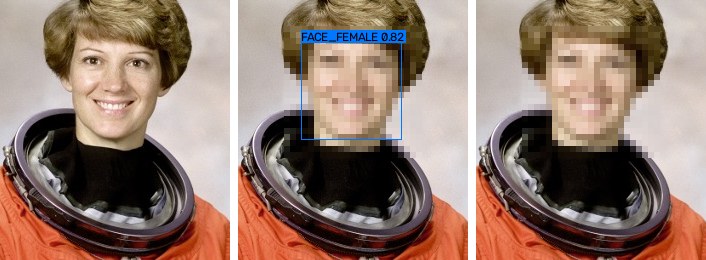
Demo uses the faces preset on a public-domain NASA portrait; the default preset
censors genitalia and the anus.
Automated detection is an aid, not a guarantee. The detector will miss regions (unusual angles, close-ups, occlusion, lighting) and will sometimes censor the wrong thing. Review every output before publishing it. You are responsible for complying with the laws that apply to your content. Only process material you have the right to process.
Features
- Detection with the open-source NudeNet v3
ONNX models (
320nships with the package;640mis more accurate and downloaded on demand). Runs on CPU, or with CUDA / DirectML / CoreML through ONNX Runtime. - Mosaic tiles aligned to a fixed grid so they don't shimmer between frames. The default tile size follows a commonly cited guideline: at least 1/100 of the image's long side and never under 4 px. Blur and solid fill are available too.
- Video tracking: each region is followed with optical flow, so the mosaic moves with it instead of smearing along its path. This covers the frames between detector runs, short stretches where the detector loses the region, and a few frames before it is first detected. Tracks end at scene cuts, and audio is kept.
- Every key parameter is a flag: classes, threshold, model, padding, tile size, shape, hold, codec and quality.
- Batch processing of folders. JSON reports of every detection. A
--draw-boxesmode for tuning. - Handles Unicode file names (Korean, Japanese, …), alpha channels, odd video sizes, and NTSC frame rates.
Install
Python 3.10+ is required. ffmpeg is bundled through imageio-ffmpeg, so there is
nothing else to install. On Intel Macs, note that recent ONNX Runtime releases
ship no Intel-macOS wheels, so pip can only use an older ONNX Runtime, and only if
one exists for your Python version (Python 3.14 on Intel macOS has none).
git clone https://github.com/fattaillabs/avmosaic && cd avmosaic
pip install .            # or: pip install -e ".[dev]" for development
GPU (optional): replace onnxruntime with onnxruntime-gpu (NVIDIA CUDA) or
onnxruntime-directml (Windows, any GPU), then pass --device cuda / --device directml.
The default --device auto picks CUDA, then DirectML, then CoreML (Apple), then CPU.
Quick start
avmosaic video.mp4                    # -> video_censored.mp4
avmosaic photo.jpg -o out.jpg
avmosaic ./scenes -o ./censored       # whole folder, structure mirrored
avmosaic video.mp4 --model 640m --detect-every 2 --hold 8
avmosaic photo.jpg --draw-boxes       # see what was detected and how confident it was
avmosaic detect video.mp4 -o detections.json   # detect only, no output media
avmosaic classes                      # list classes and presets
avmosaic models download 640m         # fetch the bigger model ahead of time
avmosaic frames sample.mp4 -o ./frames --every 2   # video -> images to label
avmosaic label ./frames                # mark where the mosaic must go, in your browser
avmosaic eval regions ./frames         # is the mosaic where you marked it?
avmosaic eval run ./NPDI -o npdi.jsonl  # benchmark on a labelled dataset (see below)
avmosaic eval summary npdi.jsonl
avmosaic FILE … is shorthand for avmosaic censor FILE ….
Parameters
| Flag | Default | Meaning |
|---|---|---|
--classes |
genitals |
Presets and/or class names, comma separated. Presets: genitals (female/male genitalia, anus), breasts, buttocks, nudity, faces, all. |
--threshold |
0.25 |
Minimum detection score. Lower it to censor more aggressively. |
--model |
320n |
320n, 640m, or a path to an .onnx file. |
--resolution |
model's own | Model input size (a multiple of 32). |
--device |
auto |
auto, cpu, cuda, tensorrt, directml, coreml, openvino. |
--channels |
rgb |
Channel order fed to the model (bgr reproduces upstream NudeNet exactly). |
--method |
mosaic |
mosaic, blur or fill. |
--block-size |
auto |
Mosaic tile: auto, a pixel count (24), or a share of the long side (2%). |
--shape |
rect |
rect, or ellipse (still covers the whole box). |
--padding |
0.15 |
Grow each box by this fraction of its size on every side. |
--fill-color |
black |
For --method fill: black, white, #rrggbb, r,g,b. |
--detect-every |
1 |
Video: run the detector on every Nth frame (and on every scene cut). Tracking fills the frames in between. |
--tracking |
on |
Video: follow regions with optical flow. off censors the union of boxes found within --hold frames instead (simpler, but smears fast motion). |
--hold |
5 |
Tracking on: follow a new region back N frames before its first detection. Off: censor boxes found up to N frames before and after. |
--max-lost |
15 |
Tracking on: keep following a region N frames after the detector lost it. |
--smooth |
2 |
Tracking on: average box positions over ±N frames (the raw box is always covered too). |
--codec / --crf / --preset |
libx264 / 18 / medium |
Video encoder settings. --ffmpeg-args "…" passes extra encoder flags. |
--no-audio |
off | Drop the audio track. Audio is otherwise copied, and converted to AAC when the source codec doesn't belong in MP4 (e.g. PCM). |
--report FILE |
— | Write every detection (per frame for video) as JSON. |
--draw-boxes |
off | Draw boxes, classes and scores on the output. |
--progress |
auto |
Progress: a bar in a terminal (auto); always also logs a line every 10 s when output goes to a file. |
-o, --suffix, -y |
— | Output file or folder, suffix used when -o is absent, overwrite. |
Tuning
- Run
avmosaic sample.mp4 --draw-boxes --report r.jsonand look at the result. - Missed regions → lower
--threshold(e.g.0.15), try--model 640m, raise--holdand--padding. - Too much censored → raise
--threshold, and check which classes the report says were found.
Recommended settings
These are starting points, not guarantees. Check the result with --draw-boxes and adjust.
| Goal | Flags | Notes |
|---|---|---|
| Balanced (default) | none | 320n, --threshold 0.25, tracking on |
| Fewer false alarms | --threshold 0.32 (or 0.35) |
On 7,783 swimwear photos, false alarms fell from 0.8% at 0.25 to 0.4% at 0.35. On a 12-minute test clip, 0.32 cut the mosaic segments from 59 to 33 and still caught every long segment. |
| Fewer misses (safety first) | --threshold 0.15 --model 640m --max-lost 30 --hold 8 --padding 0.25 |
Lower bar, bigger model, longer tracking, larger boxes. Slower, and censors more. |
| Faster | --detect-every 2 (30 fps video) or --detect-every 3 (60 fps) |
Tracking fills the frames in between. A 1080p clip went from 22.0 s to 16.1 s with --detect-every 2. |
| Coarser mosaic on small videos | --block-size 2% |
auto is max(4 px, 1/100 of the long side), so a 640×360 video gets 7 px tiles. |
| Also cover breasts | --classes genitals,breasts |
|
| Anonymize faces | --classes faces |
How tracking works
For each region the detector finds, avmosaic keeps a track and follows it frame by frame with median-flow optical flow (Lucas–Kanade on a grid of points, with a forward–backward check). The tracker is built to cover too much rather than too little:
- Between detector runs (
--detect-every N): when the next detection arrives, the accumulated flow drift is spread back over the frames in between. Both the flow path and the corrected path are covered. - Detector misses: the track continues on optical flow for up to
--max-lostframes. If flow cannot follow (occlusion, blur, a featureless region), the box covers both "it stopped" and "it kept its recent speed". When the detector finds the region again within--max-lostframes, the frames of the gap are still buffered, so they also get the straight path between the two detections. The box also grows 1% per frame without a detection, up to +50%. - Before the first detection: a new track is followed backwards over
--holdframes. - Scene cuts: these end all tracks and force a detection. Nothing is carried across the cut.
Frames are rendered with a look-ahead of max(--max-lost, --hold, --smooth, --detect-every − 1) frames. At the defaults that is 15 frames, or about 100 MB at 1080p.
Checking that the mosaic is in the right place
Whether a file is explicit is the wrong question for a censoring tool. What matters is whether the mosaic lands where it should. A person marks that once, on a few samples, and then it can be checked automatically every time the code or settings change:
-
avmosaic frames sample.mp4 -o ./frames --every 2saves a frame every 2 seconds. -
avmosaic label ./framesopens a local page (served on 127.0.0.1 only). Drag a box around every region that must be censored. Press C for an image that must stay clean. Boxes are saved next to each image as<name>.json. The page starts empty;--suggestpre-fills the detector's boxes, which is faster but biases the labels towards what the detector already finds. -
avmosaic eval regions ./framesprints a text report:- how much of each marked region the mosaic covers, with the worst cases listed
- how much of the mosaic falls outside the marked regions
- whether any clean image was censored
It exits with status 1 if a region is covered less than 90% (
--min-coverage) or a clean image loses more than 2% (--max-false-area). It takes the same detection and censoring flags ascensor, so settings can be compared directly.AVMOSAIC_SAMPLES=./frames pytest tests/test_samples.pyruns the same check as tests.
Trying it on real footage
avmosaic does not include, host or distribute any explicit material, and its tests use none. To try it on real footage, you can use a public research dataset such as The Image and video dataset for adult content detection in image and video (figshare).
18+, at your own risk. Such datasets contain explicit adult content. Before downloading, read the dataset page, including its license and disclaimer. Use the data at your own risk and only where that is lawful. Never commit files from it to this repository or attach them to issues.
avmosaic "some video.mp4" --draw-boxes --report report.json   # then watch the result
avmosaic frames "some video.mp4" -o ./frames --every 2           # label + eval regions
More about test data and private samples: tests/data/README.md.
Benchmarking on NPDI / Pornography-2k
These research datasets are not public downloads. They contain copyrighted adult material, so their maintainers share them only after a formal request and a signed responsibility agreement:
- NPDI (800 videos, ~80 h; half clean, including 200 "difficult" clips such as beaches and wrestling): Prof. Sandra Avila, UNICAMP.
- Pornography-2k (2,000 videos, ~140 h): Prof. Anderson Rocha, UNICAMP.
Both have per-video labels only, without region boxes, so avmosaic eval measures what
those labels allow. It also accepts folders of images, where each image counts as one
sample, e.g. explicit images vs. swimwear photos as hard negatives. A file's label comes
from its path below (and including) the folder you pass: anything matching
no[nt][-_ ]?porn (nonporn, non_porn, not_porn, …) is clean, then anything matching
porn is explicit. Change this with --positive and --negative.
avmosaic eval run ./NPDI -o npdi-320n.jsonl --sample-fps 1             # resumable
avmosaic eval run ./NPDI -o npdi-640m.jsonl --model 640m
avmosaic eval summary npdi-320n.jsonl npdi-640m.jsonl --thresholds 0.15,0.25,0.35
The summary reports the following, as text only:
- the file-level AUC
- for each threshold, the share of explicit and clean videos that get censored at all, and the mean share of sampled frames censored (split into easy and difficult clean videos when the path says so)
- the clean files that scored highest, with timestamps, so you can check them for false alarms
- the explicit files where nothing was found
Speed
Measured on an Apple M1 (CoreML) with a 1080p, 30 fps, 20-second clip (600 frames):
| Settings | Time | Throughput |
|---|---|---|
default (320n) |
22.0 s | 27 fps |
--detect-every 2 |
16.1 s | 37 fps |
--model 640m --detect-every 3 |
75.6 s | 7.9 fps |
Detection alone takes 15.7 ms per 1080p frame for 320n (33.1 ms on CPU) and 346 ms for
640m (469 ms on CPU). Re-encoding the same clip with ffmpeg alone takes 8.3 s.
Tracking added about 10% in a separate run on the same clip (31.8 s → 34.8 s). The clip
contained no regions to follow, so this is the scene-cut check. With tracking,
--detect-every 3 keeps boxes on target and took 20.0 s.
Python API
from avmosaic import CensorOptions, VideoOptions, censor_image, censor_video, create_detector

detector = create_detector("320n", classes=["FEMALE_GENITALIA_EXPOSED", "MALE_GENITALIA_EXPOSED"],
                           threshold=0.2)
censor_image("in.jpg", "out.jpg", detector, CensorOptions(block_size="2%"))
censor_video("in.mp4", "out.mp4", detector, CensorOptions(), VideoOptions(hold=8))
Any object with a detect(bgr_image) -> list[Detection] method can replace the
detector, for example a model you trained yourself.
Testing
pip install -e ".[dev]"
pytest                    # everything (about 10 s)
pytest -m "not model"     # skip the tests that run the real model
The tests use no explicit material.
- Pipeline tests replace the model with a colour detector that treats a synthetic
red/black checkerboard as the region to censor. They check mosaic geometry, frame count,
audio and duration, the frame-hold logic (a deliberately missed frame leaks with
hold=0and is covered withhold=2), odd sizes, NTSC rates and Unicode paths. - Tracking tests run the planner on in-memory frames and measure exactly how much of
the true object box is covered in every frame. The scenarios are fast motion, 15-frame
detector misses, curved paths with
--detect-every 6, backfill, scene cuts, two objects moving in opposite directions, and forced optical-flow failure. In the fast-motion test, a 40 px object stays fully covered either way. Tracking censors 1.03× the object's area at 8 px/frame and 1.14× at 25 px/frame.--tracking offcensors 2.70× and 5.48×. - Model tests run the real NudeNet model. They check that its output matches upstream
nudenetexactly in BGR mode, and use the model's face class on a public-domain photo as an end-to-end check. - Your own accuracy check: put labelled images in a private folder (never commit them)
and run
AVMOSAIC_SAMPLES=/path/to/samples pytest tests/test_samples.py -v. See tests/test_samples.py for the label format.
CI runs the suite on Linux, macOS and Windows with Python 3.10, 3.12 and 3.14.
Limitations
- The detector is the main source of error. NudeNet was trained on general nudity images. Small regions in large frames, extreme close-ups and partial occlusion are hard for it.
- Variable-frame-rate video is converted to a constant rate (this keeps audio in sync).
- Subtitle and data streams are not copied. Odd video sizes are padded by one pixel for H.264.
- Image metadata (EXIF) is not copied to the output. The EXIF orientation is applied first.
License
MIT for this project's code — see LICENSE. Third-party components, including an important note about NudeNet's license, are listed in NOTICE.
1 maintainer

Metadata
1 maintainer
Release files for avmosaic 0.1.0
For a detailed explanation of source distributions (sdists) and built distributions (wheels), please see the package formats documentation.
Source distribution (sdist)
| File | Size | Uploaded | Provenance | |
|---|---|---|---|---|
| avmosaic-0.1.0.tar.gz | 68.6 kB | With provenance | Details |
Built distribution (wheel)
| File | Interpreter | ABI | Platform | Reset |
|---|---|---|---|---|
| avmosaic-0.1.0-py3-none-any.whl | Python 3 | none | any | Details |
Total release size: 118.7 kB
Release files / avmosaic-0.1.0.tar.gz
| Download URL | avmosaic-0.1.0.tar.gz |
|---|---|
| Size | 68.6 kB |
| Tags | Source |
|
SHA-256 checksum How to use checksums |
9375514fd5ab2d32a0ac014680578566ee03b83e30ac3e12ebe27d8b7720f6f6
|
|
BLAKE2b-256 checksum How to use checksums |
2ebbff10a90715eae171b1502d8276ae0eb599c45b3b14c82f0f95c345011252
|
| Upload date | |
|
Uploaded using Trusted Publishing? What is trusted publishing? |
Yes |
| Uploaded via |
twine/7.0.0 CPython/3.13.14
|
Provenance
Provenance describes where a file came from. On PyPI, provenance is shared via attestations, which provide a verifiable record of the build or publishing details. View details, limitations and caveats.


PyPI Publish Attestation
PyPI verified that this artifact, at this checksum, originated from the publisher listed below.
Signed by GitHub Actions, verified by PyPI on Oct 18, 2026.
Transparency logRelease files / avmosaic-0.1.0-py3-none-any.whl
| Download URL | avmosaic-0.1.0-py3-none-any.whl |
|---|---|
| Size | 50.1 kB |
| Tags | Python 3 |
|
SHA-256 checksum How to use checksums |
9871ffcdd5507af193cb2d069b9fc1aefbe68ed54ebac9591b3816bd59e574f5
|
|
BLAKE2b-256 checksum How to use checksums |
ac456939f92c65b51997823e8054ee977c4b5b182b8471df318880672803bce2
|
| Upload date | |
|
Uploaded using Trusted Publishing? What is trusted publishing? |
Yes |
| Uploaded via |
twine/7.0.0 CPython/3.13.14
|
Provenance
Provenance describes where a file came from. On PyPI, provenance is shared via attestations, which provide a verifiable record of the build or publishing details. View details, limitations and caveats.
PyPI Publish Attestation
PyPI verified that this artifact, at this checksum, originated from the publisher listed below.
Signed by GitHub Actions, verified by PyPI on Oct 18, 2026.
Transparency logSecurity for avmosaic 0.1.0
Provenance
Provenance describes where a file came from. On PyPI, provenance is shared via attestations, which provide a verifiable record of the build or publishing details. View details, limitations and caveats.
Full provenance
All 2 files in this release have been uploaded with provenance metadata.
Attestation for avmosaic-0.1.0.tar.gz
PyPI Publish Attestation
PyPI verified that this artifact, at this checksum, originated from the publisher listed below.
Signed by GitHub Actions, verified by PyPI on Oct 18, 2026.
Transparency logA note on package security
PyPI is a repository for distributing packages, not a service for auditing them. While third-party security researchers and our staff do their best to detect and remove malicious packages, PyPI cannot guarantee the quality, security or suitability of any given package.














