
Postgres-native background job queue — Python SDK with async/sync workers, transactional enqueue, progress tracking, and web UI
Verified details
These details have been verified by PyPIProject links
GitHub Statistics
Maintainers

Project description
Awa
Postgres-native background job queue for Rust and Python.
Awa (Māori: river) provides durable, transactional job enqueueing with typed handlers in both Rust and Python. All queue state lives in Postgres — no Redis, no RabbitMQ. The Rust runtime handles polling, heartbeating, crash recovery, and dispatch. Python workers run on that same runtime via PyO3, getting Rust-grade reliability with Python-native ergonomics.
Features
- Postgres-only — one dependency you already have.
- Transactional enqueue — insert jobs inside your business transaction. Commit = visible. Rollback = gone.
- Cancel by unique key — cancel scheduled jobs by their insert-time components (kind + args) without storing job IDs.
- Rust and Python workers — same queues, identical semantics, mixed deployments.
- Crash recovery — heartbeat + hard deadline rescue. Stale jobs recovered automatically.
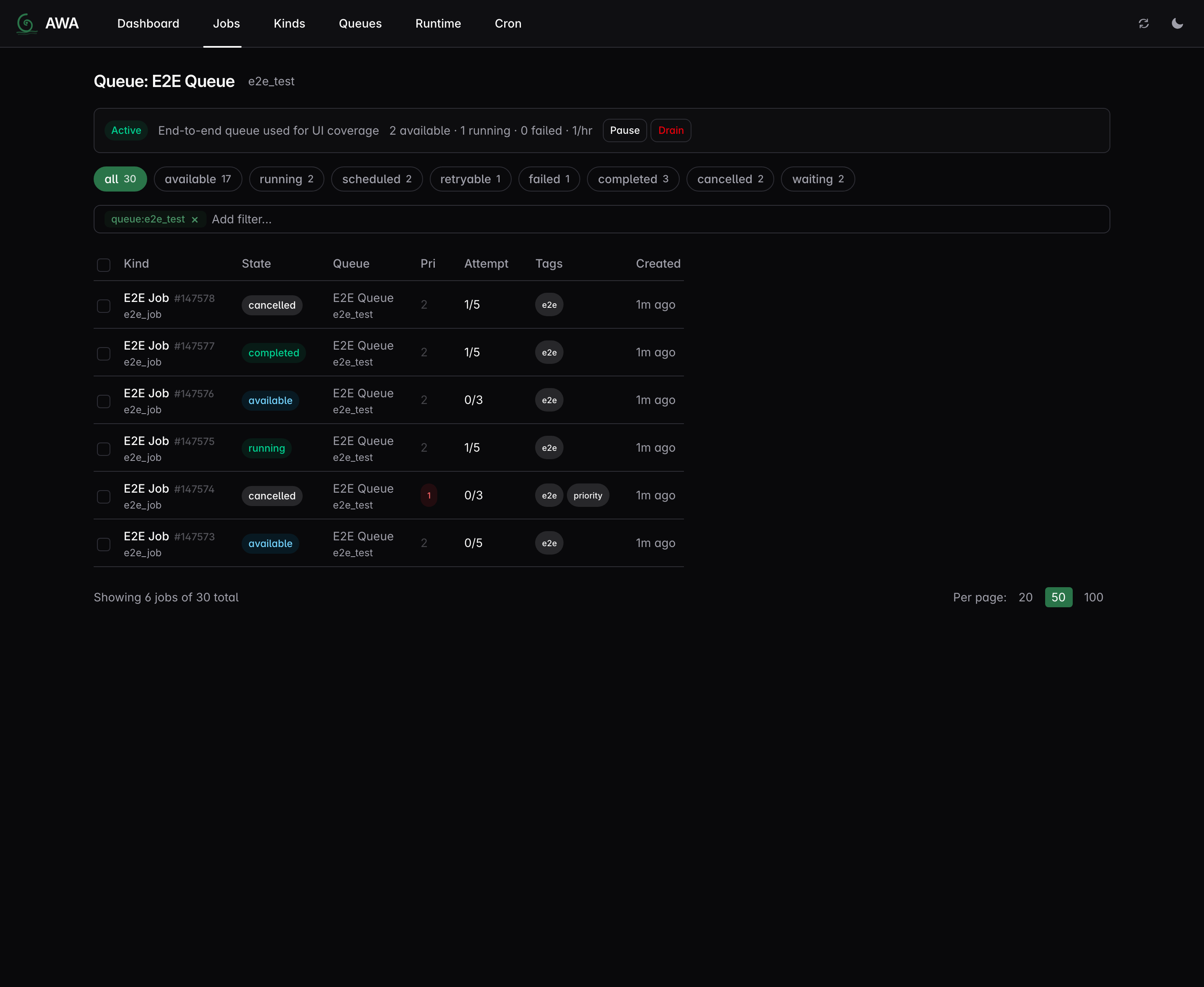
- Web UI — dashboard, job inspector, queue management, cron controls.
- Structured progress — handlers report percent, message, and checkpoint metadata; persisted across retries.
- Periodic/cron jobs — leader-elected scheduler with timezone support and atomic enqueue.
- Webhook callbacks — park jobs for external completion with optional CEL expression filtering.
- LISTEN/NOTIFY wakeup — sub-10ms pickup latency.
- OpenTelemetry — 20 built-in metrics (counters, histograms, gauges) for Prometheus/Grafana.
- Hot/cold storage — runnable work in a hot table, deferred work in a cold table.
- Rate limiting — per-queue token bucket. Weighted concurrency — global worker pool with per-queue guarantees.
Local benchmarks show ~8k jobs/sec sustained throughput (Rust workers), ~5k jobs/sec (Python workers), and sub-10ms p50 pickup latency. See benchmarking notes for methodology and caveats.
Core concurrency invariants (no duplicate processing after rescue, stale completions rejected, shutdown drain ordering) are checked with TLA+ models covering single and multi-instance deployments.
Getting Started
# 1. Install
pip install awa-pg awa-cli     # Python
# or: cargo add awa             # Rust

# 2. Start Postgres and run migrations
awa --database-url $DATABASE_URL migrate

# 3. Write a worker and start processing (see examples below)

# 4. Monitor
awa --database-url $DATABASE_URL serve   # → http://127.0.0.1:3000
Language-specific guides:
Python Example
import awa
import asyncio
from dataclasses import dataclass

@dataclass
class SendEmail:
    to: str
    subject: str

async def main():
    client = awa.AsyncClient("postgres://localhost/mydb")
    await client.migrate()

    @client.task(SendEmail, queue="email")
    async def handle_email(job):
        print(f"Sending to {job.args.to}: {job.args.subject}")

    await client.insert(
        SendEmail(to="alice@example.com", subject="Welcome"),
        queue="email",
    )

    client.start([("email", 2)])
    await asyncio.sleep(1)
    await client.shutdown()

asyncio.run(main())
Progress tracking — checkpoint and resume on retry:
@client.task(BatchImport, queue="etl")
async def handle_import(job):
    last_id = (job.progress or {}).get("metadata", {}).get("last_id", 0)
    for item in fetch_items(after=last_id):
        process(item)
        job.set_progress(50, "halfway")
        job.update_metadata({"last_id": item.id})
    await job.flush_progress()
Transactional enqueue — atomic with your business logic:
async with await client.transaction() as tx:
    await tx.execute("INSERT INTO orders (id) VALUES ($1)", order_id)
    await tx.insert(SendEmail(to="alice@example.com", subject="Order confirmed"))
Sync API for Django/Flask — use awa.Client for sync frameworks; all methods are plain (no suffix):
client = awa.Client("postgres://localhost/mydb")
client.migrate()
job = client.insert(SendEmail(to="bob@example.com", subject="Hello"))
See examples/python/ for complete runnable scripts tested in CI.
Rust Example
use awa::{Client, QueueConfig, JobArgs, JobResult, JobError, JobContext, Worker};
use serde::{Serialize, Deserialize};

#[derive(Debug, Serialize, Deserialize, JobArgs)]
struct SendEmail {
    to: String,
    subject: String,
}

struct SendEmailWorker;

#[async_trait::async_trait]
impl Worker for SendEmailWorker {
    fn kind(&self) -> &'static str { "send_email" }

    async fn perform(&self, ctx: &JobContext) -> Result<JobResult, JobError> {
        let args: SendEmail = serde_json::from_value(ctx.job.args.clone())
            .map_err(|e| JobError::terminal(e.to_string()))?;
        send_email(&args.to, &args.subject).await
            .map_err(JobError::retryable)?;
        Ok(JobResult::Completed)
    }
}

// Insert a job (with uniqueness)
awa::insert_with(&pool, &SendEmail { to: "alice@example.com".into(), subject: "Welcome".into() },
    awa::InsertOpts { unique: Some(awa::UniqueOpts { by_args: true, ..Default::default() }), ..Default::default() },
).await?;

// Cancel by unique key (e.g., when the triggering condition is resolved)
awa::admin::cancel_by_unique_key(&pool, "send_email", None, Some(&serde_json::json!({"to": "alice@example.com", "subject": "Welcome"})), None).await?;

// Start workers with a typed lifecycle hook
let client = Client::builder(pool)
    .queue("default", QueueConfig::default())
    .register_worker(SendEmailWorker)
    .on_event::<SendEmail, _, _>(|event| async move {
        if let awa::JobEvent::Exhausted { args, error, .. } = event {
            tracing::error!(to = %args.to, error = %error, "email job exhausted retries");
        }
    })
    .build()?;
client.start().await?;
Installation
Python
pip install awa-pg       # SDK: insert, worker, admin, progress
pip install awa-cli      # CLI: migrations, queue admin, web UI
Rust
[dependencies]
awa = "0.4"
CLI
Available via pip (no Rust toolchain needed) or cargo:
pip install awa-cli
# or: cargo install awa-cli

awa --database-url $DATABASE_URL migrate
awa --database-url $DATABASE_URL serve
awa --database-url $DATABASE_URL queue stats
awa --database-url $DATABASE_URL job list --state failed
Architecture
 ┌────────────────┐  ┌────────────────┐
 │ Rust producer  │  │  Python (pip)  │
 └───────┬────────┘  └────────┬───────┘
         └────────┬───────────┘
                  ▼
       ┌────────────────────┐
       │     PostgreSQL     │
       │     jobs_hot       │
       │     scheduled_jobs │
       └─────────┬──────────┘
                 │
       ┌─────────┼─────────┐
       ▼         ▼         ▼
   ┌────────┐┌────────┐┌────────┐
   │ Worker ││ Worker ││ Worker │
   │ (Rust) ││ (PyO3) ││ (PyO3) │
   └────────┘└────────┘└────────┘
All coordination through Postgres. The Rust runtime owns polling, heartbeats, shutdown, and crash recovery for both languages. Mixed Rust and Python workers coexist on the same queues. See architecture overview for full details.
Workspace
| Crate | Purpose |
|---|---|
awa |
Main crate — re-exports awa-model + awa-worker |
awa-model |
Types, queries, migrations, admin ops |
awa-macros |
#[derive(JobArgs)] proc macro |
awa-worker |
Runtime: dispatch, heartbeat, maintenance |
awa-ui |
Web UI (axum API + embedded React frontend) |
awa-cli |
CLI binary (migrations, admin, serve) |
awa-python |
PyO3 extension module (pip install awa-pg) |
awa-testing |
Test helpers (TestClient) |
Documentation
| Doc | Description |
|---|---|
| Rust getting started | From cargo add to a job reaching completed |
| Python getting started | From pip install to a job reaching completed |
| Deployment guide | Docker, Kubernetes, pool sizing, graceful shutdown |
| Migration guide | Fresh installs, upgrades, extracted SQL, rollback strategy |
| Configuration reference | QueueConfig, ClientBuilder, Python start(), env vars |
| Troubleshooting | Stuck running jobs, leader delays, heartbeat timeouts |
| Architecture overview | System design, data flow, state machine, crash recovery |
| Web UI design | API endpoints, pages, component library |
| Benchmarking notes | Methodology, headline numbers, how to run |
| Validation test plan | Full test matrix with 100+ test cases |
| TLA+ correctness models | Formal verification of core invariants |
| Grafana dashboards | Pre-built Prometheus dashboards for monitoring |
Architecture Decision Records (ADRs)
- 001: Postgres-only
- 002: BLAKE3 uniqueness
- 003: Heartbeat + deadline hybrid
- 004: PyO3 async bridge
- 005: Priority aging
- 006: AwaTransaction as narrow SQL surface
- 007: Periodic cron jobs
- 008: COPY batch ingestion
- 009: Python sync support
- 010: Per-queue rate limiting
- 011: Weighted concurrency
- 012: Split hot and deferred job storage
- 013: Durable run leases and guarded finalization
- 014: Structured progress and metadata
- 015: Builder-side post-commit lifecycle hooks
License
MIT OR Apache-2.0
Project details
Verified details
These details have been verified by PyPIProject links
GitHub Statistics
Maintainers
Release history Release notifications | RSS feed


Download files
Download the file for your platform. If you're not sure which to choose, learn more about installing packages.
Source Distributions
Built Distributions
Filter files by name, interpreter, ABI, and platform.
If you're not sure about the file name format, learn more about wheel file names.
Copy a direct link to the current filters
File details
Details for the file awa_pg-0.5.0a0-cp312-cp312-macosx_11_0_arm64.whl.
File metadata
- Download URL: awa_pg-0.5.0a0-cp312-cp312-macosx_11_0_arm64.whl
- Upload date:
- Size: 5.5 MB
- Tags: CPython 3.12, macOS 11.0+ ARM64
- Uploaded using Trusted Publishing? Yes
- Uploaded via: twine/6.1.0 CPython/3.13.7
File hashes
| Algorithm | Hash digest | |
|---|---|---|
| SHA256 |
94abe9059cbd62bca9fb1151b7a5e1a59d2750ffde3c676dc0ab38094a0d5da0
|
|
| MD5 |
7c4d0a729bef055d5d4fea3ee6be5158
|
|
| BLAKE2b-256 |
78a65b1280baf59b3c5f5440d1a198359d00c24955c86f25b83f3fa664dfc151
|
Provenance
The following attestation bundles were made for awa_pg-0.5.0a0-cp312-cp312-macosx_11_0_arm64.whl:
Publisher:
release.yml on hardbyte/awa
-
Statement:
-
Statement type:
https://in-toto.io/Statement/v1 -
Predicate type:
https://docs.pypi.org/attestations/publish/v1 -
Subject name:
awa_pg-0.5.0a0-cp312-cp312-macosx_11_0_arm64.whl -
Subject digest:
94abe9059cbd62bca9fb1151b7a5e1a59d2750ffde3c676dc0ab38094a0d5da0 - Sigstore transparency entry: 1194644847
- Sigstore integration time:
-
Permalink:
hardbyte/awa@bf4226c5261cc8546fe0e1a723f38286341c42e7 -
Branch / Tag:
refs/tags/v0.5.0-alpha.0 - Owner: https://github.com/hardbyte
-
Access:
public
-
Token Issuer:
https://token.actions.githubusercontent.com -
Runner Environment:
github-hosted -
Publication workflow:
release.yml@bf4226c5261cc8546fe0e1a723f38286341c42e7 -
Trigger Event:
push
-
Statement type:
File details
Details for the file awa_pg-0.5.0a0-cp312-cp312-macosx_10_12_x86_64.whl.
File metadata
- Download URL: awa_pg-0.5.0a0-cp312-cp312-macosx_10_12_x86_64.whl
- Upload date:
- Size: 5.8 MB
- Tags: CPython 3.12, macOS 10.12+ x86-64
- Uploaded using Trusted Publishing? Yes
- Uploaded via: twine/6.1.0 CPython/3.13.7
File hashes
| Algorithm | Hash digest | |
|---|---|---|
| SHA256 |
87f7ab91ca56825cf46a831d9e0c01da6eeb55b1ecebc27615690149409c0510
|
|
| MD5 |
26526092fb1250af592aee28ed3cb398
|
|
| BLAKE2b-256 |
af19d06dbd1ac00721b241501117b15403448e13d8ce40ee04654d32018690d7
|
Provenance
The following attestation bundles were made for awa_pg-0.5.0a0-cp312-cp312-macosx_10_12_x86_64.whl:
Publisher:
release.yml on hardbyte/awa
-
Statement:
-
Statement type:
https://in-toto.io/Statement/v1 -
Predicate type:
https://docs.pypi.org/attestations/publish/v1 -
Subject name:
awa_pg-0.5.0a0-cp312-cp312-macosx_10_12_x86_64.whl -
Subject digest:
87f7ab91ca56825cf46a831d9e0c01da6eeb55b1ecebc27615690149409c0510 - Sigstore transparency entry: 1194644824
- Sigstore integration time:
-
Permalink:
hardbyte/awa@bf4226c5261cc8546fe0e1a723f38286341c42e7 -
Branch / Tag:
refs/tags/v0.5.0-alpha.0 - Owner: https://github.com/hardbyte
-
Access:
public
-
Token Issuer:
https://token.actions.githubusercontent.com -
Runner Environment:
github-hosted -
Publication workflow:
release.yml@bf4226c5261cc8546fe0e1a723f38286341c42e7 -
Trigger Event:
push
-
Statement type:
File details
Details for the file awa_pg-0.5.0a0-cp38-cp38-manylinux_2_17_x86_64.manylinux2014_x86_64.whl.
File metadata
- Download URL: awa_pg-0.5.0a0-cp38-cp38-manylinux_2_17_x86_64.manylinux2014_x86_64.whl
- Upload date:
- Size: 6.1 MB
- Tags: CPython 3.8, manylinux: glibc 2.17+ x86-64
- Uploaded using Trusted Publishing? Yes
- Uploaded via: twine/6.1.0 CPython/3.13.7
File hashes
| Algorithm | Hash digest | |
|---|---|---|
| SHA256 |
7f6c307d87c68d1843b903d562aa651a9e7005f5685b3f9602bbcaed1f54a321
|
|
| MD5 |
cd38c94a7b59f59e52ca4107e8e86d13
|
|
| BLAKE2b-256 |
e6b54d344073e4102396ea91ecddeb806a0b6862ed90a6cf22a409e38e7908e9
|
Provenance
The following attestation bundles were made for awa_pg-0.5.0a0-cp38-cp38-manylinux_2_17_x86_64.manylinux2014_x86_64.whl:
Publisher:
release.yml on hardbyte/awa
-
Statement:
-
Statement type:
https://in-toto.io/Statement/v1 -
Predicate type:
https://docs.pypi.org/attestations/publish/v1 -
Subject name:
awa_pg-0.5.0a0-cp38-cp38-manylinux_2_17_x86_64.manylinux2014_x86_64.whl -
Subject digest:
7f6c307d87c68d1843b903d562aa651a9e7005f5685b3f9602bbcaed1f54a321 - Sigstore transparency entry: 1194644834
- Sigstore integration time:
-
Permalink:
hardbyte/awa@bf4226c5261cc8546fe0e1a723f38286341c42e7 -
Branch / Tag:
refs/tags/v0.5.0-alpha.0 - Owner: https://github.com/hardbyte
-
Access:
public
-
Token Issuer:
https://token.actions.githubusercontent.com -
Runner Environment:
github-hosted -
Publication workflow:
release.yml@bf4226c5261cc8546fe0e1a723f38286341c42e7 -
Trigger Event:
push
-
Statement type:
File details
Details for the file awa_pg-0.5.0a0-cp38-cp38-manylinux_2_17_aarch64.manylinux2014_aarch64.whl.
File metadata
- Download URL: awa_pg-0.5.0a0-cp38-cp38-manylinux_2_17_aarch64.manylinux2014_aarch64.whl
- Upload date:
- Size: 6.2 MB
- Tags: CPython 3.8, manylinux: glibc 2.17+ ARM64
- Uploaded using Trusted Publishing? Yes
- Uploaded via: twine/6.1.0 CPython/3.13.7
File hashes
| Algorithm | Hash digest | |
|---|---|---|
| SHA256 |
4aa7ccb9b91b84f18f52bf1d81a870aa403b8a06855601a9ddc3cb771e32220f
|
|
| MD5 |
4b308112cb7265a131e73177cc1e55e9
|
|
| BLAKE2b-256 |
5b33e08e790f1eb52b5e3db01ef2172f7dea91ee4ac563a845b5b628106dbdb1
|
Provenance
The following attestation bundles were made for awa_pg-0.5.0a0-cp38-cp38-manylinux_2_17_aarch64.manylinux2014_aarch64.whl:
Publisher:
release.yml on hardbyte/awa
-
Statement:
-
Statement type:
https://in-toto.io/Statement/v1 -
Predicate type:
https://docs.pypi.org/attestations/publish/v1 -
Subject name:
awa_pg-0.5.0a0-cp38-cp38-manylinux_2_17_aarch64.manylinux2014_aarch64.whl -
Subject digest:
4aa7ccb9b91b84f18f52bf1d81a870aa403b8a06855601a9ddc3cb771e32220f - Sigstore transparency entry: 1194644812
- Sigstore integration time:
-
Permalink:
hardbyte/awa@bf4226c5261cc8546fe0e1a723f38286341c42e7 -
Branch / Tag:
refs/tags/v0.5.0-alpha.0 - Owner: https://github.com/hardbyte
-
Access:
public
-
Token Issuer:
https://token.actions.githubusercontent.com -
Runner Environment:
github-hosted -
Publication workflow:
release.yml@bf4226c5261cc8546fe0e1a723f38286341c42e7 -
Trigger Event:
push
-
Statement type:






