
Awair Air Quality Dashboard



A Python CLI tool and automated data collection system for Awair air quality sensors. Provides real-time data fetching using the Awair API, historical analysis, automated S3 storage via AWS Lambda (per-device), and a web dashboard for visualization.
Features
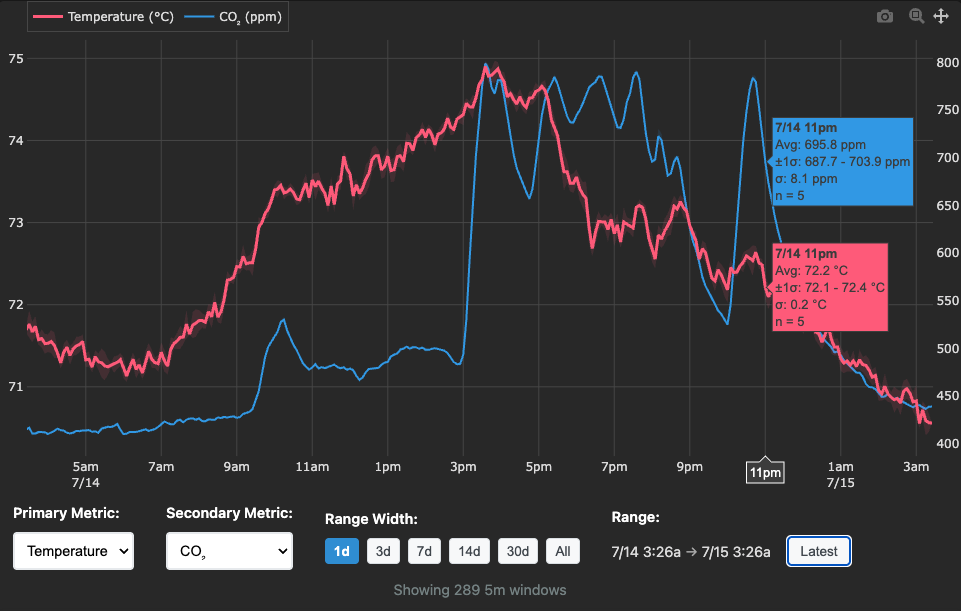
- Web Dashboard: Real-time visualization at awair.runsascoded.com
- CLI Interface: Raw data fetching, analysis, and export from Awair sensors
- Automated Collection: AWS Lambda functions that collect data every 2 minutes per device
- Multi-Device Support: Separate Lambda stacks and Parquet files per device
- S3 Storage: Efficient Parquet format with incremental updates
- Data Analysis: Built-in tools for gaps analysis, histograms, and data summaries
- Flexible Storage: Works with local files or S3 (configurable default paths)
- AWS Deployment: One-command CDK deployment with automatic IAM permissions
Installation
From PyPI (Recommended)
# Basic installation
pip install awair

# With Lambda deployment support
pip install awair[lambda]

# Development installation
pip install awair[dev]
From Source
git clone https://github.com/runsascoded/awair.git
cd awair
pip install -e .
Configuration
API Token
Set your Awair API token via:
- Environment variable:
export AWAIR_TOKEN="your-token" - Local file:
echo "your-token" > .token - User config:
echo "your-token" > ~/.awair/token
API Rate Limits:
- Hobbyist tier (default): Advertised 500/day, observed up to 1,280/day
- Enterprise tier: 86,400/day (60 requests/minute)
- Contact
developer@getawair.comto request a rate limit increase - Thanks to Steve at Awair for upgrading this project to Enterprise tier!
Device Configuration
Configure your Awair device via:
- Environment variables:
export AWAIR_DEVICE_TYPE="awair-element" AWAIR_DEVICE_ID="12345" - Local file:
echo "awair-element,12345" > .awair-device - User config:
echo "awair-element,12345" > ~/.awair/device - Auto-discovery: If not configured, the CLI will automatically detect your device on first use
- Command-line flag: Use
-i/--device-idwith numeric ID or name pattern (regex):awair data info -i 17617(numeric ID)awair data info -i "Ryan"(name pattern)awair data info -i "^Awair 2$"(exact regex match)
Data Storage Location
Configure default data file path via:
- Environment variable:
export AWAIR_DATA_PATH="s3://your-bucket/awair-17617.parquet"(explicit path) - Local file:
echo "s3://your-bucket/awair-17617.parquet" > .awair-data-path - User config:
echo "s3://your-bucket/awair-17617.parquet" > ~/.awair/data-path - Path template:
export AWAIR_DATA_PATH_TEMPLATE="s3://your-bucket/awair-{device_id}.parquet"- Automatically interpolates
{device_id}from device configuration - Default template:
s3://380nwk/awair-{device_id}.parquet - Useful for multi-device setups where you switch between devices
- Automatically interpolates
Usage
Data Collection
# Fetch raw API data and save to configured data file
awair api raw --from-dt 250710T10 --to-dt 250710T11

# Fetch raw API data and output as JSONL to stdout
awair api raw --from-dt 250710T10 --to-dt 250710T11 -d /dev/null

# Fetch only new data since latest timestamp in storage
awair api raw --recent-only

# Check your account info
awair api self

# List your devices (cached, 1 hour TTL)
awair api devices

# Force refresh device list from API
awair api devices --refresh
Data Analysis
# Show data file summary
awair data info
awair data info -d s3://your-bucket/data.parquet

# Daily histogram of record counts
awair data hist
awair data hist --from-dt 250710 --to-dt 250712

# Find timing gaps in data
awair data gaps -n 5 -m 300  # Top 5 gaps over 5 minutes
AWS Lambda Deployment
# Deploy automated data collector for a device
awair lambda deploy -s awair-updater-17617 -r 2

# Deploy for multiple devices (separate stacks)
AWAIR_DEVICE_ID=17617 AWAIR_DATA_PATH=s3://bucket/awair-17617.parquet \
  awair lambda deploy -s awair-updater-17617 -r 2

AWAIR_DEVICE_ID=137496 AWAIR_DATA_PATH=s3://bucket/awair-137496.parquet \
  awair lambda deploy -s awair-updater-137496 -r 2

# View CloudFormation template
awair lambda synth

# Monitor logs (specify function name)
aws logs tail /aws/lambda/awair-updater-17617 --follow

# Test locally
awair lambda test
Data Format
Sensor data is stored in Parquet format with these fields:
| Field | Type | Description |
|---|---|---|
timestamp |
datetime | UTC timestamp |
temp |
float | Temperature (°F) |
co2 |
int | CO2 (ppm) |
pm10 |
int | PM10 particles |
pm25 |
int | PM2.5 particles |
humid |
float | Humidity (%) |
voc |
int | Volatile Organic Compounds |
Example Data
{"timestamp":"2025-07-05T22:22:06.331Z","temp":73.36,"co2":563,"pm10":3,"pm25":2,"humid":52.31,"voc":96}
{"timestamp":"2025-07-05T22:21:06.063Z","temp":73.33,"co2":562,"pm10":3,"pm25":2,"humid":52.23,"voc":92}
Architecture
Automated Data Collection
The system uses AWS Lambda for automated data collection:
- Schedule: Runs every 2 minutes via EventBridge
- Multi-Device: Separate Lambda stack per device
- Storage: Updates device-specific S3 Parquet file incrementally
- Efficiency: Only fetches data since last update
- Reliability: Uses
utz.s3.atomic_editfor safe concurrent updates - Scalability: Each device has its own schedule and S3 path
CLI Integration
The CLI seamlessly works with both local files and S3:
# Both work the same way
storage = ParquetStorage('local-file.parquet')
storage = ParquetStorage('s3://bucket/file.parquet')
Configurable Deployments
Lambda deployments respect user configuration:
- IAM permissions generated dynamically per S3 bucket
- Environment variables passed to Lambda runtime
- Support for any S3 bucket/key combination
Development
Setup
pip install -e ".[dev]"
Code Style
ruff check
ruff format
Testing
pytest
Lambda Deployment
Deploy AWS Lambda function for automated data collection:
# Deploy latest PyPI version for a device (recommended)
AWAIR_DATA_PATH=s3://bucket/awair-17617.parquet \
  awair lambda deploy -s awair-updater-17617 -r 2

# Deploy specific PyPI version
awair lambda deploy -v 0.0.1 -s awair-updater-17617 -r 2

# Deploy from local source (development)
awair lambda deploy -v source -s awair-updater-17617 -r 2

# Build package only (no deploy)
awair lambda deploy --dry-run
Multi-Device Deployment: Each device gets its own Lambda stack with independent:
- EventBridge schedule (default: 2 minutes)
- S3 Parquet file (
awair-{device_id}.parquet) - CloudWatch logs
- IAM permissions
PyPI Deployment (Default):
- ✅ Exact Versions: Deploy specific, tested releases
- ✅ Immutable: Consistent across environments
- ✅ Traceable: Clear version tracking in Lambda
- ✅ Production Ready: Uses published releases
Source Deployment (-v source):
- 🔧 Development: Test local changes before publishing
- 🚀 Latest Features: Access unreleased functionality
AWS Infrastructure
Each Lambda deployment creates:
- Lambda Function:
awair-updater-{device_id}(e.g.,awair-updater-17617) - EventBridge Rule: Configurable schedule (default: 2 minutes)
- IAM Role: S3 permissions for device-specific target path
- CloudWatch Logs: 2-week retention
- Environment Variables:
AWAIR_TOKEN,AWAIR_DATA_PATH,AWAIR_DEVICE_ID
Example: Two devices
Stack: awair-updater-17617
  ├─ Lambda: awair-updater-17617
  ├─ EventBridge: rate(2 minutes)
  └─ S3: s3://380nwk/awair-17617.parquet

Stack: awair-updater-137496
  ├─ Lambda: awair-updater-137496
  ├─ EventBridge: rate(2 minutes)
  └─ S3: s3://380nwk/awair-137496.parquet
Required AWS Permissions
For deployment, you need permissions to create:
- Lambda functions and layers
- IAM roles and policies
- EventBridge rules
- CloudWatch log groups
- S3 bucket access (for your target bucket)
Date/Time Format
The CLI uses a compact date format for convenience:
250710→ July 10, 2025250710T16→ July 10, 2025 at 4 PM20250710T1630→ July 10, 2025 at 4:30 PM
License
MIT License - see LICENSE file for details.
1 maintainer

Metadata
1 maintainer
Release files for awair 0.0.6
For a detailed explanation of source distributions (sdists) and built distributions (wheels), please see the package formats documentation.
Source distribution (sdist)
| File | Size | Uploaded | |
|---|---|---|---|
| awair-0.0.6.tar.gz | 32.3 kB | Details |
Built distribution (wheel)
| File | Interpreter | ABI | Platform | Reset |
|---|---|---|---|---|
| awair-0.0.6-py3-none-any.whl | Python 3 | none | any | Details |
Total release size: 64.1 kB
Release files / awair-0.0.6.tar.gz
| Download URL | awair-0.0.6.tar.gz |
|---|---|
| Size | 32.3 kB |
| Tags | Source |
|
SHA-256 checksum How to use checksums |
94cab5c25d27c13bc57544ae0fb00d0cc486071a2272a1049ca596089edaaebb
|
|
BLAKE2b-256 checksum How to use checksums |
25f16c05edc8a4627ae7006333edbcc4f675c4f7ae03d063f0651df9e24a105b
|
| Upload date | |
|
Uploaded using Trusted Publishing? What is trusted publishing? |
No |
| Uploaded via |
twine/6.2.0 CPython/3.11.14
|
Release files / awair-0.0.6-py3-none-any.whl
| Download URL | awair-0.0.6-py3-none-any.whl |
|---|---|
| Size | 31.9 kB |
| Tags | Python 3 |
|
SHA-256 checksum How to use checksums |
3b94f8f22e3a1943150e5a5a3c2d2f2d205334412ef68c45a2fb868d04a2df57
|
|
BLAKE2b-256 checksum How to use checksums |
be95449c562ff0bc8dabaedb68159b6966de5d67b77bf54a739f79773699275d
|
| Upload date | |
|
Uploaded using Trusted Publishing? What is trusted publishing? |
No |
| Uploaded via |
twine/6.2.0 CPython/3.11.14
|














