
Awaitless



Durable, bounded, event-driven jobs for AI coding agents.
Awaitless turns a long local, SSH, or Slurm command into a persistent job with
a stable job_id. An agent calls MCP once to submit, once to wait, and receives
the exit code, bounded logs, and declared JSON Artifacts—without writing shell
commands or repeatedly spending context on polling.
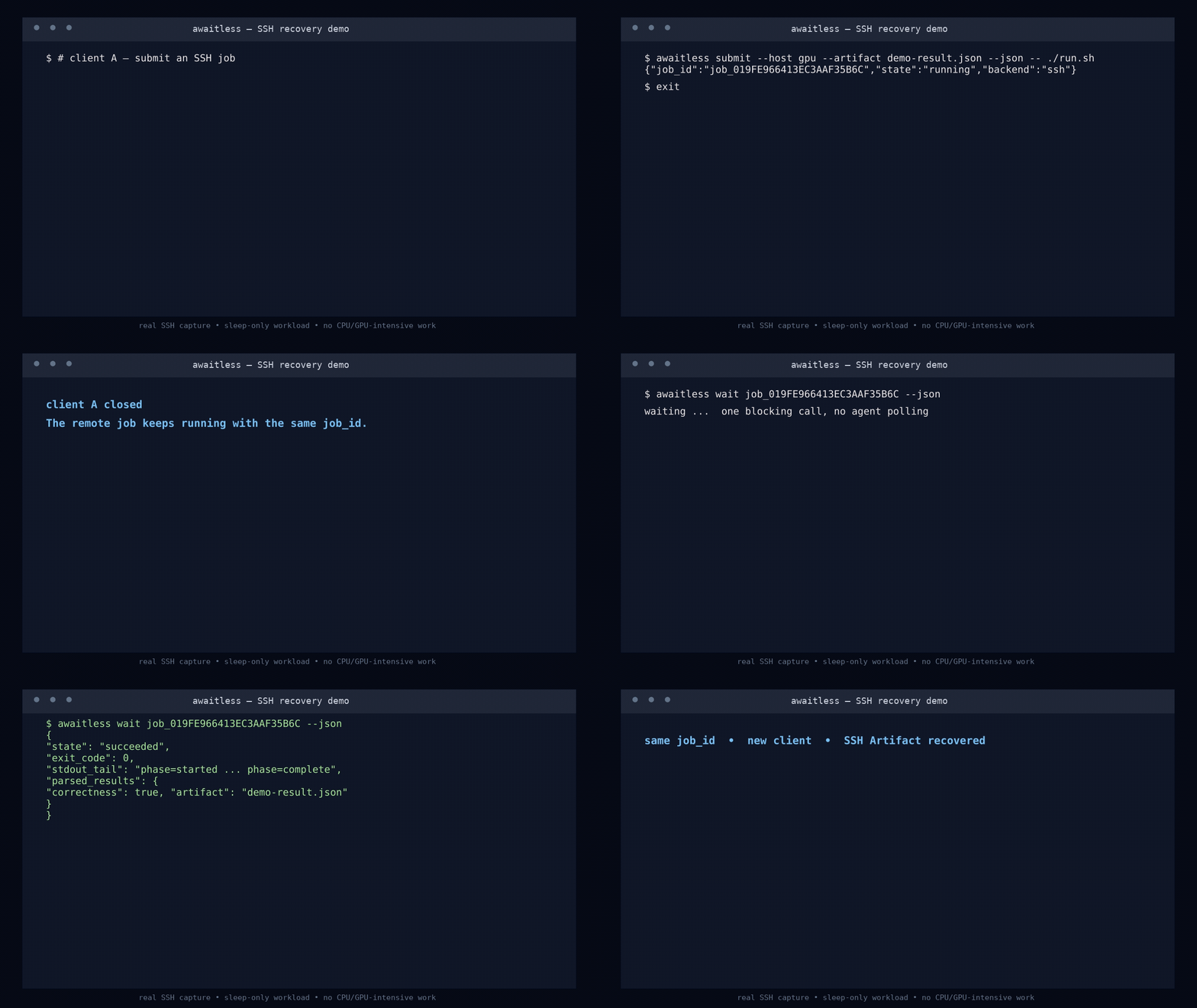
Why Awaitless
- Survives the client: closing the terminal or interrupting
waitdoes not cancel the managed job. Reuse the same ID from a new client. - Agent-native MCP tools:
submit_job,wait_for_job,get_job_status,get_job_logs,cancel_job, andlist_jobsuse the standard stdio protocol. - Schedules cluster work: the Slurm backend persists scheduler IDs and maps queue/accounting state, exit codes, cancellation, logs, and Artifacts.
- Returns bounded context: stdout and stderr tails share a configurable byte budget; complete logs stay on disk.
- Returns machine-readable results: declared JSON Artifacts are parsed into
parsed_results. - Handles real cluster edges: SSH liveness uses a wrapper-owned heartbeat and does not assume separate login sessions can see the same PID namespace.
Install
The distribution name is awaitless-runner. It installs the awaitless CLI
and awaitless-mcp stdio server. Awaitless requires Linux, Python 3.10+, and
Bash. SSH and Slurm hosts also require OpenSSH (ssh and sftp) locally.
python -m pip install awaitless-runner
awaitless doctor --json
From a source checkout:
python -m pip install -e .
Agent-native MCP quick start
Point your MCP client at the installed stdio command (adapt the outer key to your client's configuration format):
{
  "mcpServers": {
    "awaitless": {
      "command": "awaitless-mcp",
      "args": ["--config", "/home/me/.config/awaitless/config.toml"]
    }
  }
}
The server uses the official
modelcontextprotocol/python-sdk.
The Agent can now call submit_job with an argv array and later call
wait_for_job with the returned ID. Each MCP invocation opens the existing
Service and SQLite store; there is no Awaitless daemon, HTTP endpoint, or Web
service. Stopping the stdio server does not stop a submitted job.
Acceptance criterion: install the PyPI package and configure one MCP server; the Agent can submit to Slurm, survive a client disconnect, and receive a structured result without writing Awaitless CLI commands.
Quick start
Submit returns before the job finishes:
awaitless submit --json --name build -- ninja -C build
{"job_id":"job_019F...","state":"running","backend":"local"}
Then make one blocking call:
awaitless wait job_019F... --json
If that client is closed or interrupted, start a new one and run the same
wait command with the saved ID. The managed job keeps running.
Useful one-shot operations:
awaitless status <job-id> --json
awaitless logs <job-id> --tail 200 --json
awaitless cancel <job-id> --grace-period 5s --json
awaitless list --state running --json
awaitless inspect <job-id> --json
SSH and structured Artifacts
Declare a host in ~/.config/awaitless/config.toml:
[defaults]
backend = "local"
log_tail_lines = 200
max_return_bytes = 65536
poll_interval = 2

[hosts.gpu]
hostname = "gpu.example.com"
port = 22
user = "developer"
identity_file = "~/.ssh/id_ed25519"
remote_job_dir = "~/.awaitless/jobs"
# gssapi_authentication = false
# connect_timeout = 8
# operation_timeout = 20
operation_timeout is the minimum timeout for one SSH control operation, not a
job runtime limit. Use submit --timeout to limit the job itself.
Submit a remote command and declare its result:
awaitless submit --json \
  --host gpu \
  --cwd /workspace/project \
  --timeout 2h \
  --artifact results/benchmark.json \
  -- ./run_benchmark.sh
On completion, wait --json reports Artifact existence, size, and modification
time. A declared JSON file within the return budget is also exposed directly:
{
  "state": "succeeded",
  "exit_code": 0,
  "truncated": false,
  "parsed_results": {
    "correctness": true,
    "latency_us": 24.7
  }
}
Relative local Artifacts are resolved from the submission working directory,
even if a later client runs elsewhere. --log-dir /path/to/logs creates an
isolated /path/to/logs/<job-id>/ directory per job.
Slurm backend
Configure a scheduler host and its default resource request:
[defaults]
backend = "slurm"
host = "cluster"
poll_interval = 10
log_tail_lines = 200
max_return_bytes = 65536

[hosts.cluster]
hostname = "login.cluster.example"
user = "developer"
backend = "slurm"
gssapi_authentication = false
operation_timeout = 30
slurm_accounting_grace = 120
slurm_job_dir = ".awaitless/slurm/jobs"

[hosts.cluster.slurm]
partition = "compute"
account = "research"
nodes = 1
ntasks = 1
cpus_per_task = 1
time = "00:30:00"
With defaults.host configured, MCP calls may omit both backend and host.
submit_job may override the allowlisted options account, constraint,
cpus_per_task, gres, mem, nodes, ntasks, partition, qos, and
time through slurm_options. The backend sends the batch script to sbatch
over stdin, persists the returned Slurm ID, checks active state with squeue,
recovers terminal state/exit code/runtime with sacct, and cancels with
scancel. User computation is therefore scheduled on an allocated compute
node—never launched as a process on the SSH login node. A separate SFTP data
channel creates the private job directory and reads only the bounded log tails
and declared Artifacts.
Slurm PENDING maps to Awaitless pending; active scheduler states map to
running; COMPLETED maps to succeeded; CANCELLED maps to cancelled;
TIMEOUT/DEADLINE map to timed_out; scheduler, node, launch, OOM, and
preemption failures map to failed. ExitCode values such as 7:0 and signal
terminations are preserved as process-style exit codes.
Real MCP → Slurm disconnect demo
On 2026-08-10, two separate MCP stdio clients ran the checked-in demo against a real Slurm 25.11.2 cluster:
| Phase | Observed result |
|---|---|
Client 1 submit_job |
Awaitless job_019FE9CB2847AC929E0B2F, Slurm 60597793, pending |
| Client 1 exits | No daemon or waiter remains attached |
Client 2 wait_for_job |
succeeded, exit 0, runtime 8.0s |
| Bounded stdout | compute_host=node099 slurm_job_id=60597793 (43 bytes) |
| JSON Artifact | Parsed { "ok": true, "compute_host": "node099", "slurm_job_id": "60597793" } |
node099 is the allocated compute node. The reproducible driver is
scripts/mcp_slurm_demo.py,
and the raw structured evidence is
assets/mcp-slurm-demo.json.
Real experiment: 12 polls to 2 calls
On 2026-08-10, the reproducible experiment ran the same sleep-only workload on
a real SSH login node: twelve 1 KiB log records, 4.5 seconds apart. It used no
CPU- or GPU-intensive work. The traditional side repeatedly fetched its entire
log snapshot twelve times; Awaitless used one submit and one wait.
| Measured result | Traditional SSH polling | Awaitless |
|---|---|---|
| Poll/check calls after launch | 12 | 0 |
| Agent-visible CLI calls, including launch | 13 | 2 |
| Logical log bytes returned | 84,992 B | 12,288 B |
| Repeated log bytes | 72,704 B | 0 B |
| Exit code | 0 | 0 |
| Parsed JSON Artifact | No | Yes |
That is 72,704 fewer returned log bytes (85.5%) and 13 → 2 agent-visible
CLI calls (84.6%). The twelve traditional log snapshots were
[1024, 2048, 3072, 4096, 5120, 6144, 8192, 9216, 10240, 11264, 12288, 12288]
bytes. "Calls" here means agent-visible CLI invocations; Awaitless's internal
SSH control operations do not trigger additional agent turns. The byte figures
are decoded log content, not estimated tokens or network wire bytes.
The runnable method and raw result are in
benchmarks/.
Awaitless vs. alternatives
| Tool | Primary abstraction | Survives client exit | Durable status / exit code | Agent-bounded JSON result | Scheduling / resources | Best fit |
|---|---|---|---|---|---|---|
| Awaitless | Local, SSH, or Slurm job ID + MCP tools | Yes | Yes | Yes | Slurm | Agent-native jobs that need scheduling, resume, bounded logs, and Artifacts |
| nohup | Ignore SIGHUP + redirect output | Often | Manual | No | No | Keeping one shell command alive when manual PID/log handling is enough |
| tmux | Persistent interactive terminal | Yes | Manual | No | No | Humans detaching from and reattaching to an interactive shell |
| Pueue | Daemon-backed local task queue | Yes | Yes | Partial; status/log JSON | Local queue only | Human-operated queues and parallel task groups on one machine |
| Slurm | Cluster workload manager | Yes | Yes, with accounting | Job-defined | Yes | Allocating and scheduling cluster CPU/GPU resources |
| Codex Goal mode | Durable agent objective across turns | Yes | Not a process supervisor | Tool-dependent | No | Multi-turn agent orchestration; complementary to Awaitless |
Source notes: GNU nohup,
tmux, Pueue,
the Slurm overview, and the Codex
Goal mode guide. Awaitless
uses Slurm for allocation instead of replacing the cluster scheduler.
Reliability model
- The local runner and user command have independent sessions and process groups; cancellation targets the whole validated group.
- SQLite uses WAL, and active-to-terminal transitions are transactional so completion, cancellation, and stall detection cannot overwrite each other.
- SSH wrappers atomically persist
exit_codeandfinished_at. A lightweight heartbeat handles hosts where separate SSH sessions cannot inspect the same PID namespace; PID, process group, and/procstart time remain a fallback. - SSH cancellation persists intent before signaling the validated process group. OpenSSH host-key verification keeps its secure defaults.
- Slurm control-plane SSH calls are restricted to
sbatch/squeue/sacct/scancel; file access uses SFTP, and arbitrary computation exists only inside the submitted batch script. - Suspected credential values are redacted from metadata, and the executable
run specification is stored with mode
0600.
States are starting, running, stalled, succeeded, failed, cancelled,
timed_out, and lost. --stall-timeout 20m reports a stalled job but does
not cancel it automatically.
CLI exit codes: 0 success, 1 internal error, 2 invalid usage, 3 job failure, 4 job/client wait timeout, 5 cancelled, 6 lost, and 7 SSH connection failure.
Development
PYTHONPATH=src python3 -m unittest discover -s tests -v
ruff check src tests benchmarks
GitHub Actions runs the test suite on every supported CPython release from 3.10 through 3.14, then builds the distributions, checks the PyPI README, and runs an installed-wheel CLI/Artifact smoke test. Version tags use PyPI Trusted Publishing without a stored API token.
The Codex Skill lives in
skills/awaitless.
The v0.1 product requirements are in
docs/PRD.zh-CN.md,
and the v0.2 Agent/Slurm acceptance contract is in
docs/v0.2.zh-CN.md.
License
1 maintainer

Download files
Download the file for your platform. If you're not sure which to choose, learn more about installing packages.
Source Distribution
Built Distribution
Filter files by name, interpreter, ABI, and platform.
If you're not sure about the file name format, learn more about wheel file names.
Copy a direct link to the current filters
File details
Details for the file awaitless_runner-0.2.0.tar.gz.
File metadata
- Download URL: awaitless_runner-0.2.0.tar.gz
- Upload date:
- Size: 175.6 kB
- Tags: Source
- Uploaded using Trusted Publishing? Yes
- Uploaded via: twine/7.0.0 CPython/3.13.14
File hashes
| Algorithm | Hash digest | |
|---|---|---|
| SHA256 |
8e715e570fbb21fc46b639f956242298761ebaa9c643ee1935d88b36b22ee380
|
|
| MD5 |
d6b49ed34df85c40bf88ef815af1d493
|
|
| BLAKE2b-256 |
c0e8e2998968231d976fdb8051184e0c84f6ba62b93b3e7f0eea8aeae4a8e296
|
Provenance
The following attestation bundles were made for awaitless_runner-0.2.0.tar.gz:
Publisher:
publish-to-pypi.yml on xpluspro/Awaitless
-
Statement:
-
Statement type:
https://in-toto.io/Statement/v1 -
Predicate type:
https://docs.pypi.org/attestations/publish/v1 -
Subject name:
awaitless_runner-0.2.0.tar.gz -
Subject digest:
8e715e570fbb21fc46b639f956242298761ebaa9c643ee1935d88b36b22ee380 - Sigstore transparency entry: 2404438292
- Sigstore integration time:
-
Permalink:
xpluspro/Awaitless@6d35b5f0dcb32a7235c22bcd600e38caee2c474e -
Branch / Tag:
refs/tags/v0.2.0 - Owner: https://github.com/xpluspro
-
Access:
public
-
Token Issuer:
https://token.actions.githubusercontent.com -
Runner Environment:
github-hosted -
Publication workflow:
publish-to-pypi.yml@6d35b5f0dcb32a7235c22bcd600e38caee2c474e -
Trigger Event:
push
-
Statement type:
File details
Details for the file awaitless_runner-0.2.0-py3-none-any.whl.
File metadata
- Download URL: awaitless_runner-0.2.0-py3-none-any.whl
- Upload date:
- Size: 35.8 kB
- Tags: Python 3
- Uploaded using Trusted Publishing? Yes
- Uploaded via: twine/7.0.0 CPython/3.13.14
File hashes
| Algorithm | Hash digest | |
|---|---|---|
| SHA256 |
f672671e214e83e4ae1b1a2eabc7b42635c59af61bfa9976ae1fecd5762c1ed5
|
|
| MD5 |
0116f0fa07d5f197c63412b2195f0890
|
|
| BLAKE2b-256 |
78b7481908b98cf3a5ed4adc95fb90d19e909d9e1bbde553b08b36f0df9817f3
|
Provenance
The following attestation bundles were made for awaitless_runner-0.2.0-py3-none-any.whl:
Publisher:
publish-to-pypi.yml on xpluspro/Awaitless
-
Statement:
-
Statement type:
https://in-toto.io/Statement/v1 -
Predicate type:
https://docs.pypi.org/attestations/publish/v1 -
Subject name:
awaitless_runner-0.2.0-py3-none-any.whl -
Subject digest:
f672671e214e83e4ae1b1a2eabc7b42635c59af61bfa9976ae1fecd5762c1ed5 - Sigstore transparency entry: 2404438351
- Sigstore integration time:
-
Permalink:
xpluspro/Awaitless@6d35b5f0dcb32a7235c22bcd600e38caee2c474e -
Branch / Tag:
refs/tags/v0.2.0 - Owner: https://github.com/xpluspro
-
Access:
public
-
Token Issuer:
https://token.actions.githubusercontent.com -
Runner Environment:
github-hosted -
Publication workflow:
publish-to-pypi.yml@6d35b5f0dcb32a7235c22bcd600e38caee2c474e -
Trigger Event:
push
-
Statement type:







