

AWS ENI Identifier
Identify to which AWS service network interface is associated
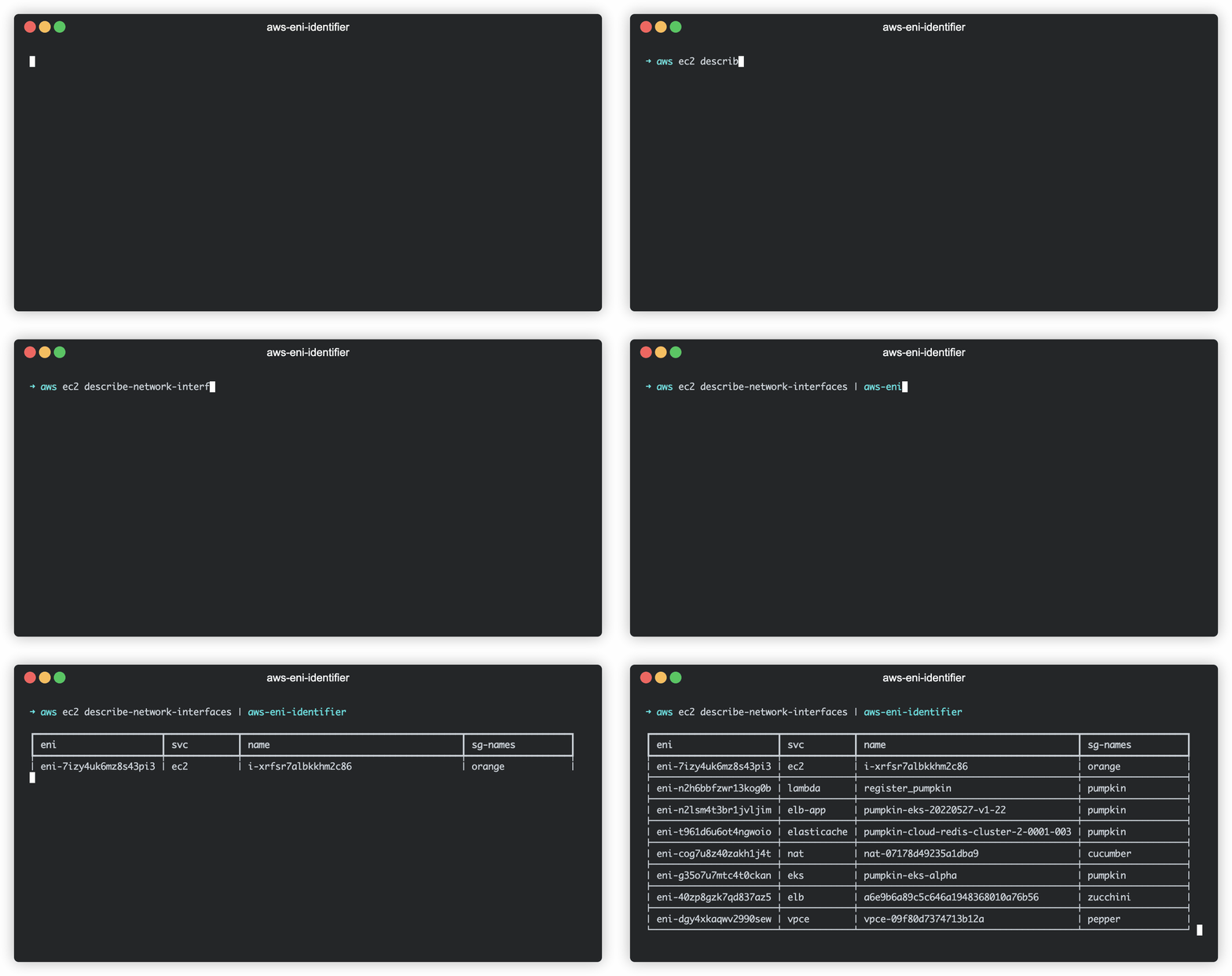
Installation
pip install aws-eni-identifier
Usage
aws-eni-identifier does not connect to AWS by itself, so you will need to load data with aws-cli
Login to aws:
aws sso login --profile my-profile
Use pipe:
aws ec2 describe-network-interfaces | aws-eni-identifier
Or save to file with aws-cli and read it:
aws ec2 describe-network-interfaces > ni.json
aws-eni-identifier -i ni.json
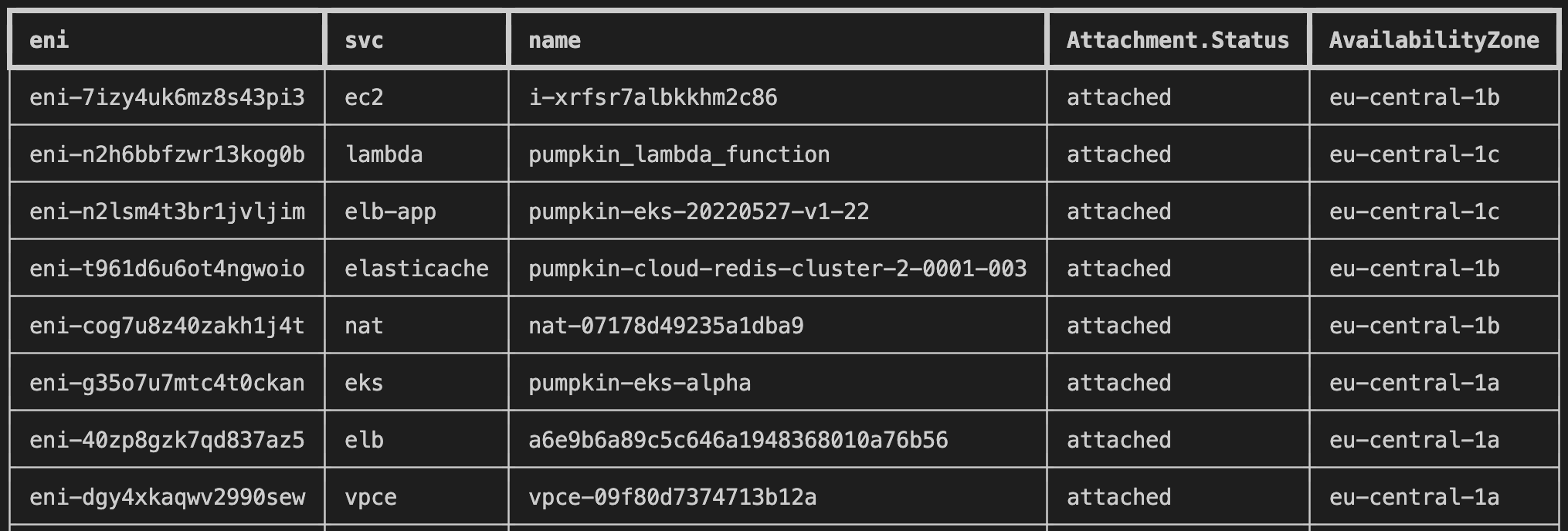
Show extra columns
aws ec2 describe-network-interfaces |
aws-eni-identifier \
    --add-column Attachment.Status \
    --add-column AvailabilityZone
Filter
Find unused network interfaces:
aws ec2 describe-network-interfaces \
    --filters "Name=status,Values=available" |
aws-eni-identifier
Find AWS resource by IP address (you can use public or private IP address)
export IP='51.21.223.193';
aws ec2 describe-network-interfaces \
    --query "NetworkInterfaces[?PrivateIpAddresses[?PrivateIpAddress=='${IP}' || Association.PublicIp=='${IP}']]" |
aws-eni-identifier
Determine what is using specific AWS network interface
aws ec2 describe-network-interfaces \
    --network-interface-ids eni-0068ac3f8786de59a |
aws-eni-identifier
You can find more information about filters and queries in AWS documentation
Developing
Install the package:
poetry install
Run tests:
poetry run pytest


Release files for aws-eni-identifier 0.1.4
For a detailed explanation of source distributions (sdists) and built distributions (wheels), please see the package formats documentation.
Source distribution (sdist)
| File | Size | Uploaded | Provenance | |
|---|---|---|---|---|
| aws_eni_identifier-0.1.4.tar.gz | 7.6 kB | Without provenance | Details |
Built distribution (wheel)
| File | Interpreter | ABI | Platform | Reset |
|---|---|---|---|---|
| aws_eni_identifier-0.1.4-py3-none-any.whl | Python 3 | none | any | Details |
Total release size: 16.9 kB
Release files / aws_eni_identifier-0.1.4.tar.gz
| Download URL | aws_eni_identifier-0.1.4.tar.gz |
|---|---|
| Size | 7.6 kB |
| Tags | Source |
|
SHA-256 checksum How to use checksums |
bef76da9fdc470a402411ae243c88c71b9ac08977267b36d55b6cc51bad7af21
|
|
BLAKE2b-256 checksum How to use checksums |
2b4a9741cea5fdb6e98c57ba23d9051cdb4c07bd431dc59e33c7a4b75ff8249d
|
| Upload date | |
|
Uploaded using Trusted Publishing? What is trusted publishing? |
No |
| Uploaded via |
poetry/1.4.0 CPython/3.9.16 Linux/5.15.0-1033-azure
|
Release files / aws_eni_identifier-0.1.4-py3-none-any.whl
| Download URL | aws_eni_identifier-0.1.4-py3-none-any.whl |
|---|---|
| Size | 9.2 kB |
| Tags | Python 3 |
|
SHA-256 checksum How to use checksums |
19fe0ec5043a1d317df3ebf9eb2999e673b64e09bc0b92575388028fcada47e1
|
|
BLAKE2b-256 checksum How to use checksums |
c823e88af17b702711f589e4d15afa88f25f0459d5ad2a009f47622a355b2db1
|
| Upload date | |
|
Uploaded using Trusted Publishing? What is trusted publishing? |
No |
| Uploaded via |
poetry/1.4.0 CPython/3.9.16 Linux/5.15.0-1033-azure
|
Security for aws-eni-identifier 0.1.4
Provenance
Provenance describes where a file came from. On PyPI, provenance is shared via attestations, which provide a verifiable record of the build or publishing details. View details, limitations and caveats.
No provenance found
None of the files in this release were uploaded with provenance metadata.
A note on package security
PyPI is a repository for distributing packages, not a service for auditing them. While third-party security researchers and our staff do their best to detect and remove malicious packages, PyPI cannot guarantee the quality, security or suitability of any given package.














