
InsuranceLake Infrastructure
Overview
This solution guidance helps you deploy extract, transform, load (ETL) processes and data storage resources to create InsuranceLake. It uses Amazon Simple Storage Service (Amazon S3) buckets for storage, AWS Glue for data transformation, and AWS Cloud Development Kit (CDK) Pipelines. The solution is originally based on the AWS blog Deploy data lake ETL jobs using CDK Pipelines.
The best way to learn about InsuranceLake is to follow the Quickstart guide and try it out.
The InsuranceLake solution is comprised of two codebases: Infrastructure and ETL.
Specifically, this solution helps you to:
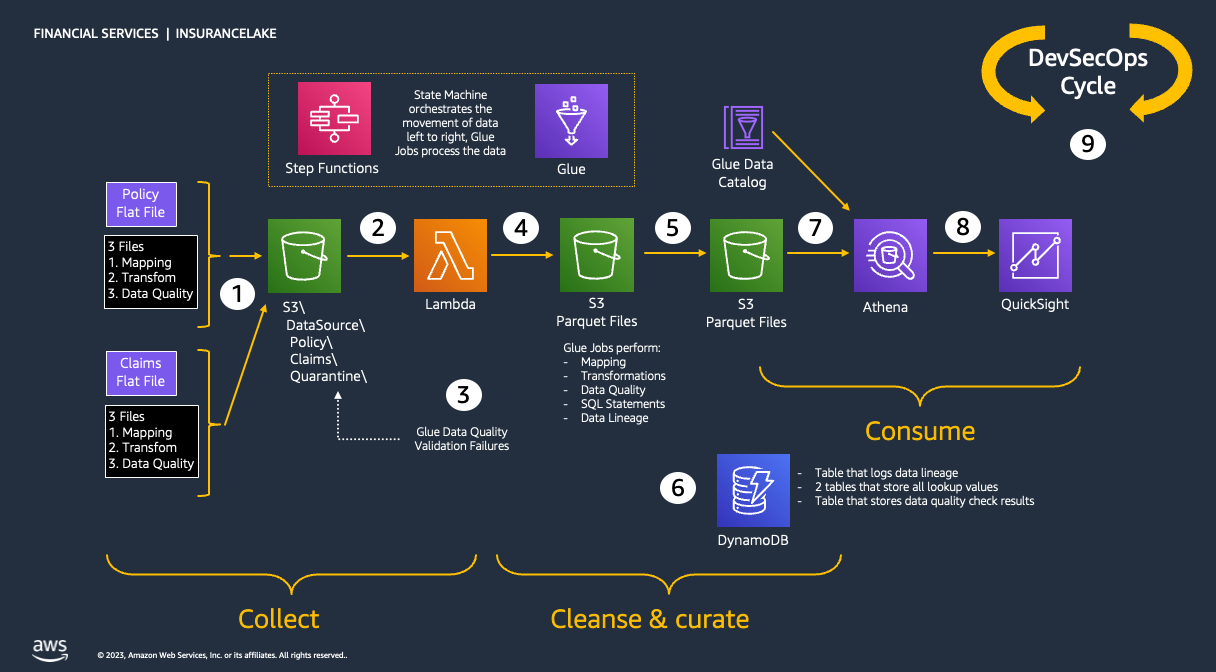
- Deploy a "3 Cs" (Collect, Cleanse, Consume) architecture InsuranceLake.
- Deploy ETL jobs needed to make common insurance industry data souces available in a data lake.
- Use pySpark Glue jobs and supporting resoures to perform data transforms in a modular approach.
- Build and replicate the application in multiple environments quickly.
- Deploy ETL jobs from a central deployment account to multiple AWS environments such as Dev, Test, and Prod.
- Leverage the benefit of self-mutating feature of CDK Pipelines; specifically, the pipeline itself is infrastructure as code and can be changed as part of the deployment.
- Increase the speed of prototyping, testing, and deployment of new ETL jobs.
Contents
Architecture
This section explains the overall InsuranceLake architecture and the components of the infrastructure.
Collect, Cleanse, Consume
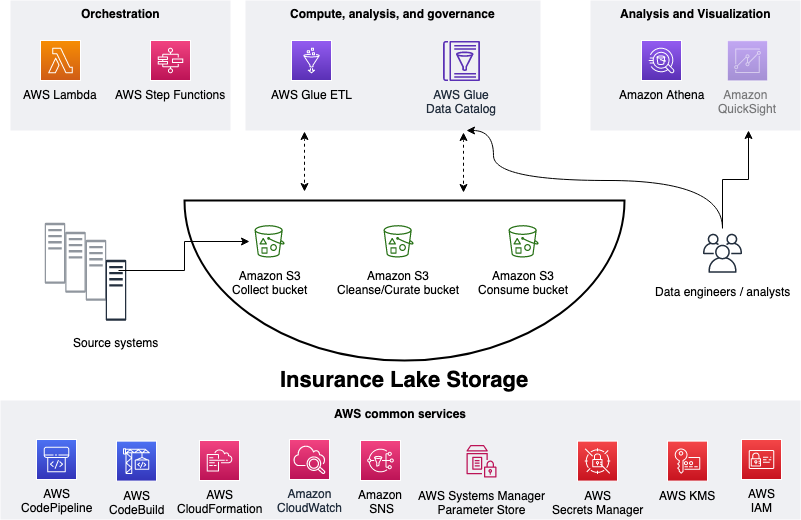
As shown in the figure below, we use S3 for storage, specifically three different S3 buckets:
- Collect bucket to store raw data in its original format.
- Cleanse/Curate bucket to store the data that meets the quality and consistency requirements for the data source.
- Consume bucket for data that is used by analysts and data consumers (for example, Amazon Quicksight, Amazon Sagemaker).
InsuranceLake is designed to support a number of source systems with different file formats and data partitions. To demonstrate, we have provided a CSV parser and sample data files for a source system with two data tables, which are uploaded to the Collect bucket.
We use AWS Lambda and AWS Step Functions for orchestration and scheduling of ETL workloads. We then use AWS Glue with PySpark for ETL and data cataloging, Amazon DynamoDB for transformation persistence, Amazon Athena for interactive queries and analysis. We use various AWS services for logging, monitoring, security, authentication, authorization, notification, build, and deployment.
Note: AWS Lake Formation is a service that makes it easy to set up a secure data lake in days. Amazon QuickSight is a scalable, serverless, embeddable, machine learning-powered business intelligence (BI) service built for the cloud. Amazon DataZone is a data management service that makes it faster and easier for customers to catalog, discover, share, and govern data stored across AWS, on premises, and third-party sources. These three services are not used in this solution but can be added.
Infrastructure
The figure below represents the infrastructure resources we provision for the data lake.
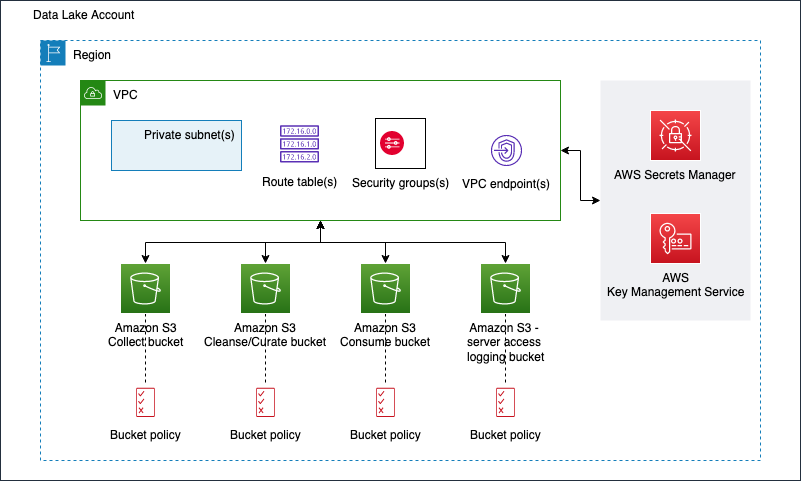
- S3 buckets for:
- Collected (raw) data
- Cleansed and Curated data
- Consume-ready (prepared) data
- Server access logging
- Optional Amazon Virtual Private Cloud (Amazon VPC)
- Subnets
- Security groups
- Route table(s)
- Amazon VPC endpoints
- Supporting services, such as AWS Key Management Service (KMS)
Codebase
Source Code Structure
The table below explains how this source code is structured.
| File / Folder | Description |
|---|---|
| app.py | Application entry point |
| code_commit_stack.py | Optional stack to deploy an empty CodeCommit respository for mirroring |
| pipeline_stack.py | CodePipeline stack entry point |
| pipeline_deploy_stage.py | CodePipeline deploy stage entry point |
| s3_bucket_zones_stack.py | Stack to create three S3 buckets (Collect, Cleanse, and Consume), supporting S3 bucket for server access logging, and KMS Key to enable server side encryption for all buckets |
| vpc_stack.py | Stack to create all resources related to Amazon VPC, including virtual private clouds across multiple availability zones (AZs), security groups, and Amazon VPC endpoints |
| test | This folder contains pytest unit tests |
| resources | This folder has static resources such as architecture diagrams |
Automation scripts
The table below lists the automation scripts to complete steps before the deployment.
| Script | Purpose |
|---|---|
| bootstrap_deployment_account.sh | Used to bootstrap deployment account |
| bootstrap_target_account.sh | Used to bootstrap target environments for example dev, test, and production |
Authors
The following people are involved in the design, architecture, development, testing, and review of this solution:
- Cory Visi, Senior Solutions Architect, Amazon Web Services
- Ratnadeep Bardhan Roy, Senior Solutions Architect, Amazon Web Services
- George Gallo, Senior Solutions Architect, Amazon Web Services
- Jose Guay, Enterprise Support, Amazon Web Services
- Isaiah Grant, Cloud Consultant, 2nd Watch, Inc.
- Muhammad Zahid Ali, Data Architect, Amazon Web Services
- Ravi Itha, Senior Data Architect, Amazon Web Services
- Justiono Putro, Cloud Infrastructure Architect, Amazon Web Services
- Mike Apted, Principal Solutions Architect, Amazon Web Services
- Nikunj Vaidya, Senior DevOps Specialist, Amazon Web Services
License Summary
This sample code is made available under the MIT-0 license. See the LICENSE file.
Copyright Amazon.com and its affiliates; all rights reserved. This file is Amazon Web Services Content and may not be duplicated or distributed without permission.
1 maintainer

Metadata
1 maintainer
Release files for aws-insurancelake-infrastructure 4.2.6
For a detailed explanation of source distributions (sdists) and built distributions (wheels), please see the package formats documentation.
Source distribution (sdist)
| File | Size | Uploaded | |
|---|---|---|---|
| aws_insurancelake_infrastructure-4.2.6.tar.gz | 20.3 kB | Details |
Built distribution (wheel)
| File | Interpreter | ABI | Platform | Reset |
|---|---|---|---|---|
| aws_insurancelake_infrastructure-4.2.6-py3-none-any.whl | Python 3 | none | any | Details |
Total release size: 41.5 kB
Release files / aws_insurancelake_infrastructure-4.2.6.tar.gz
| Download URL | aws_insurancelake_infrastructure-4.2.6.tar.gz |
|---|---|
| Size | 20.3 kB |
| Tags | Source |
|
SHA-256 checksum How to use checksums |
8d96f7a47cd1a8a69f0be8aab18a53f0fbd83f87c1480ec45ccb85d498151e26
|
|
BLAKE2b-256 checksum How to use checksums |
ac60e00f34676a6bef6c91b357ca14442df0777f6069078c89281fa8ccdadaca
|
| Upload date | |
|
Uploaded using Trusted Publishing? What is trusted publishing? |
Yes |
| Uploaded via |
twine/6.1.0 CPython/3.13.7
|
Provenance
Provenance describes where a file came from. On PyPI, provenance is shared via attestations, which provide a verifiable record of the build or publishing details. View details, limitations and caveats.


PyPI Publish Attestation
PyPI verified that this artifact, at this checksum, originated from the publisher listed below.
Signed by GitHub Actions, verified by PyPI on Feb 5, 2026.
Transparency logRelease files / aws_insurancelake_infrastructure-4.2.6-py3-none-any.whl
| Download URL | aws_insurancelake_infrastructure-4.2.6-py3-none-any.whl |
|---|---|
| Size | 21.1 kB |
| Tags | Python 3 |
|
SHA-256 checksum How to use checksums |
1cbe5f8a6be05377e2d47b565289dc93076f1aef36d5a0596849d72568762bb2
|
|
BLAKE2b-256 checksum How to use checksums |
cfc4c3f1d16a5bdf0bdf7b6645311d7c62ee1e8ce4d9c78120736a987acacbff
|
| Upload date | |
|
Uploaded using Trusted Publishing? What is trusted publishing? |
Yes |
| Uploaded via |
twine/6.1.0 CPython/3.13.7
|
Provenance
Provenance describes where a file came from. On PyPI, provenance is shared via attestations, which provide a verifiable record of the build or publishing details. View details, limitations and caveats.
PyPI Publish Attestation
PyPI verified that this artifact, at this checksum, originated from the publisher listed below.
Signed by GitHub Actions, verified by PyPI on Feb 5, 2026.
Transparency log













